Azure Devops Pipelines: Minify a package based on a parameter
Today we are conditionally going to minify our package in Azure Devops YAML Pipelines based on a parameter
Azure Devops Pipelines: Minify a package based on a parameter
Today we are conditionally going to minify our package in Azure Devops YAML Pipelines based on a parameter
Step 1: Add a parameter to indicate whether we want to minify or not
The first step is to define a variable in our YAML pipeline that is going to determine if we want to minify the package. Make the parameter a boolean and set it to true:
parameters:
  - name: minify
    type: boolean
    default: true
As a nice extra: devops will prompt us with a checkbox each time we run the pipeline:
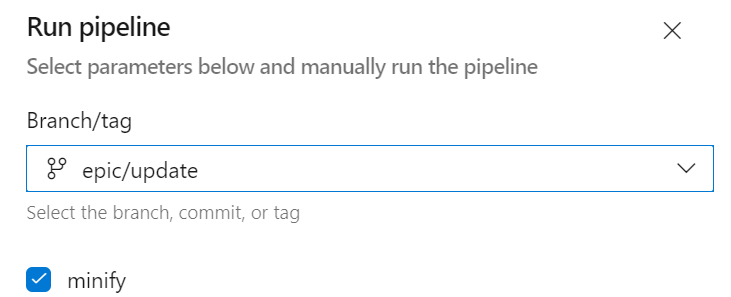
See my [other post](http://Azure Devops Pipelines - Prompt a question to the user.) about prompting a user for input in Azure Devops Pipelines
Step 2: Creating the package with the script
I’m creating my package using a gulp script. I have two commands based on whether or not I’m going to minify my package. Either:
npm run gulpor
npm run gulp:minifyLet’s add the gulp command to our YAML pipeline:
- task: Npm@1
  displayName: npm run gulp
  inputs:
    command: custom
    customCommand: run gulp
Now let’s use our parameter ‘minify’ to determine which of the two scripts we need to run:
- task: Npm@1
  "${{ if parameters.minify }}":
    displayName: Create package minified
  "${{ else }}":
    displayName: Create package
  inputs:
    command: custom
    "${{ if parameters.minify }}":
      customCommand: run gulp
    "${{ else }}":
      customCommand: run gulp:minify
Notice the if and else? Depending of the parameter the NPM script will run with the selected gulp command
Step 3 (extra): Indicate whether or not we are minifying our package
As an extra feature I like to display which pipline runs where minified package publishes. So I’m appending “-minified” in the run name
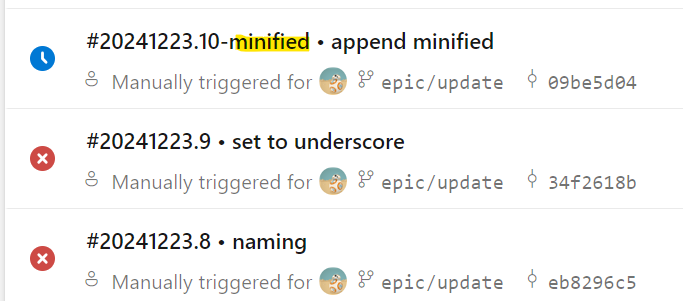
To accomplish this I’m using a script that updates the build number:
echo ##vso[build.updatebuildnumber]$(Build.BuildNumber)-minifiedRun this task only when the minify parameter is true:
- script: |
    echo ##vso[build.updatebuildnumber]$(Build.BuildNumber)-minified
    echo "Updated build number to $(Build.BuildNumber))-minified"
  displayName: Append minified to build number
  condition: eq('${{ parameters.minify }}', 'true')
And that’s it :)
We now have a YAML pipeline that can conditionally publish a minified package.
메타데이터
- post_id
- f97f625f1faf
- slug
- azure-devops-pipelines-minify-a-package-based-on-a-parameter-f97f625f1faf
- url
- https://medium.com/@woeterman_94/azure-devops-pipelines-minify-a-package-based-on-a-parameter-f97f625f1faf
- canonical_url
- https://medium.com/@woeterman_94/azure-devops-pipelines-minify-a-package-based-on-a-parameter-f97f625f1faf
- author_url
- https://medium.com/@woeterman_94
- status
- ok
- fetched_at
- 2026-06-26 21:52:29


