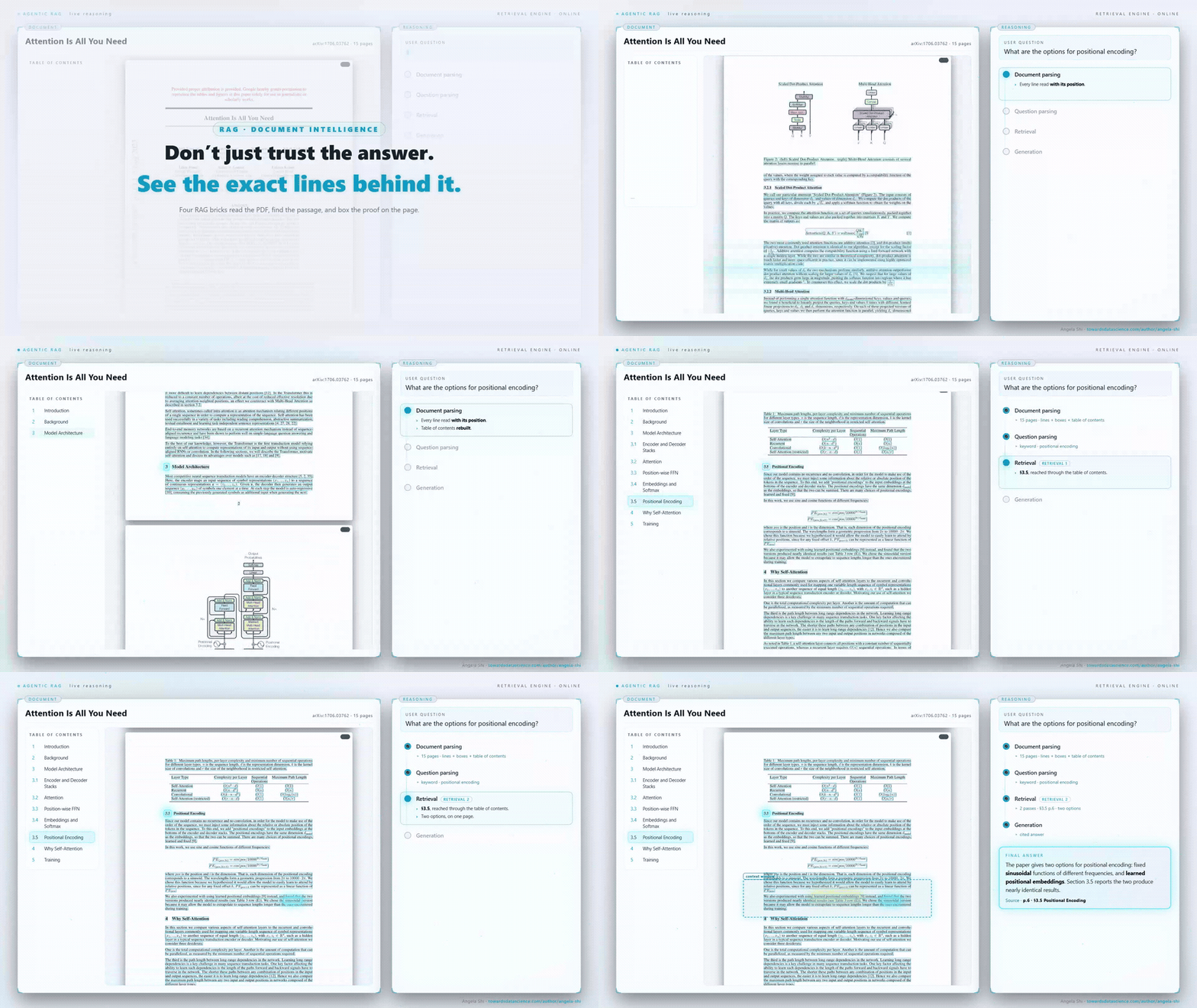
A production RAG pipeline for real-world PDFs: structural retrieval, typed answers, cited lines
The four bricks, run end-to-end on a real 45-page car-insurance policy. One surprising coverage question, answered with a number and the…
A production RAG pipeline for real-world PDFs: structural retrieval, typed answers, cited lines
The four bricks, run end-to-end on a real 45-page car-insurance policy. One surprising coverage question, answered with a number and the exact line it came from
Use this link if you are not a member.
A naive RAG pipeline answers a factual question with a fluent paragraph you have no way to verify. This walkthrough builds the production version instead, on a real 45-page car-insurance policy: it parses the PDF into structured tables, routes retrieval to the right section by name rather than the nearest embedding, and returns a typed value with the exact source lines, checkable in seconds.
We’ll go one brick at a time: what each one takes in, what it hands back, and why the upgraded version pulls off something a keyword-and-embedding baseline can’t. The document is a State Farm Personal Car Policy, form 9847C, a real booklet anyone can download from State Farm’s own site. Forty-five pages of standard auto-policy terms, nothing tuned for the question we ask. That is the point of picking it.
1. The question, and why it is hard
“If my dog is hurt in a crash, does my policy cover the vet bill?”
It sounds like a stretch, and that is exactly why it is a good test. Most people would guess a car policy has nothing to say about a dog. This one does. On page 30, under a section called Supplementary Pet Injury Coverage, it writes: “We will not pay more than $1,000 per animal. Subject to the per animal limit, we will not pay more than $2,000 per loss.”
Two things trip a naive pipeline here, and getting past them is really what the rest of this article is about.
The answer is a capped amount, not a yes/no. A pipeline built to say covered or not covered has nowhere to put $1,000 per animal, $2,000 per loss. The shape of the answer has to be decided before generation runs, or the number gets buried in prose.
The answer sits in a named section a flat scan reaches only by luck. The number $1,000 also shows up eight pages earlier, where the policy caps “loss of use” at $1,000 under a completely different coverage. A top-k over the whole document sees two passages that both look like a $1,000 limit and cannot tell them apart. Grab the wrong one and you return a confidently wrong answer, which is worse than returning nothing.
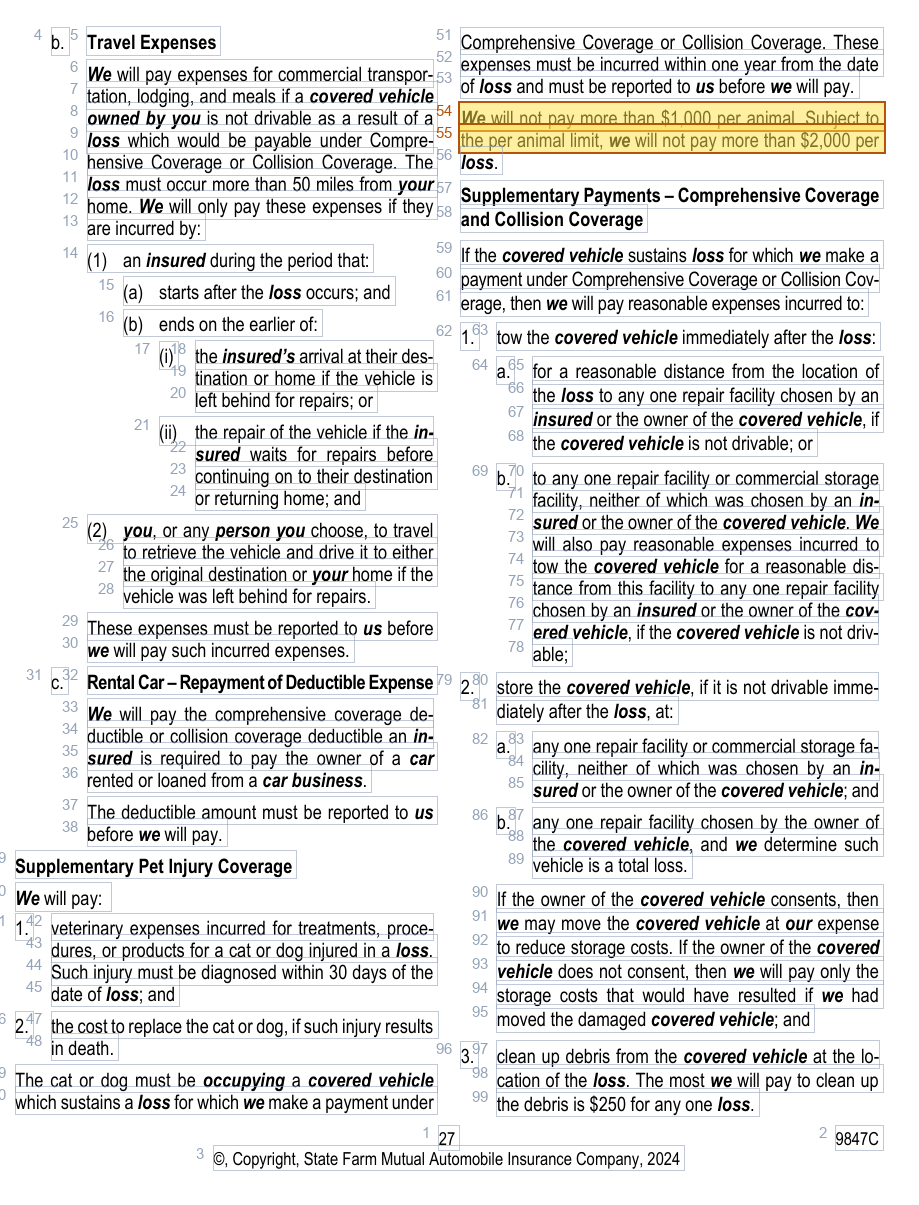
Page 30 as the pipeline sees it: every line boxed, its number beside it. The pet-injury block wraps from the left column into the right; the answer is on lines 54 and 55. The pipeline routes here by section name, then cites those exact lines. — image by author
2. Brick 1: document parsing turns the PDF into tables

The first brick reads the PDF once and returns a small set of tables that every downstream brick reuses.
A minimal RAG pipeline parses a PDF into one table: line_df, one row per visible line of text. That is enough for a keyword search and nothing else. The upgraded brick treats parsing as building a small set of tables. line_df stays, one row per line, but now each row also carries its bounding box (x0, y0, x1, y1), the rectangle the line occupies on the page. page_df groups lines into pages. And toc_df carries the document’s table of contents, one row per heading with its page range. This policy has a real one, and Supplementary Pet Injury Coverage is a line in it.
Those three tables are what let the later bricks be precise. The bounding box on a line is what turns a citation from a vague “see page 30” into a rectangle drawn on the exact spot. The table of contents is what lets retrieval reason about which section a line lives in, not just whether a keyword landed on it. Nothing is thrown away into a flat blob.

The policy as a table, not a blob of text. The bounding box on the highlighted line is what lets the answer be rendered back onto the page later
On this document line_df runs to 4,357 rows, and the line that holds the answer, “We will not pay more than $1,000 per animal…”, is one of them, line 54 on page 30, with the coordinates that will place the highlight. The parser did no understanding here. It laid out the raw material the understanding bricks work on.
3. Brick 2: question parsing turns the sentence into a brief

The second brick reads the reader’s sentence and produces a typed brief the downstream bricks can act on
The reader typed one sentence. Before anything is searched, that sentence is turned into a typed brief: the intent (a factual lookup), the keywords (dog, vet, cover), and the shape the answer should take. That last field matters here: the parser marks the answer as a capped dollar amount, which is what tells generation to return a value and not a paragraph. Deciding the shape up front is the difference between an answer you can put in a table and one you have to re-read.
Two upgrades in this brick carry most of the weight.
The first is the section hint. The parser recognises that pet coverage on an auto policy lives in its own supplementary section, and writes Supplementary Pet Injury Coverage into the brief as the section retrieval should aim at. It is not guessing from the document; it is applying a pattern that holds across policies.
The second is the expert dictionary, and it is the most important idea in this brick. A general-purpose model, asked about a dog, does not always volunteer that the policy language says cat or dog, calls the payout veterinary expenses, and files the whole thing under animal. A claims adjuster knows that vocabulary cold. The upgraded pipeline writes it down, the words an expert would expand the question into, and hands it to retrieval as extra keywords to match on. This is what amplifying the expert looks like in practice: the expert supplies the words, the pipeline applies them at scale, on every document, every time, without the expert in the loop. Where the model’s own synonyms fall short, the dictionary fills the gap, and dog… vet in the question reliably meets cat or dog… veterinary expenses on the page.
The output is not free text. It is a ParsedQuestion that splits into two smaller briefs: one for retrieval (the query, the synonyms, the section hint) and one for generation (the intent, the answer shape). Each downstream brick receives only the fields it can act on.

Question parsing runs in three steps: turn the sentence into structure, read out the fields an expert would name, then hand each one to the brick that needs it
Question parsing turns a sentence into a typed brief: intent, expected shape, a section hint, and the expert vocabulary. Each of the three steps above is a full read:
- Question parsing in RAG: structure before you search
- What the question parser extracts from a user string
- Dispatching the parsed RAG question
4. Brick 3: retrieval routes to a section instead of guessing

The third brick finds where the answer lives, then sizes the context around it
This is the brick that makes the pipeline more than a keyword toy, so let’s slow down here.
Retrieval here is filtering, not vector search. The naive move is to embed every page, embed the question, and take the top-k closest by cosine similarity. On this document that fails in a specific way: the page about loss of use and the page about pet injury both sit near a $1,000 limit in embedding space. Cosine cannot tell the loss-of-use cap from the vet-bill cap. It returns a mix, and generation guesses.
The upgraded brick works in two phases. First it finds the anchor: where the answer lives. Keyword hits from the brief, including the expert synonyms, are counted per section of the table of contents. Then a single cheap LLM call, the router, reads the section titles only, never the page bodies, together with those per-section counts, and picks the branch that actually covers animals.

The intelligence is in brick 3. The router picks Supplementary Pet Injury Coverage over the loss-of-use cap that carries the same $1,000, so the wrong page never enters the prompt
On this question the router picks Supplementary Pet Injury Coverage over the Underinsured Motor Vehicle Property Damage section, where the identical $1,000 is the loss-of-use cap. That decision is the whole ballgame: the loss-of-use page, the one that would have produced the right number for the wrong reason, never enters the prompt. Once the section is chosen, the second phase sizes the context: for a pinpoint fact like this one, a window of lines around the match; for a listing, the whole section. Embeddings are kept as a backup, for the rare case where neither the keywords nor the router agree, not the primary signal.
Retrieval as filtering routes to the right section instead of a vector top-k. The three-part read:
- Retrieval is filtering, not search: a mental model for enterprise RAG
- Anchor detection: parallel detectors, then one LLM call
- Letting an LLM pick the right RAG page: the arbiter pattern
5. Brick 4: generation answers with a contract

The fourth brick makes one constrained call and returns a typed object, not prose
One LLM call reads the lines of the picked section, constrained to a typed schema, and returns an object with four things a plain chat answer does not give.
A typed value, $1,000 per animal / $2,000 per loss, the amount the answer-shape field said to expect, ready to drop into a table or a database column.
An evidence span, page 30, lines 54 to 55, the exact rows the answer was read from. Because line_df carried the bounding box, that span becomes a rectangle on the page rather than a page reference you still have to hunt through.
A confidence the model produces inside the schema, not a cosine score bolted on afterwards.
And a caveat the model flags on its own: the injury has to be diagnosed within 30 days of the loss, and the pet has to have been in a covered vehicle in a covered loss. That is the kind of qualification a careful adjuster adds, and the schema gives it a place to live instead of losing it in prose.

The full page with the answer highlighted, rendered back onto the document. Open the policy to page 30 and the quoted line is there, word for word. The reader re-verifies the answer in under a minute. — image by author
6. The full contract behind the four bricks
Each brick above hands the next a typed object, never loose text. Seen together, that is a contract: every output is named, and every downstream brick knows exactly which outputs it consumes.

The full contract. Parsing emits relational tables and a summary; question parsing emits a ParsedQuestion that splits into a retrieval brief and a generation brief; retrieval emits a result plus the filtered lines; generation emits a typed JSON answer with citations. Every arrow is a typed object
This is what makes the pipeline ready for real use rather than a demo. A brick can be swapped or upgraded, a better parser, a stronger router, without touching its neighbours, as long as it keeps to the contract. It is also what makes the whole run auditable: every intermediate output is a named object you can log, inspect, and replay.
7. The same pipeline scales to hard questions
The pet-injury lookup is a clean illustration, but the machinery is built for harder ones, and the reason is that the question is parsed into a typed brief and retrieval routes on structure.
A listing (“what does the policy pay for after a covered loss besides the repair?”) needs the whole physical-damage supplementary block: rental, towing, storage, pet injury. The answer shape is now a list, retrieval keeps the section whole instead of windowing a match, and generation returns rows.
A decomposition (“is my windshield covered, and does the deductible apply?”) is two sub-questions with two sections. Question parsing splits it, retrieval routes each part, generation stitches the two typed answers.
A scoped synthesis (“summarise what emergency road service pays for”) reads one section in full and returns prose that is still cited to it.
The document changes, the question type changes, the four bricks and their contract do not. A keyword-and-embedding baseline handles the easy lookup and quietly fails the rest.
Further reading
Document parsing
- Beyond extract_text: the two layers of a PDF that drive RAG quality. The first half of the parsing brick: the document’s nature, signals, and summary.
- Stop returning flat text from a PDF: the relational tables RAG needs. The second half of the parsing brick: the relational tables every downstream brick reads.
- When PyMuPDF can’t see the table: parse PDFs for RAG with Azure Layout. The same tables from Azure Layout: native table cells, OCR, paragraph roles.
- Parse PDFs for RAG locally with Docling: rich tables, no cloud upload. The same tables computed locally with Docling: TableFormer cells, nothing leaves the machine.
- Vision LLMs are PDF parsers too: reading charts and diagrams for RAG. Vision as a parser: the pictures become searchable text.
- Parse scanned PDFs for RAG with EasyOCR: free OCR gives you words, not a document. Where traditional OCR stops: text recovered, structure lost.
- Making a PDF’s images searchable for RAG, without paying to read them all. The image cascade: filter cheap, classify, describe only what is worth reading.
- Reconstructing the table of contents a PDF forgot to ship, so RAG can scope by section. Rebuilding toc_df when the PDF prints a contents page but ships no outline.
Question parsing
- RAG questions need parsing too: turn the user’s string into briefs for retrieval and generation. The thesis of question parsing: why a user string needs the same parsing as a document, and how it splits into a retrieval brief and a generation brief.
- What the question parser extracts from a user string: keywords, scope, shape, decomposition, clarification. The five families of columns the parser reads straight from the user’s question, with the code that fills each one.
- Dispatching the parsed RAG question: chunk strategy, model tier, activations, audit. The decisions the parser makes on top of the user string, using the document’s profile: dispatch, activations, full schema, the audit trail (pipeline_trace.json), and a broker-corpus walkthrough.
- The Clarification Loop and Learned Defaults: When the Question Is Not Precise Enough. One focused clarification when the question is too vague, and the default learned from the answer.
Retrieval
- Retrieval is filtering, not search: a mental model for enterprise RAG. Retrieval reframed as filtering on line_df and toc_df: anchors small, context large.
- Anchor detection for RAG: parallel detectors, then one LLM call at the end. Parallel anchor detectors: keyword always, embeddings alongside, one LLM call at the end.
- Letting an LLM pick the right RAG page: the arbiter pattern at the end of retrieval. The LLM arbiter: candidates ranked with reasons, one typed JSON out.
- A structure for context engineering: the four typed pieces behind every RAG answer. Context engineering given a structure: the four typed pieces (fixed system prompt, retrieved lines, doc-context block, PromptContext wrapper) that fill one single-document RAG LLM call.
메타데이터
- post_id
- f9c6e1423567
- slug
- rag-why-top-k-embeddings-return-the-confidently-wrong-answer-and-how-routing-fixes-it-f9c6e1423567
- url
- https://pub.towardsai.net/rag-why-top-k-embeddings-return-the-confidently-wrong-answer-and-how-routing-fixes-it-f9c6e1423567
- canonical_url
- https://pub.towardsai.net/rag-why-top-k-embeddings-return-the-confidently-wrong-answer-and-how-routing-fixes-it-f9c6e1423567
- author_url
- https://medium.com/@angela.shi
- status
- ok
- fetched_at
- 2026-07-08 21:34:33