TCP vs UDP: When to Use What, and How TCP Relates to HTTP
Everything around us works because of rules. Countries have laws, sports have rules and even cooking follows instructions. Ignore them, and…
TCP vs UDP: When to Use What, and How TCP Relates to HTTP
Everything around us works because of rules. Countries have laws, sports have rules and even cooking follows instructions. Ignore them, and the result quickly turns into chaos. Rules exist not to slow things down, but to make things work as expected.
The same applies to communication. Imagine sending a WhatsApp message saying, “See you soon, Priya” and the receiver gets “See you son, Priya”. Just one missing letter, and suddenly the message becomes confusing or hilarious. A small change, but enough to completely alter the meaning and create problems. On the other hand, think about live sports streaming, sometimes a few frames drop but the match continues. You’d rather lose a moment than have the stream stop every time.
Computers face the exact same challenges when sending data. Some data must arrive correctly, no matter what. Other data must arrive fast, even if a little is lost. To handle this, engineers created communication rules called protocols. These rules eventually gave rise to two core approaches: TCP, which prioritizes correctness and reliability and UDP, which prioritizes speed and uninterrupted flow.

What is TCP?
TCP (Transmission Control Protocol) is like the “safety-first” way computers talk to each other. It makes sure that the data you send over the internet arrives accurately, completely, and in the correct order. If anything goes missing or gets mixed up along the way, TCP notices and fixes it.
Imagine, you have a friend named Aarav (the careful guy). One day you ask him to deliver an important set of documents.
- Aarav calls first saying, “Hey! Are you home? I’m bringing the documents.”
- He delivers carefully, making sure nothing gets damaged on the way.
- He checks each document asking, “Did you get everything? Is anything missing or torn?”
- If something is lost or damaged, he goes back and brings the copies he kept as a replacement.
- He only leaves when he knows everything is perfect.
This careful approach is exactly how TCP works, it ensures data is delivered safely, completely, and in the correct order.
What is UDP?
UDP (User Datagram Protocol) is like the “fast-and-light” way computers send data. Unlike TCP, UDP doesn’t check if the data arrives, doesn’t wait for confirmation, and doesn’t reorder packets. It’s all about getting information from one place to another as quickly as possible, even if a few pieces (information) are lost along the way.
Now imagine a friend named Rohan (the carefree guy). One day, you ask him to hand out notes to everyone in your class.
- Rohan doesn’t check first. He just starts passing notes to whoever he sees.
- He moves quickly, giving notes to as many classmates as possible, but some notes might get lost, dropped, or left unread.
- He doesn’t stop to check if everyone got their note.
- He keeps going, focusing on speed and making sure the process keeps moving, even if some notes are missed.
This is exactly how UDP works. It’s fast, lightweight and doesn’t wait for confirmations. Some data might get lost but the flow continues without delays.
TCP Vs UDP

Some main differences between each of them are as follows:
| Feature              |                  TCP                       |                  UDP                   |
| -------------------- | --------------------------------------     | -------------------------------------- |
| Speed                | Slower as it checks everything carefully   | Faster as it  sends without waiting    |
| Reliability          | High as it ensures all data arrives safely | Low as some data may be lost           |
| Connection Setup     | Yes, handshake to start communication      | No, just sends data immediately        |
| Order Guarantee      | Yes, data arrives in correct order         | No, data may arrive out of order       |
| Lost Packets         | Resent automatically if lost               | Ignored, no resent                     |
| Best Use Case        | When accuracy matters (files, emails)      | When speed matters (video, live games) |
As you can see, both come with their own trade-offs.
- TCP: Reliable and accurate, but slower due to checks and confirmations.
- UDP: Fast and efficient, but some data may get lost.
So, the question arises, “What should you use & When?” 🤔 Don’t worry, I’ve got you covered!
TCP or UDP: Which One Should You Use?
What to use TCP or UDP?
The answer totally depends on what your software or project needs.
- TCP is your go-to if you want everything delivered safely and in order. Speed doesn’t matter to you.
- UDP is your choice if you want things sent fast, even if a few pieces get lost.
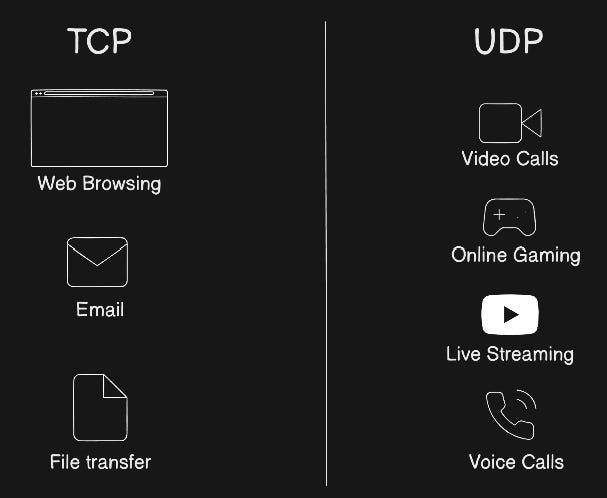
When Should You Use TCP?
- Web browsing (HTTP/HTTPS): You want webpages to load completely and correctly.
- Email (SMTP, IMAP, POP3): Every letter must be delivered fully.
- File transfers (FTP): Missing pieces of a file can be recovered.
- Online banking: Accuracy is non-negotiable as losing a transaction could be disastrous.
When Should You Use UDP?
- Live video streaming or online games: A few missing frames or packets won’t ruin the experience, but speed is crucial.
- Voice or video calls (VoIP): Slight glitches are okay but keeping the conversation smooth matters more than perfection.
- Broadcasts or real-time updates: You want the message delivered quickly to many users, even if a few miss it.
- Sensor data or IoT devices: Small losses won’t matter, but low latency is important for real-time monitoring.
HTTP: Where It Fits in the World of Web Protocols
HTTP (HyperText Transfer Protocol) is an application-level protocol. This means it defines the rules for how applications talk to each other over the internet, specifically for transferring web content like webpages, images, videos and files. When you type a website in your browser:
- Your browser sends an HTTP request to the server asking for a page or file.
- The server responds with an HTTP response, sending the requested content.
HTTP defines what the message looks like and how data is structured.
HTTP and TCP: Clarifying the Layers
HTTP is not a transport protocol. It does not handle how data travels across the network. That’s where TCP comes in.
- TCP (Transport Layer) is responsible for reliable, ordered delivery of data packets.
- HTTP (Application Layer) sits on top of TCP, using its reliable delivery to focus on content, commands, and structure.

OSI / TCP-IP Layer Mapping
Imagine you’re sending a package to a friend:
- TCP is the courier service, it ensures the package gets there safely, in order and intact.
- HTTP is the letter inside the package, it explains the instructions, messages you want to send.
So, HTTP relies on TCP to handle delivery. It cannot replace TCP and without it, HTTP wouldn’t have a reliable way to get webpages or files across the internet correctly.
How HTTP Uses TCP
You <-> Browser <-> HTTP <-> TCP <-> Internet <-> TCP <-> HTTP <-> Web ServerStep 1: You Type a URL in Your Browser
Imagine you type:
https://www.example.comYour browser is ready to fetch the webpage because the HTTP layer in your browser creates a request, “Hey server, I want this webpage”. But before it can get the content, it needs a safe way to send and receive data. That’s where TCP comes in.
Step 2: Establishing a TCP Connection (The Handshake)
Before sending your HTTP request, your computer (client) and the web server say hello and set up a reliable channel:
- Client → Server: “Hello, can we start talking?”
- Server → Client: “Yes! I’m ready.”
- Client → Server: “Great, let’s go!”
This is called the TCP three-way handshake. Now, both sides have a reliable connection to send and receive data.
We will cover more about this handshake in our next blog.
Step 3: Browser Sends an HTTP Request
Once TCP is ready, your browser sends an HTTP request over that connection.
Example HTTP request:
GET /index.html HTTP/1.1
Host: www.example.com- GET → asking the server for a file.
- /index.html → the specific webpage.
- Host → tells the server which website you’re asking for (important when one server hosts multiple sites).
TCP ensures that this request arrives completely and in order.
Step 4: Server Processes the Request
The server receives the HTTP request and:
- Finds the requested webpage (
index.html). - Prepares an HTTP response with the content of the page.
Example HTTP response header:
HTTP/1.1 200 OK
Content-Type: text/html
Content-Length: 1024
Then the server sends the response body, which is the actual HTML, CSS, images, or scripts for the page. TCP ensures that all the response packets arrive safely and in the right order.
Step 5: Browser Receives the Response
Your browser receives the data over TCP:
- Reassembles packets in order (TCP numbers them).
- Detects any missing packets and asks for them again (TCP reliability).
- Reads the HTTP headers and content to display the webpage correctly.

Clearing Common Confusions
Confusion 1: “Is HTTP the same as TCP?”
No, HTTP is an application-layer protocol that defines how web messages are structured. TCP is a transport-layer protocol that ensures those messages are delivered reliably. HTTP depends on TCP, but they are not the same thing.
Think of it this way: HTTP is the letter you write about what you’re asking for and how you phrase it. TCP is the postman making sure the letter reaches the right house, in order and intact.
Confusion 2: “Why not use UDP as it is fast?”
Because speed alone isn’t enough. UDP is fast because it doesn’t check anything. It just sends data and moves on. That means:
- Data can get lost
- Data can arrive out of order
- There’s no guarantee the other side even received it
For many things, that’s a big problem. That said, newer protocols like HTTP/3 and QUIC are experimenting with UDP-based transport that adds reliability features on top of UDP for better performance in certain conditions.
Confusion 3: “What about HTTPS?”
HTTPS = HTTP + TLS (encryption). It still runs on TCP.
Confusion 4: “Can HTTP Replace TCP?”
No, HTTP cannot replace TCP. HTTP defines what data is sent and received, while TCP handles how that data is delivered safely and in order.
Conclusion
TCP and UDP are not competitors they are tools.
TCP prioritizes correctness. UDP prioritizes speed. HTTP lives above TCP and relies on it to function.
This explains why downloads sometimes pause and retry (TCP), why video calls may glitch but continue (UDP) and why websites either load completely or fail altogether (HTTP over TCP).
메타데이터
- post_id
- f9cc2acbdaab
- slug
- tcp-vs-udp-when-to-use-what-and-how-tcp-relates-to-http-f9cc2acbdaab
- url
- https://medium.com/@tanaybahuguna/tcp-vs-udp-when-to-use-what-and-how-tcp-relates-to-http-f9cc2acbdaab
- canonical_url
- https://medium.com/@tanaybahuguna/tcp-vs-udp-when-to-use-what-and-how-tcp-relates-to-http-f9cc2acbdaab
- author_url
- https://medium.com/@tanaybahuguna
- status
- ok
- fetched_at
- 2026-07-13 22:33:36



