LLM Model Router for AI SaaS: How Builders Cut Cost Without Breaking Quality
A model router turns one AI feature into a controlled workflow, not a blind call to the biggest model. A practical, vendor-neutral guide…
LLM Model Router for AI SaaS: How Builders Cut Cost Without Breaking Quality

LLM Model Router for AI SaaS
A model router turns one AI feature into a controlled workflow, not a blind call to the biggest model. A practical, vendor-neutral guide for SaaS developers and founders who need faster, cheaper, safer AI workflows without turning their product into a pile of brittle model-specific hacks.
The fastest way to burn money in an AI SaaS product is simple: send every request to the strongest model and hope the invoice stays friendly. It feels safe at first. The best model gives strong answers, demos look polished, and nobody has to design routing logic.
Then real users arrive.
Some requests are tiny. Some need deep reasoning. Some contain sensitive data. Some need low latency more than brilliance. Some fail because a provider is slow, rate-limited, unavailable, or suddenly expensive. If your product treats all of those requests the same, your margins, reliability, and user trust all depend on one fragile decision.
An LLM model router is the layer that fixes this. It decides which model, provider, prompt shape, context size, privacy path, and fallback strategy should handle each task. Done well, it can reduce cost, improve speed, protect sensitive data, and make quality more predictable. Done badly, it becomes a confusing switchboard that hides failures until users complain.
The goal is not to use more models. The goal is to send each task to the smallest safe path that can produce a useful answer.
Why Model Routing Is Becoming a Core AI SaaS Pattern
The AI SaaS market is moving away from one-model thinking. Recent developer and product signals point in the same direction: model costs are becoming visible, AI coding and agent workflows are getting measured more carefully, model access can change without warning, and unified model APIs are becoming popular because teams want flexibility.
For builders, the implication is practical. Your AI SaaS product should not be welded to one model choice at every point in the workflow. A customer support draft, a long document analysis, a SQL explanation, a voice call summary, and a background classification job do not need the same latency, cost, context window, or reasoning depth.
Model routing is especially useful for solo SaaS founders and micro SaaS teams because it lets you compete with a tighter cost structure. You can reserve expensive models for moments where quality really matters and use cheaper or local options for simple tasks. You also get a cleaner way to test new models without rewriting the whole product.
What an LLM Model Router Actually Does
A model router is not just an if-statement that says, “use model A for cheap tasks and model B for hard tasks.” In production, it is closer to a traffic controller for AI work.
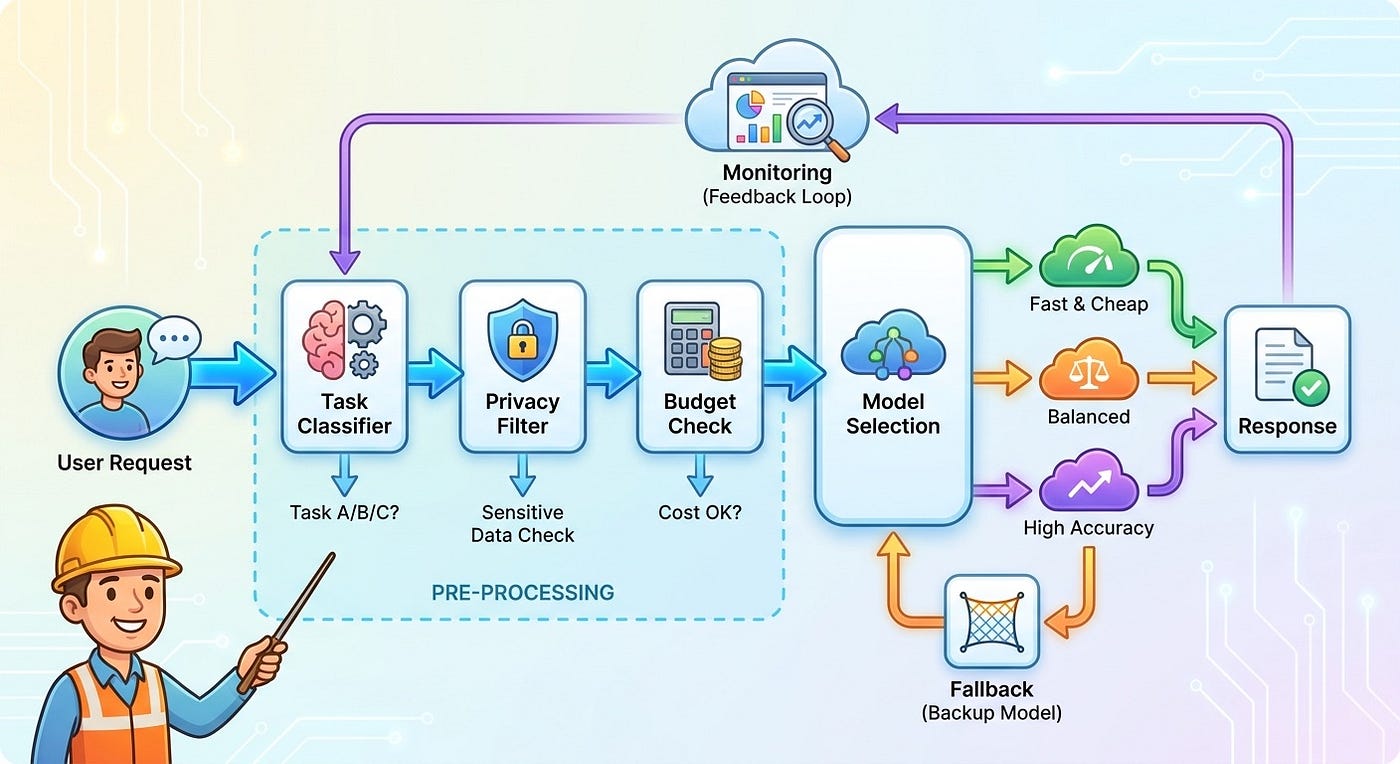
It usually handles five responsibilities:
- Classification: understanding what kind of task the user is asking for.
- Policy: applying rules about privacy, tenant limits, budgets, safety, and allowed providers.
- Selection: choosing the model, context size, tool access, and prompt template.
- Fallback: retrying or escalating when the first path fails, times out, or gives low confidence output.
- Measurement: logging cost, latency, quality signals, and user outcomes so routing improves over time.
The router sits between your product workflow and your model providers. The user should not need to know it exists. They should simply feel that the product is fast when the task is simple, careful when the task is risky, and reliable when a model provider has a bad day.
The Builder Pain Points a Router Should Solve
Before designing routing rules, define the pain you are solving. Most AI SaaS teams reach for model routing because of one or more of these problems.
Cost spikes from uneven usage
One heavy tenant, one popular automation, or one accidental loop can push token spend beyond plan economics. A router can enforce per-tenant budgets, downgrade low-risk jobs, cap context length, and stop work that no longer has a clear user value.
Latency that varies by task
Users tolerate slower answers for deep analysis. They do not tolerate a ten-second wait for a label, summary title, or autocomplete suggestion. A router lets you treat speed as a product requirement instead of a provider accident.
Provider outages and rate limits
If one provider fails, your product should not collapse unless the task truly depends on that provider. The router can move safe tasks to backup models, pause risky tasks, or show a clear “try again” state instead of silently producing weak output.
Data privacy and compliance boundaries
Some prompts contain customer records, financial data, source code, or personal information. A router can send sensitive tasks through redaction, local inference, approved regions, or stricter providers while allowing non-sensitive work to use cheaper paths.

Quality drift after model updates
Models change. A prompt that worked last month may become verbose, evasive, or brittle. A router gives you a place to run canary traffic, compare models, and roll back without editing every feature.
A practical model router uses task type, risk, budget, and quality signals before choosing a model.
A Simple Routing Architecture for AI SaaS
You do not need a giant platform to start. A useful LLM model router can begin as a small service with explicit rules and a few measured paths.
1. Task classifier
The classifier labels the request. Keep the taxonomy small at first. For example:
- Extract: pull fields from text, invoices, PDFs, or forms.
- Transform: rewrite, summarize, translate, or format.
- Reason: compare options, debug, plan, decide, or explain tradeoffs.
- Act: call tools, update records, send messages, or trigger workflows.
- Review: judge quality, detect risk, score confidence, or check policy.
This matters because the cheapest safe model for extraction may not be the best model for complex reasoning. The model that writes a friendly email may not be the model you trust to decide whether an agent should update production data.
2. Risk and privacy filter
Before picking a model, check what kind of data is being processed. Classify the request by sensitivity:
- Public or low-risk content
- Customer content without regulated data
- Personal, financial, health, legal, source code, or security-sensitive content
- Tenant-isolated enterprise content with contractual limits
For sensitive paths, the router can redact fields, reduce context, require approved providers, force local processing, or ask for human review before tool actions. This is not about fear. It is about making the safe path the default path.
3. Budget and plan policy
Every request should carry a budget context. The router should know the tenant, plan, remaining quota, workflow priority, and expected business value. A background “nice to have” summary should not spend the same budget as a user-facing report that drives a paid workflow.
A simple policy might look like this:
- Use a low-cost model for low-risk classification and formatting.
- Use a stronger model for reasoning tasks with user-visible output.
- Use the strongest approved model only when the workflow is high-risk, high-value, or repeatedly failing cheaper paths.
- Stop or queue tasks when tenant budget is exhausted instead of creating hidden losses.
4. Model catalog
Create a model catalog instead of scattering model names across your codebase. Each catalog entry should describe the model’s strengths, cost, latency target, context window, provider, privacy status, supported tools, and fallback order.
For example, your internal catalog may include:
- A fast small model for labels, simple extraction, and short summaries
- A balanced model for most user-facing writing and analysis
- A strong reasoning model for planning, code analysis, and complex decisions
- A local or private model for sensitive classification and redaction
- A review model used to check output before risky actions
The catalog keeps your product flexible. When a new model becomes cheaper or better, you update the catalog and routing tests, not every AI feature.
5. Fallback and escalation
Fallback is not just retrying the same request three times. Good fallback logic knows why the first attempt failed.
- If the provider times out, try a backup provider for safe tasks.
- If the output fails validation, retry with clearer instructions or a stronger model.
- If the task is sensitive, do not fallback to an unapproved provider.
- If the workflow can cause external impact, pause and ask for approval.
- If repeated attempts fail, return a useful error with next steps.
This is where many AI SaaS products get sloppy. They fallback for availability but forget privacy, permissions, and quality. A cheaper answer is not a win if it breaks trust.
Routing Rules You Can Start With
Here are starter rules that work for many AI SaaS products. Treat them as a baseline, then tune them with your own evals and production data.
Rule 1: Route by task shape before user plan
Do not make “free plan gets bad model, paid plan gets good model” your core logic. First ask what the task needs. A simple extraction task on an enterprise plan may still belong on a cheaper model. A risky deletion recommendation on a starter plan may still need a stronger review path.
Rule 2: Use small models for reversible work
Drafts, labels, summaries, and formatting are often reversible. If the output is easy for the user to inspect and edit, you can usually use a cheaper path. If the output triggers money movement, customer communication, or data changes, be stricter.
Rule 3: Escalate when confidence is low
Cheap-first routing works only if the router can recognize weak output. Use validators, schema checks, retrieval evidence, self-check prompts, user feedback, or review models. When confidence drops, escalate instead of pretending the first answer is good enough.
Rule 4: Keep sensitive data out of broad fallback paths
Fallbacks should inherit privacy rules. If the primary approved provider fails, the next step might be queueing, redacting, or asking the user to retry later. It should not be sending private data to a random backup because the system wanted uptime.
Rule 5: Route background jobs differently from interactive jobs
Interactive tasks need latency discipline. Background tasks need cost discipline. Batch processing, caching, slower models, or delayed queues may be perfect for nightly enrichment but terrible for an in-product copilot.
A Practical Example: Routing Support Ticket Automation
Imagine an AI SaaS feature that helps teams handle support tickets. The workflow might include classification, sentiment detection, knowledge base search, draft response generation, and escalation recommendation.
A naive implementation sends the whole ticket and full customer history to the strongest model. It works, but it is expensive and risky.
A routed implementation is cleaner:
- A small model classifies the ticket type and urgency.
- A privacy filter redacts tokens, keys, payment details, and personal identifiers when possible.
- A retrieval step fetches only the most relevant knowledge base snippets.
- A balanced model drafts the response using retrieved evidence.
- A review model checks whether the draft cites unsupported claims or suggests unsafe actions.
- High-risk tickets route to a human approval queue.
The user still sees one helpful AI feature. Behind the scenes, the product has separated cheap work, sensitive work, reasoning work, and review work. That separation is what makes the workflow easier to improve.
Implementation Sketch: A Minimal Router
The code below is intentionally simple. It shows the shape of a router, not a full production SDK. The important idea is to keep routing decisions explicit and testable.
type TaskType = "extract" | "transform" | "reason" | "act" | "review";
type RiskLevel = "low" | "medium" | "high";
type RouteRequest = {
tenantId: string;
taskType: TaskType;
risk: RiskLevel;
interactive: boolean;
containsSensitiveData: boolean;
estimatedTokens: number;
budgetRemainingCents: number;
};type RouteDecision = {
model: string;
provider: string;
maxTokens: number;
timeoutMs: number;
fallback?: string;
requiresHumanApproval: boolean;
};function routeLLM(req: RouteRequest): RouteDecision {
if (req.containsSensitiveData && req.risk === "high") {
return {
model: "private-reasoning-model",
provider: "approved-private-path",
maxTokens: Math.min(req.estimatedTokens, 8000),
timeoutMs: req.interactive ? 12000 : 45000,
requiresHumanApproval: req.taskType === "act"
};
} if (req.budgetRemainingCents < 50 && req.taskType !== "act") {
return {
model: "fast-economy-model",
provider: "low-cost-path",
maxTokens: 2000,
timeoutMs: 8000,
fallback: "balanced-model",
requiresHumanApproval: false
};
} if (req.taskType === "reason" || req.taskType === "review") {
return {
model: "strong-reasoning-model",
provider: "primary-ai-provider",
maxTokens: 12000,
timeoutMs: req.interactive ? 15000 : 60000,
fallback: "balanced-model",
requiresHumanApproval: req.risk === "high"
};
} return {
model: "balanced-model",
provider: "primary-ai-provider",
maxTokens: 4000,
timeoutMs: req.interactive ? 10000 : 30000,
fallback: "fast-economy-model",
requiresHumanApproval: false
};
}Production routing should add more guardrails: tenant policy, provider region, model version, audit logging, prompt template ID, eval score, retry reason, and output validation. Still, this basic shape is enough to avoid model chaos.
How to Test a Model Router
A router can quietly damage quality if you only measure cost. You need tests that prove cheaper paths are still good enough and fallback paths are safe.
Create a routing eval set
Collect real or realistic examples for each task type. Include easy, average, and painful cases. For each example, define the expected route, acceptable output quality, maximum cost, and maximum latency.
Test output quality by task
Do not use one global “answer quality” score. Extraction needs accuracy. Support drafts need helpfulness and policy alignment. Data analysis needs grounded evidence. Tool actions need permission checks. Review each task by the standard that matters.
Replay failures
When a user reports a bad answer, save a safe redacted trace. Replay it against your current routes and candidate routes. This turns production pain into a routing improvement loop.
Run canaries before switching defaults
Send a small percentage of low-risk traffic to a new model or route. Compare cost, latency, user edits, thumbs-down feedback, validation failures, and support complaints. A cheaper model that increases human correction time may not be cheaper at all.
The router should optimize total workflow outcome, not just token price.
Metrics That Tell You Whether Routing Is Working
Track routing like a product system, not just infrastructure. Useful metrics include:
- Cost per accepted outcome: how much you spend for an answer the user keeps or approves.
- Latency by task type: not just average latency across all AI calls.
- Escalation rate: how often cheap routes need stronger models or human review.
- Validation failure rate: how often output fails schema, policy, citation, or tool-call checks.
- Fallback reason: timeout, rate limit, low confidence, unsafe output, or provider error.
- Tenant margin impact: which workflows or customers create negative unit economics.
- User correction rate: how often users edit, reject, regenerate, or override output.
The most important metric is not “percentage of traffic on cheap models.” That can encourage bad behavior. The better metric is cost per useful, trusted outcome.
Common Mistakes to Avoid
Model routing fails when teams optimize only for token price, hide policy inside prompts, forget model version logging, or let fallback paths violate privacy expectations. Start with a few obvious routes, measure them well, and add complexity only when production traces prove you need it.
A Builder-Friendly Rollout Plan
If you are adding routing to an existing AI SaaS product, avoid a giant rewrite. Use this rollout sequence.
Step 1: Inventory your AI calls
List every place your app calls an LLM. For each call, capture task type, model, prompt, context size, average cost, latency, failure rate, and whether output is user-visible or action-triggering.
Step 2: Pick one high-cost workflow
Do not route everything at once. Start where savings are obvious and risk is manageable, such as summaries, classifications, enrichment, or draft generation.
Step 3: Add a model catalog
Move model names and provider settings into a catalog. Even before dynamic routing, this makes your system easier to audit and change.
The Evergreen Principle: Smallest Safe Model, Strongest Needed Evidence
The best AI SaaS products will not simply call the biggest model for everything. They will understand the work. They will use small models when the job is simple, strong models when judgment matters, private paths when data is sensitive, and human review when action risk is high.
That is the real promise of an LLM model router. It does not make your product impressive in a demo because you used five models. It makes your product durable because each workflow has a reason for the model it uses.
If you are building an AI SaaS product now, model routing is worth adding early. Not as a huge platform. Not as a buzzword. As a small, explicit decision layer that protects your margins, your reliability, and your users’ trust.
FAQ
What is an LLM model router?
An LLM model router is a decision layer that chooses which AI model, provider, prompt, context size, and fallback path should handle a request. It uses task type, risk, cost, latency, privacy, and quality signals instead of sending every prompt to the same model.
Why do AI SaaS builders need model routing?
AI SaaS builders need model routing because different workflows have different needs. Some tasks need speed, some need low cost, some need strong reasoning, and some need private processing. Routing helps balance quality, reliability, and margins.
Can model routing reduce LLM costs?
Yes, model routing can reduce LLM costs by sending simple or reversible tasks to cheaper models, limiting context size, batching background work, and reserving expensive models for high-value or high-risk tasks. The key is to measure cost per useful outcome, not just token price.
Is model routing safe for sensitive customer data?
It can be, if privacy rules are built into the router. Sensitive data should be redacted, minimized, routed only to approved providers, processed locally when needed, or paused for review. Fallback paths must follow the same privacy rules as primary paths.
How should I test an LLM model router?
Test a model router with task-specific evals, real workflow examples, validation checks, canary traffic, and replayed failure cases. Compare quality, latency, cost, escalation rate, and user correction rate before changing the default route.
What is the biggest mistake in model routing?
The biggest mistake is routing only by price. A cheaper model can create more retries, more user edits, lower trust, and higher support costs. Good routing optimizes the full workflow outcome, including safety and user acceptance.
메타데이터
- post_id
- f9f98b4b2040
- slug
- llm-model-router-for-ai-saas-how-builders-cut-cost-without-breaking-quality-f9f98b4b2040
- url
- https://medium.com/@saaslyra/llm-model-router-for-ai-saas-how-builders-cut-cost-without-breaking-quality-f9f98b4b2040
- canonical_url
- https://medium.com/@saaslyra/llm-model-router-for-ai-saas-how-builders-cut-cost-without-breaking-quality-f9f98b4b2040
- author_url
- https://medium.com/@saaslyra
- status
- ok
- fetched_at
- 2026-07-09 08:02:55