For loop&While loop and Array
Explaining For and While Loop and Array
For loop&While loop and Array
Explaining For and While Loop and Array
We starting with For Loop
Everyone knows a for loop we using in JavaScript’s is one of the most common ways to perform repetitive code imaging yourself if when you need to run the same code over and over again until a stopping condition is met
As an example, we’ve got here an array numbers that contain a list of numbers.

To get each number from this array by using the for loop, first we’ve initialize the counter to 0, the condition to be evaluated before each iteration,
and the expression to be evaluated after each iteration, in this case incrementing the counter by one, and as long as the condition is true

The result of console.log shows an element from the list numbers at a specific index using the counter

I try to Explaining one little think of For Loop
How using and it
For Loop: A for loop’s declaration has three components: initialization of a variable, expression to determine if the loop will end, and a statement
that’s executed at the end of each iteration.
we can using a for loop with many was for different problem
While loop is like a for loop it have the same using but For loop is used when the number of iterations is already known.
While loop is used when the number of iterations is already Unknown Loops are also a great way to refactor your code. Today we’ll look at the three most basic waysto make a while loop in JavaScript as well as when to use which one over the other.
As an example
A while loop keeps repeating code over and over again while a certain statement is true (i.e. until it is false). Here is the syntax:
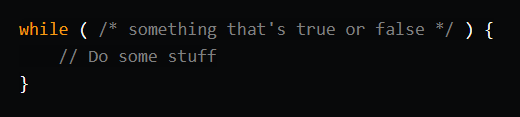
It’s that simple! Here’s an example which keeps finding a random number from 0-1 until it is over 0.2.

But what if we wanted it to alert the number? We can’t write **alert(Math.random())* because then it would find a new random number to alert. So, we'd have to make a variable and then set it to the random number at the end of each loop. It would then compare this* number, and would have it stored in a variable so we can alert it later:
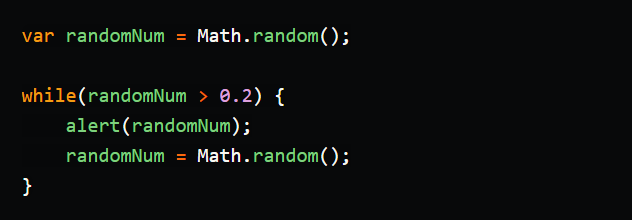
Take a moment to look at that code. First, we set the variable randomNum to a random number. We then see if it is greater than 0.2. If it is, we run the stuff inside the curly brackets. This alerts the number and then changes **randomNum to a new number. We then check to see if this number is greater than `0.2`**. If it is, we run the stuff inside the curly brackets again, and it goes on and on...
If the number is not greater than **0.2, the stuff in the brackets doesn't run, and the program continues. It does not then keep running until the number is greater than `0.2`** again.
메타데이터
- post_id
- fa31a326303b
- slug
- for-loop-while-loop-and-array-fa31a326303b
- url
- https://medium.com/@hibazoglami2018/for-loop-while-loop-and-array-fa31a326303b
- canonical_url
- https://medium.com/@hibazoglami2018/for-loop-while-loop-and-array-fa31a326303b
- author_url
- https://medium.com/@hibazoglami2018
- status
- ok
- fetched_at
- 2026-07-25 12:44:45




