Apache Kafka in Short
Learn / Refresh about Kafka quickly
Apache Kafka: In-Short
Fundamental Concepts explained concisely
Purpose
This blog aims to go over the major components involved in Kafka, how they work, and some ways they can be configured in a concise format with non-real world, highly simplified, easy to understand examples quickly.
Introduction
Apache Kafka is an open-source distributed event streaming platform that can act as both a queue as well as a publisher-subscriber model that provides at-least once delivery semantics
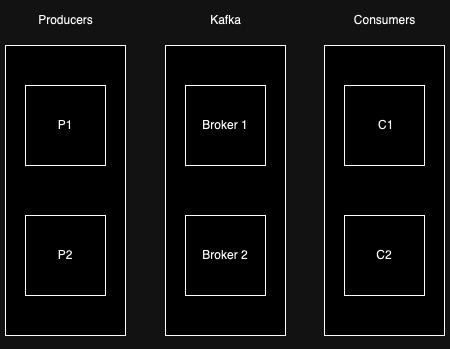
Image by Author
Let’s understand first where Kafka plays a role.
Producers
We have producers also called publishers who produce messages as events. We can have multiple producers such as Android apps, iOS apps, etc. Some examples of events are a user signup event, a YouTube video upload event, etc.
Consumers
Consumers are those who are interested in such events to execute something. For example, a consumer dedicated to sending a welcome email will be interested in a user signup event, and another consumer that performs an automated user background check might also be interested in the same event.
Role of Kafka
Now a very important point, consumers cannot match the rate at which producers produce messages. Hence Kafka comes into the picture as a middleware,
- That allows for messages to be delivered to consumers asynchronously
- That allows for the decoupling of publishers and consumers
- That is highly scalable and reliable
Kafka Broker
The broker is responsible for the management of the messages published by the publishers to be consumed by the consumers. There are multiple brokers spun up to ensure scalability and high reliability (more on this later).
Publishing
Let’s take a look at the publishing part.
Photo by Louis Hansel on Unsplash (Pizza is being Produced / Published)
Topics

Image by Author
Publishers publish messages to topics. Topics can be considered as message groups or different types of events.
Partitions

Image by Author
Each Kafka topic is distributed among multiple partitions. You can think of partitions as buckets. The publisher looks at the content to be published and decides the bucket it should be put into. This is generally done by hashing a unique key related to the content to be published. In the above example, the partition is decided by the first letter of the user’s name. An important point to note is that the publisher is aware of the brokers, topics as well as partitions among them. It fetches this information through the Kafka cluster’s metadata.
Replication among Partitions

Image by Author
Kafka has scalability and redundancy built into it by allowing for partitions to be spread across brokers. There is a single leader partition and multiple follower partitions at any point of time.
The leader is elected by Raft which is Consensus Algorithm.
It is important to note that each partition has a leader broker elected to it. In the above example, Broker 1 is the leader of the Partition A-M as well as one of the followers for the Partition N-Z for the Users topic. Whenever data is written, it goes to the leader partition first. The publisher, who knows the leader broker from the cluster metadata, sends the data there. After that, the leader replicates the data to follower partitions. The leader only acknowledges the write when it receives confirmation from at least ’n’ followers where ’n’ is a pre-set number based on the desired level of replication to ensure durability.
💡 Tidbit: Those replicas who have acknowledged all writes from the leader are known as In Sync Replicas for the concerned partition.
Append Only Log
In Kafka, data is written to logs in an append-only fashion, meaning that new messages are added at the end of the log, and existing data is never modified. This allows Kafka to optimize writes reliably. This also simplifies replication as followers can sequentially apply the replicated log segments.
Consuming
Now let’s take a look at the consumption side.
Photo by Brenna Huff on Unsplash (Let’s consume the produced pizza)
Kafka can be configured to act both as a queue as well as a pub—sub system. This is accomplished by configuring consumer groups in different ways.
Consumer Groups
Consumer groups are in-short, well, a group of consumers :) Each consumer can read more than one partition but each partition can be read by only one consumer in a consumer group.

Image by Author
In the above example, we have two partitions but only a single consumer group having a single consumer. So the consumer is responsible for both the partitions.

Image by Author
In the above example, Consumer 1 is responsible for Partition A-M and Consumer 2 is responsible for Partition N-Z . Since all the partitions have a consumer reading them, Consumer 3 is idle.

Image by Author
In the above example, we have two consumer groups. Each consumer group has two consumers reading one partition each. Say Consumer Group 1 is responsible for sending a welcome email to the user and Consumer Group 2 is responsible for web scraping to get all available information we can about the user. In this case,
Consumer 1fromConsumer Group 1will send a welcome email to users inPartition A-MConsumer 2fromConsumer Group 1will send a welcome email to users inPartition N-ZConsumer 1fromConsumer Group 2will perform web scraping for users inPartition A-MConsumer 2fromConsumer Group 2will perform web scraping for users inPartition N-Z
Partition Level Queue

Image by Author
To get a queue-like behavior for each partition, you can put all your consumers in one group. Once Consumer 1 reads messageIshan from Partition A-M and marks it as committed, that message won’t be read by anyone else. Then the consumer will move to the second message within the partition, thus behaving like a queue.
Simple Pub Sub Behaviour

Image by Author
For the entire system to behave like a pub sub when you can afford only a single consumer per task, you can put each of your consumer in its own group. In the above example, Task 1 such as sending a welcome email will be handled by Consumer Group 1 , Task 2 such as creating a word art of the user’s name will be handled by Consumer Group 2 and Task 3 such as web scraping will be handled by Consumer Group 3 . Since there is a single consumer per group, the consumer will be responsible for all the partitions.
Conclusion
That’s it, folks! I hope you learned/refreshed your understanding of Apache Kafka. I tried to keep it as short and as simple as possible in order to do justice to this article’s title.
Inspiration Credit
An in-depth YouTube video about Apache Kafka by Hussein Nasser inspired me to write this blog for a quick intro, and quick revision. You can find the excellent video here, https://youtu.be/R873BlNVUB4 and follow him to keep learning something new regarding backend engineering regularly.
메타데이터
- post_id
- fa56cc197114
- slug
- apache-kafka-in-short-fa56cc197114
- url
- https://blog.dataengineerthings.org/apache-kafka-in-short-fa56cc197114
- canonical_url
- https://blog.dataengineerthings.org/apache-kafka-in-short-fa56cc197114
- author_url
- https://medium.com/@susmitpy
- status
- ok
- fetched_at
- 2026-07-24 06:51:05