Low level design : Search Autocomplete System
Designing a Scalable and Personalized Search Autocomplete System: Architecture, Class Design, and Performance Optimization
Low level design : Search Autocomplete System
Photo by visuals on Unsplash
Designing a Scalable and Personalized Search Autocomplete System: Architecture, Class Design, and Performance Optimization
In this article, we’ll dive into the design of a scalable and personalized search autocomplete system — a critical feature in modern applications that need to deliver fast, accurate, and context-aware suggestions. We’ll explore the architectural components that enable real-time query processing, ranking based on user preferences, and caching for high performance.
The goal is to design a Search Autocomplete System that suggests possible queries or search results as the user types. We will structure the proposed design as below.
1. Functional Requirements 2. Non-Functional Requirements 3. Key Components 4. Low Level Design diagram 5. Workflow overview 6. Interfaces/Classes and Services 7. Implementations (Consolidate and put all together) 8. Conclusion
Functional Requirements:
- Search Suggestions: As the user types a query, the system should provide real-time search suggestions based on the query’s prefix.
- Ranking: Suggestions should be ranked based on relevance and user-specific preferences (e.g., past searches, location).
- Caching: Frequently searched queries should be cached for faster results, reducing response time for repeated queries.
- Personalization: The system should tailor search suggestions to each user by considering their past searches and preferences.
- Scalability: The system should handle high query traffic and provide fast results with low latency.
- Error Handling: Graceful degradation should occur when components like the cache or ranking system are temporarily unavailable.
Non-Functional Requirements:
- The system must be scalable to handle millions of concurrent users.
- It should provide low latency for real-time feedback.
- Fault-tolerant and capable of recovering from failures.
- Must support a distributed environment for search indexing and query resolution.
Key Components
- SearchOrchestrator:
- Central controller of the search process. It coordinates fetching, ranking, caching, and returning results to the user.
- It interacts with the search index, ranking module, and cache.
2. SearchIndex:
- Provides a list of suggestions based on the query prefix.
- May be implemented in various ways (e.g., Trie-based index, database).
3. Ranker:
- Ranks search suggestions based on relevance and user preferences.
- Ensures that personalized results are shown to the user.
4. CacheManager:
- Manages caching of search results to avoid redundant queries.
- Provides functionality to retrieve and store search results in memory.
5. UserPreferences:
- Stores user-specific preferences, including location and past searches.
- Helps personalize the ranking of search suggestions.
6. SearchResult:
- Contains the final search suggestions returned to the user.
- May include metadata (e.g., whether the result was fetched from cache).
7. SearchQuery: Captures the user input and represents the query
Low Level Design diagram
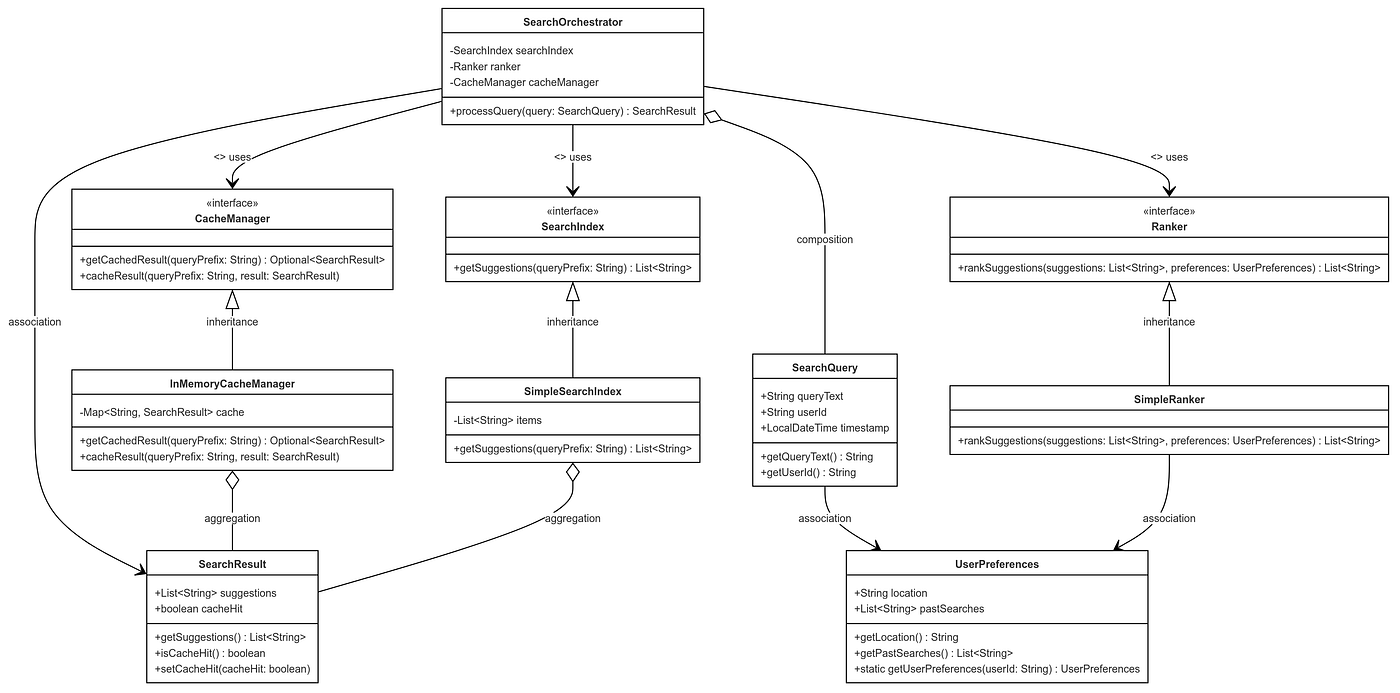
Search Auto complete system LLD
Workflow Overview
- Query Submission: The user starts typing in the search box, which triggers a search query to the system.
- Cache Check: The system checks if suggestions for the query prefix are already cached. If found, return the cached results.
- Search Index Lookup: If the query is not in the cache, the system searches the SearchIndex for relevant suggestions.
- Ranking: The Ranker orders the suggestions based on relevance and personalization (using UserPreferences).
- Cache Update: The CacheManager updates the cache with the suggestions for future lookups.
- Result Presentation: The SearchResult is returned to the user with ranked suggestions.
Interfaces/Classes/Services
**1. SearchQuery:**Represents the search input.
class SearchQuery {
    private String queryText;
    private String userId;
    private LocalDateTime timestamp;

    // Constructor, Getters, and Setters
}
**2. SearchResult:**Represents the suggestions provided to the user.
class SearchResult {
    private List<String> suggestions;
    private List<Integer> rankings;
    private boolean cacheHit;

    // Constructor, Getters, and Setters
}
**3. SearchIndex:**Manages the data structure to store searchable items (Trie, HashMap, etc.).
interface SearchIndex {
    List<String> getSuggestions(String queryPrefix);
}
**4. Ranker :**Ranks search results based on user preferences and relevance.
interface Ranker {
    List<String> rankSuggestions(List<String> suggestions, UserPreferences preferences);
}
**5. UserPreferences:**Encapsulates user-specific preferences.
class UserPreferences {
    private String location;
    private List<String> pastSearches;

    // Constructor, Getters, and Setters

    public static UserPreferences getUserPreferences(String userId) {
        // Retrieve preferences from the database or other source.
    }
}
6. CacheManager:Manages the caching of query results to improve performance.
interface CacheManager {
    Optional<SearchResult> getCachedResult(String queryPrefix);
    void cacheResult(String queryPrefix, SearchResult result);
}
**7. SearchOrchestrator:**Coordinates the entire flow of the autocomplete system.
class SearchOrchestrator {
    private SearchIndex searchIndex;
    private Ranker ranker;
    private CacheManager cacheManager;

    public SearchOrchestrator(SearchIndex searchIndex, Ranker ranker, CacheManager cacheManager) {
        this.searchIndex = searchIndex;
        this.ranker = ranker;
        this.cacheManager = cacheManager;
    }

    public SearchResult processQuery(SearchQuery query) {
        // 1. Check cache for query suggestions
        Optional<SearchResult> cachedResult = cacheManager.getCachedResult(query.getQueryText());
        if (cachedResult.isPresent()) {
            cachedResult.get().setCacheHit(true);
            return cachedResult.get();
        }

        // 2. Search in the index for suggestions
        List<String> suggestions = searchIndex.getSuggestions(query.getQueryText());

        // 3. Retrieve user preferences
        UserPreferences preferences = UserPreferences.getUserPreferences(query.getUserId());

        // 4. Rank suggestions
        List<String> rankedSuggestions = ranker.rankSuggestions(suggestions, preferences);

        // 5. Create and cache the result
        SearchResult result = new SearchResult(rankedSuggestions, /* rankings */, false);
        cacheManager.cacheResult(query.getQueryText(), result);

        // 6. Return the result
        return result;
    }
}
Consolidate and put all together
The SearchAutocompleteSystem is composed of several services and interfaces that work together to provide a scalable, low-latency autocomplete experience.
- The SearchOrchestrator is the main entry point, coordinating the query flow.
- The SearchIndex holds the data, Ranker ranks results, and CacheManager optimizes performance by reducing redundant lookups.
- UserPreferences allows for personalized search suggestions.
With the above components, the system adheres to SOLID principles by ensuring:
- Single Responsibility: Each component has a specific function.
- Open/Closed: Components like the Ranker can be extended with new algorithms without changing existing code.
- Liskov Substitution: Components like SearchIndex and CacheManager could have different implementations (e.g., in-memory, distributed).
- Interface Segregation: Each service has a clearly defined interface that focuses on its specific role.
- Dependency Inversion: The system is modular, and the SearchOrchestrator relies on abstractions (
SearchIndex,Ranker, etc.), making it easy to switch out implementations.
This system design is scalable and well-architected to handle high loads, personalization, and real-time performance. Following is consolidated code implementation.
import java.time.LocalDateTime;
import java.util.*;

// SearchQuery: Represents the search input
class SearchQuery {
    private String queryText;
    private String userId;
    private LocalDateTime timestamp;

    public SearchQuery(String queryText, String userId) {
        this.queryText = queryText;
        this.userId = userId;
        this.timestamp = LocalDateTime.now();
    }

    public String getQueryText() {
        return queryText;
    }

    public String getUserId() {
        return userId;
    }
}

// SearchResult: Represents the autocomplete suggestions
class SearchResult {
    private List<String> suggestions;
    private boolean cacheHit;

    public SearchResult(List<String> suggestions, boolean cacheHit) {
        this.suggestions = suggestions;
        this.cacheHit = cacheHit;
    }

    public List<String> getSuggestions() {
        return suggestions;
    }

    public boolean isCacheHit() {
        return cacheHit;
    }

    public void setCacheHit(boolean cacheHit) {
        this.cacheHit = cacheHit;
    }
}

// SearchIndex: Interface to fetch suggestions from the search index
interface SearchIndex {
    List<String> getSuggestions(String queryPrefix);
}

// Ranker: Interface to rank suggestions based on relevance and user preferences
interface Ranker {
    List<String> rankSuggestions(List<String> suggestions, UserPreferences preferences);
}

// UserPreferences: Stores user-specific preferences
class UserPreferences {
    private String location;
    private List<String> pastSearches;

    public UserPreferences(String location, List<String> pastSearches) {
        this.location = location;
        this.pastSearches = pastSearches;
    }

    public String getLocation() {
        return location;
    }

    public List<String> getPastSearches() {
        return pastSearches;
    }

    // Mock method to simulate fetching user preferences
    public static UserPreferences getUserPreferences(String userId) {
        return new UserPreferences("New York", Arrays.asList("pizza", "movies", "coffee"));
    }
}

// CacheManager: Interface to manage caching of query results
interface CacheManager {
    Optional<SearchResult> getCachedResult(String queryPrefix);
    void cacheResult(String queryPrefix, SearchResult result);
}

// Simple In-Memory CacheManager implementation
class InMemoryCacheManager implements CacheManager {
    private Map<String, SearchResult> cache = new HashMap<>();

    @Override
    public Optional<SearchResult> getCachedResult(String queryPrefix) {
        return Optional.ofNullable(cache.get(queryPrefix));
    }

    @Override
    public void cacheResult(String queryPrefix, SearchResult result) {
        cache.put(queryPrefix, result);
    }
}

// Mock SearchIndex implementation using a predefined list of items
class SimpleSearchIndex implements SearchIndex {
    private List<String> items = Arrays.asList("pizza", "pasta", "burger", "coffee", "movies", "milkshake");

    @Override
    public List<String> getSuggestions(String queryPrefix) {
        List<String> suggestions = new ArrayList<>();
        for (String item : items) {
            if (item.startsWith(queryPrefix.toLowerCase())) {
                suggestions.add(item);
            }
        }
        return suggestions;
    }
}

// Simple Ranker implementation that ranks suggestions based on string length
class SimpleRanker implements Ranker {
    @Override
    public List<String> rankSuggestions(List<String> suggestions, UserPreferences preferences) {
        // Here you can apply more complex ranking based on user preferences.
        suggestions.sort(Comparator.comparingInt(String::length));
        return suggestions;
    }
}

// SearchOrchestrator: Coordinates the search autocomplete process
class SearchOrchestrator {
    private SearchIndex searchIndex;
    private Ranker ranker;
    private CacheManager cacheManager;

    public SearchOrchestrator(SearchIndex searchIndex, Ranker ranker, CacheManager cacheManager) {
        this.searchIndex = searchIndex;
        this.ranker = ranker;
        this.cacheManager = cacheManager;
    }

    public SearchResult processQuery(SearchQuery query) {
        // Check cache first
        Optional<SearchResult> cachedResult = cacheManager.getCachedResult(query.getQueryText());
        if (cachedResult.isPresent()) {
            cachedResult.get().setCacheHit(true);
            return cachedResult.get();
        }

        // Fetch suggestions from the search index
        List<String> suggestions = searchIndex.getSuggestions(query.getQueryText());

        // Retrieve user preferences
        UserPreferences preferences = UserPreferences.getUserPreferences(query.getUserId());

        // Rank suggestions based on relevance and user preferences
        List<String> rankedSuggestions = ranker.rankSuggestions(suggestions, preferences);

        // Create and cache the result
        SearchResult result = new SearchResult(rankedSuggestions, false);
        cacheManager.cacheResult(query.getQueryText(), result);

        return result;
    }
}
Main function
public class Main {
    public static void main(String[] args) {
        // Initialize the system components
        SearchIndex searchIndex = new SimpleSearchIndex();
        Ranker ranker = new SimpleRanker();
        CacheManager cacheManager = new InMemoryCacheManager();

        // Initialize Search Orchestrator
        SearchOrchestrator orchestrator = new SearchOrchestrator(searchIndex, ranker, cacheManager);

        // Example search queries
        SearchQuery query1 = new SearchQuery("pi", "user123");
        SearchResult result1 = orchestrator.processQuery(query1);
        printSearchResult(query1, result1);

        // Cached query to show cache hit
        SearchQuery query2 = new SearchQuery("pi", "user123");
        SearchResult result2 = orchestrator.processQuery(query2);
        printSearchResult(query2, result2);

        // Another search query
        SearchQuery query3 = new SearchQuery("mo", "user456");
        SearchResult result3 = orchestrator.processQuery(query3);
        printSearchResult(query3, result3);
    }

    // Utility to print search results
    private static void printSearchResult(SearchQuery query, SearchResult result) {
        System.out.println("Query: " + query.getQueryText());
        System.out.println("Suggestions: " + result.getSuggestions());
        System.out.println("Cache Hit: " + result.isCacheHit());
        System.out.println("----------");
    }
}
Workflow diagram

Search workflow sequence diagram
Conclusion
Building a robust and scalable search autocomplete system requires a thoughtful balance of performance, personalization, and system design. By adhering to SOLID principles and employing clear OOP patterns, this design provides flexibility and efficiency, ensuring the system can handle high traffic and deliver personalized experiences.
This architecture supports real-time performance through caching, ranks suggestions based on user preferences for more relevant results, and enables scalability for large-scale applications. By leveraging separation of concerns and modular design, the system is not only easier to maintain but also adaptable to future changes, such as adding new ranking algorithms or integrating external data sources.
The proposed system is a well-rounded solution for modern search functionality that needs to scale and personalize results for millions of users.
Refer to following for more Low Level Design problems for Senior SDE interviews.
Happy System Designing !!!!😊💻🎉🛠️🌟📐🚀✨.
Clap and Follow link to support more such content.
메타데이터
- post_id
- fa7a099a482d
- slug
- low-level-design-search-autocomplete-system-fa7a099a482d
- url
- https://blog.devgenius.io/low-level-design-search-autocomplete-system-fa7a099a482d
- canonical_url
- https://blog.devgenius.io/low-level-design-search-autocomplete-system-fa7a099a482d
- author_url
- https://medium.com/@scalabrix
- status
- ok
- fetched_at
- 2026-08-18 18:18:24