BWAPP Series : HTML Injection-Low Severity Level
Hellllllloooooooooooooo…………🙋🏻♀️
BWAPP Series : HTML Injection-Low Severity Level
Hellllllloooooooooooooo…………🙋🏻♀️
Welcome to the first post of my bWAPP series, where we’ll explore different web application vulnerabilities hands-on using the intentionally vulnerable application — bWAPP (buggy Web Application). In this post, we’ll cover HTML Injection (Low Severity) — what it is, how it works, and how to test it using bWAPP.
What is HTML Injection?
HTML Injection is a type of web vulnerability where an attacker can inject arbitrary HTML code into a web page. This can modify how the website looks or behaves for the user.
It’s different from Cross-Site Scripting (XSS) because HTML Injection doesn’t execute JavaScript (at least in its basic form). However, it can still be dangerous — attackers can deface the site, trick users with fake forms, or manipulate the UI.
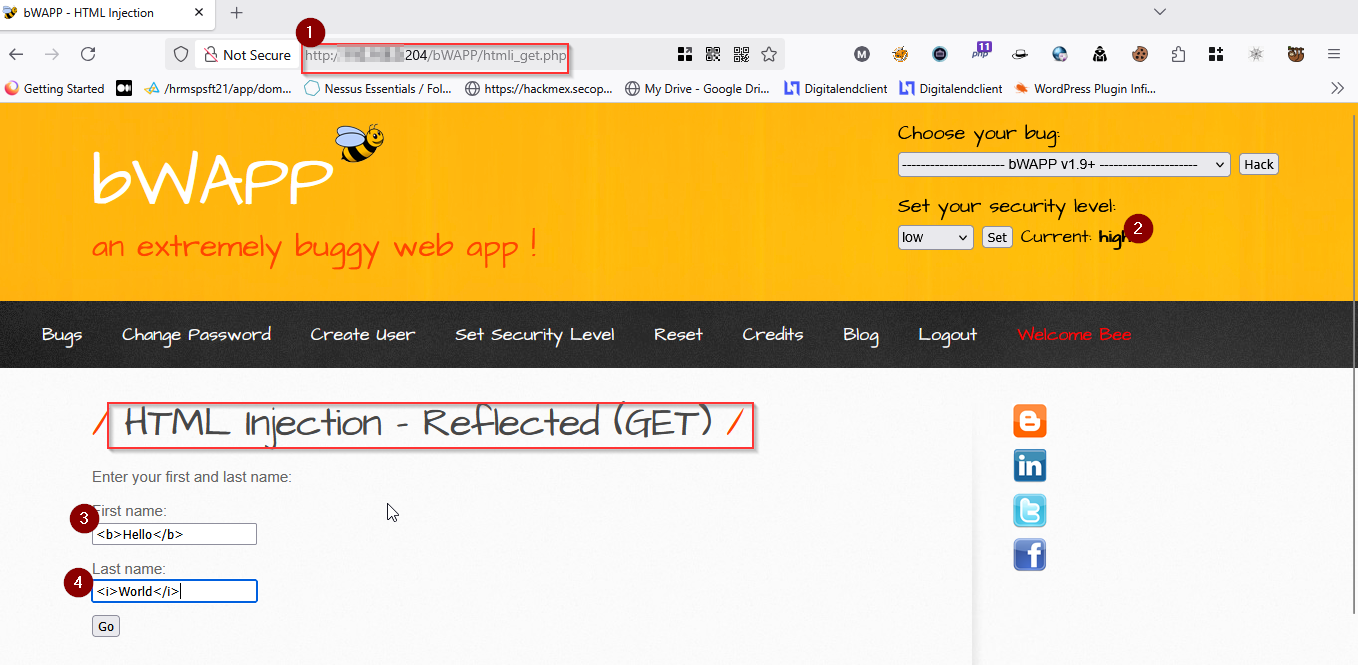
Scenario in bWAPP: HTML Injection (Low)
- Open bWAPP and log in.
- Select the bug:
HTML Injection (Low)from the dropdown. - You’ll see a simple input form like this:
What's your name?
[         John         ]
[  Say Hello! Button   ]
- Enter any name and click “Say Hello!” — it will respond with:
Hello JohnLooks simple, right

💉 HTML: The Fun Begins
Let’s try injecting HTML code into the input field.
Example 1: Changing Text Appearance
In the input box, enter:
<b>Hacker</b>
Output:
Hello Hacker
Now “Hacker” appears in bold. That’s HTML injection in action!
Example 2: Adding a Link
Try this:
<a href="https://malicious.com">Click Me</a>Output
Hello Click Me

Clicking the link takes the user to a different site — this could be used for phishing!
Example 3: Image Injection
<img src="https://example.com/image.jpg" width="100">
Now an image is displayed on the page — injected through user input.
Why is This a Problem?
Even though this is “low severity”, it’s still a UI redress attack. An attacker can:
- Trick users with fake forms
- Display fake messages
- Insert malicious-looking content (even if JavaScript isn’t allowed)
How to Prevent It?
- Sanitize user input — strip or encode HTML tags.
- Validate input on both client and server sides.
- Use security libraries like OWASP’s ESAPI to handle encoding.
Example in PHP
$name = htmlspecialchars($_GET['name']);
echo "Hello " . $name;
This converts < and > into < and >, making injection impossible.
Final Thoughts
HTML Injection may look harmless, but it opens doors for phishing, defacement, and social engineering attacks. Understanding it through bWAPP’s low severity level helps build a strong base for more advanced attacks like XSS.
Behind the Scenes: How HTML Injection Happens in the Backend
To understand HTML Injection better, let’s take a quick look at what happens on the server-side (backend) when you submit the input.
The Vulnerable Backend Code (Example in PHP)
When you enter your name in bWAPP and click “Say Hello!”, something like this is happening on the server:
$name = $_GET['name'];
echo "Hello " . $name;
Let’s break it down:
- The server takes whatever value the user submitted using
$_GET['name']. - It directly appends it to the output:
Hello {user input}. - There is no filtering or sanitization of the user input.
So, if the user enters:
<b>Hacker</b>Then the response becomes:
Hello <b>Hacker</b>Which the browser renders as:
Hello Hacker
What’s the Problem Here?
The application trusts the user input completely and reflects it back into the HTML output without encoding it. This is a classic mistake — user input should never be directly embedded into HTML without validation or sanitization.
Secure Version (Fixed Backend Code)
To prevent HTML Injection, we should encode special characters:
$name = htmlspecialchars($_GET['name']);
echo "Hello " . $name;
Now if someone tries to inject:
<b>Hacker</b>It will be displayed as:
Hello <b>Hacker</b>The browser sees it as plain text — not HTML — and doesn’t render it as bold.
Conclusion
Input Vulnerable Output Fixed Output<b>Hacker</b>Hello Hacker Hello <b>Hacker</b><a href="bad.com">Click</a>Click (dangerous link)Hello <a href="bad.com">Click</a>
Thanks For Reading….💃
메타데이터
- post_id
- fa9ad5ae1bfb
- slug
- bwapp-series-html-injection-low-severity-level-fa9ad5ae1bfb
- url
- https://medium.com/@madhuhack01/bwapp-series-html-injection-low-severity-level-fa9ad5ae1bfb
- canonical_url
- https://medium.com/@madhuhack01/bwapp-series-html-injection-low-severity-level-fa9ad5ae1bfb
- author_url
- https://medium.com/@madhuhack01
- status
- ok
- fetched_at
- 2026-06-27 18:20:27