Migrating from asdf to mise without the headaches
1. Remove asdf plugins and uninstall asdf
Wiki topics:
🌐 · Web Development
Migrating from asdf to mise without the headaches
1. Remove asdf plugins and uninstall asdf
# remove plugins
asdf plugin list | xargs -n 1 asdf plugin remove
# uninstall asdf
brew uninstall asdf --force
brew autoremoveclean up .zshrc
# ASDF configuration
. "$BREW_PREFIX/opt/asdf/libexec/asdf.sh"
remove files
rm -rf ~/.asdf
rm -rf ~/.tool-versions
Confirmed that asdf has been deleted.
brew list asdf# if you can remove asdf successfully, you will see something like this
Error: No such keg: /opt/homebrew/Cellar/asdf
Execution time: 0.88s2. Install mise
https://mise.jdx.dev/getting-started.html
brew install mise# if you install mise successfully, you can see this when running version command
mise --version
_ __
____ ___ (_)_______ ___ ____ ____ / /___ _________
/ __ `__ \/ / ___/ _ \______/ _ \/ __ \______/ __ \/ / __ `/ ___/ _ \
/ / / / / / (__ ) __/_____/ __/ / / /_____/ /_/ / / /_/ / /__/ __/
/_/ /_/ /_/_/____/\___/ \___/_/ /_/ / .___/_/\__,_/\___/\___/
/_/ by @jdx
2025.12.12 macos-arm64 (2025-12-18)
Execution time: 0.90sadd the following to .zshrc. If you use bash or fish, you need to replace zsh with bash/fish
eval "$(mise activate zsh)"3. Install mise plugins
In my case, I need to install nodejs, pnpm, bun, yarn, and python.
First check available plugins
mise plugins ls-remoteAlso check the core list
mise plugins ls --core
bun
deno
elixir
erlang
go
java
node
python
ruby
rust
swift
zig
Then check available version for each plugin
# Check available nodes version
mise ls-remote node
mise ls-remote pnpm
mise ls-remote bun
mise ls-remote yarn
mise ls-remote python
Finally install
mise install node@22.21.1
mise install yarn@1.22.22
mise install pnpm@10.22.0
mise install bun@1.3.5
mise install python@3.12.12
or you can install them via mise.toml
- create
mise.tomlin your repo folder - add
[tools]tomise.tomlFor this case, the toml file is like below
[tools]
node = "22.21.1"
python = "3.12.12"
yarn = "1.22.22"
pnpm = "10.22.0"- install versions
mise ERROR error parsing config file: ~/Desktop/dev_test/blog/mise.toml
mise ERROR Config files in ~/Desktop/dev_test/blog/mise.toml are not trusted.
Trust them with `mise trust`. See https://mise.jdx.dev/cli/trust.html for more information.
mise ERROR Run with --verbose or MISE_VERBOSE=1 for more information
# if you see the above Error message, you need to run the trust command to accept the config file.
mise trustmise installCheck versions
yarn -v
1.22.22
Execution time: 0.17s
node -v
v22.21.1
Execution time: 0.03s python --version
Python 3.12.12
Execution time: 0.04sIf you see something like this, probably you are missing adding the eval command to your .zshrc
node -v
zsh: command not found: node
You need to add the following to .zshrc.
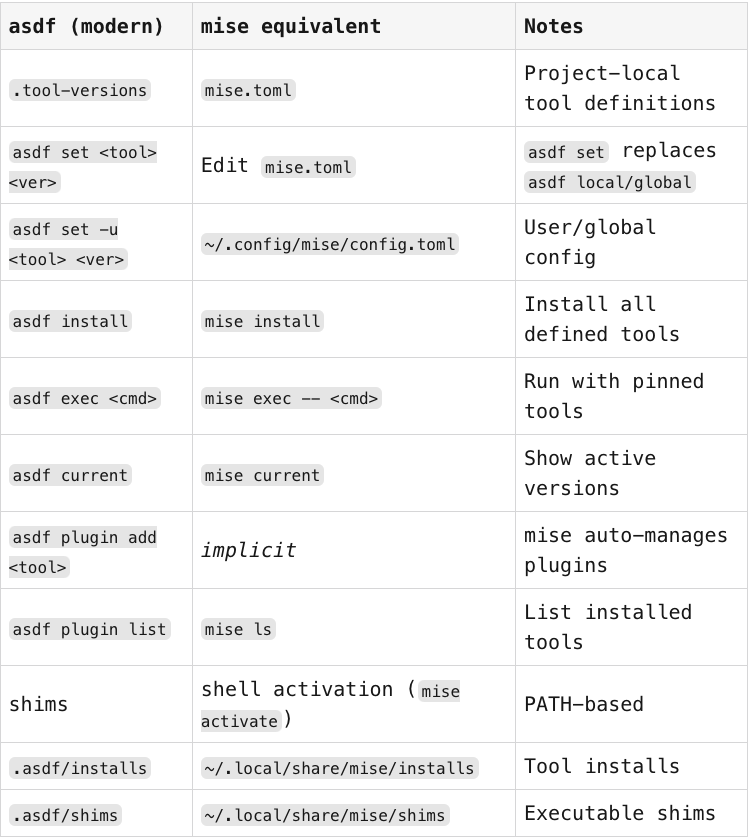
eval "$(mise activate zsh)"4. asdf → mise command mapping
메타데이터
- post_id
- fad759f33dce
- slug
- migrating-from-asdf-to-mise-without-the-headaches-fad759f33dce
- url
- https://medium.com/@koji-kanao/migrating-from-asdf-to-mise-without-the-headaches-fad759f33dce
- canonical_url
- https://medium.com/@koji-kanao/migrating-from-asdf-to-mise-without-the-headaches-fad759f33dce
- author_url
- https://medium.com/@koji-kanao
- status
- ok
- fetched_at
- 2026-07-13 17:02:51





