Tunneling TCP Connections Over SSH Using socat and nc
The Problem
Tunneling TCP Connections Over SSH Using socat and nc
The Problem
Sometimes you need to reach a service on a remote host that isn’t directly accessible from your machine, maybe it’s behind a firewall, on a private network segment, or only reachable through a jump host. In this post I’ll show a lightweight, dependency-free way to tunnel TCP traffic using tools you almost certainly already have: ssh, nc (netcat), and socat.
The Setup
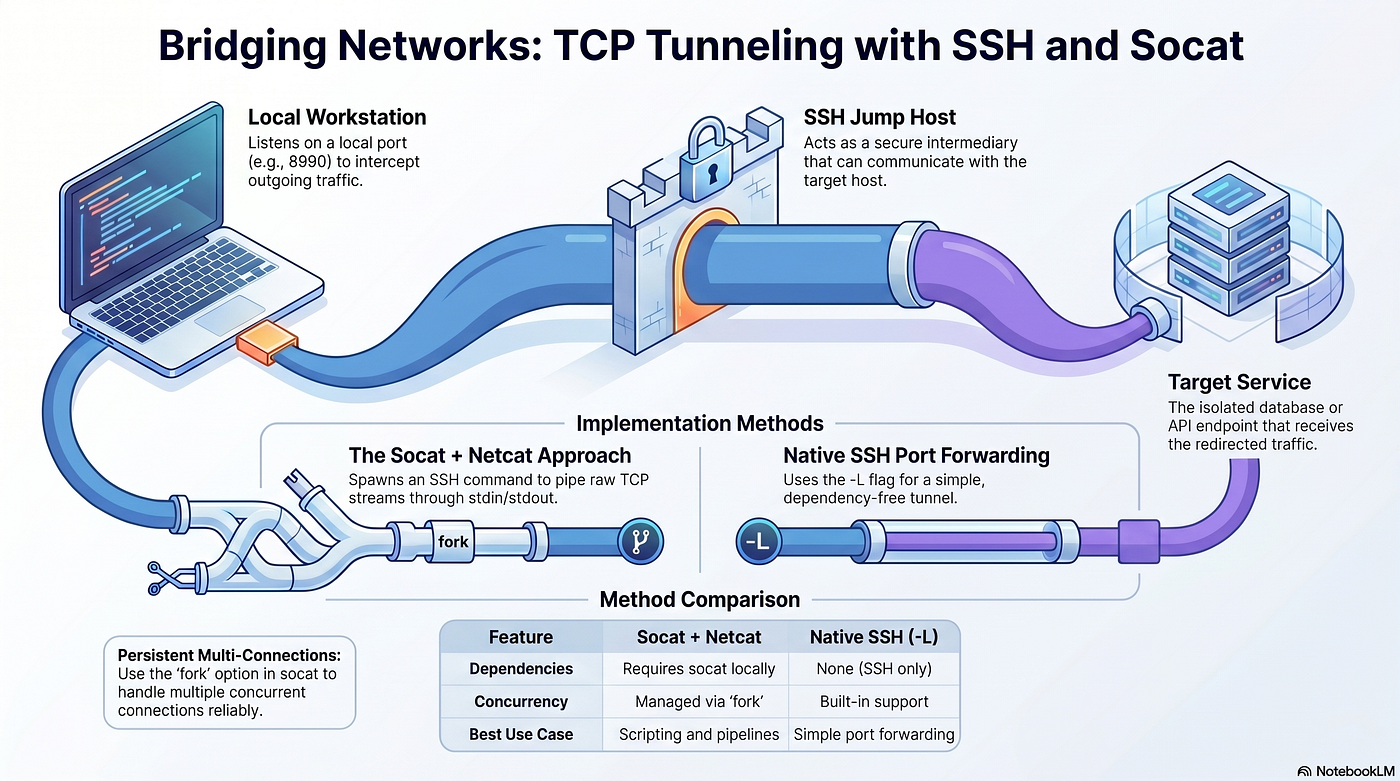
We have three actors:
- Local machine — your workstation
- Jump host — an SSH-accessible server that can reach the target
- Target service — a TCP service (e.g. a database, API, or metrics endpoint) running on a host only reachable from the jump host
The goal: make the target service available on a local port as if it were running on your own machine.
The Command
socat TCP-LISTEN:8990,fork,reuseaddr EXEC:"ssh user@jump-host nc target-host 9000"Let’s break it down:
**socat TCP-LISTEN:8990,fork,reuseaddr** — listens on local port8990.forkhandles multiple connections concurrently;reuseaddrallows quick restarts without "address already in use" errors.**EXEC:"..."** — for each incoming connection, socat spawns the given command and pipes the TCP stream through its stdin/stdout.**ssh user@jump-host** — opens an SSH session to the jump host.**nc target-host 9000** — on the jump host, netcat connects to the target service and streams raw TCP.
The result: localhost:8990 → SSH → jump host → netcat → target service. A full TCP tunnel with no extra software on any host.
SH Config for Cleaner Usage
Rather than hardcoding the jump host address every time, define it in ~/.ssh/config:
Host jump-tunnel
    HostName <jump-host-ip>
    User youruser
    PasswordAuthentication yes
    PubkeyAuthentication no
    LocalForward 8990 <target-host>:9000
Now the socat command becomes:
socat TCP-LISTEN:8990,fork,reuseaddr EXEC:"ssh jump-tunnel nc <target-host> 9000"Alternative: Pure SSH Port Forwarding
If you don’t need fork (i.e. only one consumer at a time), you can skip socat entirely and use SSH's built-in LocalForward:
ssh -N -L 8990:<target-host>:9000 user@jump-hostOr with the config entry above, simply:
ssh -N jump-tunnel-N tells SSH not to execute a remote command — just hold the tunnel open.
When to Use socat vs SSH -L

For most use cases, ssh -L is simpler. The socat approach shines when you need to compose it into a larger pipeline or script.
Conclusion
With just ssh, nc, and socat you can punch through network boundaries and expose remote TCP services locally — no VPN, no extra firewall rules, no installed agents. It's a handy trick to have in your toolkit when working across segmented networks.
메타데이터
- post_id
- fb142a2d6034
- slug
- tunneling-tcp-connections-over-ssh-using-socat-and-nc-fb142a2d6034
- url
- https://blog.devops.dev/tunneling-tcp-connections-over-ssh-using-socat-and-nc-fb142a2d6034
- canonical_url
- https://blog.devops.dev/tunneling-tcp-connections-over-ssh-using-socat-and-nc-fb142a2d6034
- author_url
- https://medium.com/@mobinshaterian
- status
- ok
- fetched_at
- 2026-06-10 21:21:38