Search and Replace Text in PDF Files in C#
Replacing text in PDF documents allows for efficient and automated modification of textual content within PDF files. This process involves…
Search and Replace Text in PDF Files in C#
Replacing text in PDF documents allows for efficient and automated modification of textual content within PDF files. This process involves searching for specific text patterns or phrases and replacing them with desired alternatives. By replacing text in PDFs, users can update placeholders, correct errors, customize document content, or perform other text-related operations.
In this article, I am going to introduce how to replace text in PDF documents in C# using the Spire.PDF for .NET library.
- Replace Text in a Specific Page in PDF in C#
- Replace Text of an Entire PDF Document in C#
- Replace the First Occurrence of the Target Text in C#
- Replace Text in PDF with a Regular Expression in C#
.NET Library for PDF Text Replacement
Spire.PDF for .NET is a powerful library that provides comprehensive PDF manipulation capabilities in .NET applications. Among its features is a text replacement function, which allows you to search for specific text in a PDF document and replace it with new text.
Below is a table outlining the key classes in Spire.PDF that are specifically designed for text replacement in PDF documents:

To install the Spire.PDF library, you have two options: you can either manually download it from the official website and add the DLL files as references to your project, or you can install it directly through NuGet.\
PM> Install-Package Spire.PDFReplace Text in a Specific Page in PDF in C
To replace text in a specific page, you can use the ReplaceAllText method of the PdfTextReplacer class. This code example loads a PDF document, and replaces the text “wikis” in a specified page with “wikipedia”.
using Spire.Pdf;
using Spire.Pdf.Texts;

namespace ReplaceTextInPage
{
    class Program
    {
        static void Main(string[] args)
        {
            // Create a PdfDocument object
            PdfDocument doc = new PdfDocument();

            // Load a PDF file
            doc.LoadFromFile("C:\\Users\\Administrator\\Desktop\\wikis.pdf");

            // Create a PdfTextReplaceOptions object
            PdfTextReplaceOptions textReplaceOptions = new PdfTextReplaceOptions();

            // Specify the options for text replacement
            textReplaceOptions.ReplaceType = PdfTextReplaceOptions.ReplaceActionType.IgnoreCase;
            textReplaceOptions.ReplaceType = PdfTextReplaceOptions.ReplaceActionType.WholeWord;
            textReplaceOptions.ReplaceType = PdfTextReplaceOptions.ReplaceActionType.AutofitWidth;

            // Get a specific page
            PdfPageBase page = doc.Pages[0];

            // Create a PdfTextReplacer object based on the page
            PdfTextReplacer textReplacer = new PdfTextReplacer(page);

            // Set the replace options
            textReplacer.Options = textReplaceOptions;

            // Replace all occurrences of target text with new text
            textReplacer.ReplaceAllText("wikis", "wikipedia");

            // Save the document to a different PDF file
            doc.SaveToFile("ReplaceTextInPage.pdf");

            // Dispose resources
            doc.Dispose();
        }
    }
}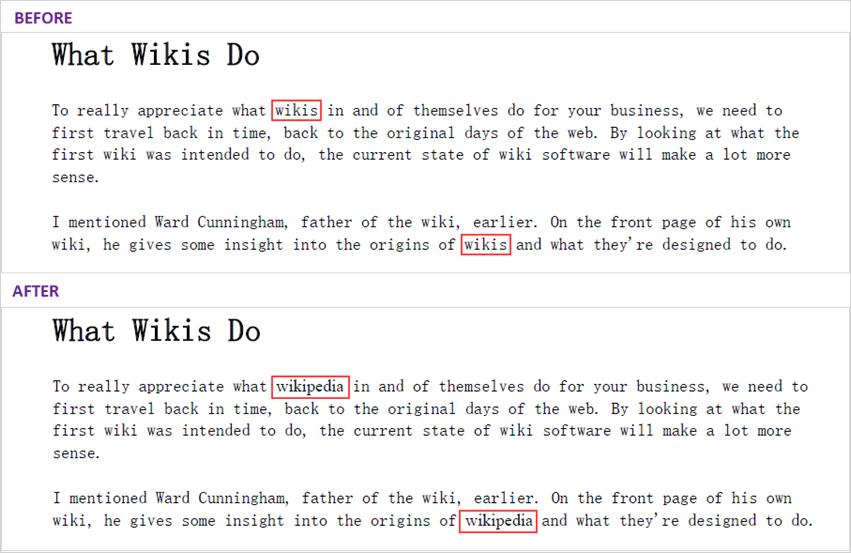
Figure 1. Replace in a PDF Page
Replace Text of an Entire PDF Document in C#
Now that you already know how to reaplce text in a specific page, you can iterate through the pages in the document and replace the text in each page.
The following code snippet loads a PDF document, replaces the target text “wikis” with “wikipedia” in the entire document.
using Spire.Pdf.Texts;
using Spire.Pdf;

namespace FindAndReplaceTextInPDF
{
    class Program
    {
        static void Main(string[] args)
        {
            // Create a PdfDocument object
            PdfDocument doc = new PdfDocument();

            // Load a PDF file
            doc.LoadFromFile("C:\\Users\\Administrator\\Desktop\\wikis.pdf");

            // Create a PdfTextReplaceOptions object, specifying the options for text replacement
            PdfTextReplaceOptions textReplaceOptions = new PdfTextReplaceOptions();
            textReplaceOptions.ReplaceType = PdfTextReplaceOptions.ReplaceActionType.AutofitWidth;
            textReplaceOptions.ReplaceType = PdfTextReplaceOptions.ReplaceActionType.WholeWord;

            // Iterate through the pages in the document
            foreach (PdfPageBase page in doc.Pages)
            {

                // Create a PdfTextReplacer object based on a specific page
                PdfTextReplacer textReplacer = new PdfTextReplacer(page);

                // Set replace options
                textReplacer.Options = textReplaceOptions;

                // Replace all target strings with a new string
                textReplacer.ReplaceAllText("wikis", "wikipedia");
            }

            // Save the document to a different PDF file
            doc.SaveToFile("ReplaceTextInDocument.pdf");
        }
    }
}
Replace the First Occurrence of the Target Text in C
To place only the first occurrence of the target text, you use the ReplaceText method of the PdfTextReplacer class.
The following code snippet loads a PDF document, replaces the first occurence of the target text “wikis” with “wikipedia” in a certain page.
using Spire.Pdf.Texts;
using Spire.Pdf;

namespace ReplaceTheFirstOccurence
{
    class Program
    {
        static void Main(string[] args)
        {
            // Create a PdfDocument object
            PdfDocument doc = new PdfDocument();

            // Load a PDF file
            doc.LoadFromFile("C:\\Users\\Administrator\\Desktop\\wikis.pdf");

            // Create a PdfTextReplaceOptions object, specifying the options for text replacement
            PdfTextReplaceOptions textReplaceOptions = new PdfTextReplaceOptions();
            textReplaceOptions.ReplaceType = PdfTextReplaceOptions.ReplaceActionType.AutofitWidth;
            textReplaceOptions.ReplaceType = PdfTextReplaceOptions.ReplaceActionType.WholeWord;

            // Get a specific page
            PdfPageBase page = doc.Pages[0];

            // Create a PdfTextReplacer object based on  the page
            PdfTextReplacer textReplacer = new PdfTextReplacer(page);

            // Set replace options
            textReplacer.Options = textReplaceOptions;

            // Replace the first occurrence of the target string
            textReplacer.ReplaceText("wikis", "wikipedia");

            // Save the document to a different PDF file
            doc.SaveToFile("ReplaceFirstMatch.pdf");
        }
    }
}
Figure 2. Replace the First Occurrence of Target Text in PDF
Replace Text in PDF with a Regular Expression in C
Regular expressions are a powerful tool for searching for specific patterns or sequences of characters within larger text. Spire.PDF allows you to search and replace text in PDF by using regular expressions as well. Here is an example.
using Spire.Pdf;
using Spire.Pdf.Texts;

namespace ReplaceUsingRegularExpression
{
    class Program
    {
        static void Main(string[] args)
        {
            // Create a PdfDocument object
            PdfDocument doc = new PdfDocument();

            // Load a PDF file
            doc.LoadFromFile("C:\\Users\\Administrator\\Desktop\wikis.pdf");

            // Create a PdfTextReplaceOptions object
            PdfTextReplaceOptions textReplaceOptions = new PdfTextReplaceOptions();

            // Set the replace type as Regex
            textReplaceOptions.ReplaceType = PdfTextReplaceOptions.ReplaceActionType.Regex;

            // Get a specific page
            PdfPageBase page = doc.Pages[1];

            // Create a PdfTextReplacer object based on the page
            PdfTextReplacer textReplacer = new PdfTextReplacer(page);

            // Set the replace options
            textReplacer.Options = textReplaceOptions;

            // Specify the regular expression
            string regularExpression = @"\bW\w*?S\b";

            // Replace all occurrences that match the regular expression with new text
            textReplacer.ReplaceAllText(regularExpression, "NEW");

            // Save the document to a different PDF file
            doc.SaveToFile("ReplaceWithRegularExpression.pdf");

            // Dispose resources
            doc.Dispose();
        }
    }
}
Conclusion
In this blog post, I’ve demonstrated how to replace text in a PDF documents with four C# code examples. I hope you find this article helpful.
메타데이터
- post_id
- fb79b705c90f
- slug
- c-guide-search-and-replace-text-in-pdf-files-fb79b705c90f
- url
- https://medium.com/@alexaae9/c-guide-search-and-replace-text-in-pdf-files-fb79b705c90f
- canonical_url
- https://medium.com/@alexaae9/c-guide-search-and-replace-text-in-pdf-files-fb79b705c90f
- author_url
- https://medium.com/@alexaae9
- status
- ok
- fetched_at
- 2026-08-21 11:22:42