Understanding Amazon EC2
A Deep Dive into Amazon EC2: From Basics to Advanced Features
Understanding Amazon EC2
What is Amazon EC2?
Amazon EC2 — (Amazon Elastic Compute Cloud) provides on-demand, scalable computing capacity in the AWS Cloud. By using EC2, you reduce hardware costs and speed up application development and deployment. EC2 instances run as virtual machines on host computers in AWS Availability Zones. These instances operate on a hypervisor layer managed by AWS.
Use Cases of Amazon EC2 Instances
- When you need complete control over your computing resources (e.g., custom server configurations).
- Cost optimization (like choosing between pay-as-you-go or reserved pricing).
- When you need flexibility to run any workload, from simple apps to complex AI models.
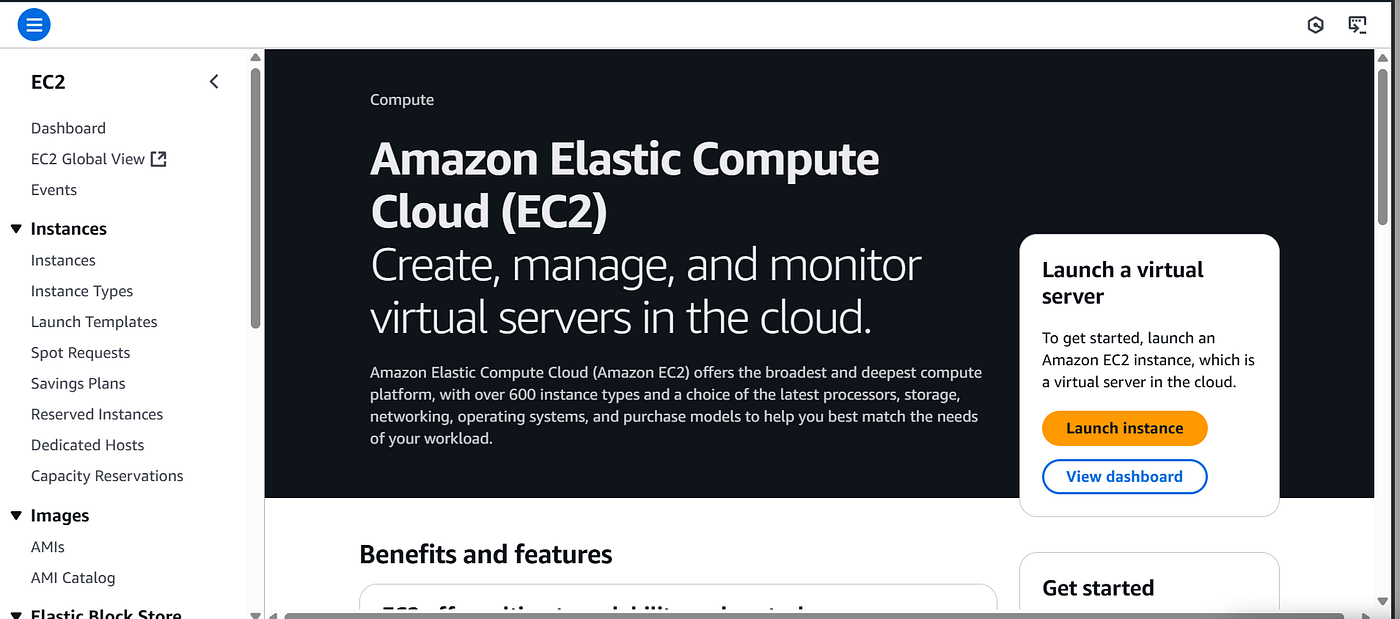
Amazon Elastic Compute Cloud (EC2)
Launching an EC2 Instance: The Role of AMIs
To launch an instance, you need an Amazon Machine Image (AMI). Think of an AMI as a blueprint that defines:
A template for the root volume.
Launch permissions (who can use it).
Block device mapping (how storage is organized).
Benefits of AMIs:
- Repeatability: Launch identical instances every time.
- Reusability: Share AMIs across teams or regions.
- Recoverability: Restore instances quickly from backups.
Choosing an AMI:
Pick based on your needs:
- Region (geographic location).
- Operating System (Linux, Windows, etc.).
- Storage Type (SSD vs. HDD).
- Architecture (ARM, x86).
- Virtualization Type (paravirtual vs. hardware-assisted).
EC2 Image Builder: Simplify AMI Creation
EC2 Image Builder is a service that Creates, maintains, and validates Linux or Windows images. It Provides a GUI-based pipeline to automate AMI updates. Ensures images are secure, up-to-date, and version-controlled.
Want to see it in action? Watch this tutorial.
Choosing the Right EC2 Instance Type: Workload Examples
- General Purpose (M5, T2, MAC): Offer Balanced performance for everyday tasks. Examples include — Web servers (hosting company websites), Development/test environments, Small databases (like Redis or MongoDB).
- Compute Optimized (C7, C6, C5): CPU-heavy tasks requiring high processing power. Examples include — Video encoding/transcoding, Scientific modeling or simulations, and Batch processing (e.g., financial risk analysis).
- Memory Optimized (R5, x1, HMI): Applications that need fast access to large datasets in memory. Examples include — Real-time big data analytics (Apache Spark), In-memory databases (SAP HANA), and High-performance caching (Redis).
- Storage Optimized (I3, D2, H1): High-speed read/write operations on large datasets. Examples include — Data warehousing (Amazon Redshift), Log processing (analysing terabytes of logs), and Distributed file systems (Hadoop).
- Accelerated Computing (P3, G4, F1): Tasks requiring hardware accelerators (GPUs/FPGAs). Examples include — Machine learning training (TensorFlow/PyTorch), 3D rendering (animation studios), and Genomics research (DNA sequencing).
- High Performance Computing (Hpc7g, Hpc7a): Complex, large-scale computations. Examples include — Weather forecasting simulations, Computational fluid dynamics (aerospace engineering), and Deep learning at scale.
Choosing the correct instance can be challenging at times, it is better to underspec and the resize if needed.
AWS offers a Compute optimizer service that analyzes the configuration and utilization metric of EC2 instances and auto scaling groups. It then generates optimization recommendations to reduce the cost and improve the performance of workloads. It uses machine learning to analyze the workload and generates the type and recommended type. It classifies its findings as under-provisioned, over-provisioned, optimized, or none.
N/B — None comes in when an instance has been active for less than 12 hours and when the instance has been running for less than 30 hrs or when the instance is not supported by a compute optimizer.
You can find out more here — https://youtu.be/1b1Qyq_bsQE
Adding Storage to EC2
EC2 offers 4 storage options and they include —
- Instance Store: Lightning-fast temporary storage (data lost on shutdown).
- Amazon EBS: Persistent storage (detach/attach to other instances).
- Amazon EFS: Shared file storage for multiple instances.
- Amazon FSx for Windows: Shared storage optimized for Windows apps.
Understanding Placement Groups
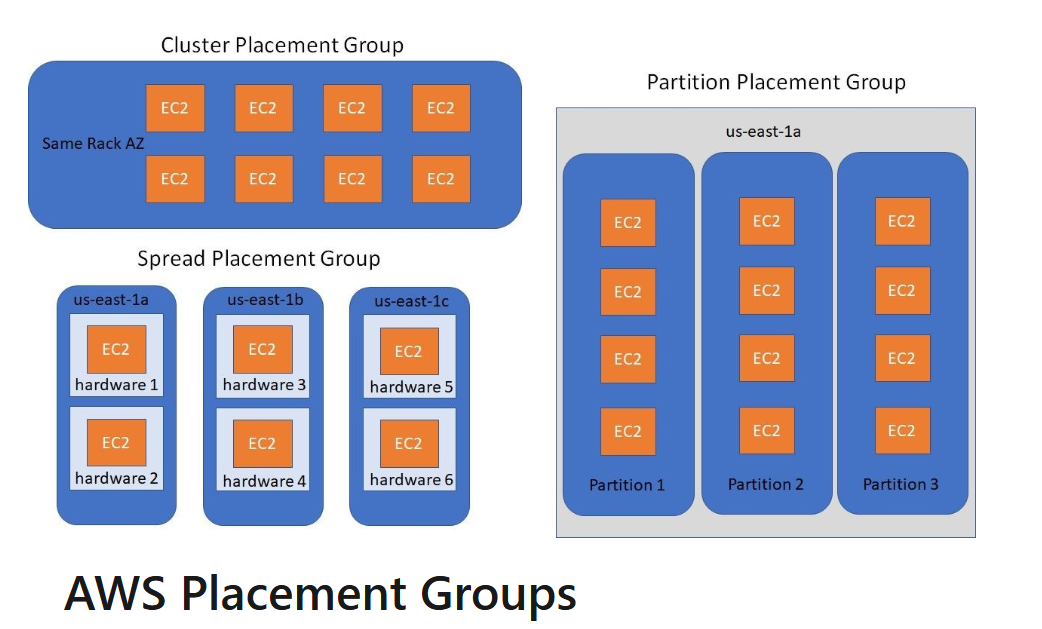
Placement groups are logical groupings of instances within a specific cloud environment, used to optimize performance and resource allocation. Depending on the type of workload, you can create a placement group using one of the following placement strategies: -
- Cluster — Packs instances close together inside an Availability Zone. This strategy enables workloads to achieve the low-latency network performance necessary for tightly-coupled node-to-node communication that is typical of high-performance computing (HPC) applications.
- Partition — Spreads your instances across logical partitions such that groups of instances in one partition do not share the underlying hardware with groups of instances in different partitions. Instances spread across partition in multiple AZ (7 partitions per AZ) Each partition can have many instances and each partition represents a rack. This strategy is typically used by large distributed and replicated workloads, such as Hadoop, Cassandra, and Kafka.
- Spread — Strictly places a small group of instances across distinct underlying hardware to reduce correlated failures. It spans over multiple Availability Zones and Limited to 7 instances per AZ per placement group.
Placement groups are optional. If you don’t launch your instances into a placement group, EC2 tries to place the instances in such a way that all of your instances are spread out across the underlying hardware to minimize correlated failures.
Charlie Chahardoli
Elastic Network Interfaces
They are logical components in a vpc that represents a virtual network card. Elastic Network Interfaces are bound to an Availability zone.
Amazon EC2 is a cornerstone of cloud computing, offering unparalleled flexibility and scalability to power a diverse array of applications. Throughout this article, we’ve explored its essential elements — from the basics of Amazon Machine Images (AMIs) and instance types to advanced features like placement groups and Elastic Network Interfaces. These components allow you to tailor your compute resources to specific workloads, balancing performance, cost, and reliability.
메타데이터
- post_id
- fb8b0d0bb8a5
- slug
- understanding-amazon-ec2-fb8b0d0bb8a5
- url
- https://medium.com/@mwamiselunani/understanding-amazon-ec2-fb8b0d0bb8a5
- canonical_url
- https://medium.com/@mwamiselunani/understanding-amazon-ec2-fb8b0d0bb8a5
- author_url
- https://medium.com/@mwamiselunani
- status
- ok
- fetched_at
- 2026-06-24 18:57:25