EventBridge vs. SNS vs. SQS: A Former Sysadmin’s Guide to “Which Pipe Do I Use?”
Running RabbitMQ on bare metal taught me one thing: a single broker doing everything feels elegant until it doesn’t. When I migrated to…
EventBridge vs. SNS vs. SQS: A Former Sysadmin’s Guide to “Which Pipe Do I Use?”
Running RabbitMQ on bare metal taught me one thing: a single broker doing everything feels elegant until it doesn’t. When I migrated to AWS, I expected one managed messaging service. Instead, I found three: Amazon SNS, Amazon SQS, and Amazon EventBridge. My first instinct was to pick the one that looked most familiar and move on. That instinct cost me a 2 AM incident where messages silently vanished because I used SNS where I needed a queue.
Why AWS has three messaging tools
On-premises, RabbitMQ handled pub/sub, routing, and queuing under one roof. That monolithic model works at data center scale, but it creates hidden coupling between communication patterns that behave very differently under load.
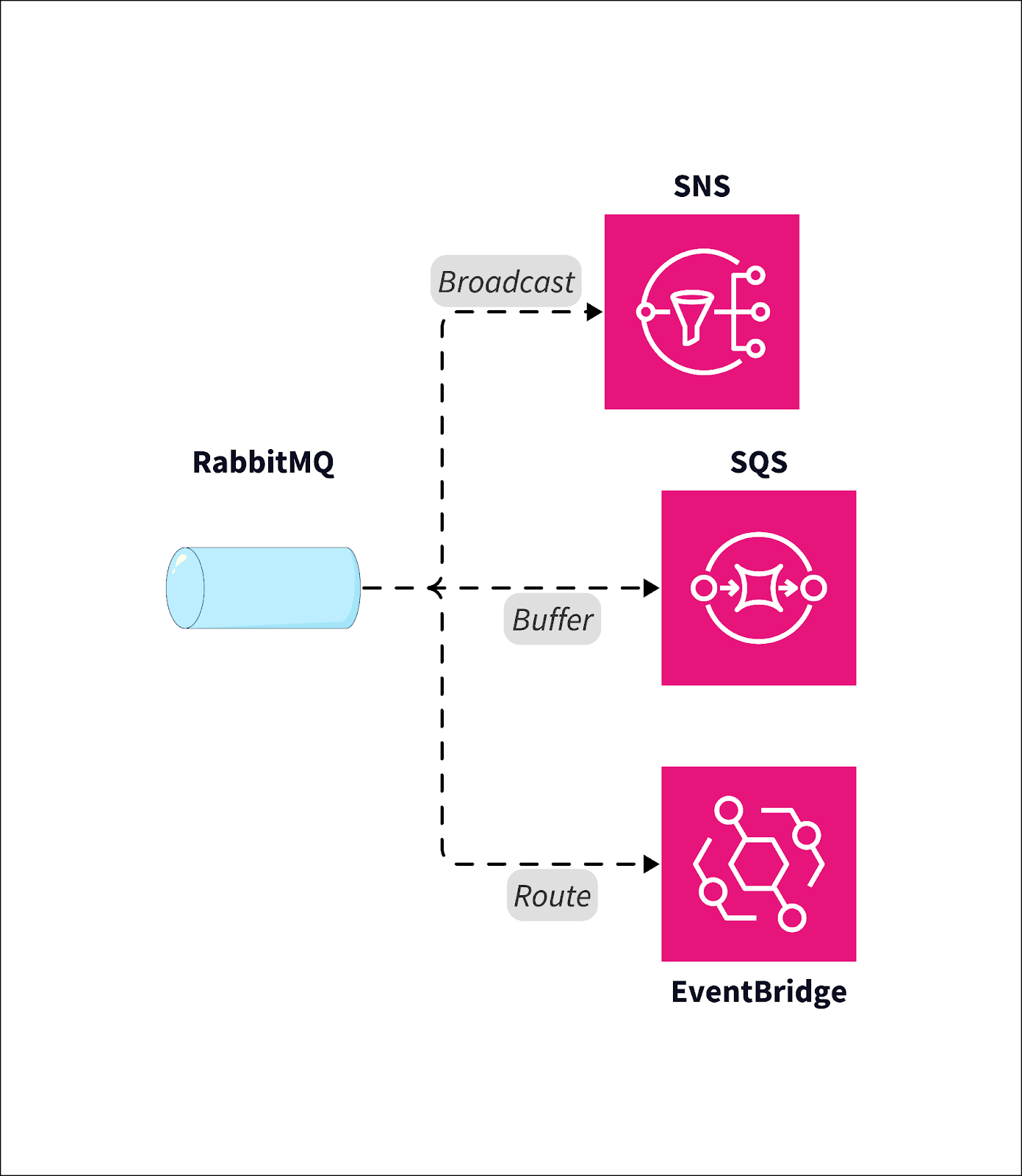
AWS deliberately decomposed messaging into three purpose-built tools because cloud-native systems have fundamentally different needs:
- Broadcast: One event, many simultaneous receivers, no storage required.
- Buffer: Durable job storage with retry semantics and consumer-controlled processing.
- Route: Content-based filtering across dozens of AWS services and SaaS integrations.
Amazon SNS, SQS, and EventBridge are specialized layers of event communication. Understanding this separation is the first step to not building something that silently drops.
The mental model shift that unlocked everything for me: stop asking “which messaging service should I use?” and start asking “what communication pattern does this problem require?” The diagram below maps your existing mental model to the three AWS services.
What is Amazon SNS?
I tried to use Amazon SNS as a queue during my first month on AWS. I thought “pub/sub” meant “reliable delivery to subscribers.” It does not. SNS is a push-based fan-out system, and the word “push” carries a specific technical meaning here: SNS delivers to subscribers immediately and does not retain messages afterward.
How SNS fan-out actually works
Consider an e-commerce OrderPlaced event. SNS publishes it once to a topic, and three subscribers receive it simultaneously and independently:
- Email Lambda: Sends order confirmation to the customer.
- Inventory service: Decrements stock counts.
- Fraud detection: Scores the transaction in real time.
Each subscriber processes in parallel. That is the broadcast value proposition.
That 2 AM incident I mentioned? I had three Lambda subscribers on an SNS topic processing payment events. One subscriber started throwing errors, burned through its retries, and the messages just disappeared. No trace, no recovery option. It took us hours to identify the gap in our transaction records, and we had to reconcile manually against our payment provider. The fix was straightforward: I put SQS queues between SNS and every subscriber so each one had durable storage and its own DLQ.
Amazon SNS does not buffer messages, once sent, a message is gone. Use SNS when a single event must reach many receivers instantly and durability is handled downstream.
Attention: SNS topics have no DLQ. Individual Lambda subscriptions can be configured with a DLQ, but that is per-subscriber configuration, not topic-level protection. If you need guaranteed delivery, the right answer is SNS+SQS fan-out, not SNS alone.
What is Amazon SQS?
Amazon SQS felt familiar the moment I understood it. It maps closely to a traditional work queue: producers drop messages in, consumers pull them out, and the queue holds everything safely in between. That pull-based model is the defining characteristic.
Visibility timeout and why it matters
When a consumer retrieves a message, SQS hides it from other consumers for a configurable VisibilityTimeout period. If the consumer crashes mid-processing, the timeout expires and the message becomes visible again for retry.
Key production characteristics worth knowing:
- Retention: Messages persist up to 14 days, configurable via MessageRetentionPeriod.
- Dead-letter queues: After maxReceiveCount failed attempts, messages route to a DLQ automatically.
- FIFO queues: Guarantee exactly-once processing and strict ordering when sequence matters. FIFO queues cap throughput at 300 transactions per second without batching, a real constraint for high-volume workloads.
Note: SQS uses at-least-once delivery semantics on standard queues. Message duplication is possible, design idempotent consumers from day one so your processing logic handles receiving the same message twice without corrupting state.
Use Amazon SQS when you need reliable buffering where consumers pull jobs at their own pace. For auto-scaling your consumer fleet, watch the ApproximateNumberOfMessagesVisible CloudWatch metric. When that number climbs, scale out consumers. When it drops to zero, scale in. As a starting point, I typically set a threshold around 100 visible messages per instance and adjust from there based on per-message processing time. That single metric drives most SQS-based autoscaling policies I have written.
The critical limitation: SQS does not push. Nothing happens unless consumers actively poll. If your consumers stop running, messages accumulate silently until retention expires.
The CLI commands below provide a production-ready SQS setup.
# Step 1: Create the Dead Letter Queue (DLQ) first so its ARN is available for the redrive policy
aws sqs create-queue \
  --queue-name my-app-dlq \
  --attributes '{
    "MessageRetentionPeriod": "1209600"  # Retain messages for 14 days (in seconds)
  }'

# Step 2: Retrieve the ARN of the newly created DLQ (required for the redrive policy)
DLQ_ARN=$(aws sqs get-queue-attributes \
  --queue-url https://sqs.<region>.amazonaws.com/<account-id>/my-app-dlq \
  --attribute-names QueueArn \
  --query 'Attributes.QueueArn' \
  --output text)

# Step 3: Create the main standard SQS queue with retention, visibility timeout, and redrive policy
aws sqs create-queue \
  --queue-name my-app-queue \
  --attributes "{
    \"MessageRetentionPeriod\": \"1209600\",   # Retain messages for 14 days (in seconds)
    \"VisibilityTimeout\": \"60\",             # Hide message from other consumers for 60 seconds after receipt
    \"RedrivePolicy\": \"{\\\"deadLetterTargetArn\\\":\\\"${DLQ_ARN}\\\",\\\"maxReceiveCount\\\":\\\"3\\\"}\"
    # maxReceiveCount: move message to DLQ after 3 failed receive attempts
  }"
What is Amazon EventBridge?
Amazon EventBridge confused me the longest because nothing in my on-premises toolkit resembled it. Think of it as a rule-driven routing engine, not a queue or a broadcast system. That distinction changes how you design with it.
Content-based routing in practice
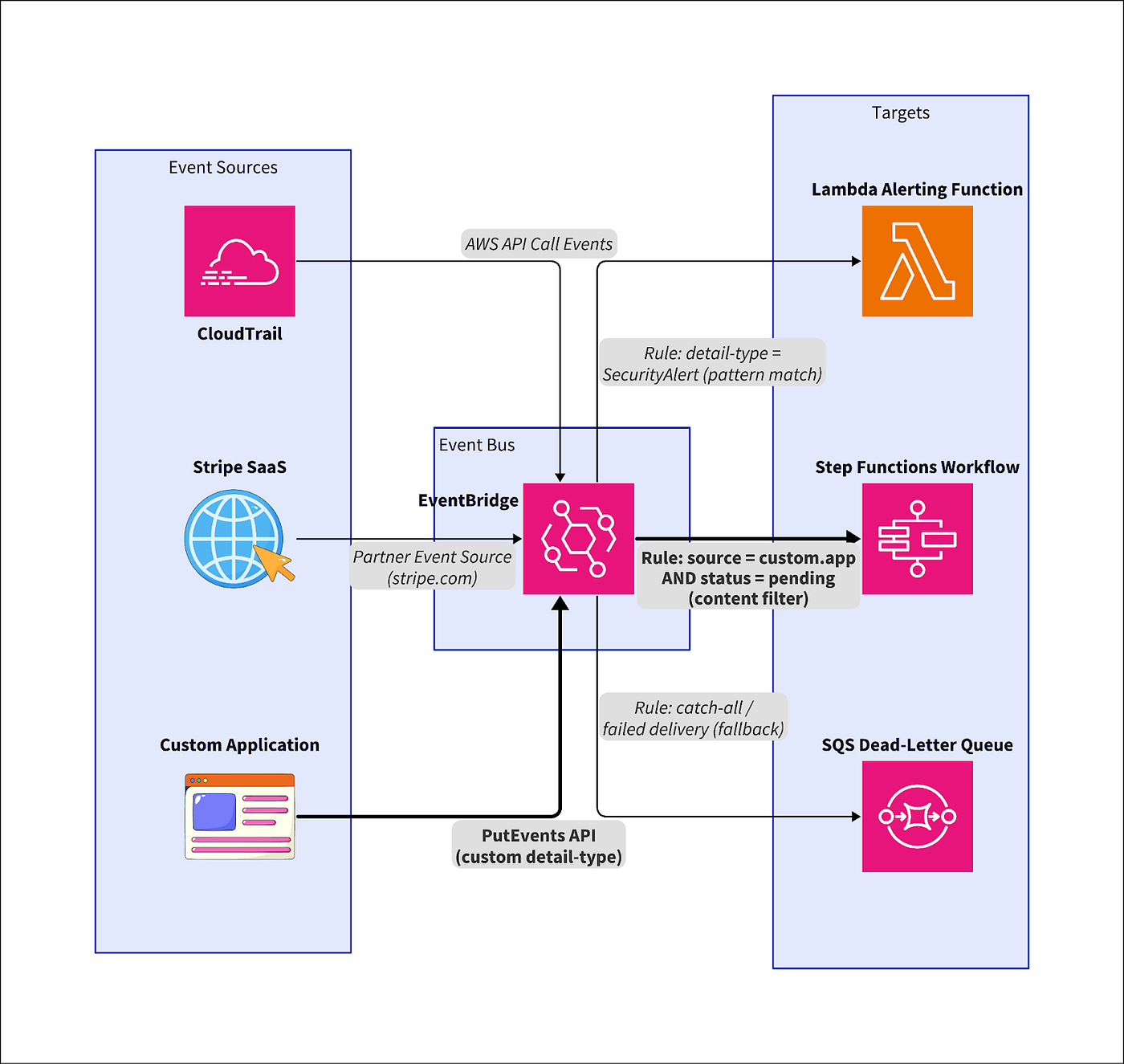
The example that made EventBridge click for me was a security monitoring pipeline. AWS CloudTrail emits API activity events onto the default EventBridge event bus. I wrote a rule with a content-based filter pattern targeting only IAM policy change events. Those filtered events route to a Lambda alerting function. Everything else is ignored or routed to different targets by separate rules.
The power is multi-source ingestion. EventBridge receives events from dozens of AWS services and third-party SaaS integrations natively. One event bus can route Stripe payment failures, CloudTrail API calls, and custom application events to completely different targets based on what each event actually contains.
Use Amazon EventBridge whenever you need content-based routing or SaaS event integration across multiple sources and targets. The limitation is equally important: EventBridge does not buffer work. It routes events in real time with no consumer polling model. If you try to use it as a processing queue, you will hit unexpected behavior when downstream targets are slow or unavailable.
The diagram below shows how EventBridge’s rule-based routing works across multiple sources.
A quick decision cheat sheet
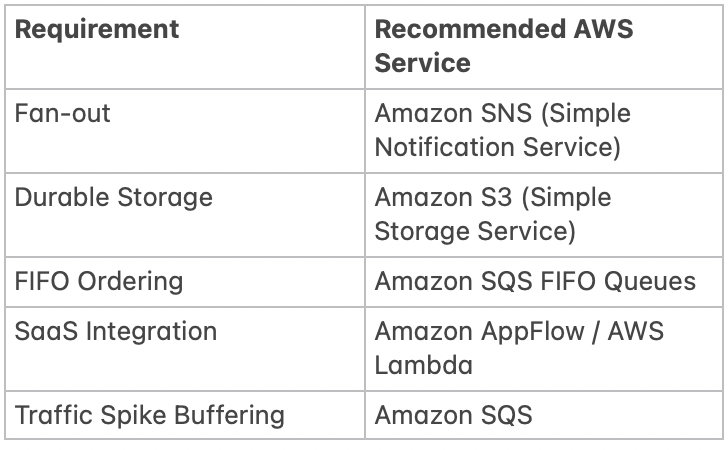
To pick the right AWS messaging service quickly, use this cheat sheet. Compare their core differences below, then follow the three-question flow that follows.

When I am staring at a whiteboard and need to pick a service fast, I ask three questions in sequence.
- Do I need to broadcast one message to many receivers instantly? That is Amazon SNS, push-based fan-out with no storage requirement.
- Do I need reliable buffering where consumers pull jobs at their own pace? That is Amazon SQS, durable queue with retry semantics and DLQ support.
- Do I need content-based routing or SaaS event integration? That is Amazon EventBridge, rule-based event router acting as the event backbone.
These three questions cover roughly 90% of real-world decisions. The remaining 10% involves combining services, which the patterns section covers. The decision matrix below is designed to be bookmarked.
Common beginner mistakes to avoid
Knowing which service to pick is half the battle. The other half is knowing what goes wrong when you pick correctly but configure badly. I have made or witnessed every one of these. Let me save you the incident report.
Before you deploy, keep these five pitfalls in mind:
- SNS for durability: No message persistence. Use SQS instead.
- EventBridge as a queue: Routes events, does not store or poll.
- SQS for broadcast: One consumer per message. Use SNS+SQS fan-out.
- Forgetting SQS is pull-based: Stops polling = silent message loss.
- Ignoring idempotency: All three services deliver at-least-once. Handle duplicates.
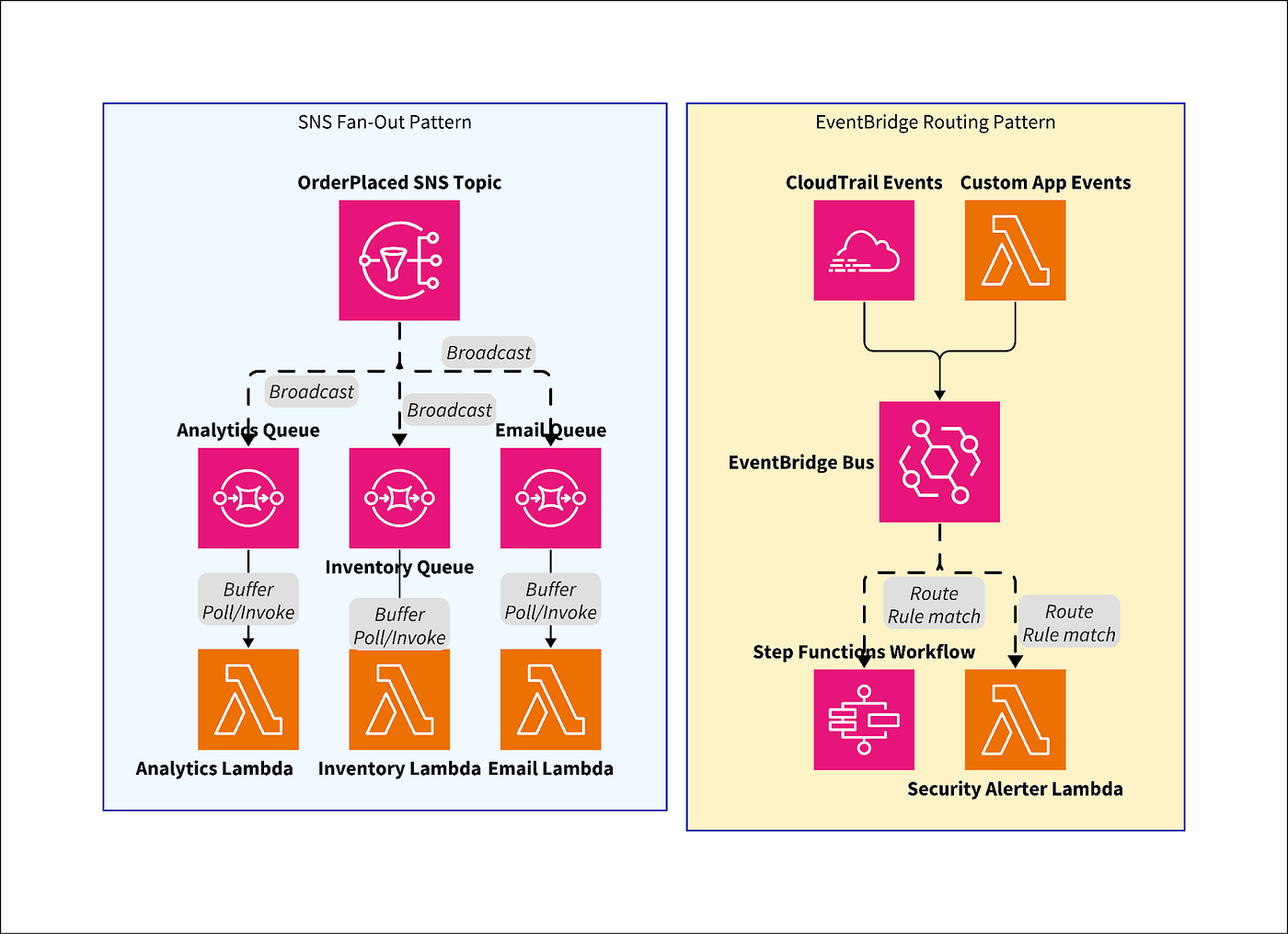
The architecture diagram below shows both the SNS, SQS fan-out pattern and EventBridge orchestration working together in a single production system.
Real-world architecture patterns
The last four systems I have shipped on AWS all use at least two of these services together. Here is what that looks like in practice.
SNS and SQS fan-out
SNS publishes an event to a topic. Multiple SQS queues subscribe independently. Each microservice processes its own queue at its own pace, with its own DLQ for failure isolation. This pattern gives you broadcast capability from SNS and per-subscriber durability from SQS. In one system, our fraud detection service started throwing errors during a dependency outage. Because it had its own SQS queue and DLQ, the email confirmation and inventory services kept running without interruption. We reprocessed the fraud queue’s DLQ the next morning with zero data loss.
EventBridge orchestration
EventBridge acts as the central event backbone, receiving system-wide events and routing them to Lambda, Step Functions, or SQS queues based on content filtering rules. In one project, I routed Stripe payment_intent.failed events to a Step Functions retry workflow while sending CloudTrail ConsoleLogin events from unfamiliar IPs to a Lambda security alerter. Same event bus, completely different processing pipelines, all driven by rule patterns.
EventBridge charges $1.00 per million events published. At high telemetry volumes (millions of events per day), that adds up fast compared to SNS at $0.50 per million publishes. Always verify current pricing at the AWS pricing page before committing a pattern to production at scale.
Final takeaway
These three services are not interchangeable, and treating them as such is the root cause of most messaging-related incidents I have seen in cloud migrations. Amazon SNS says it once and everyone hears it. Amazon SQS puts it in a mailbox so you can process it safely later. Amazon EventBridge routes events intelligently based on what they actually contain.
EventBridge is the piece that surprises people most. Once you stop trying to make it behave like a queue, your architecture gets cleaner.
Choosing correctly comes down to delivery style (push vs. pull), durability needs (ephemeral broadcast vs. retained queue), and routing complexity (simple fan-out vs. content-based rules). When I stopped thinking of these as “AWS’s three messaging services” and started thinking of them as broadcast, buffer, and route, every architecture decision got faster.
메타데이터
- post_id
- fb95b024658e
- slug
- eventbridge-vs-sns-vs-sqs-a-former-sysadmins-guide-to-which-pipe-do-i-use-fb95b024658e
- url
- https://medium.com/@repobaby/eventbridge-vs-sns-vs-sqs-a-former-sysadmins-guide-to-which-pipe-do-i-use-fb95b024658e
- canonical_url
- https://medium.com/@repobaby/eventbridge-vs-sns-vs-sqs-a-former-sysadmins-guide-to-which-pipe-do-i-use-fb95b024658e
- author_url
- https://medium.com/@repobaby
- status
- ok
- fetched_at
- 2026-06-21 21:05:38