Prompt Caching 101: Designing Prompts for Speed and Cost
If you regularly use AI coding assistants or chatbots and keep running into token limits, your subscription tier may not be the only…
Prompt Caching 101: Designing Prompts for Speed and Cost
If you regularly use AI coding assistants or chatbots and keep running into token limits, your subscription tier may not be the only reason.
Sometimes the bigger issue is how you’re asking questions.
Many of us treat AI like a search engine or a brand-new conversation every time. We resend the same instructions, examples, and context over and over without realizing it. That approach not only consumes more tokens but can also make responses slower and more expensive.
One simple concept — prompt caching — can help explain why some prompts are dramatically more efficient than others. Understanding how it works won’t give you unlimited tokens, but it can help you get more value from the ones you already have.
What is prompt caching?
Prompt caching means the model reuses the already-processed beginning of a prompt when later requests start with the exact same text.
Think of it like this:
Request 1:
[System instructions]
[Tool definitions]
[Examples]
[Your question]

Request 2:
[System instructionsb]
[Tool definitions]
[Examples]
[A different question]
The repeated beginning can be cached, so the model doesn’t have to process it from scratch every time.
The key idea is exact prefix matching.
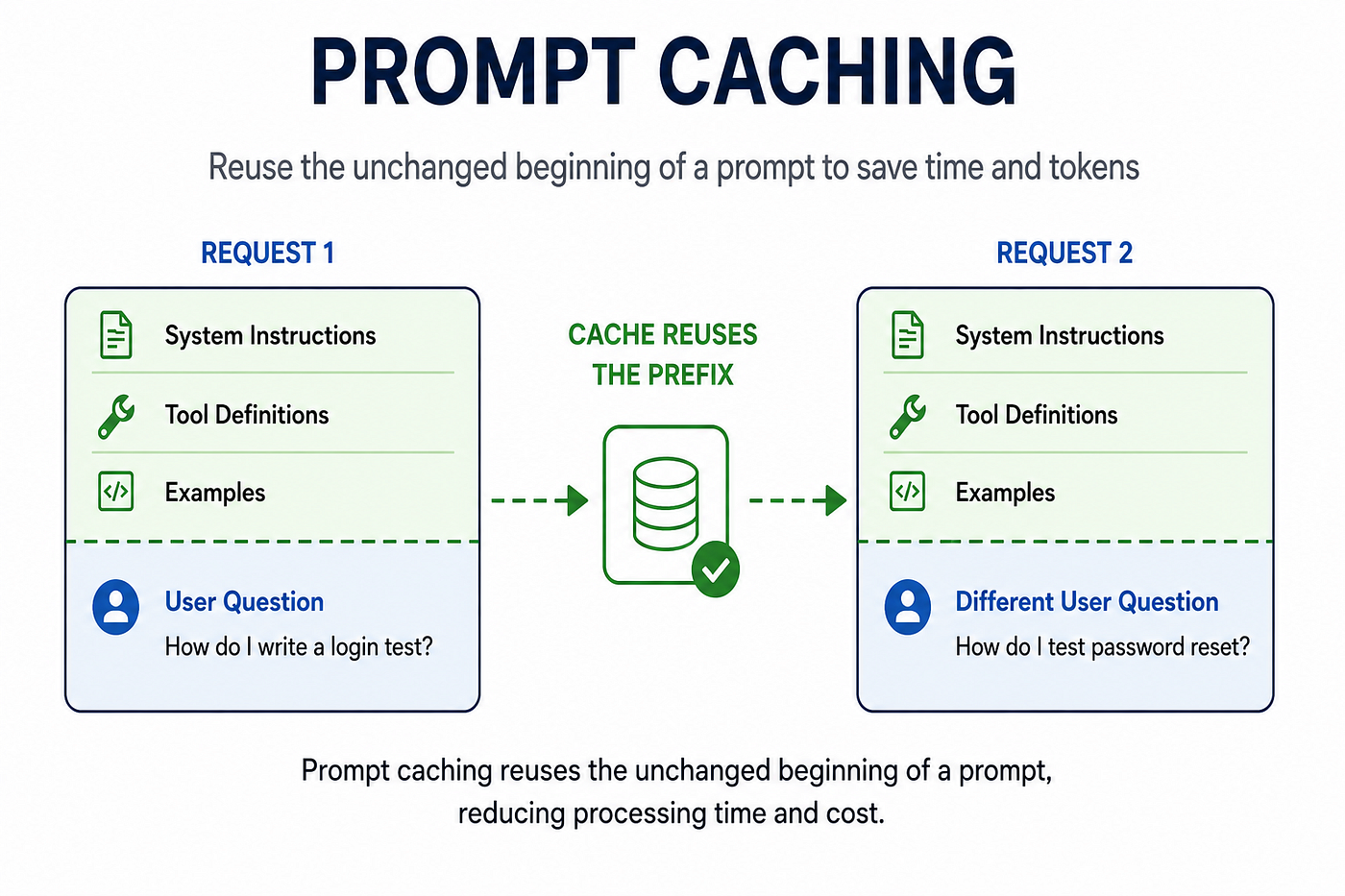
A diagram showing two prompt requests with identical system instructions, tool definitions, and examples but different user questions. An arrow labeled “Cache Reuses the Prefix” illustrates that the shared beginning of the prompt is reused to reduce processing time and cost .Prompt caching works by reusing the unchanged beginning of a prompt. When the system instructions, examples, and tool definitions stay the same, the model can process repeated requests more efficiently.
If the beginning of your prompt is identical, the model can reuse previous work. If the beginning changes, it generally has to start over.
A cache-unfriendly prompt
Today's date: June 27
Project: Customer Portal
Question: How do I write a login test?

System Instructions...
Examples...
Output format...
Here, the prompt starts with information that changes every request.
A cache-friendly prompt
System Instructions...
Examples...
Output format...

System Instructions...
Examples...
Output format...
Now the stable instructions appear first, giving the cache a much better chance of being reused.
Why engineers should care
Prompt caching can reduce both latency and cost because the model doesn’t need to repeatedly process thousands of identical tokens.
This becomes especially useful if you’re building:
- AI coding assistants
- Internal chatbots
- RAG applications
- AI agents
- Multi-turn workflows
Many production applications send the same system prompt hundreds or thousands of times each day.
A simple prompt layout

Design your prompts with stable content first and changing content last. This simple structure improves cache reuse, helping AI applications respond faster while using fewer input tokens
When designing prompts, I like to think of them in two parts:
Stable
------
System prompt
Task instructions
Output format
Examples
Tool definitions

Variable
--------
User request
Conversation history
Retrieved documents
Keep the stable content at the top. Push changing information toward the end.
The takeaway
Prompt caching isn’t something you enable with a checkbox.
It’s something you design for.
If you’re repeatedly sending large prompts to an LLM, simply reorganizing your prompt structure can make your application faster, cheaper, and more efficient.
Sometimes getting more from AI isn’t about buying a bigger plan.
It’s about asking better questions in a smarter way.
메타데이터
- post_id
- fbb8e17c2cab
- slug
- prompt-caching-101-designing-prompts-for-speed-and-cost-fbb8e17c2cab
- url
- https://aiqualityengineer.cc/prompt-caching-101-designing-prompts-for-speed-and-cost-fbb8e17c2cab
- canonical_url
- https://aiqualityengineer.cc/prompt-caching-101-designing-prompts-for-speed-and-cost-fbb8e17c2cab
- author_url
- https://medium.com/@swatipriyaseela
- status
- ok
- fetched_at
- 2026-07-09 15:12:33