How to write Functions in Python?
In this tutorial you will learn functions in Python, passing arguments to functions and scope of variables.
How to write Functions in Python?
In this tutorial you will learn functions in Python, passing arguments to functions and scope of variables.
What is a Function?
A block of code is combined to create a function in Python. Modularity (dividing a bigger problem into small pieces) and code re-usability are the two main advantages of using functions. You are already familiar with using functions. These are the built-in functions you used so far i.e. input(), print() and len() functions.
Functions are defined in Python using the def keyword. Syntax of function definition in Python is:
def function_name([arguments])
  function_body
The function_name is a user-defined name and rules of naming a variable applies to function name as well. Arguments to function are optional and will be explained later in this chapter. function_body consists of valid Python statements.
Let us define a simple function.
def my_func():
  print("Hello from a function")
We have defined a simple function that displays the message “Hello from a function” on the screen. Note that if we have a program that has only the function definition above and we run it, nothing will be displayed. The reason is that we have no called the function. In order to execute a function we must call it. We can call the function using the function name like my_func(). Note that we may call the function as many times as we want. In the following code the function is called 3 times and the output can be seen on the screen.
def my_func():
   print("Hello from a function")

my_func()
my_func()
my_func()
Hello from a function
Hello from a function
Hello from a functionArguments to functions
Values can be passed to functions as arguments also called parameters. We will write a simple function greet with one argument.
def greet(name):
  print(f"Hello, {name}!")

greet("Alice")
greet("Bob")
greet("Charlie")
Hello, Alice!
Hello, Bob!
Hello, Charlie!The return statement
return statement is used in function to return control to the calling function. When this statement is executed, the function is terminated and control is transferred to the calling program.
Syntax of return statement is:
return [return_value]A function may or may not return a value i.e. the return value is optional. Both the following statements are true.
return
return 100
Functions that returns a value that can be used by the calling program.
Let us define a function that calculates area of a square and returns it to the calling program.
def square(x):
  return x * x

area1 = square(5)
area2 = square(10)

print(f"Area of square#1: {area1}")
print(f"Area of square#2: {area2}")
Area of square#1: 25
Area of square#2: 100Default values to arguments (Optional arguments)
Default values can be given to argument that makes it an optional argument.
def square(x=1):
  return x * x

area1 = square(5)
area2 = square()

print(f"Area of square#1: {area1}")
print(f"Area of square#2: {area2}")
Area of square#1: 25
Area of square#2: 1Note that if value for the optional argument is not provided, the default value is taken.
Scope of variables
Variable scope refers to the parts of your code where a variable is accessible and can be used. Not all variables can be accessed from everywhere in your program. Understanding scope prevents errors and helps you write better code.
Think of it like rooms in a house. A item (variable) in your bedroom (local scope) isn’t automatically available in the kitchen (a different scope).
Let us explain with a simple example:
x = 100
def func():
  print("Inside func():", x)

func()
print("Outside:", x)
Inside func(): 100
Outside: 100In the given code variable x defined outside function body can be access within the function. Let us change the value of x inside the function body and see what is the effect.
x = 100

def func():
  x = 50
  print("Inside func():", x)

func()
print("Outside:", x)
Inside func(): 50
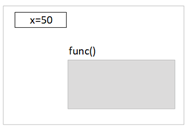
Outside: 100What happened? We changed the value of x inside the function to 50 but when we try to print it outside the function it is still 100. The reason is that when we assign value of x inside the function, it is not the variable x outside the function that is changed but another variable x created inside the function. So in this case we have now two different variables x, one defined outside the function and the other one defined inside it. In computer memory, it is like:
Global variable
There may be a requirement where we need to have a single variable that can be accessed from any function inside the program scope. This is achieved by using global variable. Global variable is a variable created in the main body of your code (outside all functions). It can be accessed from anywhere in your code. The keyword global is added before the variable inside the function body to tell the Python interpreter that the given variable is a global variable and not to create a new local variable. The concept can be understood by modifying the code mentioned above to see the effect.
x = 100
def func():
  global x
  x = 50
  print("Inside func():", x)

func()
print("Outside:", x)
Inside func(): 50
Outside: 50The statement global x means that any access to the variable x in the function referrers to the global variable x and no local variable should be created. The memory will be like:
메타데이터
- post_id
- fbf6480c66bb
- slug
- how-to-write-functions-in-python-fbf6480c66bb
- url
- https://medium.com/python-tutorial-beginner-to-advance/how-to-write-functions-in-python-fbf6480c66bb
- canonical_url
- https://medium.com/python-tutorial-beginner-to-advance/how-to-write-functions-in-python-fbf6480c66bb
- author_url
- https://medium.com/@haiderkhalil
- status
- ok
- fetched_at
- 2026-07-28 02:51:27