Invoice Automation: How It Works, What It Costs, and What UK Businesses Get Wrong
A finance leader’s deep-dive into invoice automation: the actual technical workflow, realistic UK cost ranges, and the seven implementation…
Invoice Automation: How It Works, What It Costs, and What UK Businesses Get Wrong
A finance leader’s deep-dive into invoice automation: the actual technical workflow, realistic UK cost ranges, and the seven implementation mistakes that quietly destroy ROI — written for finance directors who are evaluating, not selling.
TL;DR
- Invoice automation works by combining six layered technologies: multi-channel capture, AI-driven data extraction, validation and enrichment, automated PO matching, workflow-based approval routing, and direct ERP posting — with payment execution increasingly bundled into the same platform.
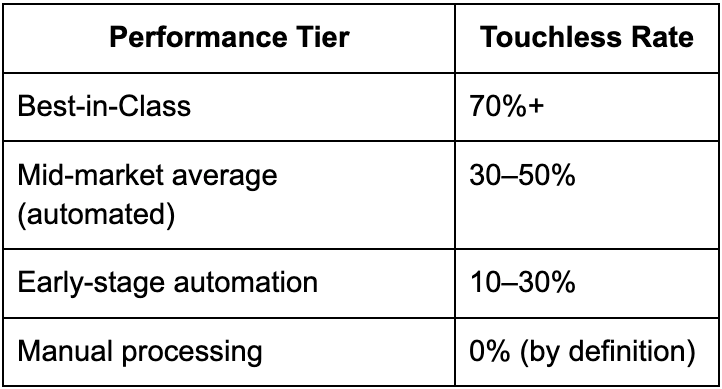
- Best-in-class deployments reach 70%+ touchless processing (invoices that flow from receipt to payment-ready without human intervention). Mid-market UK averages sit at 30–50%.
- UK software costs typically run £20,000–£150,000+ per year for mid-market deployments, with one-time implementation costs of £30,000–£200,000. Total cost of ownership over three years is usually £150,000–£500,000 for businesses processing 10,000–50,000 invoices annually.
- Cost per invoice drops from £10–£15 (manual UK average per IOFM) to £2–£5 (automated) — a 60–80% reduction that scales linearly with volume.
- Payback periods of 9–18 months are realistic. Business cases promising sub-6-month payback usually rest on aggressive headcount assumptions that don’t survive contact with reality.
- The seven most common UK implementation mistakes are: treating it as an IT project, skipping data cleanup, buying for today instead of 2029, underinvesting in change management, confusing OCR for AI, accepting the wrong pricing model, and ignoring the e-invoicing mandate roadmap.
How does invoice automation work?
Invoice automation works by replacing the manual steps of receiving, capturing, validating, matching, approving, posting, and paying invoices with a software platform that performs each step automatically — using AI and machine learning to handle the variations and exceptions that previously required human judgement. The platform sits between your suppliers and your ERP, ingesting invoices in any format, extracting their structured data, matching them against purchase orders and goods receipts, routing them through approval workflows defined by business rules, and posting the cleared invoice to the general ledger. For best-in-class deployments, 70% or more of invoices flow through this process without any human touch.
The rest of this article breaks down each stage of the workflow, sets out realistic UK cost ranges, and — most importantly — covers the seven implementation mistakes that determine whether the savings actually land.
The invoice automation workflow, step by step
A complete invoice automation platform performs seven distinct functions. Each is worth understanding because the gaps between vendors are often hidden inside specific stages.
Stage 1: Multi-channel invoice capture
Suppliers send invoices in every possible format: emailed PDFs, paper invoices through the post, structured XML files through EDI feeds, uploads to a supplier portal, and — increasingly — PEPPOL-format e-invoices via certified access points. Modern automated invoice processing software accepts all of these as inputs.
The capture layer normalises everything into a single structured invoice record. PDFs are processed via OCR; structured formats (PEPPOL, EDI) are parsed directly; paper invoices are scanned and processed alongside PDFs. The output of this stage is a standardised digital invoice ready for the next step regardless of how it arrived.
Stage 2: AI-driven data extraction
This is where invoice automation has changed most in the last three years. Traditional OCR reads the invoice and tries to map fields by position — supplier name top-left, invoice number top-right, total at the bottom. It works for invoices that match its trained templates and fails on anything else.
Modern AI extraction works differently. The system uses machine learning to understand invoice structure semantically — recognising the supplier from VAT number patterns, identifying line items by contextual cues, and learning each supplier’s particular format over time. Mature AI extraction achieves above 95% field-level accuracy on common invoice formats, compared to 60–80% for traditional OCR. The distinction matters because data extraction is the foundation of every downstream stage — poor extraction means manual correction, which destroys the touchless rate that justifies the investment.
Stage 3: Validation and enrichment
Before an invoice can flow into matching and approval, the platform validates it against rules and enriches it with data from other systems:
- Master data checks: Does the supplier exist? Are the bank details on file the same as those on the invoice?
- VAT validation: Is the VAT number valid? Does the VAT treatment match what’s expected for this supplier and transaction type?
- Duplicate detection: Has this invoice — or one nearly identical — been processed before?
- Tolerance checks: Does the invoice amount fall within expected ranges for this supplier?
- Enrichment: GL codes, cost centres, project codes, and approval routing rules are added from master data and historical patterns.
Validation failures route to a defined exception workflow rather than blocking the whole queue. This stage is also where most fraud controls live — duplicate detection, bank detail change verification, anomaly detection against supplier baselines.
Stage 4: Purchase order matching
For invoices linked to a purchase order, the platform performs automated matching:
- 2-way matching: Invoice against PO. Does what’s invoiced match what was ordered, on price and quantity, within defined tolerances?
- **3-way matching**: Invoice against PO and goods receipt. Has what was ordered actually been received before payment is approved?
Matched invoices proceed to approval automatically. Mismatched invoices route to an exception queue for the right person to resolve — typically with the platform suggesting the most likely cause (price variance, quantity variance, partial delivery).
Three-way matching at scale is the single biggest control against phantom invoice fraud and the single biggest driver of touchless processing rate.
Stage 5: Workflow-based approval
Non-PO invoices, mismatched invoices, and invoices above approval thresholds flow into a workflow that routes them to the right approver based on rules: GL code, cost centre, amount, supplier category. Approvers see the invoice, the relevant context, and an approve/reject decision in their normal workflow tools (email, mobile app, Microsoft Teams).
The platform tracks approval status, sends reminders for ageing approvals, and escalates when SLAs are breached. This stage typically determines end-to-end processing time more than any other — and is where the largest variation between best-in-class and average deployments shows up.
Stage 6: ERP posting
Approved invoices post to the ERP general ledger automatically. The platform’s quality of integration here matters enormously: native connectors to Sage 200, Xero, NetSuite, Dynamics 365 Business Central, and SAP Business One make this trivial. Bespoke middleware integrations turn what should be a real-time post into a batched, error-prone overnight process.
Stage 7: Payment execution
Increasingly bundled into the same platform. Approved invoices flow into payment runs that execute via the appropriate channel: BACS for routine UK payments, Faster Payments for time-critical ones, virtual cards for selected suppliers, and direct supplier portal payments where the supplier prefers. Early payment discount capture happens here, often through dynamic discounting integrations.
What invoice automation actually costs in the UK
Honest cost ranges are difficult to find in vendor-influenced content. Here are realistic ranges based on UK mid-market deployments processing 10,000–50,000 invoices per year.
Annual software subscription
Pricing models vary by vendor and by what’s bundled. Typical structures:
- Per-invoice pricing: £0.40–£1.20 per invoice processed, often with a minimum monthly commitment. Common for AP-focused tools.
- Per-user pricing: £30–£150 per user per month, sometimes with separate fees for approvers vs admins. Common for broader source-to-pay platforms.
- Tiered subscription: £15,000–£100,000+ per year based on invoice volume and feature set. Common for mid-market and enterprise platforms.
For a UK mid-market business processing 20,000 invoices annually, total annual software cost typically lands between £20,000 and £80,000.
One-time implementation
Implementation costs are where business cases most often underestimate. Realistic ranges:
- Light-touch implementations (single entity, single ERP, light customisation): £15,000–£40,000
- Standard mid-market implementations: £40,000–£100,000
- Complex multi-entity, multi-currency, or heavily customised implementations: £100,000–£250,000+
These figures include configuration, ERP integration, supplier onboarding, user training, and parallel running. They typically don’t include the internal time cost from your own finance team, which usually runs to 80–250 person-hours over the implementation period.
Hidden costs that catch UK businesses out
Three cost lines that consistently get missed in business cases:
- Middleware and integration: If the vendor’s native ERP connector is weak or absent, custom integration via Mulesoft, Boomi, or equivalent can add £20,000–£60,000 annually in licensing plus implementation.
- Data cleanup: Supplier master data, VAT code consistency, GL structure rationalisation. Typically £10,000–£40,000 in consulting time, sometimes more for businesses with significant duplicate vendor problems.
- Change management: Training, process redesign, supplier communication on new payment channels. £10,000–£30,000 in external support is typical, and businesses that skip this line item are the ones whose touchless rates plateau at 30%.
Total cost of ownership over three years
For a typical UK mid-market deployment processing 20,000 invoices annually, three-year TCO realistically lands between £150,000 and £500,000. Against £700,000–£1,000,000+ of manual processing cost over the same period (at £12 per invoice manually × 60,000 invoices), the math works clearly — but only if implementation is done well, which is where most of the variance lives.
What UK businesses get wrong: the seven implementation mistakes
This is the section vendor-produced content avoids. These are the mistakes that consistently turn promising business cases into underperforming deployments.
Mistake 1: Treating it as an IT project, not a finance transformation
Invoice automation projects led by IT — selected on technical specifications, implemented as a software rollout, governed through IT steering committees — almost universally underdeliver against their business cases. The reason is that the value comes from process redesign (approval thresholds, exception handling rules, supplier communication standards), and process redesign requires finance leadership, not IT leadership.
The correct ownership model: the CFO or Finance Director is the sponsor; the AP manager or AP transformation lead is the day-to-day owner; IT provides the integration and security input. When IT owns the project, the technology lands but the process change doesn’t, and touchless rates stall.
Mistake 2: Skipping data hygiene before go-live
Duplicate vendor records, inconsistent VAT codes, missing bank details, broken or stale POs — these are the silent killers of touchless processing rates. Every automation rule that runs against this data either fails or, worse, succeeds incorrectly.
A two-to-six-week data cleanup before go-live is the highest-ROI activity in any invoice automation project. UK businesses that skip it almost always end up doing it after go-live, but at higher cost and with degraded results in the meantime.
Mistake 3: Buying for today, not for 2029
The UK e-invoicing mandate confirmed at Autumn Budget 2025 takes effect from 1 April 2029. PDFs and OCR-processed images are explicitly excluded from the definition of e-invoicing for the mandate. Any UK business buying invoice automation software in 2026 without clear, credible PEPPOL Access Point capability — either now or on a published roadmap — is buying a transitional technology that will need replacing within three years.
The implementation roadmap publishes at Budget 2026 in November. The window for vendor selection that considers this properly is the next 12–18 months. After that, implementation slots will be scarce and late selection costs will rise sharply.
Mistake 4: Underinvesting in change management
The invoice automation business case is built on touchless processing rates that require behavioural changes well outside the AP function: sales teams entering accurate PO data, operations teams confirming goods receipts in real time, approvers responding to invoices within hours rather than days, and suppliers shifting from PDF email to portal or PEPPOL.
UK businesses that budget for software and implementation but not for the behavioural change consistently see touchless rates plateau in the 30–40% range — well below the 70%+ best-in-class benchmark. The change management investment is small (typically 10–15% of total project cost) and the return is the difference between a successful deployment and a disappointing one.
Mistake 5: Confusing OCR for AI
Many UK vendors still market traditional OCR plus workflow as “AI-powered invoice automation.” The distinction matters because the two technologies have different cost structures, different accuracy ceilings, and different futures.
OCR achieves 60–80% accuracy on common formats and stays static after deployment. AI-driven extraction reaches above 95% and improves continuously as it learns from your transaction history. For a business processing 20,000 invoices a year, the difference between 80% and 95% accuracy is 3,000 invoices a year requiring manual correction versus 1,000 — roughly 200 hours of annual AP team workload.
When evaluating vendors, ask specifically: what is your field-level extraction accuracy at 30 days post-deployment, and at 12 months? Vendors that can’t answer both numbers concretely don’t have the AI capability they’re claiming.
Mistake 6: Accepting the wrong pricing model
Pricing models for invoice automation solutions are not commercially neutral — they shape behaviour over the contract period.
- Per-invoice pricing is fair but caps the platform’s incentive to push touchless rates higher.
- Per-user pricing punishes scale — a growing business adds users and costs even when invoice volume grows faster than headcount.
- Revenue-based pricing punishes business growth that has nothing to do with AP volume.
- Transaction-value-based pricing punishes price inflation in your supplier base.
The right model for most UK mid-market businesses is tiered subscription based on invoice volume, with clear price brackets and predictable annual escalators. Vendors that resist this are usually trying to capture upside that should accrue to your business.
Mistake 7: Vendor selection by feature list rather than reference call
Feature comparison spreadsheets reward vendors who claim every capability and punish vendors who are honest about their gaps. Reference calls with actual customers — particularly customers running similar volume on the same ERP — produce dramatically more accurate signal.
The two questions to ask any reference customer: what did the implementation actually take in time and budget compared to what was originally quoted, and what is your current touchless processing rate against the target you started with? The gap between answers and vendor promises is the truest predictor of your own experience.
How to evaluate invoice automation solutions: a structured checklist
The right way to evaluate invoice automation vendors compresses into ten questions that surface the issues that matter:
- Native ERP integration: Do you have a productised connector for our ERP, or will integration be custom-built?
- Extraction accuracy: What’s your field-level extraction accuracy at 30 days and at 12 months, with evidence from comparable customers?
- PEPPOL Access Point: What’s your current capability and your roadmap for the 2029 UK mandate?
- Touchless processing: What touchless rate do your best mid-market UK customers achieve, and what’s the median?
- Implementation timeline: What’s a realistic go-live timeline for our profile, and what reference customer can confirm that timeline was actually met?
- Total cost of ownership: Three-year TCO including software, implementation, integration, and any add-on modules — quoted in writing.
- Pricing model: Tiered subscription based on invoice volume, with documented escalators and clear bracket boundaries.
- Exit terms: What does data extraction look like if we leave you in year three?
- Audit and compliance: How do your audit logs, MTD digital linkage, and FRS 102-relevant data outputs work in practice?
- Roadmap transparency: What’s the published 12-month product roadmap, and which capabilities currently in development are on it?
Vendors who answer these questions concretely and consistently are the shortlist. Vendors who hedge, redirect, or promise to “follow up after the demo” are not.
Frequently asked questions
How does invoice automation work?
Invoice automation works by combining multi-channel invoice capture, AI-driven data extraction, validation and enrichment, automated PO matching, workflow-based approval routing, ERP posting, and payment execution into a single platform. Each stage is performed by software with machine learning handling the variations and exceptions that previously required human judgement. Best-in-class platforms process 70%+ of invoices end-to-end without human intervention.
What does invoice automation cost in the UK?
For mid-market UK businesses processing 10,000–50,000 invoices annually, expect £20,000–£80,000 in annual software subscription, £40,000–£100,000 in one-time implementation, and £150,000–£500,000 in three-year total cost of ownership. Per-invoice processing cost drops from £10–£15 manually to £2–£5 automated.
What’s the difference between OCR and AI in invoice automation?
OCR reads invoices by mapping fields by position on pre-defined templates, achieving 60–80% accuracy and staying static after deployment. AI-driven extraction understands invoice structure semantically, reaches above 95% field-level accuracy, and improves continuously by learning from transaction history. Vendors marketing OCR as AI are common; the test is whether accuracy improves over time.
How long does invoice automation take to implement?
For a single-entity, single-ERP UK mid-market deployment processing 10,000–50,000 invoices per year, expect 8–16 weeks from contract to go-live. Multi-entity, multi-currency, or heavily customised implementations run 4–9 months. The most common cause of overrun is data hygiene work that should have happened pre-implementation.
What is the ROI of invoice automation?
Payback periods of 9–18 months are typical for properly-structured business cases. For a UK mid-market business processing 20,000 invoices per year, hard cash benefits in Year 1 typically run £150,000–£250,000, against three-year TCO of £150,000–£500,000.
Invoice automation works. The technology is mature, the cost reductions are real, and the regulatory direction (the 2029 e-invoicing mandate) makes the transition increasingly non-optional for UK businesses. None of that is in dispute.
What separates the deployments that deliver from the deployments that disappoint is implementation discipline, not vendor selection. The seven mistakes above account for the overwhelming majority of underperforming projects — and almost all of them are decisions made by the buying organisation, not failures of the software itself.
The right framing for any UK finance team in 2026 is this: the question isn’t whether to automate invoice processing, but whether to do it with the discipline that makes the business case land. Get the implementation right, and the cost case writes itself. Get it wrong, and you’ll spend the next three years explaining why the savings never showed up.
메타데이터
- post_id
- fc3306a5a0dd
- slug
- invoice-automation-how-it-works-what-it-costs-and-what-uk-businesses-get-wrong-fc3306a5a0dd
- url
- https://medium.com/@dost.ai/invoice-automation-how-it-works-what-it-costs-and-what-uk-businesses-get-wrong-fc3306a5a0dd
- canonical_url
- https://medium.com/@dost.ai/invoice-automation-how-it-works-what-it-costs-and-what-uk-businesses-get-wrong-fc3306a5a0dd
- author_url
- https://medium.com/@dost.ai
- status
- ok
- fetched_at
- 2026-06-13 09:11:36