Preserving Memories — Slides & VHS
Tech You’ll Need To Transfer Old Media to Digital
Preserving Memories — Slides & VHS
Tech You’ll Need To Transfer Old Media to Digital
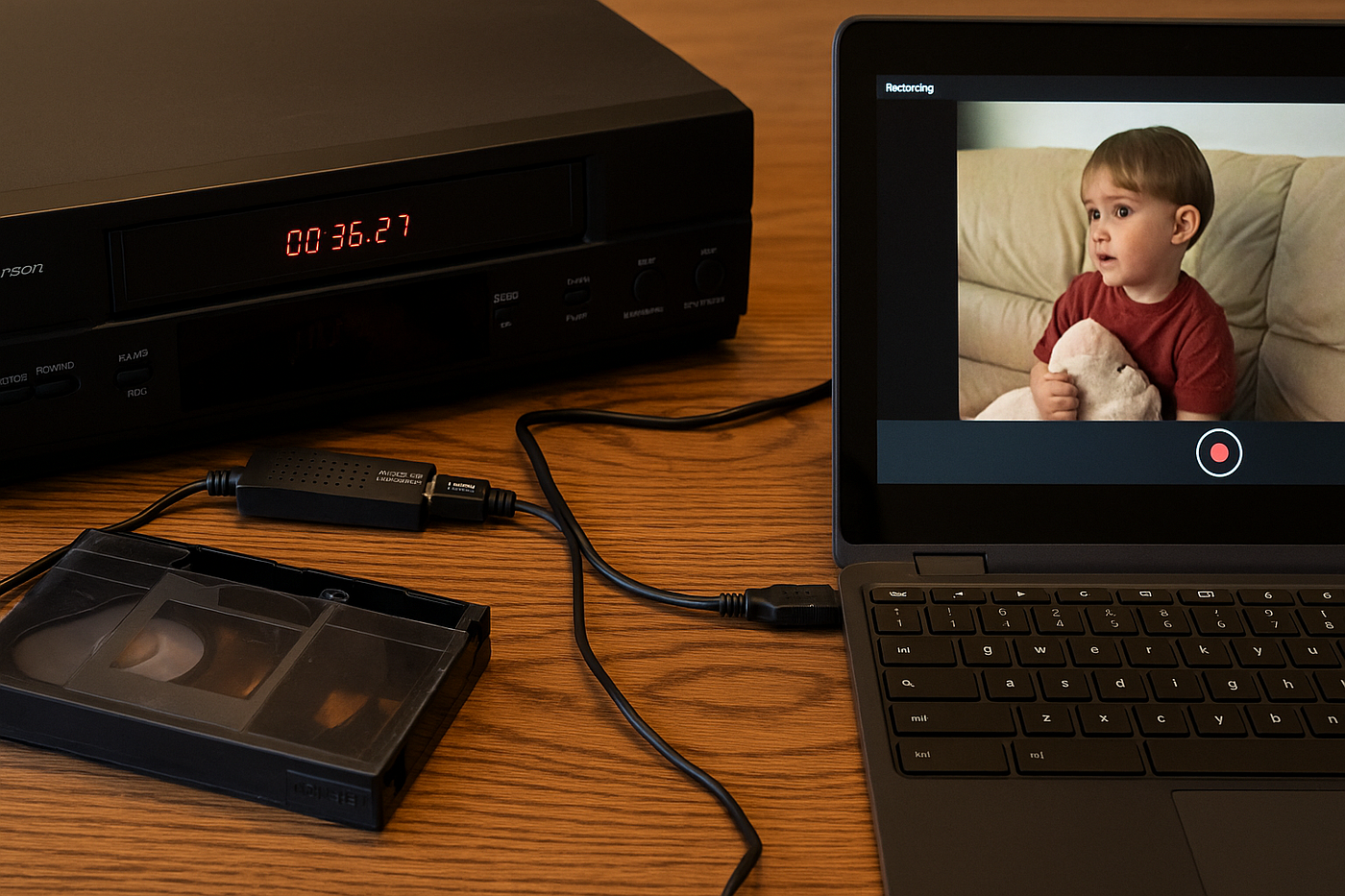
Image Generated Using ChatGPT
Over the past year, I’ve been on a journey to transfer all my family’s old videos from VHS to digital. Once I started, my wife’s family wanted their tapes transferred too. Before I knew it, I had gone down a rabbit hole of old technology — and I think the lessons I’ve learned can save you a lot of time and money.
Before we begin, here’s something important: you can do this yourself. You don’t need to ship your priceless tapes across the country, hoping they won’t get lost in the mail. And you don’t have to pay hundreds of dollars either. Depending on the tech you already have, this can be a low-cost project. It’ll take some time and patience, but preserving those cherished memories is more than worth it.
Dad’s Old Slides — Slow, But Cheap.
Before I get into video transfer, let’s talk slides.
You’ve got two options for transferring slides to digital. The more expensive — but convenient — option is to take your slides to a place like Walmart and have them digitized professionally. I’ve done this, and honestly, the results were worth the cost.
But if you’re on a budget and have a lot of free time (emphasis on a lot), you can buy a slide and negative scanner for around $70 on Amazon. The downside? You have to do it one image at a time, manually snapping a photo of each slide. The scanners do a decent job, but occasionally you’ll get a blurry image and wonder: was the original out of focus, or did I just mess up the shot?
From Analog to HDMI to USB — Two Essential Devices
To convert old analog signals — those red, white, and yellow RCA cables — you need a way to get them into your computer. There are a few ways to do this, but I’ll walk you through what worked for me. It’s cheap and opens up a lot of options.
Step 1: Get an analog-to-HDMI converter. These run about $10–$15 on Amazon. This device converts your RCA signal into HDMI, which you can plug into a modern TV or monitor.
If your only goal is to watch those old home videos, this little box is all you need. Hook it up to your old VCR, DVD player, or camcorder, and enjoy a nostalgic family movie night.
But if you want to digitize those tapes, you’ll need one more piece of hardware: an HDMI-to-USB capture device. This gadget takes the HDMI signal and allows your computer to recognize it as a video input.
Now you might be thinking you need fancy software to record it. Here’s the good news:
You don’t!
If you’re using a Chromebook (or really any laptop with a camera app), it should detect the input as just another camera. Open your camera app, switch to “Record,” and flip through the camera options until you see a blue screen. Once you’re there, hit “Play” on your VCR and “Record” on your laptop — and you’re off to the races.
A Few Odds and Ends
After you’ve got your converters, the next step is finding a player for your tapes. Let me walk you through two common tape formats.
1. VHS-C Tapes
These were smaller, chunkier versions of VHS tapes. To play them, you’ll need:
- A VCR with analog outputs
- A VHS-C adapter (about $30–$40 on Amazon; requires AA batteries)
VCRs range from $75–$300 depending on condition. But here’s a tip: I got mine at a Salvation Army for $8. Check garage sales, estate sales, or even ask older friends and neighbors. Someone probably has one collecting dust.
2. Hi-8 / Video-8 Tapes
These were Sony’s compact tape formats, and I had no clue they existed until my mother-in-law handed me a bag of them. I thought I was prepared — turns out, I wasn’t.
No standard VCR could play these tapes, and they didn’t fit my VHS-C adapter either. After some digging, I learned that Hi-8 camcorders were the key. These are easier to find and more reliable than the rare Hi-8 VCRs.
It took me two months of patience and Facebook Marketplace searches, but I finally snagged a Hi-8 camcorder in working condition for $110. Worth every penny. That old camera played back her tapes flawlessly — and now I’m tempted to record something new with it just for fun.
Lesson: Be patient. These tapes have sat for 20+ years — waiting a few more months to find a good deal won’t hurt.
Cables, Cables, Cables
Most of my early frustrations came down to one thing: bad cables.
My advice? Just buy new ones. Trust me.
The first issue I had was with an old HDMI cable I dug out of a box. I thought the analog-to-HDMI adapter was broken — but the cable was just bad. Swapped it out, and everything worked fine.
Another issue came after I got my Hi-8 camcorder. I drove an hour to pick it up, then plugged it in and… nothing. The viewfinder showed playback, but the output to the TV or computer wasn’t working. I got frustrated. Left a bad review. Then it hit me: maybe it’s the cable.
I had my son grab a new analog cable from my spare parts box — and just like that, it worked perfectly. Thankfully, I updated my review and gave the seller the five stars he deserved.
Conclusion
If you’ve got boxes of old tapes or slides tucked away in your closet, don’t toss them out! This project may take some time and cost around $100–$200, but that’s a small price to relive memories you thought you’d forgotten.
When the video starts playing, it doesn’t just confirm your memories — it corrects them. You see it again, exactly how it was. And once you’re done, you’ll have everything you need to help someone else do the same. Who knows? You might even make your money back preserving someone else’s past.
메타데이터
- post_id
- fc47be01dd13
- slug
- preserving-memories-slides-vhs-fc47be01dd13
- url
- https://medium.com/readers-club/preserving-memories-slides-vhs-fc47be01dd13
- canonical_url
- https://medium.com/readers-club/preserving-memories-slides-vhs-fc47be01dd13
- author_url
- https://medium.com/@JeremyLundmark
- status
- ok
- fetched_at
- 2026-07-26 01:38:54