Design Patterns
How to learn and apply reusable solutions to common design problems
Design Patterns
How to learn and apply reusable solutions to common design problems
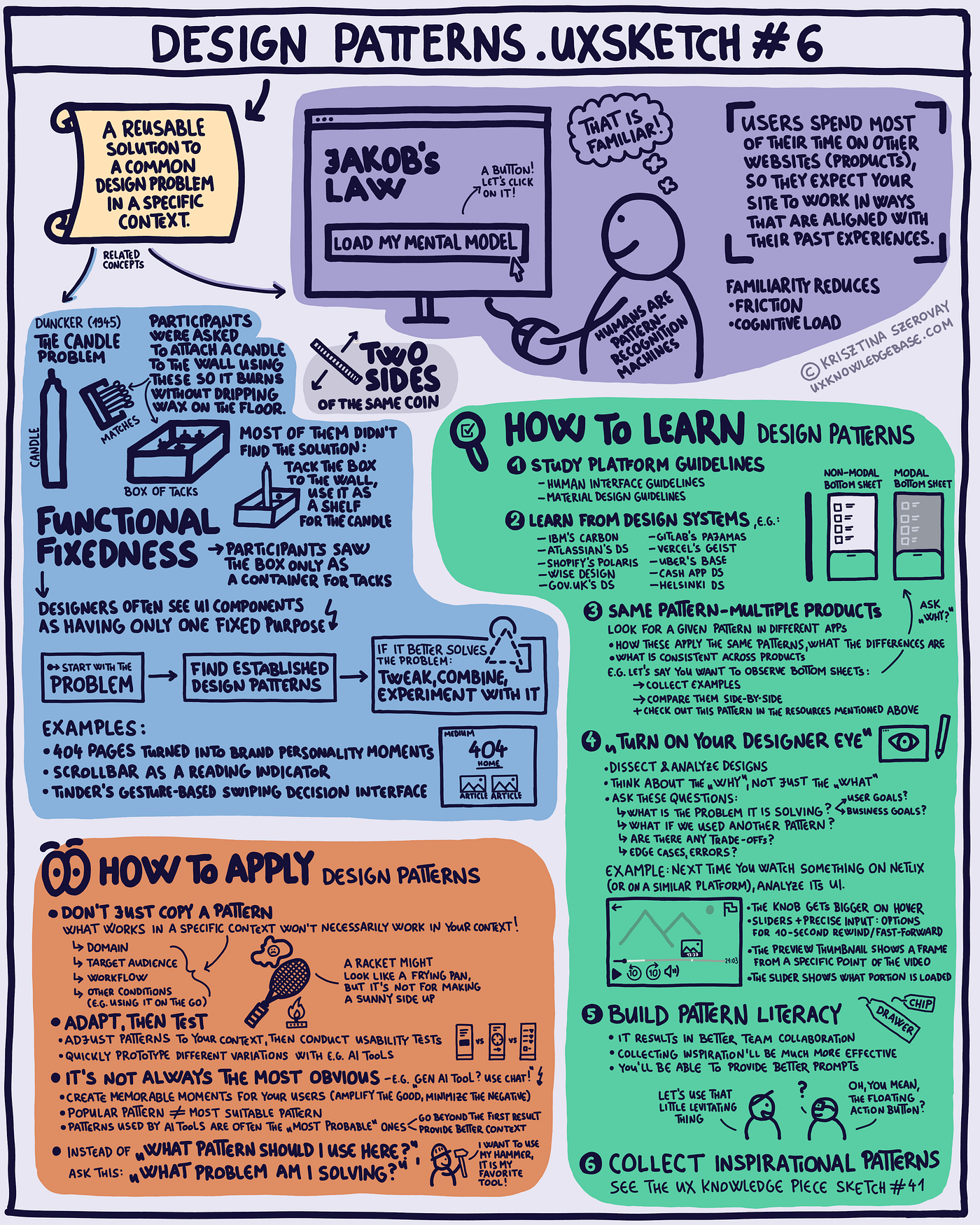
Design Patterns .uxsketch #6
“The only two things worth focusing on (or teaching in my case) right now are the fundamentals and the cutting edge. Everything in between feels subject to change.” said Dan Saffer recently, and I couldn’t agree more, so I created a sketch about learning and applying design patterns.
Definition & 2 related concepts
A design pattern is reusable solution to a common design problem in a specific context. Let’s discover two related concepts first.
Jakob’s Law
Humans are pattern-recognition machines. And since your users spend most of their time on other websites (products), they expect your site to work in ways that are aligned with their past experiences. Familiarity reduces friction and cognitive load.
Functional Fixedness
The concept’s origin is Duncker’s experiment, the so-called Candle Problem from 1945. Participants were asked to attach a candle to the wall so it burns without dripping wax on the floor. They were given a candle, matches and a box of tacks. Most of them didn’t find the solution: tack the box to the wall, and use it as a shelf for the candle. (Duncker, K. (1945). “On problem solving”. Psychological Monographs, 58:5)
This is “Functional Fixedness” → Participants saw the box only as a container for tacks. Similarly, designers often see UI components as having only one fixed purpose.
→ Start with the problem → Find established design patterns → If it better solves the problem: Tweak, combine, experiment with it
Examples for “tweaks” that turned out great:
- 404 pages converted into brand personality moments
- Scrollbar as a reading indicator
- Tinder’s gesture-based swiping decision interface
- Airbnb’s 3D icons and their placement

Medium’s 404 page

Mobbin.com’s 404 page

A menu can contain 3D icons — e.g. “Become a host” by Airbnb
Somewhat related: a great article about indicators:
How to Learn Design Patterns
① Study platform guidelines:
- Human Interface Guidelines
- Material Design Guidelines
② Learn from design systems, e.g.:
- IBM’s Carbon
- Atlassian
- Shopify’s Polaris
- Wise Design
- Gov.uk
- GitLab’s Pajamas
- Vercel’s Geist
- Uber’s Base
- Cash App
- Helsinki
③ Same pattern — multiple products
Look for a given pattern in different apps
- How these apply the same patterns, what the differences are
- What is consistent across products E.g. let’s say you want to observe bottom sheets: → Collect examples → Compare them side-by-side → Check out this pattern in the resources mentioned above Ask “why?”

Bottom sheets in different apps (from Mobbin)
④ Turn on your “designer eye”
Dissect & analyze designs, think about the “why”, not just the “what”
Ask these questions:
- What is the problem it is solving? (User goals? Business goals?)
- What if we used another pattern?
- Are there any trade-offs?
- Edge cases, errors?
Example: Next time you watch something on Netflix (or on a similar platform), analyze its UI.
- The knob gets bigger on hover
- Sliders + precise input: options for 10-second rewind/fast-forward
- The preview thumbnail shows a frame from a specific point of the video
- The slider shows what portion is loaded

Netflix: turn on your “designer eye”
⑤ Build pattern literacy
- It results in better team collaboration
- Collecting inspiration’ll be much more effective
- You’ll be able to provide better prompts, e.g. “Let’s use that little levitating thing” “Oh, you mean, the floating action button?”
⑥ Collect inspirational patterns
Collecting and using design inspiration seems to be an obvious activity, however, over the years I have learned and discovered some good practices, so I decided to write a guide on this topic:
How to Apply Design Patterns
Don’t just copy a pattern: What works in a specific context won’t necessarily work in your context! These might differ:
- Domain
- Target audience
- Workflow
- Other conditions (e.g. using it on the go)
Adapt, then test:
- Adjust patterns to your context, then conduct usability tests
- Quickly prototype different variations with e.g. AI tools
It’s not always the most obvious, e.g. “Gen AI tool? Use chat!” Wrong approach!
- Create memorable moments for your users (amplify the good, minimize the negative)
- Popular pattern ≠ most suitable pattern
- Patterns used by AI tools are often the “most probable” ones, so go beyond the first result
Instead of “What pattern should I use here?” Ask this: “What problem am I solving?”
Do you like my sketches? Support my work!
Coffee is my fuel — you can buy me one if you want to boost the sketch-creation process! ;)
If you like my sketches, **buy me a coffee** to support my work! Thanks, I really appreciate your encouragement! 🙏

Sketching for UX designers course on Udemy
Check out the **Sketching for UX Designers course** on Udemy, use the coupon code SKETCHFORUX202601 to get 80% off!
Subscribe to my **Sketching for UX newsletter** to get early access to my newest UX Knowledge Piece Sketch (and receive it directly to your inbox each month). I also share my favorite design and visual thinking links.
**Get my Sketching for UX Designers Workbook here for free** (and you can choose to support me by paying a couple of dollars, I really appreciate your support!)
You can also **grab a copy of my 100-day Long UX Visual Library Building Challenge book** (also on a pay-what-you-want basis).
메타데이터
- post_id
- fc84aa9a8ea7
- slug
- design-patterns-fc84aa9a8ea7
- url
- https://uxknowledgebase.com/design-patterns-fc84aa9a8ea7
- canonical_url
- https://uxknowledgebase.com/design-patterns-fc84aa9a8ea7
- author_url
- https://medium.com/@krisztina.szerovay
- status
- ok
- fetched_at
- 2026-06-15 20:49:13