Getting Started with Working with CodeLlama: Creating a CodeLlama Application
An industry-grade, practical guide to building your own AI coding assistant using CodeLlama.
Getting Started with Working with CodeLlama: Creating a CodeLlama Application
An industry-grade, practical guide to building your own AI coding assistant using CodeLlama.
Introduction: The Problem CodeLlama Solves
Modern developers write code faster than ever — but also debug, refactor, and review more than ever. Generic AI models can help, but they often:
- Miss syntax details
- Generate inconsistent code
- Hallucinate APIs
- Lack deep understanding of programming patterns
CodeLlama exists to fix this.
It is designed specifically for code, trained on massive programming datasets, and optimized for real developer workflows — from learning to production tooling.
In this guide, we’ll go from zero to building a working CodeLlama application, step by step, with clean explanations and real code.
What Is CodeLlama?
CodeLlama is a family of large language models released by Meta, fine-tuned specifically for programming tasks.
It is built on top of the LLaMA architecture, but trained and optimized to:
- Understand programming syntax
- Generate correct, structured code
- Complete functions and classes
- Explain logic and fix bugs
CodeLlama Model Variants
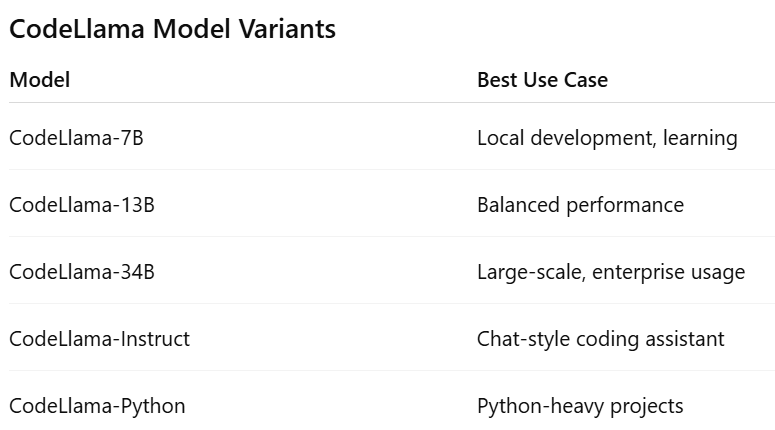
CodeLlama Model Variants
Why CodeLlama Exists (And Why Developers Care)
Traditional LLMs are generalists. CodeLlama is a specialist.
CodeLlama Is Built For:
- Developers
- Students learning to code
- AI-powered dev tools
- Offline and privacy-first environments
Key Advantages
- Open-source
- Can run locally
- No API lock-in
- Strong code reasoning
CodeLlama Architecture
Understanding the basics helps you use it better.
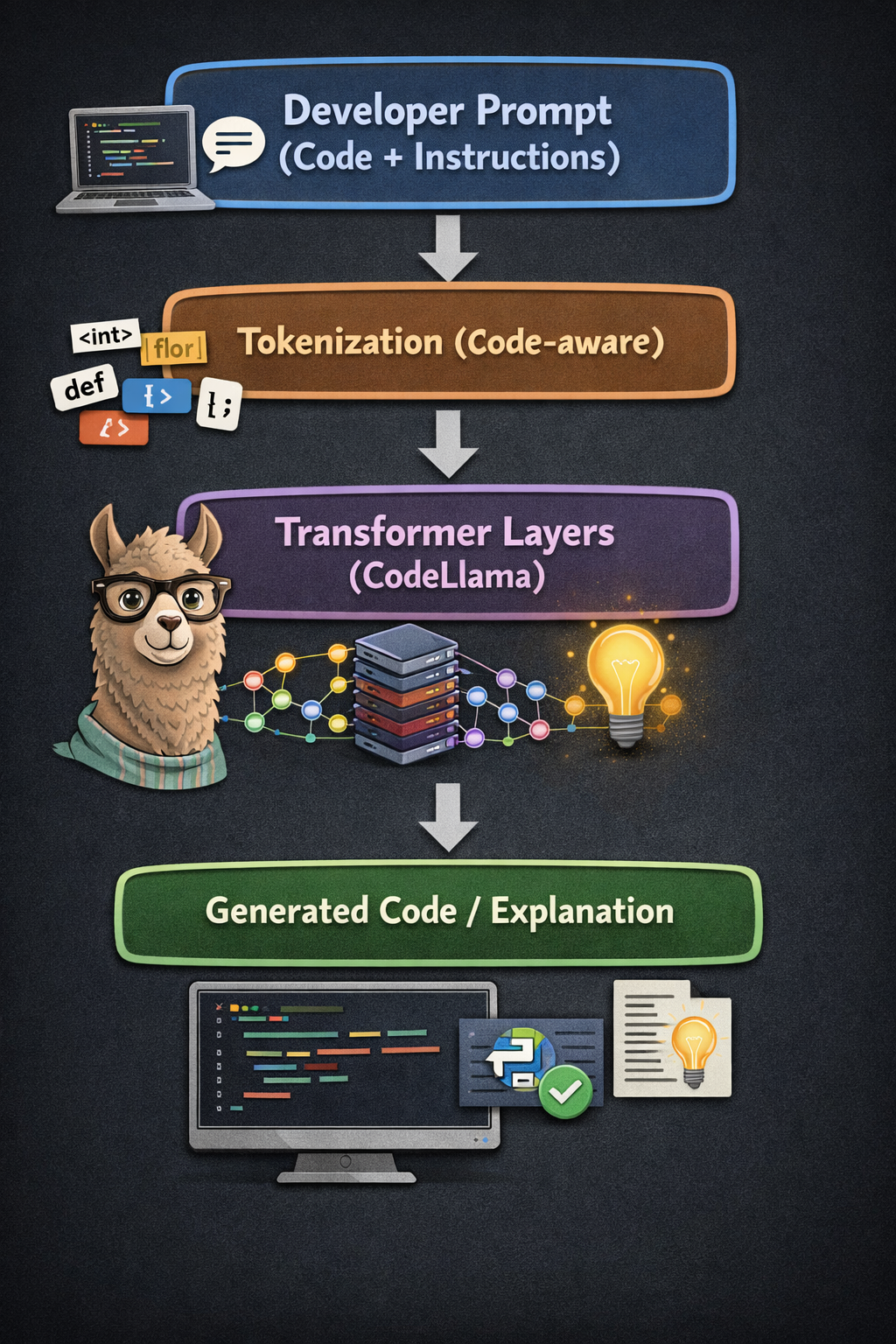
CodeLlama Architecture
Why It Works Well for Code
- Trained on real-world repositories
- Learns indentation, syntax, and structure
- Predicts logical next tokens in code
- Understands standard libraries & patterns
Installation & Setup
We’ll cover local setup (recommended for learning) and cloud setup (for production).
Local Setup (Step-by-Step)
Prerequisites
- Python 3.9+
- 16GB RAM (minimum)
- GPU recommended (CUDA-enabled)
Step 1: Install Dependencies
pip install torch transformers accelerateStep 2: Load CodeLlama Model
from transformers import AutoTokenizer, AutoModelForCausalLM
import torch
model_id = "codellama/CodeLlama-7b-Instruct-hf"tokenizer = AutoTokenizer.from_pretrained(model_id)model = AutoModelForCausalLM.from_pretrained(
model_id,
torch_dtype=torch.float16,
device_map="auto"
)✅ This loads CodeLlama and automatically maps it to your GPU or CPU.
First Hands-On Example (Hello CodeLlama)
prompt = """
Write a clean Python function to check if a number is prime.
Explain the logic step by step.
"""
inputs = tokenizer(prompt, return_tensors="pt").to(model.device)output = model.generate(
**inputs,
max_new_tokens=200,
temperature=0.2
)print(tokenizer.decode(output[0], skip_special_tokens=True))📌 You’ll get:
- Correct code
- Clean formatting
- Logical explanation
Creating a Simple CodeLlama Application
Let’s build a mini coding assistant.
Features
- Accepts developer input
- Generates code
- Runs locally
Core Generator Function
def generate_code(prompt):
    inputs = tokenizer(prompt, return_tensors="pt").to(model.device)
output = model.generate(
**inputs,
max_new_tokens=300,
temperature=0.3,
top_p=0.95
) return tokenizer.decode(output[0], skip_special_tokens=True)CLI-Based Application
while True:
    user_input = input("Ask CodeLlama (type 'exit' to quit): ")
if user_input.lower() == "exit":
break response = generate_code(user_input)
print("\nGenerated Output:\n")
print(response)🎉 You now have a working local AI coding assistant.
Prompt Engineering Tips (Very Important)
❌ Weak Prompt
create code✅ Strong Prompt
Write an optimized Java function to reverse a string.
Include time and space complexity.
Best Practices
- Specify language
- Ask for explanation
- Mention constraints
- Keep prompts clear
Performance Optimization Tips
- Use smaller models for local dev
- Lower
temperaturefor deterministic code - Limit
max_new_tokens - Cache repeated prompts
- Use GPU whenever possible
Common Mistakes to Avoid
Running large models on CPU Using vague prompts Expecting perfect output on the first try Ignoring token limits
Real-World Use Cases
- AI coding assistants
- Code review bots
- Bug-fixing tools
- Teaching assistants
- API boilerplate generators
- Offline enterprise tools
CodeLlama vs GPT vs GitHub Copilot
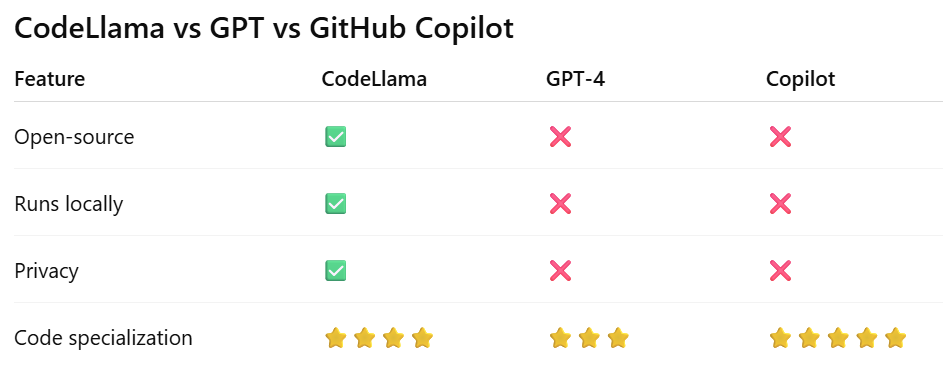
CodeLlama vs GPT vs GitHub Copilot
Production Deployment Ideas
- Wrap with FastAPI
- Add authentication
- Dockerize the app
- Deploy on AWS / GCP
- Add logging & rate limiting
Key Takeaways
- CodeLlama is designed specifically for developers
- Open-source and privacy-friendly
- Ideal for learning and production tools
- Prompt quality drives output quality
Learning Roadmap
- Learn LLM fundamentals
- Practice prompt engineering
- Build small CodeLlama tools
- Integrate with APIs & UIs
- Deploy production-ready apps
Final Call to Action
If you’re serious about AI-powered development, Start experimenting with CodeLlama today.
Build small. Learn deeply. Ship real tools.
메타데이터
- post_id
- fc9a145d2bdd
- slug
- getting-started-with-working-with-codellama-creating-a-codellama-application-fc9a145d2bdd
- url
- https://medium.com/@pranshi100verma/getting-started-with-working-with-codellama-creating-a-codellama-application-fc9a145d2bdd
- canonical_url
- https://medium.com/@pranshi100verma/getting-started-with-working-with-codellama-creating-a-codellama-application-fc9a145d2bdd
- author_url
- https://medium.com/@pranshi100verma
- status
- ok
- fetched_at
- 2026-06-24 11:06:28