JPA and Hibernate in Spring Boot Explained Simply: Entities, Repositories, Relationships, and N+1…
A beginner-friendly guide to understanding how Spring Boot applications communicate with databases
JPA and Hibernate in Spring Boot Explained Simply: Entities, Repositories, Relationships, and N+1 Problem
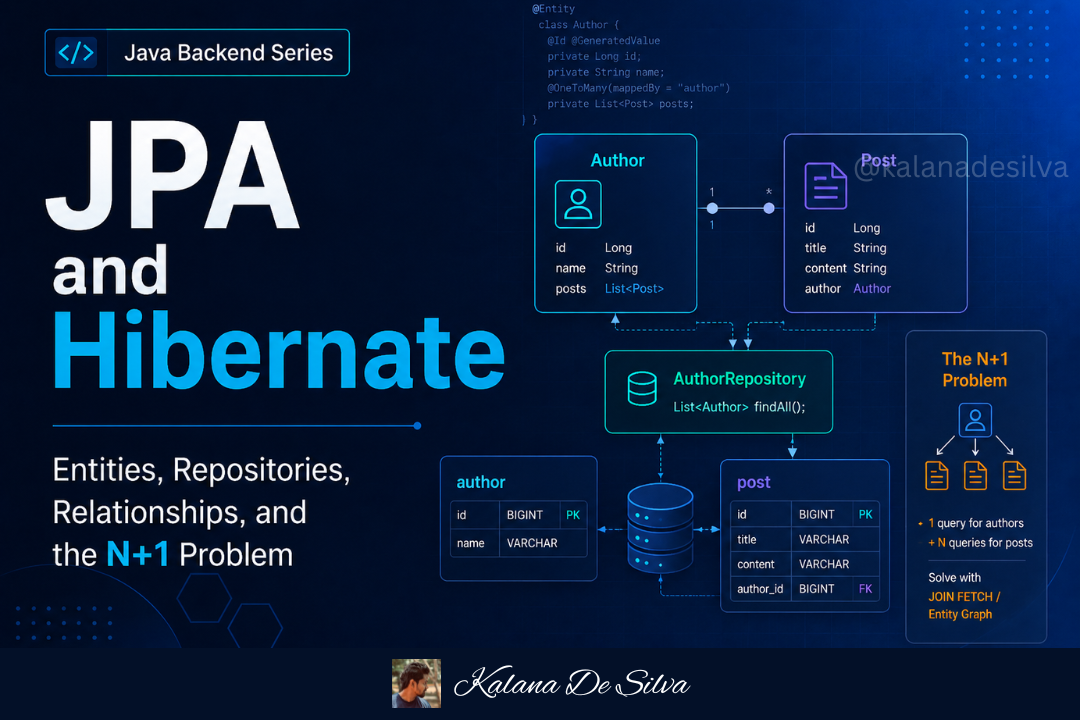
A beginner-friendly guide to understanding how Spring Boot applications communicate with databases
When we build backend applications, we usually need to store and retrieve data.
For example, imagine we are building a library management system.
The system needs to store:
- books
- authors
- members
- borrow records
- payments
- user accounts
All these details are usually stored in a database.
In a Java Spring Boot application, we often use JPA, Hibernate, and Spring Data JPA to communicate with the database.
At first, these terms can feel confusing.
Many beginners ask:
“What is JPA?” “What is Hibernate?” “Are JPA and Hibernate the same?” “What is an entity?” “What is a repository?” “What is lazy loading?” “What is the N+1 problem?”
In this article, we will understand these concepts simply using real-world examples and Spring Boot code.
Why Do We Need JPA and Hibernate?
Before understanding JPA and Hibernate, let’s first understand the problem.
Imagine we have a students table in the database.
students
--------------------------------
id | name   | email
--------------------------------
1  | Kamal  | kamal@gmail.com
2  | Nimal  | nimal@gmail.com
In Java, we may have a class like this:
public class Student {

private Long id;
private String name;
private String email;

}
Now the question is:
How do we connect this Java class with the database table?
Without JPA or Hibernate, we may need to write a lot of SQL and JDBC code manually.
Example:
Connection connection = DriverManager.getConnection(url, username, password);

PreparedStatement statement = connection.prepareStatement(
    "SELECT * FROM students WHERE id = ?"
);
statement.setLong(1, 1);
ResultSet resultSet = statement.executeQuery();
if (resultSet.next()) {
    Student student = new Student();
    student.setId(resultSet.getLong("id"));
    student.setName(resultSet.getString("name"));
    student.setEmail(resultSet.getString("email"));
}
This works, but it is too much boilerplate code.
For every insert, update, delete, and select operation, we need to write more and more code.
This is where JPA and Hibernate help us.
They help us map Java objects to database tables.
Real-World Example: Library System
Let’s use a library system to understand the idea.
In a library, we may have:
Book
Author
Member
Borrow Record
In the database, we may have tables:
books
authors
members
borrow_records
In Java, we can represent these tables as classes:
Book class
Author class
Member class
BorrowRecord class
JPA and Hibernate help us connect these Java classes with database tables.
Simple meaning:
Instead of manually converting database rows into Java objects, JPA and Hibernate help us do that automatically.
This concept is called ORM.
What is ORM?
ORM stands for:
Object Relational MappingLet’s break it down.
Object
In Java, we work with objects.
Example:
Book book = new Book();
book.setTitle("Clean Code");
book.setPrice(4500.00);
Relational
In databases, we work with tables and rows.
Example:
books table
--------------------------------
id | title      | price
--------------------------------
1  | Clean Code | 4500.00
Mapping
Mapping means connecting the Java object with the database table.
Java class  -> Database table
Java object -> Database row
Class field -> Table column
So ORM means:
Mapping Java objects with relational database tables.
Example:
Book class  -> books table
id field    -> id column
title field -> title column
price field -> price column
JPA defines how this mapping should happen.
Hibernate performs the actual work.
What is JPA?
JPA stands for:
Java Persistence APIIn modern Spring Boot applications, we commonly use Jakarta Persistence, but the concept is still commonly called JPA.
JPA is a specification.
That means JPA defines rules and standards for ORM.
JPA tells us:
- how to mark a class as an entity
- how to define primary keys
- how to map relationships
- how to manage database operations
- how object persistence should work
But JPA itself is not the actual tool that performs database operations.
It is like a rule book.
Simple meaning:
JPA is a set of rules for mapping Java objects to database tables.
What is Hibernate?
Hibernate is an ORM framework.
Hibernate is one of the most popular implementations of JPA.
Simple meaning:
Hibernate is the actual tool that follows JPA rules and performs database operations.
Think of it like this:
JPA       = Rules / Specification
Hibernate = Implementation / Tool
Real-world example:
Imagine the government creates traffic rules.
The rules say:
- stop at red light
- drive on the correct side
- wear seat belts
- follow speed limits
These are like JPA rules.
Now the drivers follow those rules in real life.
Drivers are like Hibernate.
JPA defines the rules.
Hibernate does the real work.

Simple explanation:
JPA tells what should be done. Hibernate does it.
What is Spring Data JPA?
Now we have another term:
Spring Data JPASpring Data JPA is not the same as JPA.
Spring Data JPA is a Spring project that makes JPA easier to use.
Without Spring Data JPA, we may need to write more code for common database operations.
Spring Data JPA gives us repository interfaces such as:
JpaRepository
CrudRepository
PagingAndSortingRepository
The most commonly used one is JpaRepository.
Example:
public interface BookRepository extends JpaRepository<Book, Long> {
}
With this one interface, we automatically get methods like:
save()
findById()
findAll()
deleteById()
existsById()
count()
That is very powerful.
Simple meaning:
Spring Data JPA reduces boilerplate database code by giving ready-made repository methods.
Relationship Between JPA, Hibernate, and Spring Data JPA
Let’s understand the relationship clearly.

In simple words:
Spring Data JPA makes database coding easier.
JPA defines the ORM rules.
Hibernate performs the actual ORM work.
Database stores the data.
What is an Entity?
An entity is a Java class that is connected to a database table.
Example:
import jakarta.persistence.Entity;
import jakarta.persistence.GeneratedValue;
import jakarta.persistence.GenerationType;
import jakarta.persistence.Id;

@Entity
public class Book {
    @Id
    @GeneratedValue(strategy = GenerationType.IDENTITY)
    private Long id;
    private String title;
    private Double price;
}
Here, Book is an entity.
This means Hibernate can map this class to a database table.
By default, the table name may become:
bookor depending on naming strategy:
booksWe can also manually define the table name.
import jakarta.persistence.Table;

@Entity
@Table(name = "books")
public class Book {

}
Now the Book class is mapped to the books table.
Common JPA Annotations
Let’s understand some important annotations.
@Entity
Used to mark a Java class as a database entity.
@Entity
public class Book {
}
Simple meaning:
This class represents a database table.
@Table
Used to define the table name.
@Table(name = "books")Simple meaning:
This entity is connected to the books table.
@Id
Used to mark the primary key.
@Id
private Long id;
Simple meaning:
This field is the unique identifier.
@GeneratedValue
Used to generate primary key values automatically.
@GeneratedValue(strategy = GenerationType.IDENTITY)
private Long id;
Simple meaning:
The database will generate the ID automatically.
@Column
Used to customize column details.
@Column(name = "book_title", nullable = false)
private String title;
Simple meaning:
This field is mapped to the book_title column and cannot be null.
Simple Entity Example
import jakarta.persistence.*;

@Entity
@Table(name = "books")
public class Book {
    @Id
    @GeneratedValue(strategy = GenerationType.IDENTITY)
    private Long id;
    @Column(nullable = false)
    private String title;
    private String isbn;
    private Double price;
    public Book() {
    }
    public Book(String title, String isbn, Double price) {
        this.title = title;
        this.isbn = isbn;
        this.price = price;
    }
    // getters and setters
}
This class represents a books table.
Possible database table:
books
------------------------------------------------
id | title        | isbn        | price
------------------------------------------------
1  | Clean Code   | 1234567890  | 4500.00
2  | Java Basics  | 9876543210  | 2500.00
What is a Repository?
A repository is a layer used to communicate with the database.
In Spring Boot, we usually create repository interfaces.
Example:
import org.springframework.data.jpa.repository.JpaRepository;

public interface BookRepository extends JpaRepository<Book, Long> {

}
This means:
Book       -> Entity type
Long       -> ID type
Now we can use methods like:
bookRepository.save(book);
bookRepository.findById(1L);
bookRepository.findAll();
bookRepository.deleteById(1L);
We do not need to manually implement these methods.
Spring Data JPA provides the implementation at runtime.
Repository Example
public interface BookRepository extends JpaRepository<Book, Long> {

List<Book> findByTitle(String title);
List<Book> findByPriceGreaterThan(Double price);
}
Spring Data JPA can understand method names.
For example:
findByTitle(String title)Spring Data JPA understands this as:
Find books where title equals the given title.
Another example:
findByPriceGreaterThan(Double price)Spring Data JPA understands this as:
Find books where price is greater than the given price.
This is called query method naming.
What is a Service Layer?
In Spring Boot, we usually do not call repository directly from the controller.
A clean structure is:
Controller -> Service -> Repository -> DatabaseController
Handles HTTP requests and responses.
Service
Handles business logic.
Repository
Handles database operations.
Example service:
import org.springframework.stereotype.Service;
import java.util.List;

@Service
public class BookService {
    private final BookRepository bookRepository;
    public BookService(BookRepository bookRepository) {
        this.bookRepository = bookRepository;
    }
    public Book createBook(Book book) {
        return bookRepository.save(book);
    }
    public List<Book> getAllBooks() {
        return bookRepository.findAll();
    }
    public Book getBookById(Long id) {
        return bookRepository.findById(id)
                .orElseThrow(() -> new RuntimeException("Book not found"));
    }
}
Controller Example
import org.springframework.web.bind.annotation.*;
import java.util.List;

@RestController
@RequestMapping("/api/books")
public class BookController {
    private final BookService bookService;
    public BookController(BookService bookService) {
        this.bookService = bookService;
    }
    @PostMapping
    public Book createBook(@RequestBody Book book) {
        return bookService.createBook(book);
    }
    @GetMapping
    public List<Book> getAllBooks() {
        return bookService.getAllBooks();
    }
    @GetMapping("/{id}")
    public Book getBookById(@PathVariable Long id) {
        return bookService.getBookById(id);
    }
}
Now the request flow is:

This is a common Spring Boot backend structure.
What is @Transactional?
@Transactional is used to manage database transactions.
A transaction means a group of database operations that should succeed together or fail together.
Real-world example:
Imagine a money transfer.
1. Deduct money from sender account
2. Add money to receiver account
Both should happen successfully.
If money is deducted from sender but not added to receiver, that is a serious issue.
So both operations should be inside one transaction.
If one operation fails, the full transaction should roll back.
Example:
import org.springframework.stereotype.Service;
import org.springframework.transaction.annotation.Transactional;

@Service
public class PaymentService {
    private final AccountRepository accountRepository;
    public PaymentService(AccountRepository accountRepository) {
        this.accountRepository = accountRepository;
    }
    @Transactional
    public void transferMoney(Long senderId, Long receiverId, Double amount) {
        Account sender = accountRepository.findById(senderId)
                .orElseThrow(() -> new RuntimeException("Sender not found"));
        Account receiver = accountRepository.findById(receiverId)
                .orElseThrow(() -> new RuntimeException("Receiver not found"));
        sender.setBalance(sender.getBalance() - amount);
        receiver.setBalance(receiver.getBalance() + amount);
        accountRepository.save(sender);
        accountRepository.save(receiver);
    }
}
Simple meaning:
@Transactional makes sure related database operations are handled as one unit.
Entity Relationships
In real applications, tables are usually connected.
Example:
A library system has books and authors.
One author can write many books.
One book belongs to one author.
This is a relationship.
In JPA, we can map relationships using annotations.
Main relationship types:
@OneToOne
@OneToMany
@ManyToOne
@ManyToMany
Let’s understand them simply.
1. One-to-One Relationship
One-to-one means one record is connected to one record.
Example:
One User has one UserProfile.
One UserProfile belongs to one User.
Database example:
users
----------------
id | username

user_profiles
----------------
id | full_name | user_id
Java example:
@Entity
@Table(name = "users")
public class User {

@Id
    @GeneratedValue(strategy = GenerationType.IDENTITY)
    private Long id;
    private String username;
    @OneToOne(mappedBy = "user")
    private UserProfile userProfile;
}
@Entity
@Table(name = "user_profiles")
public class UserProfile {
@Id
@GeneratedValue(strategy = GenerationType.IDENTITY)
private Long id;
private String fullName;
@OneToOne
@JoinColumn(name = "user_id")
private User user;
}Here:
UserProfile table has user_id foreign key.That foreign key connects the profile to the user.
2. Many-to-One Relationship
Many-to-one means many records are connected to one record.
Example:
Many books can belong to one author.Database example:
authors
----------------
id | name

books
----------------
id | title | author_id
Many books can have the same author_id.
Java example:
@Entity
@Table(name = "books")
public class Book {

@Id
    @GeneratedValue(strategy = GenerationType.IDENTITY)
    private Long id;
    private String title;
    @ManyToOne
    @JoinColumn(name = "author_id")
    private Author author;
}
Here, many Book records can point to one Author.
This is one of the most common relationships in backend applications.
3. One-to-Many Relationship
One-to-many is the opposite side of many-to-one.
Example:
One author can have many books.Java example:
@Entity
@Table(name = "authors")
public class Author {

@Id
    @GeneratedValue(strategy = GenerationType.IDENTITY)
    private Long id;
    private String name;
    @OneToMany(mappedBy = "author")
    private List<Book> books;
}
Here:
Author has many books.
Book owns the relationship using author_id.
mappedBy = "author" means:
The relationship is already managed by the
authorfield inside theBookentity.
In simple words:
Do not create another foreign key. Use the existing author field in Book.
4. Many-to-Many Relationship
Many-to-many means many records on one side can connect to many records on the other side.
Example:
A student can enroll in many courses.
A course can have many students.
Database usually needs a join table.
students
----------------
id | name

courses
----------------
id | name

student_courses
----------------
student_id | course_id
Java example:
@Entity
@Table(name = "students")
public class Student {

@Id
    @GeneratedValue(strategy = GenerationType.IDENTITY)
    private Long id;
    private String name;
    @ManyToMany
    @JoinTable(
        name = "student_courses",
        joinColumns = @JoinColumn(name = "student_id"),
        inverseJoinColumns = @JoinColumn(name = "course_id")
    )
    private List<Course> courses;
}
@Entity
@Table(name = "courses")
public class Course {
@Id
@GeneratedValue(strategy = GenerationType.IDENTITY)
private Long id;
private String name;
}In real projects, many-to-many can become complicated.
Sometimes it is better to create a separate entity for the join table.
Example:
StudentCourse
Enrollment
CourseRegistration
This is useful when the join table has extra fields like:
enrolledDate
status
grade
createdBy
Relationship Summary

Lazy Loading vs Eager Loading
This is another important topic in JPA.
When one entity has related data, JPA needs to decide:
Should related data be loaded immediately or later?
This is where lazy and eager loading come in.
What is Lazy Loading?
Lazy loading means:
Load related data only when it is needed.
Example:
Author author = authorRepository.findById(1L).get();At this point, Hibernate loads the author.
But it may not load the author’s books immediately.
Only when we call:
author.getBooks();then Hibernate loads the books.
Real-world example:
Imagine you go to a library and ask for author details.
The librarian gives you only author details first.
If you ask, “What books did this author write?”, then the librarian searches for the books.
That is lazy loading.
Simple meaning:
Lazy loading waits until related data is actually requested.
What is Eager Loading?
Eager loading means:
Load related data immediately.
Example:
When loading an author, Hibernate also loads the author’s books at the same time.
Real-world example:
You ask for author details, and the librarian immediately brings:
- author details
- all books written by the author
- book categories
- publisher details
Even if you only needed the author name, everything comes together.
That is eager loading.
Simple meaning:
Eager loading loads related data immediately, even if it may not be needed.
Lazy vs Eager Loading Comparison

In real projects, lazy loading is often preferred because it avoids loading unnecessary data.
But we must use it carefully.
Default Fetch Types
JPA relationships have default fetch behavior.
Common defaults:
@OneToMany  -> LAZY
@ManyToMany -> LAZY
@ManyToOne  -> EAGER
@OneToOne   -> EAGER
However, many developers prefer to explicitly define fetch type, especially in real projects.
Example:
@ManyToOne(fetch = FetchType.LAZY)
@JoinColumn(name = "author_id")
private Author author;
This makes the intention clear.
What is LazyInitializationException?
A common problem beginners face is LazyInitializationException.
This can happen when we try to access lazy-loaded data outside the active Hibernate session.
Example:
Author author = authorRepository.findById(1L).get();

List<Book> books = author.getBooks();
If the session is already closed when calling getBooks(), Hibernate cannot load the books.
So it throws an exception.
Simple meaning:
Hibernate wanted to load related data later, but the database session was already closed.
Common solutions:
- fetch required data inside the transaction
- use fetch join queries
- use DTO projections
- avoid returning entities directly from APIs
- design queries based on API requirements
What is the N+1 Problem?
The N+1 problem is one of the most important JPA interview topics.
It happens when an application runs too many unnecessary database queries.
Let’s understand with a simple example.
Imagine we have authors and books.
Author 1 -> 3 books
Author 2 -> 2 books
Author 3 -> 4 books
Now we call:
List<Author> authors = authorRepository.findAll();This runs one query:
SELECT * FROM authors;This is query number 1.
Now we loop through authors and access books:
for (Author author : authors) {
    System.out.println(author.getBooks().size());
}
If books are lazy-loaded, Hibernate may run one query per author.
SELECT * FROM books WHERE author_id = 1;
SELECT * FROM books WHERE author_id = 2;
SELECT * FROM books WHERE author_id = 3;
Now total queries:
1 query to get authors
+
3 queries to get books for each author
=
4 queries
If there are 100 authors:
1 query to get authors
+
100 queries to get books
=
101 queries
This is called the N+1 problem.
Real-World N+1 Example
Imagine a manager asks for a report:
“Give me all departments and employees under each department.”
The system first gets all departments.
Then for each department, it separately goes to the database to get employees.
If there are 50 departments, it may run:
1 query for departments
50 queries for employees
Total = 51 queries
This can slow down the application.
That is the N+1 problem.
Why is it Called N+1?
Because:
1 query to get the main records
N queries to get related records
So:
Total queries = N + 1Example:
1 query for authors
N queries for books of each author
That is why it is called N+1.
How to Fix the N+1 Problem
There are several ways to solve it.
1. Use Fetch Join
We can write a query that fetches authors and books together.
@Query("SELECT a FROM Author a JOIN FETCH a.books")
List<Author> findAllAuthorsWithBooks();
This loads authors and books in one query.
Simple meaning:
Fetch join tells Hibernate to load related data together in the same query.
2. Use EntityGraph
Another solution is @EntityGraph.
@EntityGraph(attributePaths = {"books"})
List<Author> findAll();
This tells Spring Data JPA to load books along with authors.
3. Use DTO Projections
Sometimes we do not need full entity objects.
We only need selected fields.
Example:
authorName
bookCount
In that case, we can use DTO projections.
public class AuthorBookCountDto {

private String authorName;
    private Long bookCount;
    public AuthorBookCountDto(String authorName, Long bookCount) {
        this.authorName = authorName;
        this.bookCount = bookCount;
    }
}
Query:
@Query("""
    SELECT new com.example.dto.AuthorBookCountDto(a.name, COUNT(b))
    FROM Author a
    LEFT JOIN a.books b
    GROUP BY a.name
""")
List<AuthorBookCountDto> getAuthorBookCounts();
This is often better for API responses.
Why Returning Entities Directly from APIs Can Be a Problem
In simple tutorials, we often return entities directly from controllers.
Example:
@GetMapping("/authors")
public List<Author> getAuthors() {
    return authorRepository.findAll();
}
This may work in small examples.
But in real projects, it can create problems:
- unnecessary data exposure
- circular JSON issues
- lazy loading errors
- N+1 queries
- tight coupling between database model and API response
- security risks if sensitive fields are included
A better approach is to use DTOs.
What is a DTO?
DTO stands for:
Data Transfer ObjectA DTO is used to transfer only the required data between layers or to the client.
Example entity:
@Entity
public class Book {

@Id
    private Long id;
    private String title;
    private Double price;
    private String internalCode;
}
Maybe we do not want to expose internalCode in the API response.
So we create a DTO:
public class BookResponseDto {

private Long id;
    private String title;
    private Double price;
    public BookResponseDto(Long id, String title, Double price) {
        this.id = id;
        this.title = title;
        this.price = price;
    }
    // getters
}
Now API returns only required fields.
Simple meaning:
DTO helps us control what data goes in and out of the API.
Practical DTO Example
Controller:
@GetMapping("/{id}")
public BookResponseDto getBookById(@PathVariable Long id) {
    return bookService.getBookById(id);
}
Service:
public BookResponseDto getBookById(Long id) {
    Book book = bookRepository.findById(id)
            .orElseThrow(() -> new RuntimeException("Book not found"));

return new BookResponseDto(
            book.getId(),
            book.getTitle(),
            book.getPrice()
    );
}
Now we are not returning the entity directly.
This is cleaner and safer.
Common CRUD Operations with Spring Data JPA
CRUD means:
Create
Read
Update
Delete
Let’s understand common operations.
Create
public Book createBook(Book book) {
    return bookRepository.save(book);
}
save() inserts a new record if the ID is new.
Read All
public List<Book> getAllBooks() {
    return bookRepository.findAll();
}
This gets all books.
Read by ID
public Book getBookById(Long id) {
    return bookRepository.findById(id)
            .orElseThrow(() -> new RuntimeException("Book not found"));
}
findById() returns an Optional.
So we handle the case where the book does not exist.
Update
public Book updateBook(Long id, Book updatedBook) {
    Book existingBook = bookRepository.findById(id)
            .orElseThrow(() -> new RuntimeException("Book not found"));
existingBook.setTitle(updatedBook.getTitle());
    existingBook.setPrice(updatedBook.getPrice());
    return bookRepository.save(existingBook);
}
First, find the existing record.
Then update fields.
Then save it.
Delete
public void deleteBook(Long id) {
    if (!bookRepository.existsById(id)) {
        throw new RuntimeException("Book not found");
    }

bookRepository.deleteById(id);
}
This deletes a record by ID.
Common Beginner Mistakes
1. Thinking JPA and Hibernate are the same
They are related, but not the same.
Simple difference:
JPA = specification
Hibernate = implementation
2. Returning entities directly from controllers
This may create lazy loading issues, circular reference issues, and security problems.
Better approach:
Entity -> Service -> DTO -> Response3. Putting business logic in repository
Repository should focus on database operations.
Business logic should be in service layer.
Bad:
Repository contains validation, calculation, business decisionsBetter:
Service contains business logic
Repository contains database access
4. Not understanding lazy loading
Lazy loading is useful, but if we access lazy data outside a transaction, we may get errors.
Always think:
Do I need this related data for this API response?
If yes, fetch it properly.
5. Ignoring the N+1 problem
The application may work correctly but become slow.
Always check how many queries are running when fetching related data.
6. Using many-to-many everywhere
Many-to-many looks easy, but real projects often need extra fields in the relationship.
Example:
student_id
course_id
enrolled_date
status
grade
In that case, create a separate entity like Enrollment.
7. Making every relationship EAGER
This can load too much data unnecessarily.
Better approach:
Use LAZY by default where possible.
Fetch only what the API needs.
Best Practices for JPA and Hibernate
Here are some practical best practices.
1. Use DTOs for API responses
Do not expose entities directly.
DTOs give better control over API data.
2. Keep business logic in the service layer
Use this structure:
Controller -> Service -> Repository3. Be careful with relationships
Do not create complex relationships without understanding the query impact.
4. Prefer lazy loading for relationships
Load related data only when needed.
5. Use fetch joins or DTO queries when needed
This helps avoid N+1 problems.
6. Use proper exception handling
Do not throw generic errors everywhere.
Example:
throw new BookNotFoundException("Book not found with id: " + id);Then handle it globally using @RestControllerAdvice.
7. Check generated SQL while learning
In development, it is useful to see SQL queries.
In application.properties:
spring.jpa.show-sql=true
spring.jpa.properties.hibernate.format_sql=true
This helps you understand what Hibernate is doing internally.
Simple Interview Answers
What is JPA?
JPA is a specification that defines how Java objects should be mapped to database tables. It provides rules and annotations for ORM, but it needs an implementation like Hibernate to perform the actual database operations.
What is Hibernate?
Hibernate is an ORM framework and one of the most popular implementations of JPA. It maps Java objects to database tables and helps us perform database operations without writing too much boilerplate SQL code.
What is Spring Data JPA?
Spring Data JPA is a Spring project that makes JPA easier to use. It provides repository interfaces like JpaRepository, which give ready-made methods such as save, findById, findAll, and deleteById.
What is an Entity?
An entity is a Java class mapped to a database table. In JPA, we use @Entity to mark a class as an entity and @Id to define the primary key.
What is a Repository?
A repository is a layer used to communicate with the database. In Spring Data JPA, we usually create interfaces that extend JpaRepository, and Spring provides implementations automatically.
What is Lazy Loading?
Lazy loading means related data is loaded only when it is accessed. For example, when loading an Author entity, the books may not be loaded immediately. They are loaded only when author.getBooks() is called.
What is Eager Loading?
Eager loading means related data is loaded immediately along with the main entity. It can be useful sometimes, but it may also load unnecessary data and reduce performance.
What is the N+1 Problem?
The N+1 problem happens when one query loads the main records and then additional queries are executed for each related record. For example, one query loads all authors, and then one query runs for each author to load books. This can create many unnecessary queries and slow down the application.
How Can We Solve the N+1 Problem?
We can solve the N+1 problem using fetch joins, EntityGraph, or DTO projections. The best solution depends on the API requirement and how much related data we actually need.
Simple Final Summary
JPA, Hibernate, and Spring Data JPA are very important in Spring Boot backend development.
The basic idea is:
Java objects need to be connected with database tables.
JPA defines the rules.
Hibernate performs the ORM work.
Spring Data JPA makes database operations easier.
A simple Spring Boot backend usually follows this flow:
Controller -> Service -> Repository -> DatabaseEntities represent database tables.
Repositories communicate with the database.
Services handle business logic.
DTOs control request and response data.
Relationships connect entities.
Lazy loading and eager loading decide when related data should be loaded.
The N+1 problem happens when too many unnecessary queries are executed.
If we understand these concepts clearly, we can build better Spring Boot backend applications.
Key Points to Remember
1. JPA is a specification.
2. Hibernate is an implementation of JPA.
3. Spring Data JPA simplifies database access.
4. Entity classes map Java objects to database tables.
5. Repository interfaces help perform CRUD operations.
6. @Id defines the primary key.
7. @GeneratedValue generates primary key values.
8. Relationships connect entities.
9. Lazy loading loads related data only when needed.
10. Eager loading loads related data immediately.
11. N+1 problem means too many unnecessary queries.
12. DTOs are better than returning entities directly from APIs.
13. Business logic should stay in the service layer.
14. Repository should focus on database operations.
15. Use fetch joins, EntityGraph, or DTO projections to optimize queries.
Final Thoughts
At first, JPA and Hibernate may look difficult because there are many terms.
But the core idea is simple.
We have Java classes.
We have database tables.
JPA and Hibernate help us connect them.
Once we understand entities, repositories, relationships, lazy loading, and the N+1 problem, Spring Boot database development becomes much easier.
As backend developers, we should not only know how to save and retrieve data.
We should also understand how the data is loaded, how relationships work, and how to avoid performance issues.
That understanding helps us write cleaner, faster, and more maintainable backend applications.
For real-time discussions, industry insights, and more, connect with me on LinkedIn. Let’s grow together!
Thank you for being part of this learning journey!
메타데이터
- post_id
- fca74f31203d
- slug
- jpa-and-hibernate-in-spring-boot-explained-simply-entities-repositories-relationships-and-n-1-fca74f31203d
- url
- https://medium.com/@kalanamalshan98/jpa-and-hibernate-in-spring-boot-explained-simply-entities-repositories-relationships-and-n-1-fca74f31203d
- canonical_url
- https://medium.com/@kalanamalshan98/jpa-and-hibernate-in-spring-boot-explained-simply-entities-repositories-relationships-and-n-1-fca74f31203d
- author_url
- https://medium.com/@kalanamalshan98
- status
- ok
- fetched_at
- 2026-07-09 15:12:33