Building a Reminder App with Google Antigravy, FastAPI, and Serverless
I’ve always wanted a reminder system that doesn’t just send a push notification — it should call me.
Building a Reminder App with Google Antigravy, FastAPI, and Serverless
I’ve always wanted a reminder system that doesn’t just send a push notification — it should call me.
The goal was simple:
If I schedule a task for 19–02–2026 at 10:30 AM, the app should:
- Detect the scheduled time
- Trigger an IFTTT Webhook
- Receive a VoIP call from IFTTT with the reminder message
No excuses. No missed tasks.
The Stack I Used
- FastAPI for the backend API
- AI assistance (Google Antigravity) for code enhancement
- IFTTT Webhooks for triggering VoIP calls
- Vercel (serverless) for deployment
- Azure DevOps Pipeline to simulate scheduled execution
Where AI Helped — and Where It Failed
I had already written sample APIs using FastAPI. I used Google Antigravity to enhance and optimize the code.
It helped speed up iterations. But it also introduced subtle problems.
Problem 1: Silent Code Deletions
The AI occasionally removed critical lines such as:
from fastapi import FastAPIapp = FastAPI()
Without these, the app simply breaks.
Problem 2: Structural Modifications
Sometimes it rewrote working logic in ways that changed behavior — without explaining why.
Lesson Learned
AI is an accelerator — not a replacement for understanding.
If you:
- Don’t understand your imports
- Don’t understand your app initialization
- Don’t understand your execution flow
Then you won’t even realize what broke.
Always:
- Review your code
- Run local tests
- Validate behavior against real use cases
AI doesn’t guarantee correctness. You do.
Traditional Approach (VM-Based)
If deployed on a VM, the app would:
- Run continuously
- Check reminders every 1 minute
- Trigger webhook when time matches
That’s straightforward — but expensive.
Keeping a cloud VM running 24/7 just for reminders is unnecessary expensive.
So I moved to serverless.
Vercel is serverless.
It only runs when a request hits the endpoint.
That means:
- No continuous background scheduler
- No always-running loop
So I engineered around that limitation.
Scheduled Trigger Using Azure DevOps
Since I was on the free plan of Vercel (which has execution limits), I designed an external trigger system.
I used Azure DevOps to:
- Send a GET request to the Vercel endpoint
- Every 15 minutes
- From 7 AM to 11 PM IST
- Avoid triggering reminders during night hours
Why 15 minutes?
Because reminders are supported at:
- 00 minutes
- 15 minutes
- 30 minutes
- 45 minutes
For example:
- 10:15
- 10:30
- 10:45
- 11:00
If you schedule at 10:07 AM, it won’t trigger exactly at 10:07 — it will trigger on the next 15-minute cycle that saves infrastructure cost.
Data Layer Architecture
To avoid overloading the database:
- Reminders are stored in PostgreSQL
- Cached into Redis
- The reminder checker reads from Redis
- Only syncs with PostgreSQL when required
This reduces DB load and improves execution speed inside serverless runtime limits.
Notification Layer
For the actual phone call:
- Webhook is triggered
- Webhook connects to IFTTT
- IFTTT VoIP service calls my phone
Important note:
VoIP + Webhook requires the Pro plan in IFTTT. Cost: ~₹2,500/year.
You can build everything open-source — but if you want phone calls, you pay.
Architecture Overview
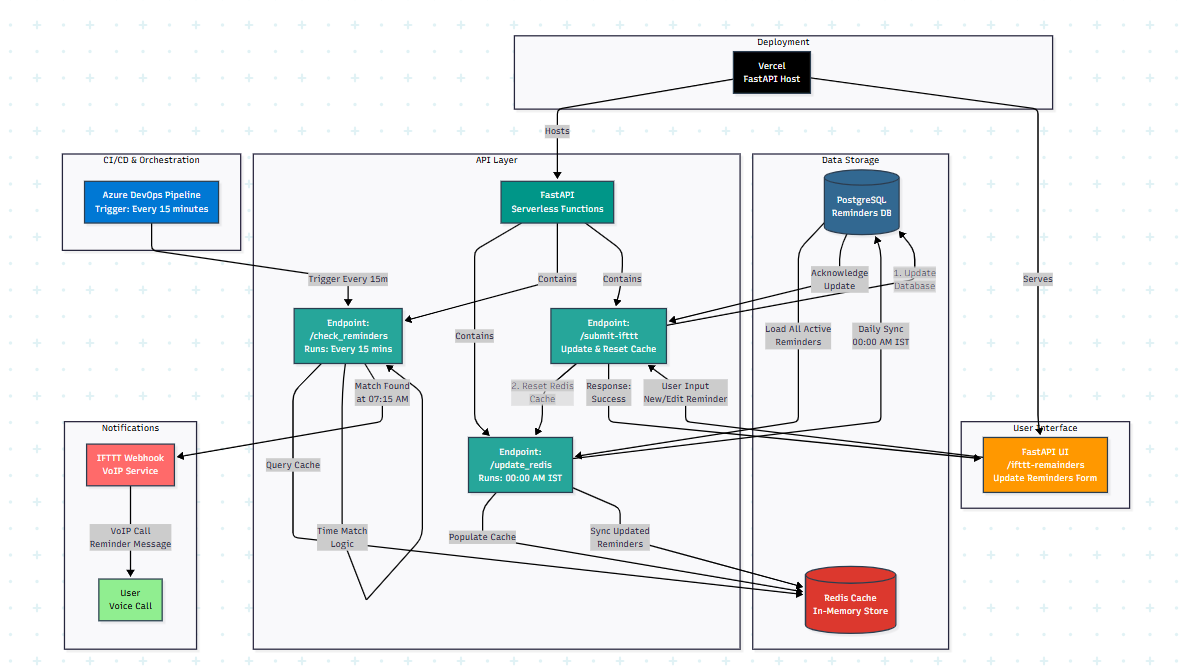
Flow:
- User creates reminder → Stored in PostgreSQL
- Redis caches reminders
- Azure DevOps triggers GET request every 15 minutes
- FastAPI checks due reminders
- Webhook fires
- IFTTT VoIP call is placed
Key Takeaways
1. AI is a Tool, Not Authority
Never trust generated code blindly.
Test it. Understand it.
2. Cost-Aware Architecture Matters
Not every problem requires a continuously running server.
OpenSource Application which i have utilized for my code
Vercel for running serverless deployment
Avien Postgresql DB for storing remainders
RedisDB from redislab
Azure DevOps pipeline for to trigger get request for every 15 minutes.
Paid App: IFTTT because VoIP and Webhook is available in pro subscription which cost around 2,500 INR.
Final Thoughts
This project forced me to think in constraints:
- No 24/7 VM
- Free-tier limits
- No background workers
- Minimal cost
Instead of throwing money at infrastructure, I designed around the limitations.
Note: Personal reminder system with controlled usage — it works.
메타데이터
- post_id
- fca80de80498
- slug
- building-a-reminder-app-with-google-antigravy-fastapi-and-serverless-fca80de80498
- url
- https://medium.com/@hemanthbitra/building-a-reminder-app-with-google-antigravy-fastapi-and-serverless-fca80de80498
- canonical_url
- https://medium.com/@hemanthbitra/building-a-reminder-app-with-google-antigravy-fastapi-and-serverless-fca80de80498
- author_url
- https://medium.com/@hemanthbitra
- status
- ok
- fetched_at
- 2026-06-24 11:06:28



