Unified Approach to build MSK Producers with messaging queues (SQS , RabbitMQ , IBMMQ )
This blog shows how to build MSK producers with a consistent approach while integrating with different queue based messaging systems…
Unified approach for processing Near real-time data from messaging queues
This blog demonstrates a unified approach to process Near real-time (NRT) data from queue based messaging systems (SQS,RabbitMQ, IBMMQ) in the AWS Cloud . This approach will help to achieve operational excellence by reducing maintenance overhead of managing and maintaining multiple different solutions specific to messaging systems.
This solution utilizes AWS Fargate and ECS containers to receive , process and publish messages from different messaging queues like Amazon SQS/RabbitMQ/IBM MQ to a MSK topic.
ECS container is implemented using Java spring boot and java camel libraries to process messages from various queue-based messaging systems (SQS, RabbitMQ, IBM MQ) as source systems.
Overview
Using ECS containers to process data can be helpful when the amount of data an application processes exceeds the limitations of function-based serverless compute services. For example, if an application requires more compute capacity or processing time than what AWS Lambda offers, using Fargate can improve performance.
Other industry practices involve:
- Employing event-based Lambda triggers for SQS and RabbitMQ. However, it’s worth noting that for RabbitMQ, there is a limitation on concurrent Lambda invocations utilizing RabbitMQ as event source . It is important to note there is no Support for integrating with IBM MQ on EC2.
- Utilizing Kafka connectors, which require at least one worker capacity unit (WCU) to be active at all times.
Our goal is to achieve greater cost optimization by dynamically scaling up from zero ECS containers to the maximum number of instances based on the message queue’s depth. With this proposed approach, there is no need to maintain a constant instance running at all times unlike with Kafka Connectors.
Prerequisites and limitations
Prerequisites
- An active AWS account
- The latest version of the AWS Command Line Interface (AWS CLI), installed and configured on your local machine or cloud9
- Git, installed and configured on your local machine or cloud9
- Java, installed and configured on your local machine or cloud9
- Maven (Camel libraries) installed and configured on your local machine or cloud9
- Jre >= 8 to run the project.
- Java Spring Boot application with Apache Camel dependencies defined in maven pom.xml
- Docker, installed and configured on your local machine or cloud9
- An Active MSK cluster with IAM access control enabled in the Authentication section. For more information about this, see Create a cluster that uses IAM access control in the Amazon MSK documentation.
- An Active ECS cluster
- Network connectivity between the ECS and MSK clusters.
- An IAM role for the ECS cluster with the policy to include the permissions described in the Amazon MSK IAM access control documentation.
Limitations
- This solution uses Amazon MSK clusters with IAM access control enabled. With Other Kafka clusters custom implementation may be required for authentication/authorization.
Architecture
Target technology stack
- Amazon SQS , Amazon MQ for RabbitMQ , Standalone IBMMQ on EC2
- Amazon MSK
- AWS Fargate
- Amazon ECS
- Amazon ECR
Target architecture
The following diagram shows an example workflow for running message-driven workloads at scale in the AWS Cloud by using Fargate:
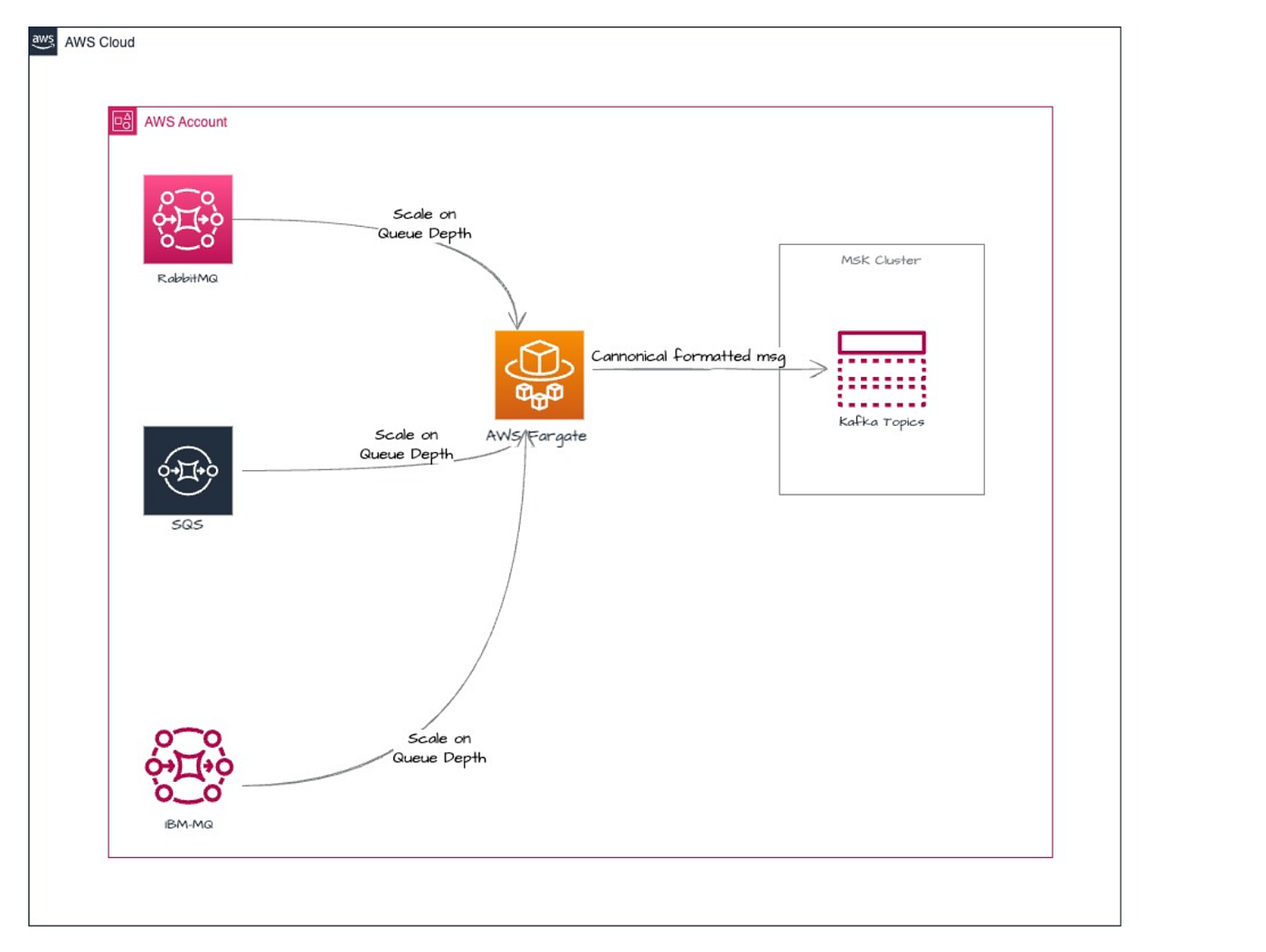
- The Fargate service receives messages from an Amazon SQS /RabbitMQ/IBMMQ queue.
- The Fargate service then processes messages and publishes them to a MSK topic.
This solution utilizes Java Spring Boot Application with Camel libraries to build ECS Container image and deploy Java microservices as containerized applications in Amazon Elastic Container Service (Amazon ECS). A Dockerfile is used to build a ECS container image with native support for the Amazon MSK IAM Authentication/Authorization(AuthN/Z) Library . The container is executed inside of an Amazon ECS cluster to function as MSK Producer to process, transform and publish messages to a topic within an IAM access control enabled MSK cluster. This solution also uses Amazon Elastic Container Registry (Amazon ECR) to manage your container.
Code
Maven Setup for ECS container with Java Springboot , Camel and MSK IAM Authentication/Authorization (AuthN/Z) libraries
<?xml version="1.0" encoding="UTF-8"?>
<project xmlns="http://maven.apache.org/POM/4.0.0" xmlns:xsi="http://www.w3.org/2001/XMLSchema-instance" xsi:schemaLocation="http://maven.apache.org/POM/4.0.0 http://maven.apache.org/maven-v4_0_0.xsd">
    <modelVersion>4.0.0</modelVersion>
    <parent>
        <groupId>org.apache.camel.springboot</groupId>
        <artifactId>spring-boot</artifactId>
        <version>3.20.4</version>
    </parent>
    <artifactId>camel-kafka-sasl-scram-connector</artifactId>
    <name>Camel Springboot Examples :: RabbitMQ to MSK route</name>
    <description>An example showing how to work with Camel and RabbitMQ to MSK route</description>
    <properties>
        <category>Messaging</category>
        <project.build.sourceEncoding>UTF-8</project.build.sourceEncoding>
        <camel.version>3.21.0</camel.version>
    </properties>
    <dependencyManagement>
        <dependencies>
            <!-- Spring Boot BOM -->
            <dependency>
                <groupId>org.springframework.boot</groupId>
                <artifactId>spring-boot-dependencies</artifactId>
                <version>${spring-boot-version}</version>
                <type>pom</type>
                <scope>import</scope>
            </dependency>
            <!-- Camel BOM -->
            <dependency>
                <groupId>org.apache.camel.springboot</groupId>
                <artifactId>camel-spring-boot-bom</artifactId>
                <version>${project.version}</version>
                <type>pom</type>
                <scope>import</scope>
            </dependency>
        </dependencies>
    </dependencyManagement>
    <dependencies>
        <!-- Spring Boot -->

        <dependency>
            <groupId>org.springframework.boot</groupId>
            <artifactId>spring-boot-starter-web</artifactId>
        </dependency>
        <dependency>
            <groupId>org.springframework.boot</groupId>
            <artifactId>spring-boot-actuator-autoconfigure</artifactId>
        </dependency>
        <!-- use spring rabbitmq -->
        <dependency>
            <groupId>org.springframework.boot</groupId>
            <artifactId>spring-boot-starter-amqp</artifactId>
        </dependency>
        <!-- Camel -->
        <dependency>
            <groupId>org.apache.camel.springboot</groupId>
            <artifactId>camel-spring-boot-starter</artifactId>
        </dependency>
        <dependency>
            <groupId>org.apache.camel.springboot</groupId>
            <artifactId>camel-spring-rabbitmq-starter</artifactId>
        </dependency>
        <!-- test -->
        <dependency>
            <groupId>org.springframework.boot</groupId>
            <artifactId>spring-boot-starter-test</artifactId>
            <scope>test</scope>
        </dependency>
        <dependency>
            <groupId>common-kafka</groupId>
            <artifactId>CommonkafkaInterface</artifactId>
            <version>4.0</version>
        </dependency>
        <dependency>
            <groupId>software.amazon.msk</groupId>
            <artifactId>aws-msk-iam-auth</artifactId>
            <version>1.1.6</version>
        </dependency>
        <dependency>
            <groupId>org.apache.camel</groupId>
            <artifactId>camel-spring-rabbitmq</artifactId>
            <version>${camel.version}</version>
        </dependency>
        <dependency>
            <groupId>org.apache.camel</groupId>
            <artifactId>camel-kafka</artifactId>
            <version>${camel.version}</version>
        </dependency>
</dependencies>
 <build>
  <plugins>
   <plugin>
    <groupId>org.springframework.boot</groupId>
    <artifactId>spring-boot-maven-plugin</artifactId>
    <version>${spring-boot-version}</version>
    <executions>
     <execution>
      <goals>
       <goal>repackage</goal>
      </goals>
     </execution>
    </executions>
   </plugin>
  </plugins>
 </build>
</project>
Java Springboot code with source and target camel route defined. Here source is RabbitMQ and destination is MSK Topic. Camel also supports IBM MQ and SQS as source.
package org.amazon.connectors;
import java.util.Set;
import org.amazon.CanonicalizeImpl;
import org.apache.camel.CamelContext;
import org.apache.camel.Exchange;
import org.apache.camel.LoggingLevel;
import org.apache.camel.Processor;
import org.apache.camel.builder.RouteBuilder;
import org.common.Model.Canonicalize;
import org.common.dto.MessageDTO;
import org.springframework.beans.factory.annotation.Value;
import org.springframework.context.annotation.Bean;
import org.springframework.stereotype.Component;
import com.rabbitmq.client.ConnectionFactory;
@Component
public class PubSubRouter extends RouteBuilder {
 @Value("${amazon.rabbitmq.connection}")
 private String rabbitmqConnection;
 @Value("${amazon.msk.connection}")
 private String mskConnection;

 private Canonicalize canon = new CanonicalizeImpl();

 @Override
 public void configure() throws Exception {
  from(rabbitmqConnection).routeId("RabbitMQ Subscriber Route").process(new Processor() {
   @Override
   public void process(Exchange exchange) throws Exception {
    MessageDTO dto = new MessageDTO();
    dto.setMessageHeader(exchange.getIn().getHeaders());
    dto.setMessageBody(exchange.getIn().getBody(String.class));
    dto.setMessageAttribute("");
    // Set the transformed message body back into the exchange
    exchange.getIn().setBody(canon.getPayload(dto));
   }
  }).log(LoggingLevel.INFO, "${body}").to(mskConnection);
 }


}
Java Springboot application.properties defintion
camel.springboot.name=rabbitmq-msk-iam-integration
#configure connection to the rabbit mq broker using spring rabbitmq style
spring.rabbitmq.host = <hostname placeholder>
spring.rabbitmq.port = 5671
spring.rabbitmq.ssl.enabled=true
spring.rabbitmq.ssl.algorithm=TLSv1.3
# turn on auto declare so the exchange, queues are automatic created if not already present in rabbitmq broker
camel.component.spring-rabbitmq.auto-declare = true
#RabbitMQ/AmazonMQ Configuration
rabbitmq.exchange.name=logs
rabbitmq.queue=iot-streams
rabbitmq.exchangeType=direct
rabbitmq.declare=true
rabbitmq.prefetchCount=100
rabbitmq.routingKey=b

#Kafka common Configuration
kafka.brokers=<brokername placeholder>:9098
kafka.topic=iot-downstream-topic3
kafka.partition.key=device
kafka.ssl.endpoint.algorithm=HTTPS
kafka.security.protocol=SASL_SSL
kafka.sasl.mechanism=AWS_MSK_IAM
kafka.sasl.jaas.config=software.amazon.msk.auth.iam.IAMLoginModule ;
kafka.sasl.client.callback.handler.class = software.amazon.msk.auth.iam.IAMClientCallbackHandler
kafka.additionalProperties.saslClientCallbackHandler=software.amazon.msk.auth.iam.IAMClientCallbackHandler
sasl.client.callback.handler.class = software.amazon.msk.auth.iam.IAMClientCallbackHandler

amazon.rabbitmq.connection=spring-rabbitmq:${rabbitmq.exchange.name}?queues=${rabbitmq.queue}&routingKey=${rabbitmq.routingKey}
amazon.msk.connection=kafka:${kafka.topic}?brokers=${kafka.brokers}&key=${kafka.partition.key}&saslMechanism=${kafka.sasl.mechanism}&securityProtocol=${kafka.security.protocol}&saslJaasConfig=${kafka.sasl.jaas.config}&additionalProperties.sasl.client.callback.handler.class=${kafka.sasl.client.callback.handler.class}
Build
- Build Java Springboot application with Apache Camel dependencies in pom.xml to create a runnable jar file camel-kafka-iam-auth-connector.jar
mvn clean install package
- Dockerize our runnable jar in a Dockerfile. The Dockerfile resides in the root directory of the build context:
- Here, in the first line, we’re importing the OpenJDK Java version 11 image as our base image from their official repository. Subsequent lines will create additional layers over this base image as we advance.
FROM eclipse-temurin:18-jdk-alpine
VOLUME /tmp
ARG JAR_FILE
COPY camel-kafka-iam-auth-connector-1.0.0.jar app.jar
ENTRYPOINT ["java","-jar","/app.jar"]- In the second line, We added a VOLUME pointing to “/tmp” because that is where a Spring Boot application creates working directories for Tomcat by default. The effect is to create a temporary file on your host under “/var/lib/docker” and link it to the container under “/tmp”.
- In the fourth line, we create a new layer by copying the generated jar, camel-kafka-iam-auth-connector-1.0.0.jar, from the target folder of the build context into the root folder of our container with the name app.jar.
- And in the final line, we specify the main application with the unified command that gets executed for this image. In this case, we tell the container to run the app.jar using the java -jar command. Also, this line does not introduce any additional layer.
- Build Docker image and push to ECR repository.
docker build -t rabbitspringbootupdated .
docker tag rabbitspringbootupdated:latest [ECR registry name]/rabbitspringboot:latest
docker push [ECR registry name]/rabbitspringboot:latest
Automation and scale
- To automate scaling your Fargate task count, you can configure Amazon Elastic Container Service (Amazon ECS) Service Auto Scaling. It’s a best practice to configure the scaling policy based on the number of visible messages in your application’s queue.For more information, see Scaling based on Amazon SQS in the Amazon EC2 Auto Scaling User Guide.
AWS services
- AWS Fargate helps you run containers without needing to manage servers or Amazon Elastic Compute Cloud (Amazon EC2) instances. It’s used in conjunction with Amazon Elastic Container Service (Amazon ECS).
- Amazon Simple Queue Service (Amazon SQS) provides a secure, durable, and available hosted queue that helps you integrate and decouple distributed software systems and components.
- Amazon MSK is a fully managed service provided by Amazon Web Services (AWS) that simplifies the setup, scaling, and management of Apache Kafka clusters in the cloud. Apache Kafka is an open-source, distributed streaming platform that is commonly used for building real-time data pipelines and event-driven applications.
- Amazon CloudWatch helps you monitor the metrics of your AWS resources and the applications you run on AWS in real time.
References
- MSK IAM access control (Amazon MSK documentation)
- Securing Apache Kafka is easy and familiar with IAM Access Control for Amazon MSK (Amazon Developer Guide)
- Docker basics for Amazon ECS (Amazon ECS documentation)
- Amazon ECS on AWS Fargate (Amazon ECS documentation)
- Configuring your service to use Service Auto Scaling (Amazon ECS documentation)
메타데이터
- post_id
- fcb5d48c7cb2
- slug
- unified-approach-to-build-msk-producers-with-messaging-queues-sqs-rabbitmq-ibmmq-fcb5d48c7cb2
- url
- https://medium.com/@phani.ami/unified-approach-to-build-msk-producers-with-messaging-queues-sqs-rabbitmq-ibmmq-fcb5d48c7cb2
- canonical_url
- https://medium.com/@phani.ami/unified-approach-to-build-msk-producers-with-messaging-queues-sqs-rabbitmq-ibmmq-fcb5d48c7cb2
- author_url
- https://medium.com/@phani.ami
- status
- ok
- fetched_at
- 2026-06-18 07:02:39