🏴 247CTF
Follow the Sequence
247CTF
Follow the Sequence
Category: Forensics / Network
Challenge Description: > We are trying to improve resource utilisation by spreading data across several subflows. We needed to install a new kernel module, but the speed upgrade is worth it! Can you combine requests and recover the flag?
Step 1: Merge the PCAP Files
We’re given three .pcap files. Combine them using mergecap:
mergecap -w chall4.pcap chall-i1.pcap chall-i2.pcap chall-i3.pcapNow we’ve got a unified capture file to work with.
🌐 Step 2: Understanding MPTCP (Multipath TCP)
MPTCP lets one TCP connection travel over multiple paths — like using both Wi-Fi and mobile data at the same time.
💡 Why It Rocks:
- Faster downloads with multiple paths
- Switch networks seamlessly (e.g. Wi-Fi → 5G)
- More resilient connections
Real-Life Example:
You’re on a Zoom call while walking through the city. Your phone is connected to both Wi-Fi and 5G:
- Traditional TCP would pick just one connection (say, Wi-Fi).
- If Wi-Fi weakens or disconnects, your call would lag or drop.
- With MPTCP, both Wi-Fi and 5G are used at the same time.
Result: ✅ Seamless call ✅ Higher speed ✅ Instant network failover without interruption
Step 3: Inspect TCP Streams in Wireshark
Examine streams 0, 1, and 2:
- Filter:
tcp.stream eq N - You’ll spot HTTP headers with
Content-Type: application/zip - That’s our target — the ZIP file is spread across the subflows.
Step 4: Reassemble Data Using Pyshark
Create a Python script to extract and combine the payloads:
import pyshark  # Used to parse the pcap file at the packet level

# === Configuration ===
streams = [0, 1, 2]  # TCP stream indexes we identified in Wireshark
pcap_file = "chall4.pcap"  # The merged pcap file
final_data = b''  # A byte buffer to hold the reconstructed file

# === Extraction Loop ===
for stream_id in streams:
    # Apply a stream-specific filter to read just the relevant TCP packets
    cap = pyshark.FileCapture(
        pcap_file,
        display_filter=f'tcp.stream eq {stream_id}'
    )

    for packet in cap:
        try:
            # Ensure this packet has TCP payload data
            if 'TCP' in packet and hasattr(packet.tcp, 'payload'):
                # Convert payload from hex string (colon-separated) to raw bytes
                hex_data = packet.tcp.payload.replace(':', '')
                final_data += bytes.fromhex(hex_data)
        except AttributeError:
            # Some packets might lack payloads—ignore them
            continue

    cap.close()  # Free up resources for the next stream

# === Write the Combined Data ===
# Once all streams have been parsed, write the result to a binary file
with open("recovered_flag_data.bin", "wb") as f:
    f.write(final_data)

print("[+] Combined data written to recovered_flag_data.bin")
This script merges data from all the streams into one binary file.
Step 5: Use Binwalk to Extract Embedded Files
Before attempting to unzip the recovered data, we scan it for embedded files using binwalk. This helps locate any hidden ZIP signatures, especially when dealing with malformed archives or appended data.
binwalk -eM secret_bundle.zipThis command:
- Scans for embedded file headers (like ZIP, PNG, etc.)
- Extracts them automatically into a folder like
_secret_bundle.zip.extracted/
Once extracted, we inspect the results — and find another ZIP archive inside.
📂 Step 6: Attempt to Unzip the Archive
Now that we’ve isolated a cleaner ZIP from the embedded data, we try to unpack it:
unzip recovered_inner.zipHowever… 😬 the archive is malformed:
No worries — we salvaged it using WinRAR’s Repair tool, then extracted successfully.
Step:
- Open in WinRAR
- Click
Repair - Extract the fixed archive
Zip repaired, challenge back on track.
Step 7: Find the Flag!
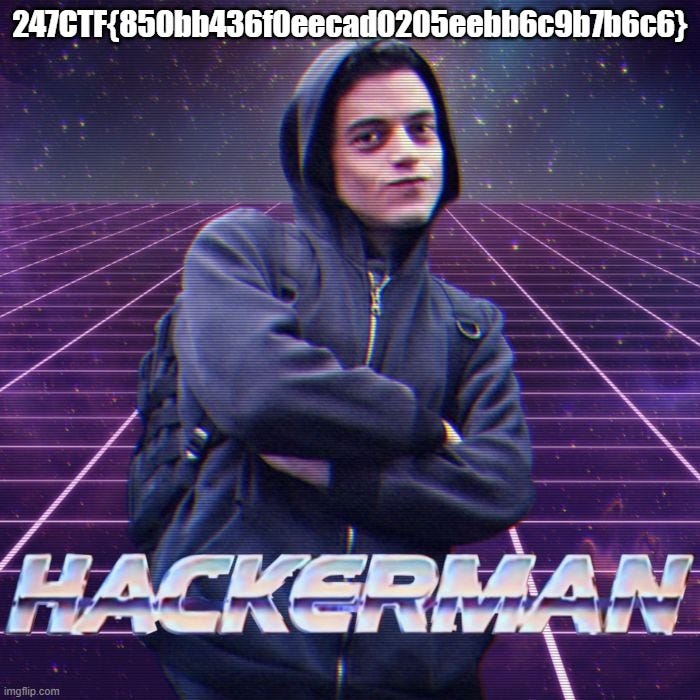
Inside the repaired archive, we find an image.
Open it — and there’s the flag embedded right inside!
Conclusion
This challenge was a masterclass in network forensics:
- Merged and analyzed MPTCP subflows
- Explored TCP streams and reassembled raw data
- Extracted and repaired a corrupt archive
- Inspected media to uncover an embedded flag
It blended protocol knowledge, scripting, byte-level investigation, and lateral thinking — all wrapped up in an elegant cyber treasure hunt. Pure digital archaeology.
메타데이터
- post_id
- fcbb8cfbedba
- slug
- 247ctf-fcbb8cfbedba
- url
- https://medium.com/@ox21.lo/247ctf-fcbb8cfbedba
- canonical_url
- https://medium.com/@ox21.lo/247ctf-fcbb8cfbedba
- author_url
- https://medium.com/@ox21.lo
- status
- ok
- fetched_at
- 2026-07-19 08:25:40