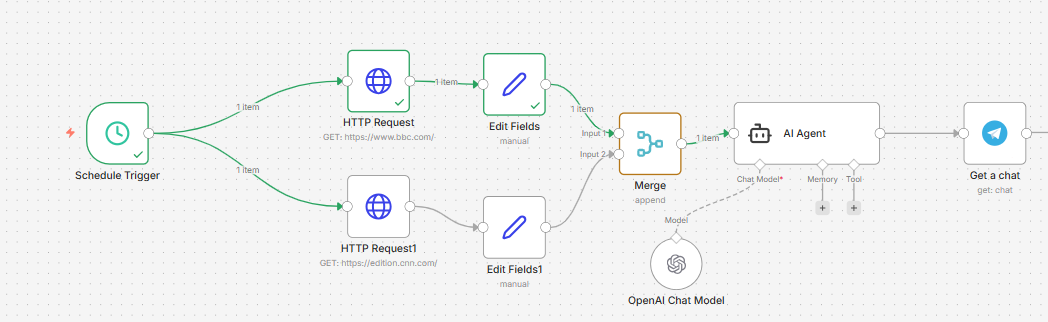
How I Built an AI-Powered Twitter Thread Generator Using n8n, OpenRouter, and Google Sheets
Automating Twitter Content Creation with AI
How I Built an AI-Powered Twitter Thread Generator Using n8n, OpenRouter, and Google Sheets

Automating Twitter Content Creation with AI
Creating engaging Twitter (X) threads consistently is time-consuming. You need ideas, structure, hooks, and formatting that keep readers engaged. Instead of manually writing every thread, I built an AI-powered Twitter Thread Generator using n8n, Google Sheets, OpenRouter AI, and JavaScript that automates the entire process.
The workflow reads a topic from Google Sheets, sends it to an AI model through OpenRouter, formats the response into a clean Twitter thread, and stores the generated content back into Google Sheets — ready for publishing or scheduling.
The Problem
Many creators and businesses struggle with:
- Running out of content ideas
- Spending hours writing threads
- Maintaining a consistent posting schedule
- Managing content across spreadsheets
I wanted a system that could generate high-quality Twitter threads automatically with minimal human effort.
Workflow Overview
The automation consists of six simple but powerful steps.
1. Schedule Trigger
The workflow begins with an n8n Schedule Trigger.
Instead of manually generating content, the automation runs automatically at a predefined time.
This allows new Twitter threads to be generated daily or multiple times a day without any manual intervention.
2. Read Topic from Google Sheets
The workflow fetches the next content topic from Google Sheets.
Example topics could include:
- AI Automation
- SaaS Growth
- Productivity Tips
- Startup Marketing
- n8n Tutorials
Google Sheets acts as a lightweight content database that anyone on the team can update.
3. Prepare the Prompt
Using the Edit Fields node, the workflow prepares the data before sending it to the AI model.
This step combines:
- Topic
- Writing style
- Thread length
- Tone of voice
- Additional instructions
Creating structured prompts significantly improves the consistency of AI-generated content.
4. Generate the Thread with OpenRouter AI
The workflow sends the prepared prompt to the OpenRouter API using an HTTP Request node.
The AI model generates:
- A compelling hook
- A well-structured thread
- Actionable insights
- A strong conclusion
- A call-to-action
Because OpenRouter supports multiple large language models, the workflow can easily switch between different AI providers without changing the automation logic.
5. Clean and Format the Response
AI responses often require slight formatting before they can be published.
A JavaScript Code node is used to:
- Split the thread into individual tweets
- Remove unwanted characters
- Clean markdown
- Format numbering
- Prepare the final output
This ensures the generated content is immediately usable.
6. Save the Generated Thread
Finally, the completed Twitter thread is appended back into Google Sheets.
Each generated thread is stored alongside its topic, making it easy to:
- Review
- Edit
- Approve
- Schedule
- Reuse later
Google Sheets becomes a centralized repository of AI-generated content.
Technologies Used
- n8n — Workflow automation
- Google Sheets — Content database
- OpenRouter API — AI model access
- JavaScript — Response formatting
- HTTP Request — API communication
Benefits of This Automation
Instead of spending 30–60 minutes writing a Twitter thread manually, this workflow can generate one in seconds.
Some key advantages include:
- Fully automated content generation
- Consistent publishing schedule
- Easy prompt customization
- Scalable for multiple content topics
- No manual copy-paste between tools
- Centralized content management using Google Sheets
Potential Improvements
This workflow can be extended with additional automations such as:
- Automatically posting to X (Twitter)
- Human approval before publishing
- AI-generated images for each thread
- Hashtag generation
- Multi-language thread creation
- Analytics tracking
- Notion or Airtable integration
- Slack or Discord notifications after generation
Final Thoughts
This project demonstrates how workflow automation and AI can significantly reduce the time required to produce high-quality social media content. By combining n8n, OpenRouter, and Google Sheets, I created a system that transforms simple topic ideas into polished Twitter threads with minimal human involvement.
Rather than replacing creativity, the automation accelerates the writing process, allowing creators and businesses to focus on strategy while AI handles the repetitive work.
Let’s Connect
If you’re looking to automate your business processes or build custom AI workflows like this, I’d be happy to help. Whether it’s AI content generation, workflow automation, lead generation, CRM integrations, or custom n8n solutions, feel free to reach out.
📧 Email: ahrz.work@gmail.com
I’m always open to discussing new projects, collaborations, or automation ideas.
Tags:
#n8n #AIAutomation #OpenRouter #TwitterThreads #GoogleSheets #Automation #JavaScript #WorkflowAutomation #NoCode #ArtificialIntelligence
메타데이터
- post_id
- fce15bce9fa9
- slug
- how-i-built-an-ai-powered-twitter-thread-generator-using-n8n-openrouter-and-google-sheets-fce15bce9fa9
- url
- https://medium.com/@ahrz.work/how-i-built-an-ai-powered-twitter-thread-generator-using-n8n-openrouter-and-google-sheets-fce15bce9fa9
- canonical_url
- https://medium.com/@ahrz.work/how-i-built-an-ai-powered-twitter-thread-generator-using-n8n-openrouter-and-google-sheets-fce15bce9fa9
- author_url
- https://medium.com/@ahrz.work
- status
- ok
- fetched_at
- 2026-07-16 00:44:52