reCAPTCHA Integration with Cloud Armor
To integrate reCAPTCHA Enterprise with Google Cloud Armor, follow these detailed steps:
Wiki topics:
☁️ · DevOps & Cloud
reCAPTCHA Integration with Cloud Armor
To integrate reCAPTCHA Enterprise with Google Cloud Armor, follow these detailed steps:
Step 1: Set Up Google Cloud Project
1. Create a Google Cloud Project:
- Go to the Google Cloud Console.
- Click on the project drop-down and select “New Project.”
- Enter a name for your project and click “Create.”
2. Enable APIs:
- In the Google Cloud Console, navigate to “APIs & Services” > “Library.”
- Search for and enable reCAPTCHA Enterprise API and Cloud Armor API
Step 2: Configure reCAPTCHA Enterprise
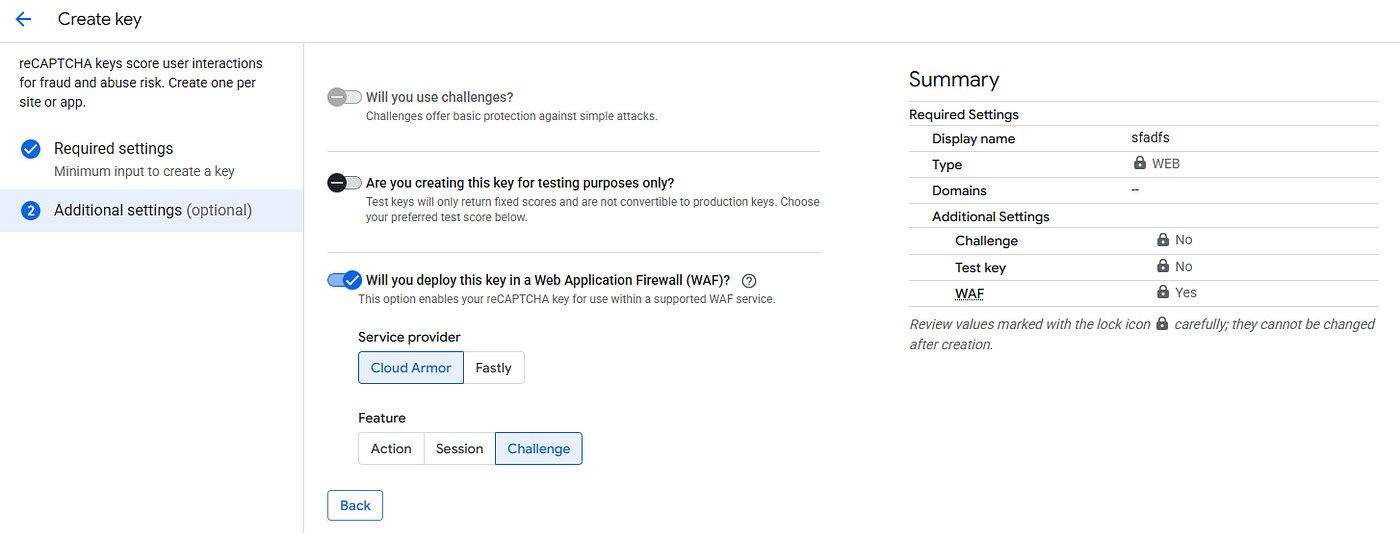
1. Create a reCAPTCHA Enterprise Key:
- Go to the reCAPTCHA Enterprise Console.
- Click on “Create Key.”
- Fill in the required details such as the name and select the application type of reCAPTCHA
- Add the domains where you will use reCAPTCHA.
- Check WAF option, selecting Cloud Armor and Feature = Challenge.
- Click “Create key” button.
2. Get the Site Key and Secret Key:
- After creating the key, you will be provided with a Key ID. Make sure to save these for later use.
Step 3: Integrate reCAPTCHA with Cloud Armor
1. Get the Site Key and Secret Key:
- In your Cloud Armor policy, create a rule to redirect to reCAPTCHA for all IP address.
- Set priority higher than other rules.

2. Run the following command to add challenge page key to cloud armor policy
gcloud compute security-policies update {cloud-armor-policy} \
--recaptcha-redirect-site-key "CHALLENGE-PAGE-KEY"
Step 4: Testing
2. Test the Integration
- Open web application in an inprivate mode or incognito mode.
- In some PC, the web app will redirect to Recaptcha challenge page to ensure the user is not bot. In other PC, this task can be omitted.
By following these steps, the integration of reCAPTCHA Enterprise with Google Cloud Armor has been completed, enhancing the security of your application against bots and malicious traffic.
Reference:
https://codelabs.developers.google.com/codelabs/cloud-armor-recaptcha-bot-management?hl=en#7
메타데이터
- post_id
- fced2f033f99
- slug
- recaptcha-integration-with-cloud-armor-fced2f033f99
- url
- https://medium.com/@chuntezuka/recaptcha-integration-with-cloud-armor-fced2f033f99
- canonical_url
- https://medium.com/@chuntezuka/recaptcha-integration-with-cloud-armor-fced2f033f99
- author_url
- https://medium.com/@chuntezuka
- status
- ok
- fetched_at
- 2026-07-30 12:04:41


