Python Text File Reading and Writing in various modes, Part 1
Python can be a bit complicated when reading and writing files. Even in text mode, which I am going to discuss in these articles, things…
Python Text File Reading and Writing in various modes, Part 1
Python can be a bit complicated when reading and writing files. Even in text mode, which I am going to discuss in these articles, things can get a bit…well, complicated.
Knowing where to apply the right file open mode will let you create a robust file management system, with little surprises like program terminating not because a file you opened doesn’t exist, but because it exists.
Opening a file is as simple as this, using with function which will take care of opening and closing file, so you don’t have to close it manually.
with open("list.txt") as file:You do whatever you do with a file handler file in an indented block that follows, and it is closed after the indented block operations end.
Create manually a sample text file list.txt, with sample contents, like London(no new line at the end). I am going to use file handler’s read method, which will read all file contents at one, and return it as a single string- we can assign it to a variable to process further, or simply print it.
with open("list.txt") as file:
    print(file.read())
London
When we opened a file, we did so without specifying something that is called file open mode. It is a second parameter to an open function, and if omitted, defaults to r, a read mode. We can still specify it for readability — notice that we must enclose it in quotes.
with open("list.txt", "r")Specifying a nonexistent file will cause FileNotFoudError, so it might be wise to use try to catch an exception that might occur.
Why should we care about other modes if we can read the file with r? Because, we need to write to a file. Trying to write to a file with simple write file handler method will give us an error:
    file.write("Paris")
io.UnsupportedOperation: not writable
r mode will allow us to read, but not write. To be able to write, we need something else.
One option is using r+ mode- it will allow us to read and write.
with open("list.txt", "r+) as file:
    print(file.read())
    file.write("Paris")
Can you guess what the file will look like now? Will it be Paris? Or London?
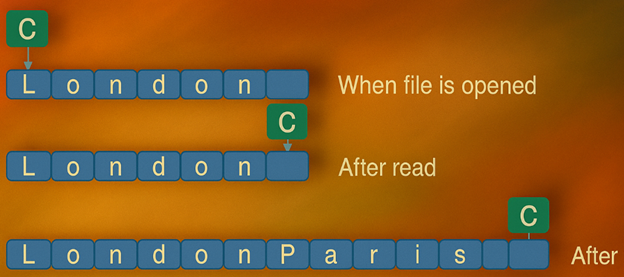
LondonParisIt will be LondonParis. So, it is like an append mode…or not really. It appended Paris to London(no usual newline if you do not specify it explicitly), but only because we read the file before writing.
Reading file moves something called cursor from the beginning of the file to the end of it-and subsequent write wrote Paris from that position. You can think of the cursor as a pointer (in bytes) that defines where next read or write will take place.

If you try to do two reads, second one will yield nothing, because cursor is at the end of the file after the first read.
You can see the cursor position by using file handler’s tell method- it will report the exact current location of the cursor. Play a bit and place file.tell() at various locations in your program.
Take care, if you run program multiple times, you will probably have something line LondonParisParisParisLondon… in your file, so revert the file manually to its previous London content.
When you do that, execute the following program:
with open("list.txt", "r+") as file:
    file.write("Paris")
What do you think that the result will be? Let us look at the list.txt file:
ParisnWhat happened there? We opened file, with cursor position at 0, and wrote Paris from that position. Paris overwrote initial Londo, and left n, with cursor positioned at that letter, n.

If we add line and rerun program (revert list.txt to London before that), what will be printed?
print(file.read())Do you think that it will print Parisn? Think again, because this will be the output:
nThis is because cursor shows not only where writing will start, but also where reading starts- and cursor was at position 5(letter n,all that is left of London) when we started reading.
In my next article, I will explain additional modes and their nuances.
If you are learning Python, and want to follow the PCEP Python exam syllabus, check my newest Udemy Course, it is a video tutorial packed with hands-on example, quizzes, coding exercises and two full mock exams:
https://www.udemy.com/course/pass-python-pcep-30-0x-video-lessons-and-mock-tests-2025/
If you want to learn more about AWS Lightsail service, check my course on Udemy on AWS Lightsail.
https://www.udemy.com/course/aws-lighsail-a-different-perspective
Also, if you want to prepare for the basic AWS Certified Cloud Practitioner exam, check another one of my courses, also on Udemy:
https://www.udemy.com/course/aws-certified-cloud-practitioner-crash-course
메타데이터
- post_id
- fd045ef7f790
- slug
- python-text-file-reading-and-writing-in-various-modes-part-1-fd045ef7f790
- url
- https://medium.com/@krejjas/python-text-file-reading-and-writing-in-various-modes-part-1-fd045ef7f790
- canonical_url
- https://medium.com/@krejjas/python-text-file-reading-and-writing-in-various-modes-part-1-fd045ef7f790
- author_url
- https://medium.com/@krejjas
- status
- ok
- fetched_at
- 2026-06-23 17:05:31






