DNS: a computer network overview of Domain Name Service
Translating hostnames to IP addresses
DNS: a computer network overview of Domain Name System
Photo by Markus Spiske on Unsplash
Spotting applications on the Internet
When visiting websites via a browser or calling an API through a script or software (such as Postman or Insomnia), you need to specify a destination URL. The URL is composed of the hostname and the pathname. For example, we deployed an HTTP application on AWS in this article. As a result, we received the *http://<environment-name>.<random-string>.<aws-region>.elasticbeanstalk.com/<route> URL. http://<environment-name>.<random-string>.<aws-region>.elasticbeanstalk.com* is the hostname.
The hostname is a human-friendly string that labels the host where an application resides. However, for machines, such an arbitrary length-variable string is difficult to handle. As a consequence, a 32-bit IP address is used instead when end systems communicate across the Internet. The IP address has a “{part-1}.{part-2}.{part-3}.{part-4}” format, where each part is a decimal number between 0 and 255. Besides, when read from left to right, each portion adds information about the host location on the Internet.
A geographical analogy
As an analogy, this terminology is like a person's or a monument’s address. Let’s take the Cristo Redentor, in Brazil, as an example:
Cristo Rendentor in Brazil
If you ask where it is located, you would probably hear:
Parque Nacional da Tijuca — Alto da Boa Vista, Rio de Janeiro — RJ
This is meaningful for people who would type it into software like Google Maps to learn how to get there, just like they type the hostname into a browser. However, software does not work with such human-friendly strings. Instead, they use the geographical coordinates (for Cristo Redentor, they are 22°57′7″S 43°12′38″W / 22.95194°S 43.21056°W), similar to how IP addresses are used.
Domain Name System (DNS)
Domain Name System, or DNS, is an application-layer protocol that, as the main service, translates hostnames into IP addresses. Under the hood, DNS consists of querying a distributed database.
When you type a URL into a browser:
- The browser runs a DNS client.
- The browser extracts the hostname from the URL and passes it to the DNS client.
- The DNS client sends a query for the IP address associated with the hostname.
- The DNS client receives the response containing, among other things, the IP addresses.
- The browser uses the IP address to open a TCP connection and communicate with the end system over HTTP.
Other services provided by DNS are:
- Aliasing: complicated hostnames can have simpler, shorter versions, called aliases. The original, complicated hostname is called the canonical hostname. Every time an end user types an alias hostname in the browser, DNS resolves it to the canonical hostname and the corresponding IP address.
- Load distribution: applications with high throughput typically distribute incoming traffic among servers with different IP addresses. For such a use case, DNS maps a given request to one of these IP addresses.
Why distributed?
One alternative to the distributed approach of DNS is to store all the hostname-to-IP mappings in a centralized database. However, that has several prohibitive inconveniences:
- Single point of failure: Once the database is down, the whole Internet is down.
- High throughput: All massive Internet traffic would go through this database, which would need to scale up accordingly.
- Worldwide audience: A centralized database could not be close to all clients, adding delay to distant ones.
- Maintenance: Such a centralized database would have to store numerous hostname-to-IP mappings and handle frequent updates.
Therefore, a distributed system suits the decentralized, global nature of the Internet. Additionally, DNS has extra features that speed it up:
- It runs over UDP since it needs to be fast rather than reliable.
- It has a DNS caching mechanism that reduces the number of active queries.
DNS hierarchy
There are three types of DNS servers:
- Root DNS servers provide the IP address of TLD servers.
- Top-level domain (TLD) servers provide the IP address of authoritative DNS servers.
- Authoritative DNS servers provide the IP address of the hostname.
The following diagram summarizes the lifecycle of a DNS request:
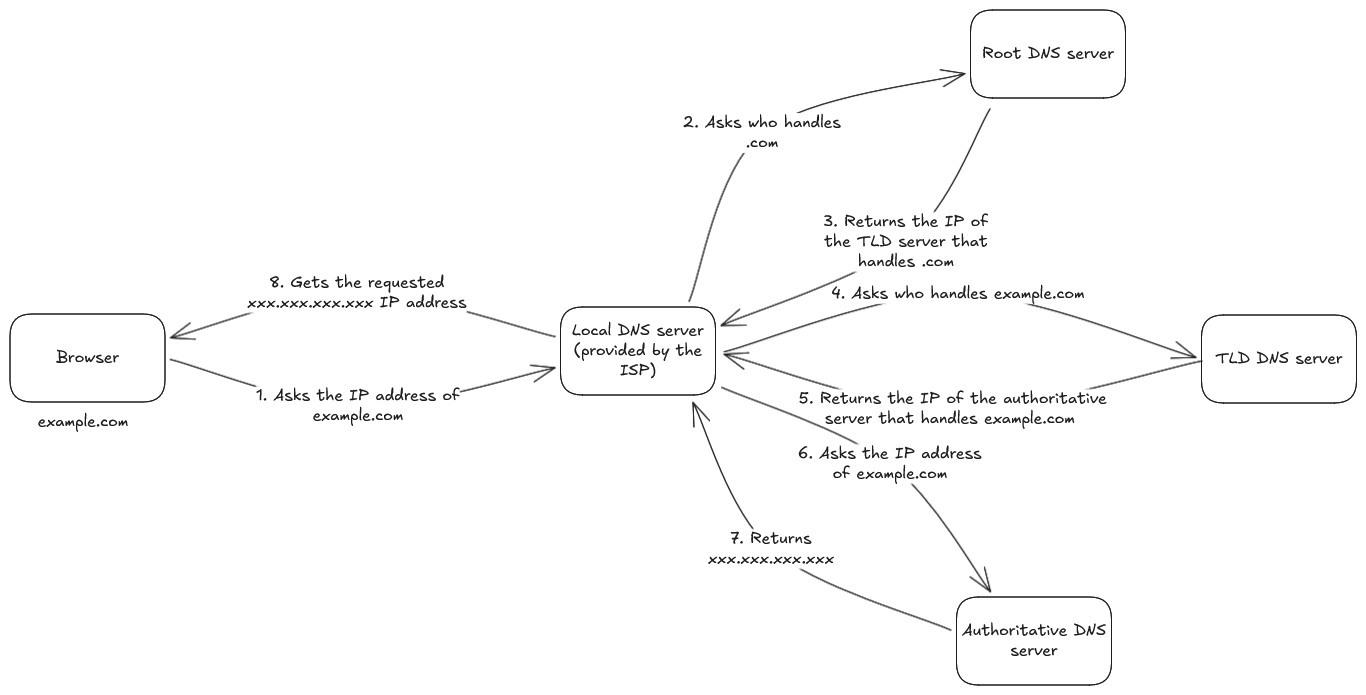
Note that the request goes down through the DNS hierarchy, from the root DNS server to the authoritative DNS server, to get fully resolved into an IP address. The number of hops can be reduced by DNS caching. If the hostname is found in the cache, there is no need to perform a round trip to a DNS server. The DNS cache also keeps the IP address of TLD servers.
DNS records
A resource record (RR) is a four-value tuple containing the following values:
- Name: hostname that was queried.
- Type: type of the record. We will expand on this later.
- Value: value held by the record. Its meaning depends on the record type.
- TTL: Time-To-Live for the resource in the DNS cache.
Let’s now explore the main record types. For that purpose, we will use the nslookup command-line tool, which allows us to get DNS records of a given domain.
A and AAAA type records
They connect the name of a domain with the corresponding IP address. A records provide the IPv4 version, while AAAA provides the IPv6 one (check this to know the difference).
We can query these records with nslookup in the following way:
A type record:
nslookup -type=A medium.comOutput:
Server: 127.0.0.53
Address: 127.0.0.53#53

Non-authoritative answer:
Name: medium.com
Address: 162.159.153.4
Name: medium.com
Address: 162.159.152.4
AAAA type record:
nslookup -type=AAAA medium.comOutput:
Server:  127.0.0.53
Address: 127.0.0.53#53

Non-authoritative answer:
Name: medium.com
Address: 2606:4700:7::a29f:9904
Name: medium.com
Address: 2606:4700:7::a29f:9804
NS type record
It connects the name of a domain with the corresponding authoritative DNS server that knows how to obtain IP addresses for domain hosts.
We can try this out with nslookup as shown below:
nslookup -type=ns medium.comOutput:
Server: 127.0.0.53
Address: 127.0.0.53#53

Non-authoritative answer:
medium.com nameserver = alina.ns.cloudflare.com.
medium.com nameserver = kip.ns.cloudflare.com.

Authoritative answers can be found from:
MX type record
It provides the name of the mail servers for that domain. It means that all emails sent to the hostname will be sent to these mail servers.
With nslookup:
nslookup -type=mx medium.comOutput:
Server:  127.0.0.53
Address: 127.0.0.53#53

Non-authoritative answer:
medium.com mail exchanger = 10 aspmx2.googlemail.com.
medium.com mail exchanger = 1 aspmx.l.google.com.
medium.com mail exchanger = 5 alt2.aspmx.l.google.com.
medium.com mail exchanger = 5 alt1.aspmx.l.google.com.
medium.com mail exchanger = 10 aspmx3.googlemail.com.

Authoritative answers can be found from:
CNAME type record
It provides the canonical hostname for the provided alias hostname. For example:
nslookup -type=cname en.wikipedia.orgThe output is:
Server:  127.0.0.53
Address: 127.0.0.53#53

Non-authoritative answer:
en.wikipedia.org canonical name = dyna.wikimedia.org.

Authoritative answers can be found from:
A remark about authoritative DNS servers
Authoritative DNS servers provide the A and AAAA records of a given hostname. On the other hand, non-authoritative servers contain the NS type record for the domain that includes the hostname and the type A record providing the IP address of the NS record value field.
DNS messages
A DNS has the following format:
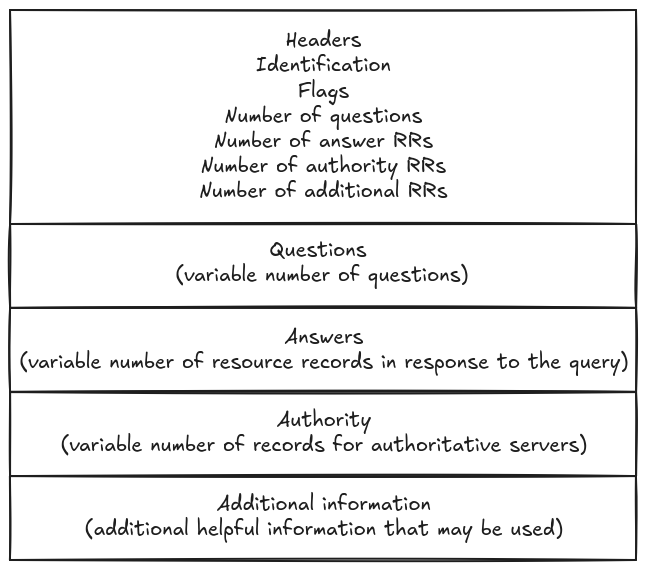
We can check the entire DNS message using the dig command-line tool in Linux and MacOS. If you do not have it installed (many Linux distributions come with it installed by default), follow the instructions in this article.
Then, we can run the following command to query for the A records associated with a given hostname:
dig medium.comThe output is:
; <<>> DiG 9.18.30-0ubuntu0.20.04.2-Ubuntu <<>> medium.com
;; global options: +cmd
;; Got answer:
;; ->>HEADER<<- opcode: QUERY, status: NOERROR, id: 60888
;; flags: qr rd ra; QUERY: 1, ANSWER: 2, AUTHORITY: 0, ADDITIONAL: 1

;; OPT PSEUDOSECTION:
; EDNS: version: 0, flags:; udp: 65494
;; QUESTION SECTION:
;medium.com.   IN A

;; ANSWER SECTION:
medium.com.  223 IN A 162.159.153.4
medium.com.  223 IN A 162.159.152.4

;; Query time: 4 msec
;; SERVER: 127.0.0.53#53(127.0.0.53) (UDP)
;; WHEN: Mon May 18 01:19:19 -03 2026
;; MSG SIZE  rcvd: 71
The answer section should remind the output of the nslookup command. Indeed, the dig command provides a more detailed output than the nslookup, but they should be consistent with each other. Feel free to play around with other resource types and compare them with the outputs obtained previously.
Another interesting feature of the dig command is the DNS trace, which shows the path of the query across DNS servers. Let’s obtain the DNS trace for the medium.com hostname through the command below:
dig medium.com +traceThis yields:
; <<>> DiG 9.18.30-0ubuntu0.20.04.2-Ubuntu <<>> medium.com +trace
;; global options: +cmd
.   656 IN NS h.root-servers.net.
.   656 IN NS g.root-servers.net.
.   656 IN NS f.root-servers.net.
.   656 IN NS e.root-servers.net.
.   656 IN NS d.root-servers.net.
.   656 IN NS c.root-servers.net.
.   656 IN NS b.root-servers.net.
.   656 IN NS a.root-servers.net.
.   656 IN NS m.root-servers.net.
.   656 IN NS l.root-servers.net.
.   656 IN NS k.root-servers.net.
.   656 IN NS j.root-servers.net.
.   656 IN NS i.root-servers.net.
;; Received 262 bytes from 127.0.0.53#53(127.0.0.53) in 0 ms

;; UDP setup with 2001:500:2d::d#53(2001:500:2d::d) for medium.com failed: network unreachable.
;; no servers could be reached
;; UDP setup with 2001:500:2d::d#53(2001:500:2d::d) for medium.com failed: network unreachable.
;; no servers could be reached
;; UDP setup with 2001:500:2d::d#53(2001:500:2d::d) for medium.com failed: network unreachable.
;; UDP setup with 2001:500:2::c#53(2001:500:2::c) for medium.com failed: network unreachable.
com.   172800 IN NS e.gtld-servers.net.
com.   172800 IN NS c.gtld-servers.net.
com.   172800 IN NS d.gtld-servers.net.
com.   172800 IN NS g.gtld-servers.net.
com.   172800 IN NS i.gtld-servers.net.
com.   172800 IN NS k.gtld-servers.net.
com.   172800 IN NS a.gtld-servers.net.
com.   172800 IN NS b.gtld-servers.net.
com.   172800 IN NS l.gtld-servers.net.
com.   172800 IN NS f.gtld-servers.net.
com.   172800 IN NS h.gtld-servers.net.
com.   172800 IN NS m.gtld-servers.net.
com.   172800 IN NS j.gtld-servers.net.
com.   86400 IN DS 19718 13 2 8ACBB0CD28F41250A80A491389424D341522D946B0DA0C0291F2D3D7 71D7805A
com.   86400 IN RRSIG DS 8 1 86400 20260530170000 20260517160000 54393 . e22UmlJHaWiBG1OSdNb1aXbEiIeA1+1DuI2TZqEWqoyXNOqKCxpYhV4X 27ge+rTPAVeCSkuIITtVNazIMHqva8P7FXXksR0rjJyQg0Gpvqmh859a 8m2rhI54acSW5nA0Klr3DwJ2uZ3OJodW4cTjIRPqERiE15tdUawZ0RDd Trio0put4ew5sa9O59+F7/LyXXN6x5JvO8yZETrwYtTMs/zg7fOOgE5R 0MFz8fJhRXKZbzbWmNTIVBZwalJ/25g7McX94XUWVbu9Brmn6tG8LCA9 teJxiNgx86o3pTANulzQ5nLSkN7seXrBPRQuQL5x0ylGLU79LmyTJYEf 1FRudg==
;; Received 1170 bytes from 202.12.27.33#53(m.root-servers.net) in 8 ms

;; UDP setup with 2001:503:a83e::2:30#53(2001:503:a83e::2:30) for medium.com failed: network unreachable.
;; UDP setup with 2001:503:39c1::30#53(2001:503:39c1::30) for medium.com failed: network unreachable.
;; UDP setup with 2001:500:856e::30#53(2001:500:856e::30) for medium.com failed: network unreachable.
;; UDP setup with 2001:503:d2d::30#53(2001:503:d2d::30) for medium.com failed: network unreachable.
;; UDP setup with 2001:501:b1f9::30#53(2001:501:b1f9::30) for medium.com failed: network unreachable.
;; UDP setup with 2001:503:eea3::30#53(2001:503:eea3::30) for medium.com failed: network unreachable.
;; UDP setup with 2001:503:83eb::30#53(2001:503:83eb::30) for medium.com failed: network unreachable.
medium.com.  172800 IN NS kip.ns.cloudflare.com.
medium.com.  172800 IN NS alina.ns.cloudflare.com.
CK0POJMG874LJREF7EFN8430QVIT8BSM.com. 900 IN NSEC3 1 1 0 - CK0Q3UDG8CEKKAE7RUKPGCT1DVSSH8LL NS SOA RRSIG DNSKEY NSEC3PARAM
CK0POJMG874LJREF7EFN8430QVIT8BSM.com. 900 IN RRSIG NSEC3 13 2 900 20260522002629 20260514231629 27677 com. 4NrGuzOcoweHvSpzplYAnKaYtTl2uTrH+R/KNXuaKtvXqt5ceQcQEagO Guc0w3L7oTxlT2pWBbZjoTcf2NA+8w==
78A549A6CH2LGLVP2EOCSNLTK39RDQ9V.com. 900 IN NSEC3 1 1 0 - 78A5R9415BAEP59TODMLNNT1PCQU8HCK NS DS RRSIG
78A549A6CH2LGLVP2EOCSNLTK39RDQ9V.com. 900 IN RRSIG NSEC3 13 2 900 20260522022725 20260515011725 27677 com. 1q+guifc6fXs49eO13+uTs/j4AEl0NzaT9V/JJpuAtnFNjRUrno9c3fZ juI8X67dmx++8mUzWUOvuvCWGewOTQ==
;; Received 712 bytes from 192.5.6.30#53(a.gtld-servers.net) in 220 ms

;; UDP setup with 2a06:98c1:50::ac40:2180#53(2a06:98c1:50::ac40:2180) for medium.com failed: network unreachable.
;; UDP setup with 2803:f800:50::6ca2:c03d#53(2803:f800:50::6ca2:c03d) for medium.com failed: network unreachable.
;; UDP setup with 2606:4700:58::adf5:3b80#53(2606:4700:58::adf5:3b80) for medium.com failed: network unreachable.
medium.com.  300 IN A 162.159.153.4
medium.com.  300 IN A 162.159.152.4
;; Received 71 bytes from 173.245.59.128#53(kip.ns.cloudflare.com) in 4 ms
In the above output, you can see that:
- First, the local DNS server goes over the root servers.
- Then, one of the root servers (m.root-servers.net) returns the TLD servers handling the .com domain.
- Then, one of the TLD servers (a.gtld-servers.net) returns the authoritative servers that handle the medium.com domain.
- Finally, the IP addresses 162.159.153.4 and 162.159.152.4 corresponding to the hostname medium.com are returned.
Inserting records into the DNS database
By now, we have a great understanding of what services DNS provides, how it works, and even how to query the DNS database with nslookup and dig. Nonetheless, software developers should also know how to set up a domain for an application hosted on a server with a specific IP. Let’s say you want to register a domain example.com associated with the IP address 123.123.123.1. There are two fundamental steps involved:
- Have authoritative servers that contain the A records for your domain. In that case, it would be the mapping between example.com and 123.123.123.1. Also, we can have other record types, like an MX record for a mail server. In our example, let’s say the authoritative server is hosted in a domain dns.example.com, which maps to an IP address 121.212.121.2.
- A Domain Registrar, a commercial entity, would be responsible for inserting the DNS database with an NS record and an A record. These records would map your domain example.com to the authoritative server *dns.example.com and the authoritative server domain dns.example.com to its IP address 121.212.121.2, *respectively.
These steps are outlined in green in the diagram below:
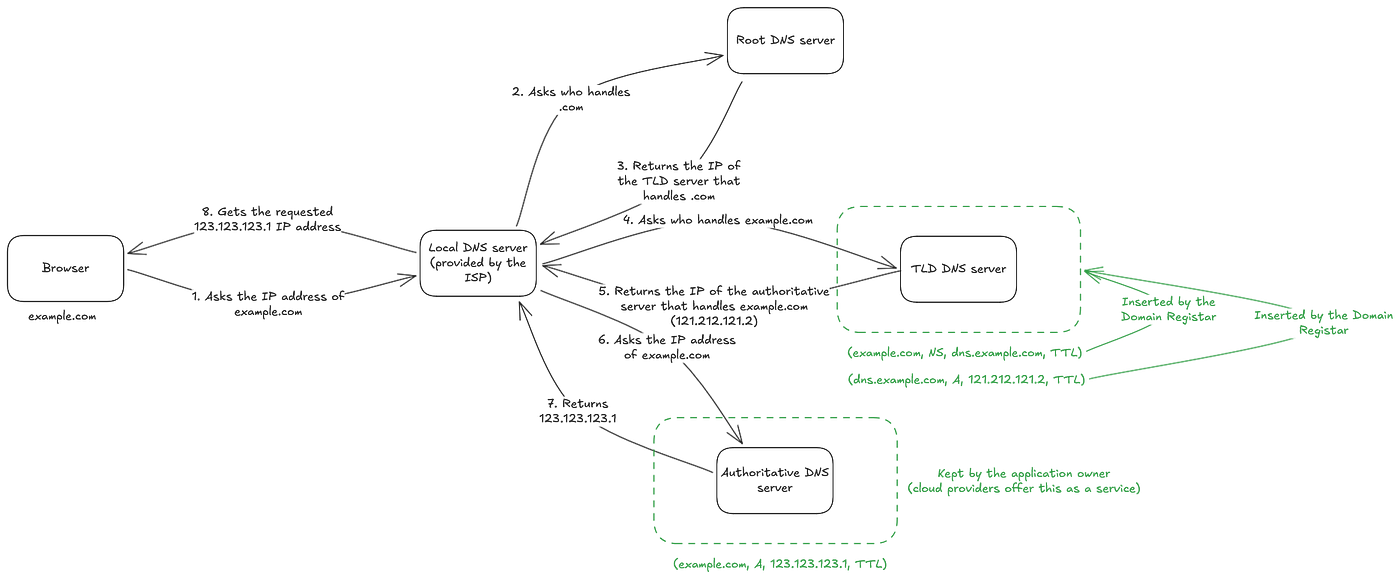
AWS Route 53 provides both authoritative server and Domain Registrar services within the AWS environment.
References
Kurose, J. F., & Ross, K. W. (2021). Computer Networking: A Top-Down Approach (8th ed.). Pearson.
메타데이터
- post_id
- fd31fa68b61c
- slug
- dns-a-computer-network-overview-of-domain-name-service-fd31fa68b61c
- url
- https://medium.com/@humbertofilho_30158/dns-a-computer-network-overview-of-domain-name-service-fd31fa68b61c
- canonical_url
- https://medium.com/@humbertofilho_30158/dns-a-computer-network-overview-of-domain-name-service-fd31fa68b61c
- author_url
- https://medium.com/@humbertofilho_30158
- status
- ok
- fetched_at
- 2026-06-20 20:29:01