Building a Sudoku game without coding using Amazon Q Developer
I was experimenting with Amazon Q developer for the “Build Games Challenge: Build Classics with Amazon Q Developer CLI” and decided to…
Building a Sudoku game without coding using Amazon Q Developer
I was experimenting with Amazon Q developer for the “Build Games Challenge: Build Classics with Amazon Q Developer CLI” and decided to develop a game of Sudoku.
The process is straightforward,
- Create an Amazon Builder ID.
- Install the Amazon Q extension in Visual Studio Code.
- Sign in to your Amazon Builder ID with the extension.
- Enter your requirements, and it will generate all the necessary files to run the application.
It was impressive that I didn’t need to open the application code before running it!
I wrote a brief prompt:
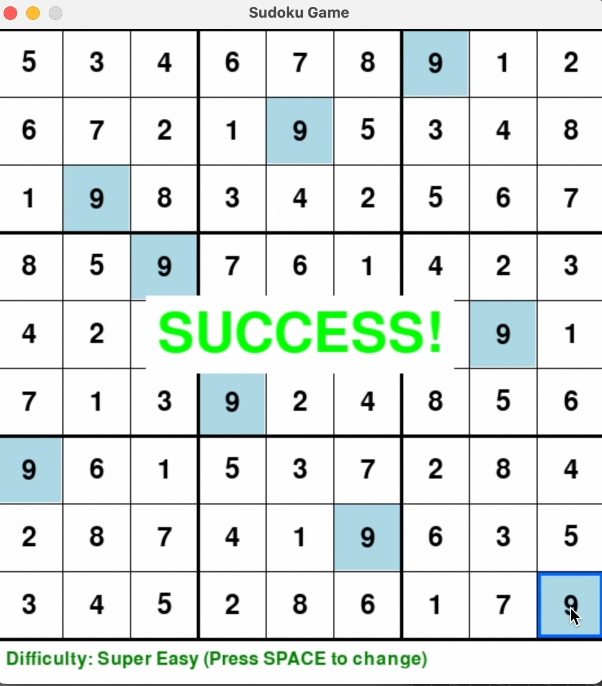
“Create a Sudoku game with pygame. I need the game to be having features like — highlighting the selected cell, show the numbers already present in the game with the same number”.
The game was generated quickly. All I had to do was run two commands: install prerequisites with pip install -r requirements.txt and then python sudoku.py.
I tested the game for functionality and added features. I specified,
Once the game is finished, it should give a success message,
and
Add a feature to show the game difficulty level — super easy, easy, medium and hard.
I tested the game, and it worked as expected. Excellent coding (not coding) experience.
[embed]
You can find the generated code here https://github.com/sujithrpillai/sudoku
I recommend exploring this feature of Amazon Q to enhance your coding experience.
메타데이터
- post_id
- fd4aeb3e4077
- slug
- building-a-sudoku-game-without-coding-using-amazon-q-developer-fd4aeb3e4077
- url
- https://medium.com/@srpillai/building-a-sudoku-game-without-coding-using-amazon-q-developer-fd4aeb3e4077
- canonical_url
- https://medium.com/@srpillai/building-a-sudoku-game-without-coding-using-amazon-q-developer-fd4aeb3e4077
- author_url
- https://medium.com/@srpillai
- status
- ok
- fetched_at
- 2026-07-19 07:45:11



