CDS Views — Part 1
What’s a CDS View?
CDS Views — Part 1
CDS and its Architecture
What’s a CDS View?
A view is an entity that is not persistent; it is defined as the projection of other entities. A CDS View is an infrastructure layer used to define semantically rich data models. Allows developers to define entity types and the relationships between them. CDS stands for Core Data Services. Previously SE11 Views were created and used, but CDS is more powerful will find out how.
Types of Languages associated with CDS are as below
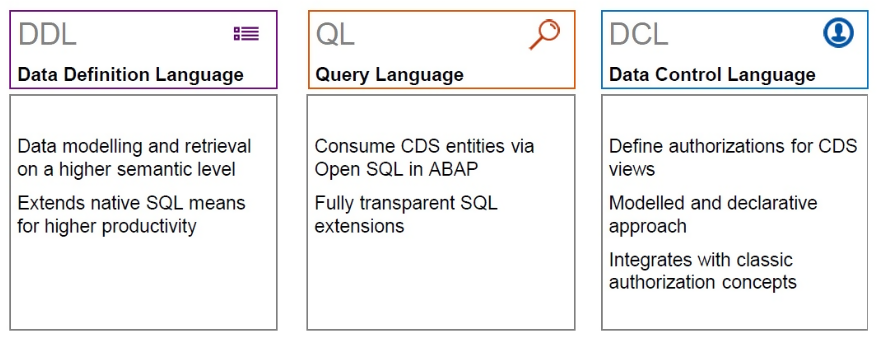
Fig. 1 CDS View characteristics
Features of CDS View
- Semantically rich data-models
- Uses domain-specific languages
- Completely based on SQL (has most of SQL functions)
- Compatible with any DB
- Native integration with SAP HANA
- Built-in functions and code pushdown
Simple CDS View

In the above example,
- Lines with ‘@’ is known as annotation and will get to know more in upcoming parts.
- Define View is a keyword followed by CDS View name/Entity name. Also, note the annotation “@AbapCatalog.sqlViewName: ‘ZCDS_SQL1’ ” here ZCDS_SQL1 is known as SQL View name, in the next section will understand the difference between the two.
- as Select from is again a keyword followed by DB tables/View ( in this case it's a DB — VBAK(sales order header table) ).
- From begin of curly braces ‘{‘ to the end of it ‘}’ is known as the Projection/Selection list. Those are fields which are visible to the end consumer.
Difference Between CDS View & SQL View
- CDS View represents a View that can be modelled/created or modified in Eclipse/HANA Studio/VS Code only. This cannot be created/Modified in SE11(SAP GUI) only can be Viewed where as SQL View is auto-generated when a CDS view is activated. Thus annotation “@AbapCatalog.sqlViewName:” is mandatory.
- CDS View shows calculation logic/arithmetic/string operations/ case statements used, basically, we can have a look at business logic written in it. whereas SQL view represents only Tables used/Join Conditions/Fields in Selection/Selection Condition if any.
- Associating SQL View for a CDS view is a must except for the Table function(Type of CDS view covered in next Part 2 ).
Difference Between ABAP Dictionary Views & CDS View
- Most of you must be aware of ABAP Dictionary Views(SE11 views), CDS view is an advanced version of it with many more features & functionalities added.
- ABAP Dictionary views just join a few Database tables/ Views whereas CDS along with joining them adds features like calculations, aggregations, and more variations of table join to it, and they can also be stacked with each other (Upcoming in Part 4).
Fig. 2 ABAP Dictionary Views vs CDS View
Development Environment
It is not possible to create CDS views in SAP GUI. The recommended tool for this is Eclipse IDE with the ABAP Development Tools (ADT) plugin. This is a platform for modern ABAP-related development. It is not limited to CDS views and can be used for developing other objects such as ABAP programs, classes, function modules etc. Along with eclipse, other tools like HANA Studio & VS Code can also be used for creating CDS Views. To get Eclipse with ADT tools installed [*To install ADT for Eclipse Follow 6.1.3 Installation Steps*]
This work was Originally Published in my Other blog post from 2022 https://saptechacademy.wordpress.com/2021/09/14/cds-views-part-1/
Let's catch up in the next Post! Thank you😊
메타데이터
- post_id
- fd4f4b6e51f6
- slug
- cds-views-part-1-fd4f4b6e51f6
- url
- https://medium.com/@naveenkumarbaskaran/cds-views-part-1-fd4f4b6e51f6
- canonical_url
- https://medium.com/@naveenkumarbaskaran/cds-views-part-1-fd4f4b6e51f6
- author_url
- https://medium.com/@naveenkumarbaskaran
- status
- ok
- fetched_at
- 2026-06-15 20:49:13