Behind Every Click: How Web Browsers Use Processes and Threads
Once we start a web browser, enter a URL or click Enter, the webpage loads immediately. We can open various tabs, watch videos, listen to…
Behind Every Click: How Web Browsers Use Processes and Threads
Once we start a web browser, enter a URL or click Enter, the webpage loads immediately. We can open various tabs, watch videos, listen to songs and even use web applications without paying too much attention to what is happening in the background. However, modern web browsers are some of the most complex software applications that we use on a regular basis.
Nevertheless, all the speed and responsiveness provided by browsers come from a very carefully crafted architecture based on two key concepts of operating systems. They are processes and threads. They allow browsers to handle numerous tasks simultaneously while ensuring safety, reliability and efficiency of the application.
In this article, I will analyze the process and thread architecture in modern browsers focusing on two popular ones. They are Google Chrome and Mozilla Firefox.
Processes and Threads
To get the idea of browser architecture, it is necessary to realize the difference between process and thread.
Process may be considered as a self-contained running program. It has its own memory, resources and environment. The operating system uses processes to separate applications from each other. Thus, if some process crashes, other processes will not be affected by this crash.
Thread is a smaller unit of execution which is contained in the process. Several threads can work in the same process using the same memory and resources. As threads use the same resources, they are much quicker to create than processes. Thus, it allows doing several things at once.
The modern browsers rely on these two concepts greatly.
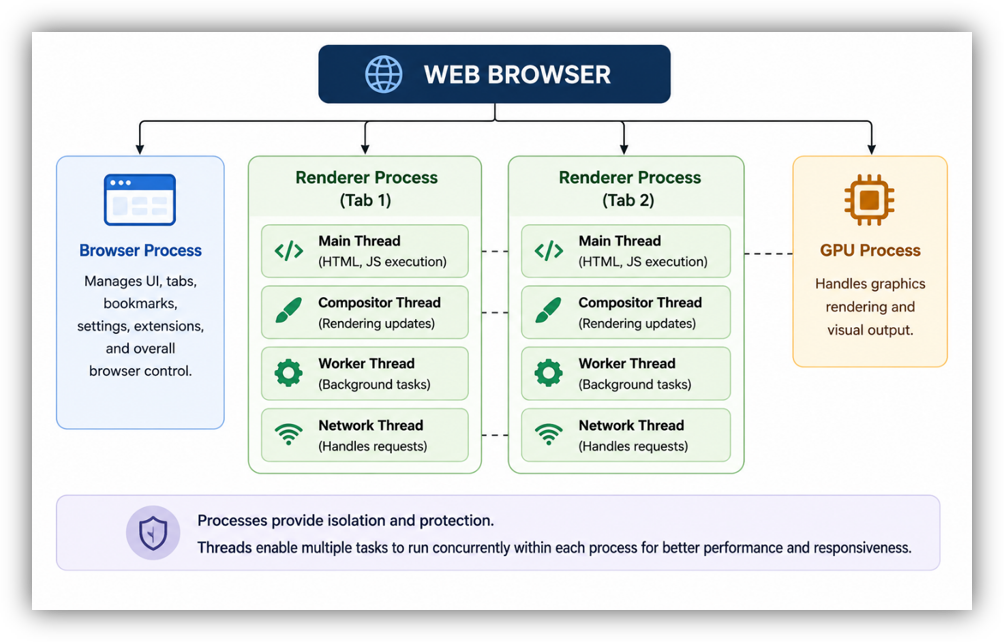
Processes provide isolation while threads allow multiple tasks to execute concurrently within each process
Why Modern Browsers Need More Than One Process
Over the past twenty years, there have been many changes on the Internet. Websites used to feature only static text and pictures on their web pages. Nowadays, web pages operate like full-blown software applications. There are many operations going on at the same time on one web page. JavaScript is being executed, video is being played, input from the user is being processed, communication with the server takes place, dynamic content is being shown.
In case a browser decided to do all this within one process and one thread, its performance would drop dramatically. A sluggish script running on one web page would bring everything else to a halt. In case of a crash in one tab, all other tabs would go down with it. There would be even more risks associated with security threats. Multi-process architecture is the way to overcome these issues.
How Google Chrome Uses Processes and Threads
Google Chrome is usually considered the browser that introduced the concept of multi-process architecture to the world of browsers. The moment of Chrome’s launch in 2008 was characterized by treating browser tabs not as a set of elements within the same process but rather as independent objects.
Whenever a user launches several tabs in Google Chrome, it usually starts separate renderer processes for them. Renderer processes are used for rendering pages, loading web pages and scripts as well as carrying out JavaScript code. Thus, whenever a tab gets crashed because of a problematic website or some JavaScript, all other tabs work without any problem.
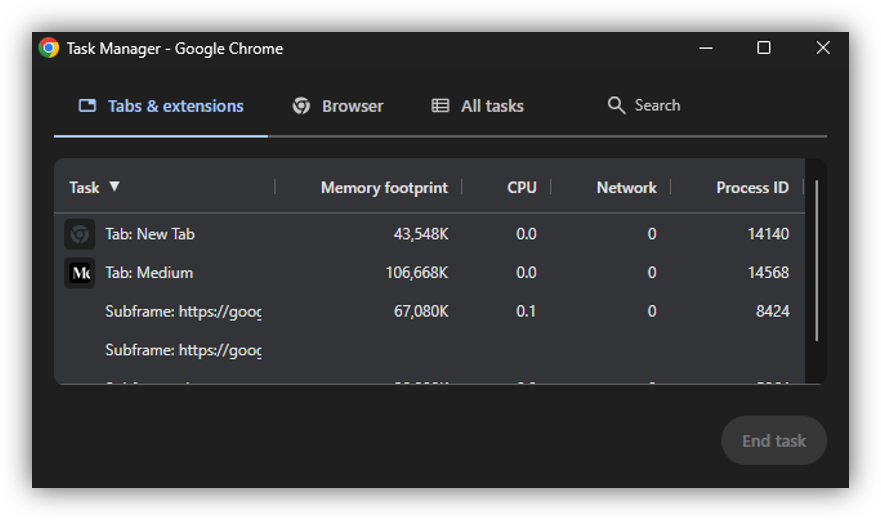
Chrome Task Manager reveals how different browser components run as separate processes
Google Chrome also uses separate processes for managing the browser itself, rendering graphics, networking and extensions. It makes Chrome more stable and secure since every process works independently and is placed in a certain environment.
It should be noted that the usage of processes in Google Chrome is not the only aspect. Each process contains several threads, which take care of user interactions, computation, rendering and networking simultaneously. While one thread is dealing with a user’s click, another one downloads information from the web server, and the third one renders something on the screen.
How Firefox Approaches the Same Problem
Mozilla Firefox took a somewhat different path. Earlier versions of Firefox relied heavily on a single-process architecture. While this approach reduced memory consumption, it also meant that problems in one webpage could potentially affect the entire browser.
As web applications became more complex, Mozilla recognized the limitations of this design and introduced major architectural changes through projects known as Electrolysis and Quantum. These initiatives transformed Firefox into a modern multi-process browser capable of competing with Chrome in terms of performance and reliability.
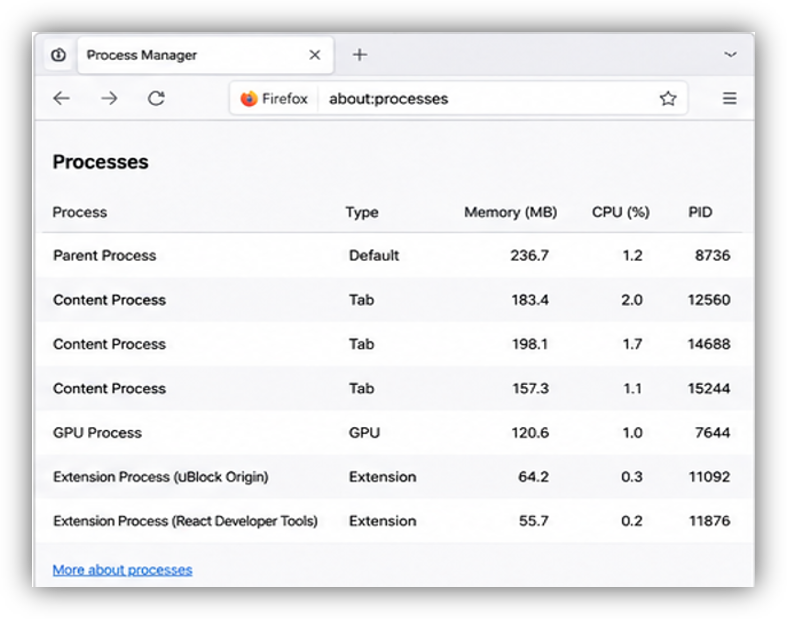
Firefox organizes tabs and browser services across multiple content processes
Today, Firefox uses a parent process that manages the browser interface while content processes handle webpage execution. Unlike Chrome, which often assigns separate processes to many tabs, Firefox commonly groups multiple tabs into a smaller number of content processes. This approach helps reduce memory usage while still providing a significant level of isolation.
Firefox also makes extensive use of multithreading. One of the most notable examples is the Quantum engine, which introduced parallel processing techniques throughout the browser. Tasks such as CSS styling, rendering, and page layout can be distributed across multiple CPU cores, allowing Firefox to take advantage of modern hardware more efficiently.
As a result, Firefox is often praised for delivering strong performance while maintaining lower memory consumption than Chrome.
Comparing Chrome and Firefox
Despite the common architecture features of Chrome and Firefox, there are differences in their approaches.
Chrome favors isolation process. It divides all browser parts into lots of processes which ensure maximum stability and security. In case of some problems, the damage will be done to the process only. Such an approach brings reliability to Chrome but at the same time consumes a lot of memory.
Firefox uses a balance solution. It tries to make better resource management between tabs and to provide good isolation of them. Thus, Firefox manages to save memory without losing much performance.
Processes and threads are actively used by both to maintain responsive user interface and workload distribution between cores. No matter whether the user watches the video, uses any web app or just opens a couple of tabs, threads help the browser to accomplish many tasks at once.
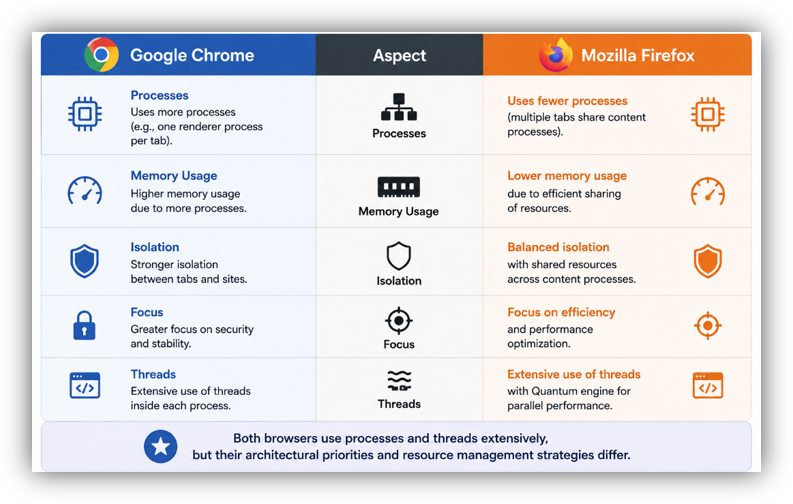
Although both browsers use processes and threads extensively, their architectural priorities differ
What I Learned from This Research
Analyzing the architecture of a browser allows one to understand the relevance of OS principles in the actual development of software solutions. It becomes evident that processes and threads are not just abstract notions mentioned in textbooks but rather a crucial component that affects the operation of those applications used by millions of people.
According to my research, both Chrome and Firefox utilize multithreading and multitasking as means of implementing the latest technologies for browsing. The main difference is that Chrome prioritizes isolation and security while Firefox concentrates on efficiency and managing resources. Nevertheless, the key to responsive and stable performance of both browsers lies in their utilization of the same operating system principles.
The most exciting fact that became apparent throughout my research was that each and every action taken during our surfing depends on many processes and threads.
Conclusion
Today’s web browsers offer excellent illustrations of how the principles of the operating system can be put into practical application. By using the principle of processes, browsers ensure task isolation to increase security and stability. By using threads, they allow users to do multiple things at once.
Google Chrome and Mozilla Firefox handle these issues in different ways, but both browsers illustrate how crucial it is to have good handling of processes and threads. With the ongoing development of web technologies and increasing complexity of online applications, the above principles will always be central to designing a browser.
The next time you open ten tabs without your browser freezing, keep in mind the work of a complicated system of processes and threads.
메타데이터
- post_id
- fd90905cb0ee
- slug
- behind-every-click-how-web-browsers-use-processes-and-threads-fd90905cb0ee
- url
- https://medium.com/@dhanushahasheel/behind-every-click-how-web-browsers-use-processes-and-threads-fd90905cb0ee
- canonical_url
- https://medium.com/@dhanushahasheel/behind-every-click-how-web-browsers-use-processes-and-threads-fd90905cb0ee
- author_url
- https://medium.com/@dhanushahasheel
- status
- ok
- fetched_at
- 2026-06-21 15:33:18




