Networking Fundamentals #1: How Devices Communicate and Connect
From Binary Data and Network Devices to Bus, Ring, Star, and Mesh Topologies.
Networking Fundamentals #1: How Devices Communicate and Connect
From Binary Data and Network Devices to Bus, Ring, Star, and Mesh Topologies.
Why Do Networks Even Exist?
It all started with a simple idea: making two devices communicate with each other.
That’s it.
Over time, networks evolved into something much bigger. Today, they support:
- Data Sharing — transferring files between devices
- Resource Sharing — allowing multiple users to share printers and other resources
- Modern Services — such as VoIP (voice and video calls) and IoT (imagine your fridge texting you, “We’re out of milk” 😄)
What Is a Network Made Of?
Every network consists of three main components:
End Devices
Laptops, smartphones, servers, and desktops.
Network Devices
Switches and routers that move data from one place to another.
Your data usually travels through many routers before reaching its destination. That’s how someone in Egypt can communicate with someone in Syria.
Media
How data physically travels:
- Wired (copper or fiber-optic cables)
- Wireless (radio waves through the air)
How Does Data Actually Travel?
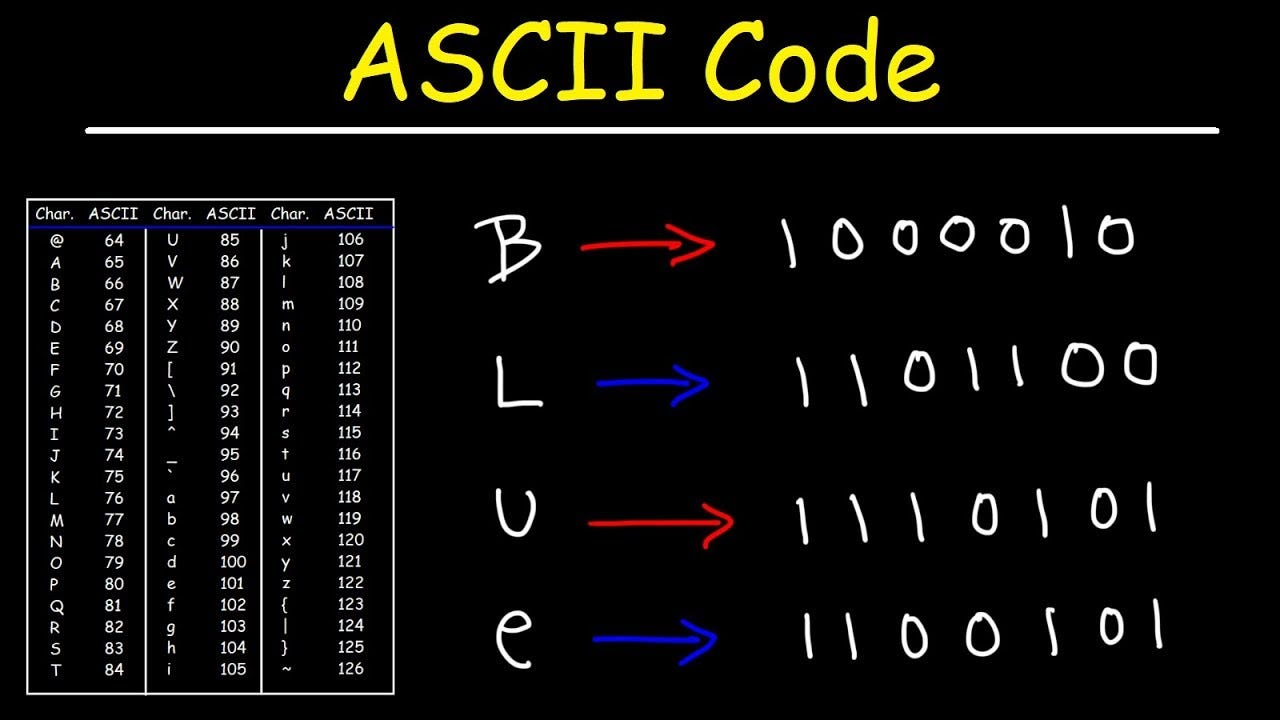
Computers communicate using binary data.
When you type the letter A, the computer converts it into:
01000001This binary information is then represented as electrical pulses and transmitted through the medium.
Network Topologies
Having devices and cables isn’t enough — you also need a design that determines how devices connect to each other.
This design is called a Network Topology.
Different organizations choose different topologies depending on their requirements, budget, and scale.
1. Bus Topology
All devices connect to a single coaxial cable using T-connectors.
At both ends of the cable, terminators prevent signals from reflecting back.
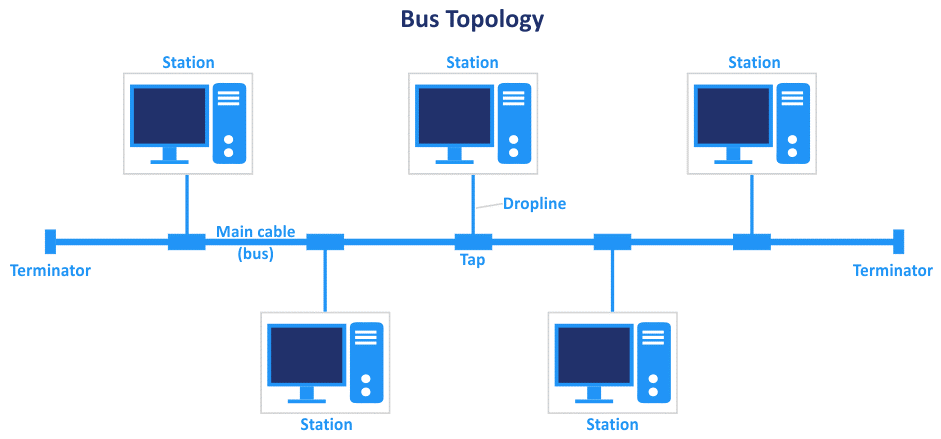
Physical Topology: Bus
Logical Topology: Bus
The Problem — Collisions 💥
Every device shares the same cable.
If two devices transmit at the same time, their signals interfere with each other. This is called a Collision.
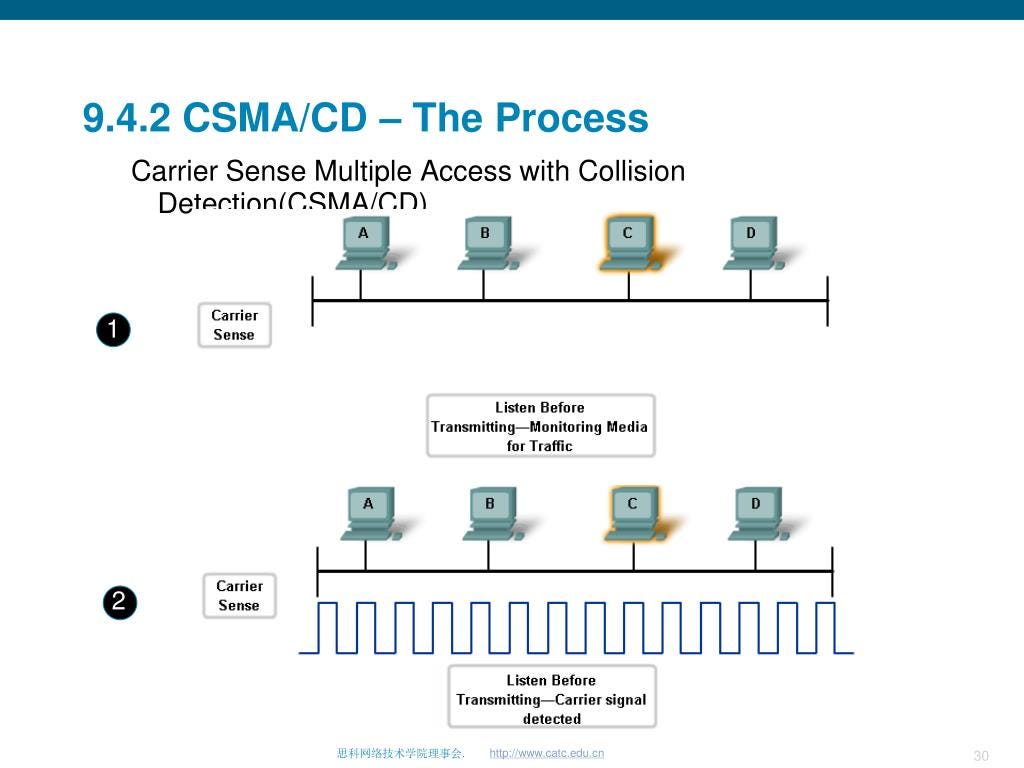
The Fix — CSMA/CD
Carrier Sense Multiple Access with Collision Detection
Before transmitting, the NIC checks whether the medium is free:
- Free → Transmit
- Busy → Wait
If a collision still occurs:
- A jam signal is sent.
- All devices stop transmitting.
- Each device waits a random amount of time.
- Transmission is attempted again.
2. Ring Topology
Devices are connected in a circular path.
Data travels around the ring until it reaches its destination.
FDDI (Fiber Distributed Data Interface)
Physical Topology: Ring
Logical Topology: Ring
FDDI uses two rings:
- A primary ring for communication
- A secondary ring for redundancy
Token Ring
Token Ring physically appears as a star because all devices connect to a central MAU (Multistation Access Unit).
However, logically it behaves as a ring.
A special frame called a Token continuously circulates around the network.
Only the device holding the token can transmit data.
No token → No transmission → No collisions.

Physical Topology: Star
Logical Topology: Ring
3. Star Topology — Hub vs Switch
The most common topology used in LANs today.
Every device connects to a central device, which can be either a Hub or a Switch.
Hub — The Simple One 🤦
A Hub receives a frame and floods it out of every port.
As a result:
- Everyone receives the frame
- All devices share the same collision domain
- CSMA/CD is required
Switch — The Smart One 🧠
A Switch builds a MAC Address Table in memory.
It records:
- Source MAC Address
- Incoming Port
When the destination MAC address is known, the switch forwards the frame only through the correct port.
This provides:
- Better performance
- Dedicated collision domains
- No collisions in modern switched Ethernet networks
How Does a Switch Learn?
- A device sends a frame.
- The switch records the source MAC address and incoming port.
- If the destination is unknown, the frame is flooded.
- Once learned, future frames are forwarded only to the correct port

Physical Topology: Star
Logical Topology:
- Bus (when using a Hub)
- Point-to-Point (when using a Switch)
MAC Address vs IP Address
Every networked device has at least two important addresses.
MAC Address (Physical Address / BIA)
- Burned into the NIC
- 48 bits long
- Written in hexadecimal
- Globally unique
Example:
00:1A:2B:3C:4D:5EIP Address (Logical Address)
- Can change
- Used for communication between different networks
We’ll explore IP addressing in a future post.
4. Mesh Topology
Every device connects directly to every other device.
If one connection fails, traffic can use another path.
This is called redundancy.
Mesh topology is commonly used in:
- Data centers
- Enterprise core networks
- Critical infrastructure
For a Full Mesh network:
Links = n(n - 1) / 2
Collision Domain vs Broadcast Domain
DeviceCollision DomainBroadcast DomainHubShared ❌Shared ❌SwitchPer Port ✅SharedRouterPer Port ✅Per Port ✅
A Router separates both collision domains and broadcast domains.
Final Thoughts
Networks may seem complicated today, but they all started with one goal: allowing devices to communicate.
Understanding these foundations makes advanced topics like Switching, Routing, VLANs, and the OSI Model much easier to learn.
Next Post
The OSI Model — Why Does It Exist and How Does It Actually Work? 🔜
메타데이터
- post_id
- fd9964526c74
- slug
- networking-fundamentals-1-how-devices-communicate-and-connect-fd9964526c74
- url
- https://medium.com/@amrkarim000/networking-fundamentals-1-how-devices-communicate-and-connect-fd9964526c74
- canonical_url
- https://medium.com/@amrkarim000/networking-fundamentals-1-how-devices-communicate-and-connect-fd9964526c74
- author_url
- https://medium.com/@amrkarim000
- status
- ok
- fetched_at
- 2026-06-15 20:49:13



