Snowflake Dual Failover: Keeping Listings Accessible When Both PRD and UAT Go Down
Imagine two Snowflake environments — a production account that owns the data and a UAT account that consumes it via an internal listing…
Snowflake Dual Failover: Keeping Listings Accessible When Both PRD and UAT Go Down
Imagine two Snowflake environments — a production account that owns the data and a UAT account that consumes it via an internal listing. Normal day: PRD publishes, UAT queries. Then an entire Azure region goes down. Both accounts fail simultaneously.
With traditional data sharing, this breaks everything. The share disappears from the consumer’s view. Someone has to re-mount it, re-grant access, and coordinate across teams — during the incident.
With Listing BCDR, neither the consumer team nor their pipelines notice anything happened. The listing data remains accessible from the new DR primary, automatically routed to the new DR consumer, with no re-mounting, no re-granting, and no consumer-side action. This article walks through exactly how to set that up — and the one configuration decision that determines whether it works or fails.
The Scenario
Four accounts. Two regions. Both fail at once.
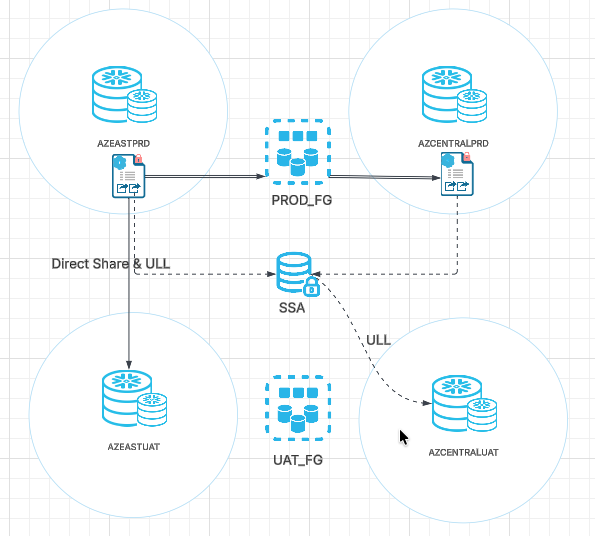
When East US goes down, both PROD and UAT failover to Central US simultaneously. Consumers in AZCENTRALUAT need to keep querying listing data — without any manual intervention.
How It Works: ULL and SSA
ULL is what the consumer queries — a logical name that never changes:
SELECT * FROM ORGDATACLOUD$INTERNAL$YOUR_LISTING.SCHEMA."TABLE";No database mount. No hardcoded account. It works the same before failover, after failover, and after failback.
SSA (Secure Share Area) is Snowflake’s internal auto-fulfillment infrastructure that keeps the ULL working. SSA re-routes on its next scheduled auto-fulfillment refresh cycle — the interval is determined by the refresh frequency configured on your listing (visible in the listing details as ‘Every X minutes’). It checks which account currently holds the primary of the failover group, and pulls data from there into each consumer account. When you promote a DR account to primary, SSA automatically re-routes on its next cycle — consumers see nothing change.
The catch: SSA only builds pipelines for accounts explicitly in the listing’s target list. This is why the setup step below is critical.
The One Thing That Makes or Breaks This
Add both your primary AND DR consumer accounts to the listing targets when you first create the listing.
If you only target AZEASTUAT at creation, SSA never builds a pipeline for AZCENTRALUAT. After failover, AZCENTRALUAT gets:
Listing data is not ready yet.Adding the account after the fact doesn’t fix it cleanly. Start with both accounts from day one.
Setup (One-Time)
Prerequisites: All accounts involved must be on Snowflake Business Critical Edition or higher. Failover groups and listing BCDR are not available on Standard or Enterprise editions.
The listing must have auto-fulfillment enabled. BCDR is not supported for stage-backed, paid, or Snowflake Native App listings.
Create the listing in Snowsight targeting both JNRBPCJ.AZEASTUAT and JNRBPCJ.AZCENTRALUAT under Access. Then:
-- AZEASTPRD: provider failover group (DB + Listing together)
CREATE FAILOVER GROUP PROD_FG
    OBJECT_TYPES = DATABASES, LISTINGS
    ALLOWED_DATABASES = BCDR_TEST_DB
    ALLOWED_ACCOUNTS = JNRBPCJ.AZCENTRALPRD;

-- AZEASTUAT: consumer failover group (Roles only — NOT databases)
-- Snowflake does not allow replicating databases created from a share.
-- The ULL handles data access — no database replication needed.
CREATE FAILOVER GROUP UAT_FG
    OBJECT_TYPES = ROLES
    ALLOWED_ACCOUNTS = JNRBPCJ.AZCENTRALUAT;
DR accounts — create replicas:
-- AZCENTRALPRD
CREATE FAILOVER GROUP PROD_FG AS REPLICA OF JNRBPCJ.AZEASTPRD.PROD_FG;
ALTER FAILOVER GROUP PROD_FG REFRESH;

-- AZCENTRALUAT (run LINK first to avoid role conflicts on first refresh)
SELECT SYSTEM$LINK_ACCOUNT_OBJECTS_BY_NAME('UAT_FG');
CREATE FAILOVER GROUP UAT_FG AS REPLICA OF JNRBPCJ.AZEASTUAT.UAT_FG;
ALTER FAILOVER GROUP UAT_FG REFRESH;
When the Region Goes Down — Execute Failover
Two commands:
-- On AZCENTRALPRD
ALTER FAILOVER GROUP PROD_FG PRIMARY;

-- On AZCENTRALUAT
ALTER FAILOVER GROUP UAT_FG PRIMARY;
Consumers in AZCENTRALUAT immediately query via ULL — nothing changes on their side:
SELECT * FROM ORGDATACLOUD$INTERNAL$YOUR_LISTING.SCHEMA."TABLE";New data written to AZCENTRALPRD after failover propagates to consumers automatically on the listing’s next auto-fulfillment refresh cycle.
Why This Beats Traditional Data Sharing After Failover

Key Takeaway
The entire BCDR setup for listings comes down to one architectural decision: include your DR consumer account in the listing targets from the start. Everything else — ULL resolution, SSA re-routing, role replication — is automatic. The failover itself is two SQL commands.
메타데이터
- post_id
- fd9995bb3681
- slug
- snowflake-dual-failover-keeping-listings-accessible-when-both-prd-and-uat-go-down-fd9995bb3681
- url
- https://medium.com/snowflake/snowflake-dual-failover-keeping-listings-accessible-when-both-prd-and-uat-go-down-fd9995bb3681
- canonical_url
- https://medium.com/snowflake/snowflake-dual-failover-keeping-listings-accessible-when-both-prd-and-uat-go-down-fd9995bb3681
- author_url
- https://medium.com/@shivalinaik
- status
- ok
- fetched_at
- 2026-07-17 18:43:00