How we built a reliable design token pipeline from Figma to React
A practical guide to syncing Figma variables directly to your codebase without the manual copy-pasting.
How we built a reliable design token pipeline from Figma to React
A practical guide to syncing Figma variables directly to your codebase without the manual copy-pasting.
The silent failure of copy and paste
It happened on a rainy Wednesday afternoon. I was looking at a bug report from our QA team. The primary button on our checkout page was the wrong shade of blue. It was a tiny difference. You probably would not notice it unless you put the designs side by side. But it was definitely wrong.
I checked the codebase. The CSS variable for the primary colour was set to a specific hex code. I then opened Figma. The design system had a completely different hex code.
Turns out our lead designer updated the brand colours two weeks earlier. She posted a message in a Slack channel with 40 people in it. The message had a zip file attached with a JSON export of the new tokens. I was on holiday. The other developers saw the message but forgot to download the file and update the variables.
This is how design systems slowly fall apart. It is not because of a grand failure. It happens through hundreds of tiny missed updates.
We had a beautiful Figma file with meticulously crafted variables. We had a clean React codebase. But the bridge between them was literally a person downloading a file and pasting values into a code editor. Honestly it felt completely broken. We were building complex web applications but we were managing our source of truth like it was 2010.
What we tried first
We knew we needed to fix this. So basically we went through a few different phases of trying to automate things.
Our first attempt was a custom Node script. We used the Figma REST API to pull the variables from our design system file. We ran this script locally before creating a new release. It sounded great in theory. But the reality was a nightmare. The Figma API response was incredibly complex. We had to write a massive parser just to get the raw values out. And then Figma introduced variable collections and modes. Our script broke completely. We spent three days fixing it instead of building actual features.
The second attempt was using a community plugin that exported a JSON file directly to our local machines. This was slightly better than the API script. But it still required a developer to manually run the plugin. They had to save the file to the right folder. Then they had to commit the changes. Human error was still a massive factor. People would just forget to run the sync. Or they would accidentally overwrite the wrong file.
We needed something that removed the human element from the sync entirely. We needed the design tool to talk directly to the version control system.
The approach that actually worked
We took a step back and looked at how developers collaborate. We do not send zip files to each other. We use Pull Requests. We propose changes. We review the diffs. We merge them.
The core lesson was that design tokens should be treated exactly like code. When a designer makes a change in Figma they are essentially writing code. They are updating the foundational variables of the application. That change needs to go through the exact same rigorous process as a code change.
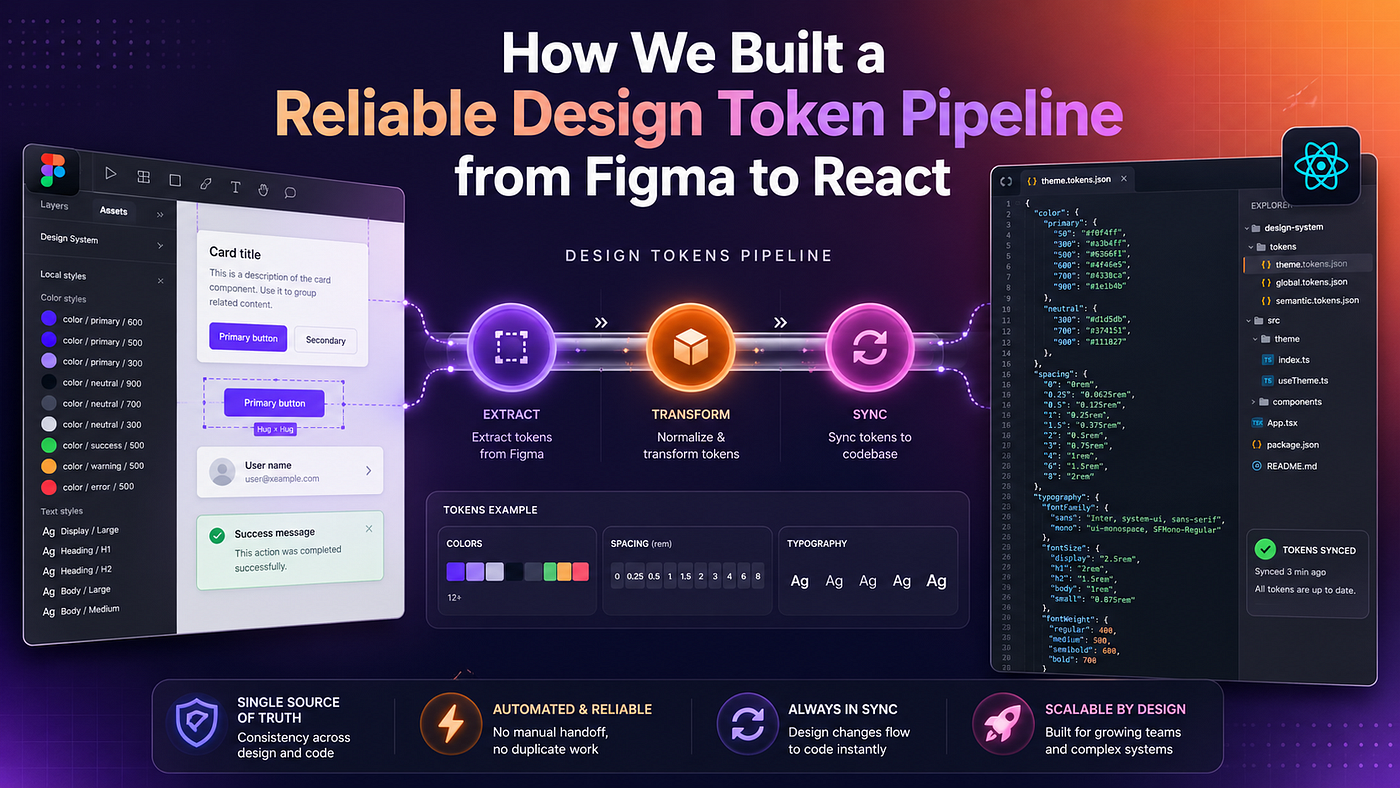
We decided on a new architecture. The source of truth would be Figma. The destination would be a specific JSON file in our GitHub repository. The format would be the W3C Design Tokens specification. This is a standard way of defining design tokens that most modern tools understand.
Once the JSON file landed in GitHub we would use a tool called Style Dictionary to transform those raw tokens into the formats we actually needed. We needed CSS variables for the web. We needed TypeScript definitions for our React components.
The flow looked like this. A designer updates a colour in Figma. They push a button. A Pull Request automatically appears in GitHub. The PR shows exactly which token changed from the old value to the new value. A developer reviews the PR. They click merge. A GitHub Action runs Style Dictionary. The new CSS variables are generated and deployed.
this is the one thing nobody talks about. The real magic is not the automation itself. The real magic is the visibility. Developers can see exactly what the designers changed right in the PR diff.
Setting up the pipeline
Let me show you exactly how we set this up. You need three main pieces to make this work. You need a standard token format. You need a build tool. And you need a CI pipeline.
First we look at the token format. The W3C Design Tokens spec uses a nested JSON structure. It separates the token name from its value and type. Here is a simplified example of what that JSON looks like when it arrives from Figma.
{
  "colors": {
    "primary": {
      "500": {
        "$value": "#2563eb",
        "$type": "color"
      }
    },
    "background": {
      "default": {
        "$value": "#ffffff",
        "$type": "color"
      }
    }
  },
  "spacing": {
    "small": {
      "$value": "8px",
      "$type": "dimension"
    }
  }
}
This JSON file lives at the root of our design system folder. We usually call it tokens.json. But browsers do not understand this JSON file. We need to convert it into CSS variables.
This is where Style Dictionary comes in. It is an amazing open source tool built by Amazon. It takes that JSON file and runs it through a series of transforms. You configure it using a simple JavaScript file.
Here is the config.js file we use for Style Dictionary.
module.exports = {
  source: ['tokens.json'],
  platforms: {
    css: {
      transformGroup: 'css',
      buildPath: 'build/css/',
      files: [{
        destination: 'variables.css',
        format: 'css/variables'
      }]
    },
    js: {
      transformGroup: 'js',
      buildPath: 'build/js/',
      files: [{
        destination: 'tokens.js',
        format: 'javascript/es6'
      }]
    }
  }
}
When you run Style Dictionary with this config it reads the tokens.json file. It flattens the nested structure. It converts the W3C format into valid CSS variables.
The output is a clean CSS file that looks exactly like something you would write by hand.
/**
 * Do not edit directly
 * Generated on Wed May 15 2024
 */
:root {
--colors-primary-500: #2563eb;
--colors-background-default: #ffffff;
--spacing-small: 8px;
}The final piece of the puzzle is the GitHub Action. We want to make sure Style Dictionary runs automatically every time a new Pull Request is merged into the main branch.
We created a simple workflow file in our repository. This workflow installs the dependencies. It runs the build script. And it commits the generated CSS files back to the repository.
name: Build Design Tokenson:
push:
branches:
- main
paths:
- 'tokens.json'jobs:
build:
runs-on: ubuntu-latest
steps:
- uses: actions/checkout@v3
- name: Setup Node.js
uses: actions/setup-node@v3
with:
node-version: '18'
- name: Install dependencies
run: npm install
- name: Build tokens
run: npx style-dictionary build
- name: Commit generated files
uses: stefanzweifel/git-auto-commit-action@v4
with:
commit_message: "chore: update generated css variables"
file_pattern: "build/**"The results of automating the sync
The impact of this new workflow was immediate. The friction between design and engineering completely vanished.
We no longer had Slack messages asking for the latest hex codes. We no longer had QA tickets about mismatched padding values. Everything was perfectly in sync.
The best part was the Pull Request reviews. When a designer updated a token the PR clearly showed the old value in red and the new value in green. Developers could review the change in seconds. They did not have to guess what changed in a massive Figma file. The diff told the whole story.
We also noticed that designers felt more ownership over the final product. They could see their changes flowing directly into the codebase. They were essentially deploying code without having to open a terminal. It brought the two disciplines much closer together.
Moving beyond manual scripts
Setting all of this up took a lot of trial and error. Getting the JSON exactly right for Style Dictionary was tricky. Managing the GitHub authentication from a Figma plugin was a massive headache.
I got tired of setting this up from scratch for every new project. I wanted an easier way to bridge that gap. So I built Design System Sync. It takes this exact pipeline and packages it into a simple Figma plugin. You map your Figma variables to your GitHub or Bitbucket repository once. Then you just click a button to generate a clean Pull Request with your W3C design tokens. It handles the diffs and assigns reviewers automatically.
If you want to stop copying and pasting variables you can check out the website at https://ds-sync.netlify.app?utm_source=medium&utm_medium=post&utm_campaign=bot or grab the plugin directly from the Figma Community at https://www.figma.com/community/plugin/1561389071519901700?utm_source=medium&utm_medium=post&utm_campaign=bot.
Building a solid token pipeline takes a bit of upfront work. But the peace of mind you get from knowing your code perfectly matches your designs is absolutely worth it. You can finally stop worrying about the wrong shade of blue and get back to building great features.
메타데이터
- post_id
- fddf4725cdbe
- slug
- how-we-built-a-reliable-design-token-pipeline-from-figma-to-react-fddf4725cdbe
- url
- https://medium.com/@alexdev82/how-we-built-a-reliable-design-token-pipeline-from-figma-to-react-fddf4725cdbe
- canonical_url
- https://medium.com/@alexdev82/how-we-built-a-reliable-design-token-pipeline-from-figma-to-react-fddf4725cdbe
- author_url
- https://medium.com/@alexdev82
- status
- ok
- fetched_at
- 2026-07-16 18:08:31