User Flows: Mapping the Path to User Success
Imagine you open a food delivery app for the first time. You’re hungry and want to order lunch. But confusion hits immediately: Do you need…
User Flows: Mapping the Path to User Success

Imagine you open a food delivery app for the first time. You’re hungry and want to order lunch. But confusion hits immediately: Do you need to create an account first, or can you browse restaurants? When you find a restaurant, where’s the menu? Is it one page or multiple sections? After selecting dishes, where do you add special instructions? Before or after payment? How do you apply a coupon code? At the end or during checkout? Can you edit your order after submitting it, or is it locked?
You pause. You tap around nervously. You accidentally add something you didn’t want. You get frustrated and close the app. A competitor’s app was clearer, so you use that instead. This moment of uncertainty — this is what happens when a product doesn’t have a clear user flow. A user flow is the invisible guide that shows people exactly where to go, what to do next, and how to reach their goal without confusion. It’s the difference between a user who completes their task and one who abandons your product forever.
What is a User Flow?
A user flow is a visual diagram that shows the path a user takes to accomplish a specific goal within a product or service. It maps out every screen, interaction, decision point, and possible outcome. Think of it as a GPS for your user’s journey.
User flows can be simple (5 screens) or complex (50+ screens). They can map a single task like “sign up for an account” or a broader experience like “browse, select, and purchase a product.” The key is that they visualize the actual path users follow, including alternative routes when things go wrong.
Key Elements of a User Flow
- Starting Point: Where does the user begin? (E.g., home screen, login page)
- Screens/Pages: Each screen the user encounters during their journey
- Actions/Interactions: Buttons clicked, form fields filled, choices made
- Decision Points: Where the flow branches based on user choice or system condition
End Points: Where the flow concludes (success, error, or abandonment)
Why User Flows Matter: Real Impact
Consider this: A user wants to buy a shirt from an e-commerce app. Without a clear user flow, they might:
- Get lost and tap random buttons
- Hit dead-ends and feel frustrated
- Abandon the app and buy from a competitor instead
With a well-designed user flow, the path is clear and intuitive. Users know exactly what to do next. They complete their purchase. They might even recommend the app to friends.

Types of User Flows
1. Task Flows
These map a single, specific user task. Example: “How does a user reset their password?” Task flows are narrow and focused. They’re perfect for understanding the critical path for one action.
2. User Journeys
These map broader experiences across multiple tasks. Example: “How does a new user discover a product, create an account, make a purchase, and provide feedback?” User journeys show the bigger picture of the user experience.
3. Wireflows
These combine user flows with wireframes (low-fidelity screen mockups). Instead of abstract boxes, you see what each screen actually looks like. This is powerful because it combines the flow logic with the visual design, helping teams understand both the interaction and the interface.
How to Design a User Flow: Step-by-Step
Step 1: Define the Goal
Start by asking: “What is the user trying to accomplish?” Be specific. Not “use the app,” but “order food for delivery” or “find a nearby dentist.” This clarity ensures your flow stays focused.
Step 2: Identify the Starting Point
Where does the user begin? Home screen? A specific menu? External link? This anchor point matters because different starting points create different flows.
Step 3: List All Possible Screens
Brainstorm every screen the user might encounter. Include success screens, error screens, confirmation screens, and alternative paths. If the user forgets their password, what screen appears? If payment fails, where do they go?
Step 4: Map the Happy Path
Start with the ideal scenario where everything goes right. User clicks button → next screen → fills form → success. This is the primary flow. Keep it simple and linear.
Step 5: Add Alternative Paths
Now add branches: What if the user cancels? What if they make an error? What if they choose Option A instead of Option B? These alternative paths make your flow realistic and comprehensive.
Step 6: Define Decision Points
Mark where the flow branches. These are moments where the user makes a choice or the system makes a decision. Use diamonds (♦) to represent decision points in your diagram.
Step 7: Identify End Points
Where does each path end? Success? Error? Back to home? Clear endpoints help you understand all possible outcomes and ensure users always know what happened.
Real Example: Spotify “Follow an Artist” Flow
Let’s map out how a user follows an artist on Spotify. This is a simple but real task.
The Happy Path:
- User opens the Spotify app
- Searches for “Taylor Swift”
- Taps on the artist’s name
- Sees artist profile page
- Taps the “Follow” button
- Button changes to “Following” and artist is added to their library
Alternative Paths:
- User clicks back: Return to search results
- User clicks “Unfollow”: Artist is removed from library
- User has poor connection: Error message appears, user can retry
Notice how simple this is? The flow is clear. Users know exactly what’s happening. The “Follow” button gives immediate feedback. If something goes wrong, users can recover. This is what good user flow design looks like.
Common User Flow Mistakes to Avoid
❌ The Too-Complex Flow
Trying to map the entire product in one flow. This creates spaghetti diagrams that no one can follow. Instead: break it into smaller, focused flows. One flow = one primary goal.
❌ Ignoring the Sad Path
Only mapping the happy path where everything goes right. Real users encounter errors, cancel actions, and hit edge cases. Design for these scenarios or your product feels broken.
❌ Assuming You Know the User
Creating flows based on assumptions instead of user research. Watch real users interact with your product. Ask them questions. Their actual behavior often surprises designers.
❌ Unclear Visual Symbols
Using inconsistent shapes, labels, or connection lines. If your team can’t read your flow, it’s not helping. Use standard symbols: rectangles for screens, diamonds for decisions, circles for start/end.
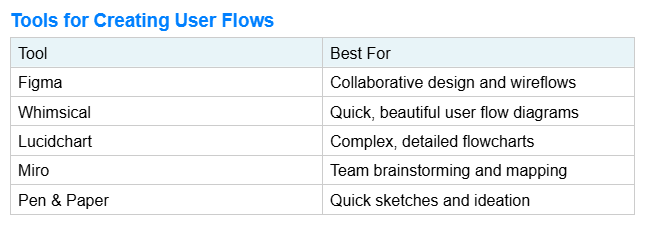
Pro tip: Start with pen and paper. Quick sketches help you think. Once your flow is solid, move to digital tools for presentation and collaboration.
Conclusion
User flows are the invisible architects of great products. They prevent confusion, reduce development mistakes, and ensure users can accomplish their goals without frustration. Every successful app, website, or digital product has well-thought-out user flows — even if the users never see them.
When you design a user flow, you’re not just drawing boxes and lines. You’re empathising with users, anticipating their questions, and creating a clear path to their goal. You’re removing friction. You’re building trust.
The best user flows feel so natural that users never notice them. They just… work.
메타데이터
- post_id
- fde11fb5e5e8
- slug
- user-flows-mapping-the-path-to-user-success-fde11fb5e5e8
- url
- https://medium.com/@kkhadayat25/user-flows-mapping-the-path-to-user-success-fde11fb5e5e8
- canonical_url
- https://medium.com/@kkhadayat25/user-flows-mapping-the-path-to-user-success-fde11fb5e5e8
- author_url
- https://medium.com/@kkhadayat25
- status
- ok
- fetched_at
- 2026-06-09 15:37:30

