Angular Signals:
With the advent of angular 16 we have had the inception/onset for the angular signals which changes a lot of things how they work/function…
Angular Signals:
With the advent of angular 16 we have had the inception/onset for the angular signals which changes a lot of things how they work/function in traditional angular practices and logic.Now as we head into 2026 with fully ready angular 20 features forming the pillar of zoneless app development already they have had signals in a very strong position to be used to change the age old practice of traversing the entire component tree to find out what changed. In layman terms we can consider a big mansion with multiple rooms as our angular component structure when we switch on a light bulb in one room earlier with boolean flag variables angular used to travel to every room to check which room’s light has been switched on, but now with signals angular can directly open the room whose light bulb has been switched on. This saves a lot of effort , time and complexity as compared to the traditional zone.js mechanism of traversing each room/component.
Let’s take a basic example from the below code snippet and attached screenshot:
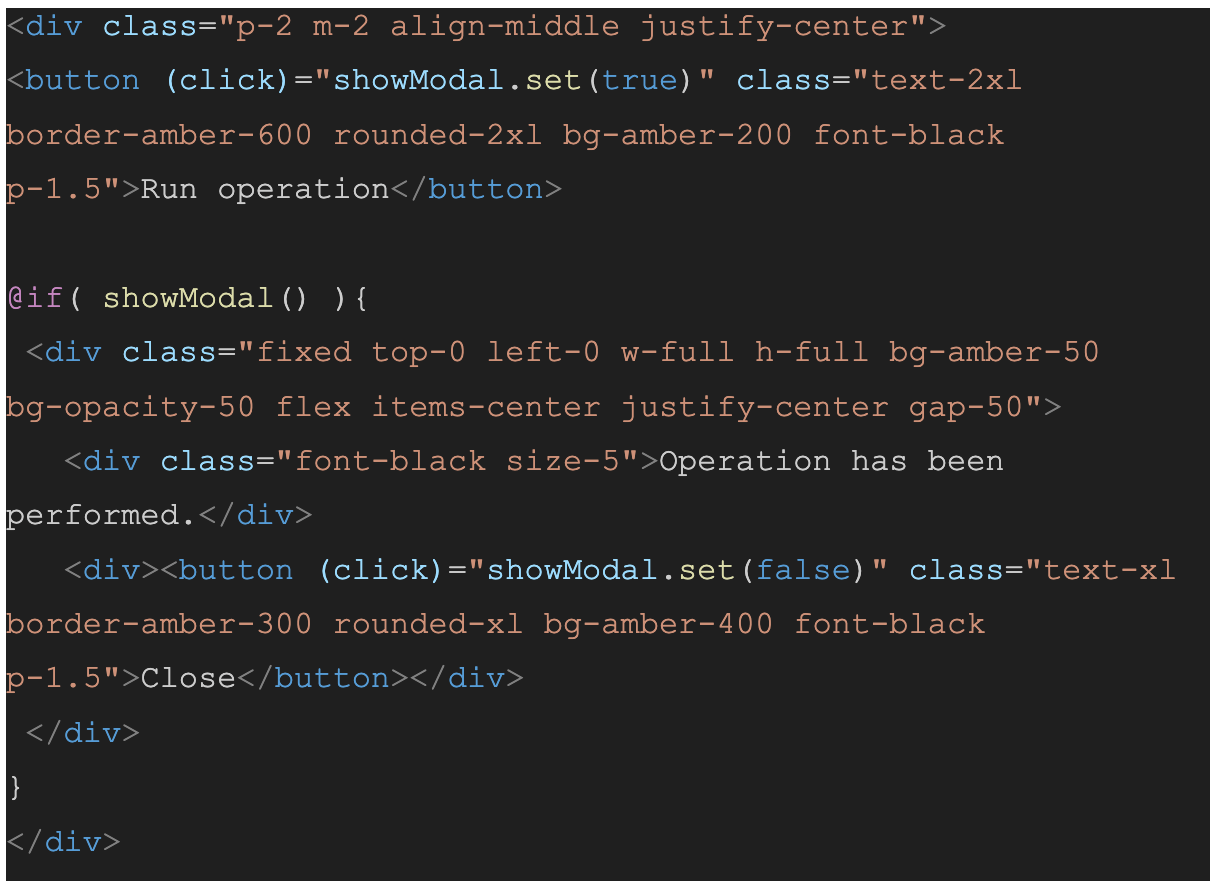

Now in the above example we have the signal showModal that is being used to show/hide a modal sort of a mimic functionality . So the idea is to replace the boolean variable showModal which we could have used to show/hide the modal.
Before that, here are the screenshots for the ts file and how the modal looks on the UI after clicking the *Run the operation* button.


So as you can see we have used the signal showModal in the ts file. Here the signal creates a reactive state (think of it conceptually similar to a react state if you are a react developer but obviously different in their update approach) within the component that enables angular’s change-detection mechanism (in a separate blog) to exactly identify what changed in the component and find the DOM element where the change is reflecting directly without following the traditional way of the DFS search algorithm it otherwise used to follow to scan everything and then find that one element that changed. So it may have an O(N) complexity relative to the tree whereas the signals will have an O(1) complexity directly to the element.
Hence we can conclude using signals are highly efficient when compared to the traditional practice of traversal.
BONUS:
As you might see the usage of @if and not the traditional *ngIf directive in the code snippet, below are few advantages of using them, more coming in a different blog about angular 20 advantages.
Advantages of using @if instead of *ngIf directive 🔜
No need to import the common Module anymore use the built in @if directly. It’s more readable No need to depend on the <ng-container> / <div> for using the *ngIf directive and a separate <ng-template> for the else block. We can use the @if directly.
메타데이터
- post_id
- fe04ea2b62a1
- slug
- angular-signals-fe04ea2b62a1
- url
- https://medium.com/@abhishekmohapatra_84875/angular-signals-fe04ea2b62a1
- canonical_url
- https://medium.com/@abhishekmohapatra_84875/angular-signals-fe04ea2b62a1
- author_url
- https://medium.com/@abhishekmohapatra_84875
- status
- ok
- fetched_at
- 2026-08-09 19:09:49



