SPARQL for Beginners: From Installation to Querying Knowledge Graphs
SPARQL (SPARQL Protocol and RDF Query Language) is a query language designed to retrieve and manipulate data stored in RDF format. It’s…
SPARQL for Beginners: From Installation to Querying Knowledge Graphs
SPARQL (SPARQL Protocol and RDF Query Language) is a query language designed to retrieve and manipulate data stored in RDF format. It’s like SQL for knowledge graphs. With SPARQL, you can ask questions such as:
- “Who lives in Italy?”
- “Which musicians are in a particular band?”
In this guide, we’ll show you how to set up SPARQL, load RDF data, and run queries.
Step 1: Installation
Apache Jena Fuseki (free, open-source)
- Download Fuseki from the official site.
- Extract the zip/tar file.
- Start the server:
./fuseki-server- Open the web interface at:
[http://localhost:3030](http://localhost:3030)
Step 2: Prepare RDF Data
RDF data is stored in triples (Subject–Predicate–Object).
Example in Turtle (.ttl) format:
@prefix ex: <http://example.org/> .
ex:John ex:livesIn ex:Italy .
ex:Alice ex:livesIn ex:France .
ex:John ex:knows ex:Alice .- ex:John → Subject
- ex:livesIn → Predicate
- ex:Italy → Object
Save this file as data.ttl.
Step 3: Load RDF Data into Fuseki
- Open the Fuseki web interface:
[http://localhost:3030](http://localhost:3030) - Create a new dataset (e.g.,
myDataset) - Choose Persistent (to save data)
- Upload your RDF file (
data.ttl) - Data is now stored as triples and ready for querying
Step 4: Write SPARQL Queries
SPARQL queries use triple patterns with variables to search RDF data.
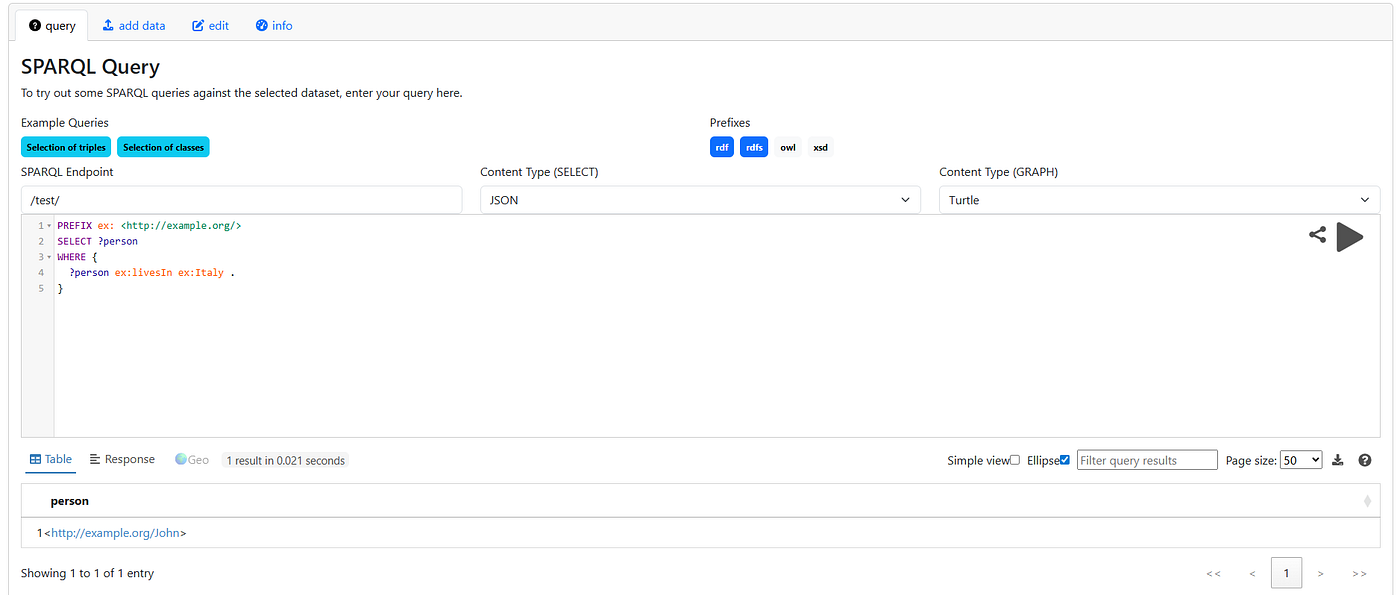
Example 1: Find all people living in Italy
PREFIX ex: <http://example.org/>
SELECT ?person
WHERE {
  ?person ex:livesIn ex:Italy .
}
Result:
Example 2: Find all relationships
PREFIX ex: <http://example.org/>
SELECT ?subject ?predicate ?object
WHERE {
  ?subject ?predicate ?object .
}
Result:

Example 3: Filter by property
PREFIX ex: <http://example.org/>
SELECT ?person
WHERE {
  ?person ex:knows ex:Alice .
}
Result:

Step 5: Using SPARQL in Python
You can also query SPARQL endpoints using Python RDFLib.
from rdflib import Graph
# Load RDF data
g = Graph()
g.parse("data.ttl", format="ttl")
# SPARQL query
q = """
PREFIX ex: <http://example.org/>
SELECT ?person
WHERE {
  ?person ex:livesIn ex:Italy .
}
"""
for row in g.query(q):
    print(row.person)
Output:

Tips for Beginners
- Always use prefixes (
PREFIX ex: <http://example.org/>) to make queries readable - Triple patterns can include variables (?x) for flexible searches
- Use SELECT, WHERE, and optional FILTER clauses for more control
Real-World Use Cases
- Search engines like Google use knowledge graphs
- Recommendation systems (movies, music, products)
- AI chatbots and assistants
- Linked open data integration
Conclusion
SPARQL is a powerful tool for querying RDF data and building knowledge graphs. By installing a triple store like Fuseki, loading RDF data, and writing SPARQL queries, you can explore and analyze connected data effectively.
메타데이터
- post_id
- fe877ee0b034
- slug
- sparql-for-beginners-from-installation-to-querying-knowledge-graphs-fe877ee0b034
- url
- https://medium.com/@osamadev/sparql-for-beginners-from-installation-to-querying-knowledge-graphs-fe877ee0b034
- canonical_url
- https://medium.com/@osamadev/sparql-for-beginners-from-installation-to-querying-knowledge-graphs-fe877ee0b034
- author_url
- https://medium.com/@osamadev
- status
- ok
- fetched_at
- 2026-07-08 05:22:04




