End-to-End Data Migration Testing for Microsoft Fabric — A Practical Enterprise Guide Using…
Note — Stuck behind a medium paywall? Click here to read this blog for free!
End-to-End Data Migration Testing for Microsoft Fabric — A Practical Enterprise Guide Using Datagaps
Note — Stuck behind a medium paywall? Click here to read this blog for free!
I hope you are not surprised by what is happening in the data world these days. More and more organizations are moving towards Microsoft Fabric. Some are coming from SQL Server. Some from Synapse. Others are migrating from legacy enterprise data warehouses, Azure Data Factory pipelines, or even a mix of different systems that have grown over time.
There are many of them, and it makes sense why they are doing so. Microsoft Fabric brings together data engineering, warehousing, lakehouses, Power BI, notebooks, pipelines, AI, and analytics into a single ecosystem. Instead of managing multiple disconnected services, teams now have a more unified way to build data platforms and data agents.
But everyone involved in migration still faces the decade-old problem. How do you build trust in it? Migration is not just about moving data from one place to another. How do you know the migrated data is actually correct? Just because data landed inside Fabric does not automatically mean the migration was successful. Right?
I’m sure if you have worked on any kind of migration in the past, you must have come across at least one of these issues — missing records, broken transformations, wrong aggregates, different business logic outputs, data type mismatches, and maybe KPI inconsistencies in reports.
These problems often do not show up during migration. They show up later, when business teams start using dashboards and suddenly ask — “Why are numbers different from last month?” The reason is poor testing.

don’t be this guy. read this blog till the end to know what to test and how to do so!
In this blog, I want to talk about a practical approach to data migration testing for Microsoft Fabric, and specifically, how tools like Datagaps can help validate migrations properly instead of relying only on manual SQL checks and assumptions. You always need to back yourself with data before calling it a successful migration xd :)
What Microsoft Fabric Already Offers for Migration?
To be fair, Microsoft Fabric already provides quite a few things that make migration easier. For example, Fabric now has a Migration Assistant for Data Warehouse migrations. It helps organizations move workloads into Fabric with less manual effort.

If you are migrating from systems like SQL Server or Synapse, this can significantly reduce effort. Instead of rebuilding everything manually, Fabric helps you understand what can move directly and what needs adjustments.

read more about it here
But Fabric helps you execute migration. It does not automatically guarantee that the migration outcome is fully correct from a testing perspective. And migration testing is usually much harder than people initially expect (until you use the right tools, ofc). So what do we do?
What Should Actually Be Tested on Datagaps During a Microsoft Fabric Migration?
That’s exactly what we want to learn and implement today. Irrespective of whether you are migrating to Fabric or any other database, the concept of migration testing remains similar.
In my opinion, we can do this in multiple layers. The first one is metadata comparison. Instead of directly comparing tables or even touching the data, the first thing that you do is start with the basics. You validate the structure first. The moment you perform metadata comparison, you will get a broader view of things to check, like data type consistency, nullability, and whether primary keys are correct or not.
And this is important because data type inconsistency is one of the most common issues that we can observe when moving from one platform to another. If a DECIMAL(18,4) becomes something slightly different after migration, calculations downstream may behave differently to some extent.
In Datagaps, you can build your dataflow to test this. It has a Metadata Compare component, which you can use to get it done.

metadata comparison component in dataflow
You need to select your source and target databases, select the relevant schema, and that’s it. It’ll automatically map your tables, and you’ll have the option to change this mapping if required. Maybe you might have changed the naming for a few of the deprecated tables. You can do that in the next step once you have selected your schema.

mapping for metadata comparison
When you run this activity, you get a detailed output based on metadata comparison. For example, data type mismatches, columns that only exist in the source for a particular table, or mismatches in column lengths, etc.

type of metadata checks
You can clearly see the differences in source and target columns, based on all the tables you have selected for comparison during the setup.
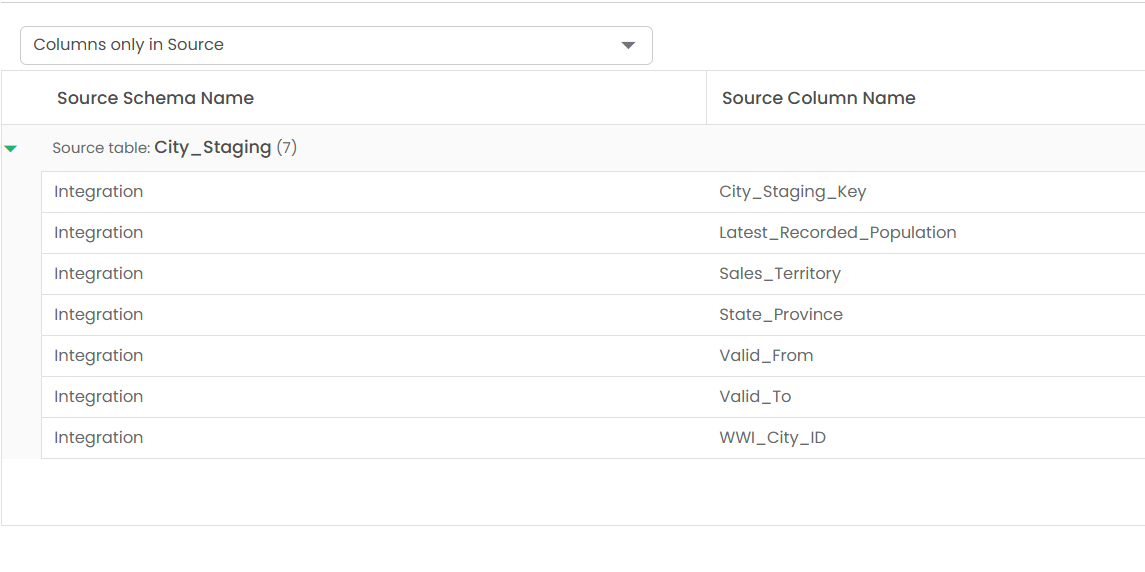
columns existing in source only
When it comes to data type mismatches, you can clearly see the differences that occurred during migration. For example, here the data type for Location changed from nvarchar to geography. It could be something else for some other columns, but you get the point. You get a similarly detailed report for all the tables in your database immediately, with no manual effort in writing code.

data type mismatch
So the first level of validation happens using metadata comparison between source and target databases. And the best-case migration would be when you have zero failures among all the test cases of metadata comparison given in Datagaps. At least, with no major bugs here.
Once you are done with the schema verification between source and target, you move to the second layer of data migration testing, which now involves using migrated data too. So not just metadata, but the actual data itself.
But the term “using migrated data for testing” is very generic. What exactly do we do? Before we do the source-to-target data comparison, we can do the data profile comparison to analyze whether the profile of the data that we have in the target is the same as its source or not. This is not the same as comparing the data itself. This is comparing the profiles of that dataset, where we calculate some individual statistics about the data.
So the second layer of our data migration testing involves creating a data profile and using this to compare your source and target datasets.
In Datagaps, we can implement this logic within dataflows using the Data Profile component and then compare it using the Data Compare activity. All you need to do is create two datasets, define what information you want to keep in your data profile, and then use the generated output to validate whether we have any mismatches here.

data profile comparison
So you calculate values like row count of a particular table, nulls, minimum value, maximum value, and some other statistical insights. Pretty much everything that can help you understand the distribution of the data and analyze whether this distribution is the same across both databases. If not, then there’s a mismatch. This was the second layer of validation during data migration testing.
The third layer, and one of the important layers, is the comparison of the data itself. This step helps you go one step further and compare where exactly the issue lies. It goes row by row, based on mapping columns, and then finds exact matches and mismatches in both datasets.
If you had to implement this manually in Fabric, you would have to build a separate notebook connecting both source and target, then write code to handle multiple edge cases in your data, adding logic for comparison, etc. But in Datagaps, you can simply add an in-built component for data comparison. You connect your source and target as above, and just add another activity from the available components in Dataflow. Here’s what this would look like in Datagaps.

settings to enable for data comparison

connect both Fabric and Source Database
Also, another good part about this data comparison is that if you choose not to perform an initial metadata check and do not fix those issues, you will find them here as an error message.
For example, let’s say there were certain additional columns in your target table, and when we perform a comparison of the data, it’ll fail. We need to make sure that either we select only columns that exist in both databases or at least fix these issues after the initial metadata check itself. So the sequence of validation that we do during data migration testing becomes important.

failure in case metadata issue is not fixed
The error message clearly means that the columns do not exist in the target dataset, and that means during the migration, something happened, and there was a change in column names or some other issue. But something is wrong.
Once you fix this and try again on the same dataset, you’ll find the detailed comparison report with row-by-row comparison based on unique keys.

data comparison report
You’ll also find results that either only exist in the source or the target. In case of any mismatch, you can view the exact row that has issues and filter that for further review. You can export this dataset separately with a simple query.

different datasets after comparison
So, overall, this third layer checks everything related to data mismatch and helps you find exact issues that might exist. This layer of validation will help you do a successful data migration.
So till now, we have covered three layers of data migration testing — Metadata Comparison, Data Profile Comparison, and Source-to-Target Data Comparison itself. In most cases, these three checks would be sufficient to call it a successful migration, but at the same time, we know that the processes are not as easy as they look.
We can further do more checks to be 100% sure whether the processes happening at the source are also happening correctly at the target database and whether some transformation is causing the mismatch.
So the fourth layer of validation is Transformation Check, which is somewhat an enhancement of data comparison. So if we have any transformation happening at the source database, we can check whether the transformation happening at the target database yields the same output or not. We can use the Transform component in Dataflow to do that.

dataflow for data transformation validation
When you go to the Transform component, you can define your query as per your business logic and do the validation.
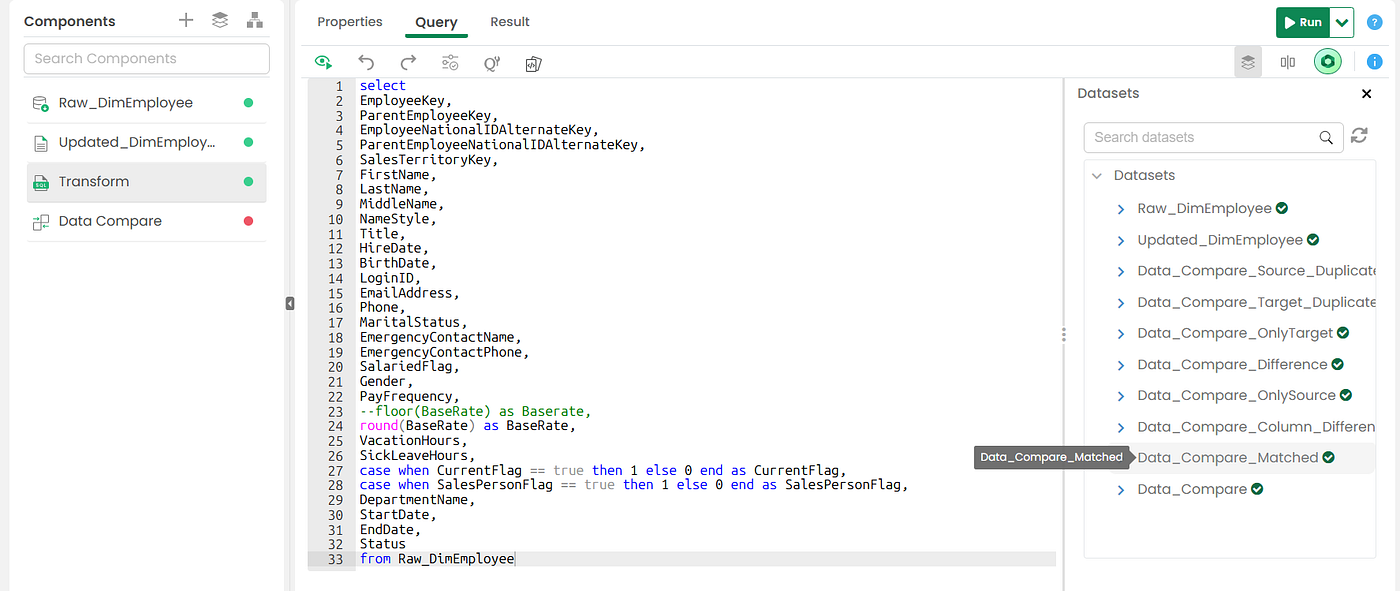
data transformation testing
Additionally, after you run the dataflow, again you will get access to all the datasets that are generated as a result of the comparisons to speed up fixes (check the right side of the image above).
What else can we test? Migration affects the entire data lifecycle, and dashboards are an integral part of that. You might have to migrate your Power BI or Tableau reports from SQL Server to Fabric. And you need to be sure that the reports are working as expected after the migration. You would have to compare the reports available in the source with those of the target to be 100% sure that everything from data to reports is migrated successfully.

powerbi report comparison
Dataflows within Datagaps allow you to do that as well. In fact, not just Power BI, but any other reporting tool like Tableau can also be tested the same way. You’ll have various components to validate these reports. Maybe more about the components later, but overall for migration, you should test reports too, and you can consider this as the last layer of data migration testing.

components offered by Datagaps

comparing powerbi reports during migration
So to summarize, when it comes to data migration testing, you need to implement these 5 layers of validation to be 100% sure before making any success claim for your delivery. You can refer to this chart below whenever you work on any migration project and need to have a detailed test report of your data migration journey.

I’ll call this out again: if you are migrating to Microsoft Fabric, you can migrate easily using Fabric Migration Assistant and other available features, but when it comes to building trust and verifying the accuracy of your migration, you need some standard checks and tools like Datagaps to make sure that the migration is successful.
So AI within Fabric helps you with migration, and AI within Datagaps will help you test your migration.
Share this blog with someone who might find this relevant, especially those who are in a leadership position and managing a data migration project. Till then, cheers.
Who am I? — Shresth Shukla this side. I talk about data and AI product experiences on my publication ***UselessAI.in***. If you haven’t subscribed, do so to get the latest blogs in your email.
메타데이터
- post_id
- fe9089a528df
- slug
- end-to-end-data-migration-testing-for-microsoft-fabric-a-practical-enterprise-guide-using-fe9089a528df
- url
- https://uselessai.in/end-to-end-data-migration-testing-for-microsoft-fabric-a-practical-enterprise-guide-using-fe9089a528df
- canonical_url
- https://uselessai.in/end-to-end-data-migration-testing-for-microsoft-fabric-a-practical-enterprise-guide-using-fe9089a528df
- author_url
- https://medium.com/@theshresthshukla
- status
- ok
- fetched_at
- 2026-06-12 07:40:50