AI-Assisted AWS Architecture Diagram Generation
Explored how AI can simplify and accelerate AWS architecture documentation by converting technical architecture requirements into editable…
AI-Assisted AWS Architecture Diagram Generation
Explored how AI can simplify and accelerate AWS architecture documentation by converting technical architecture requirements into editable Draw.io diagrams. The POC demonstrates using Cursor AI to analyze AWS services and dependencies, generate a .drawio file, and refine the architecture diagram through AI-assisted validation. This approach helps reduce manual diagramming effort while making architecture documentation faster, reusable, and easier to maintain.
Please follow the steps outlined below.
- Create New Folder in cursor
- Create a file ‘architecture-requirements.md’ inside that.
- Paste below content in the file.
Demo AWS Architecture
Frontend
- React application
- Hosted on Amazon S3
- Distributed through CloudFront
DNS and Security
- Route 53 for DNS
- AWS WAF attached to CloudFront
- HTTPS enabled
Authentication
- Amazon Cognito User Pool
- Email OTP authentication
Backend
- API Gateway
- ECS Fargate
- Application Load Balancer
- NestJS backend
Database
- Amazon Aurora PostgreSQL
- Prisma ORM
Supporting Services
- Amazon SES
- AWS Secrets Manager
- Amazon CloudWatch
- Sentry
- PostHog
Expected Flow
User
→ Route 53
→ CloudFront + WAF
→ S3 for frontend
Frontend
→ API Gateway
→ ALB
→ ECS Fargate
→ Aurora PostgreSQL
Authentication
→ Cognito
Backend
→ SES
→ Secrets Manager
→ CloudWatch
- Provide below prompt to cursor(model used for poc Cursor Grok 4.5)
I want to create an AI-assisted AWS architecture diagram POC.
Use the architecture described in
architecture-requirements.md.
Your task is to generate a complete, editable Draw.io architecture diagram for this AWS architecture.
Requirements:
- Represent AWS services using appropriate AWS architecture icons where possible.
- Organize the diagram into logical sections:
- Users
- DNS / Security
- Frontend
- Authentication
- API / Backend
- Database
- Supporting / Monitoring services
- Show clear directional relationships and data flows between components.
- Group related components inside logical containers/VPC boundaries where appropriate.
- Clearly distinguish frontend, backend, database, authentication, and external services.
- Use meaningful labels for connections.
- Keep the diagram clean, professional, and suitable for technical documentation.
- Avoid unnecessary crossing lines.
- Use a left-to-right architecture flow where practical.
- Generate a valid Draw.io XML file that can be opened directly in diagrams.net / Draw.io.
Most importantly, create an actual
.drawiofile rather than only describing the diagram.
Before generating the file:
- Analyze the architecture.
- Identify all AWS services and dependencies.
- Determine the appropriate layout.
- Then generate the Draw.io XML.
After generating the file, verify that:
- The XML is valid.
- The file can be opened by Draw.io.
- All major AWS services from the requirements are represented.
- Connections between services are correctly represented.
Create the final file as:
‘demo-architecture.drawio`
-
Open the newly created
demo-architecture.drawiofile in the official diagrams.net website. -
The generated architecture diagram will look like the image attached below.
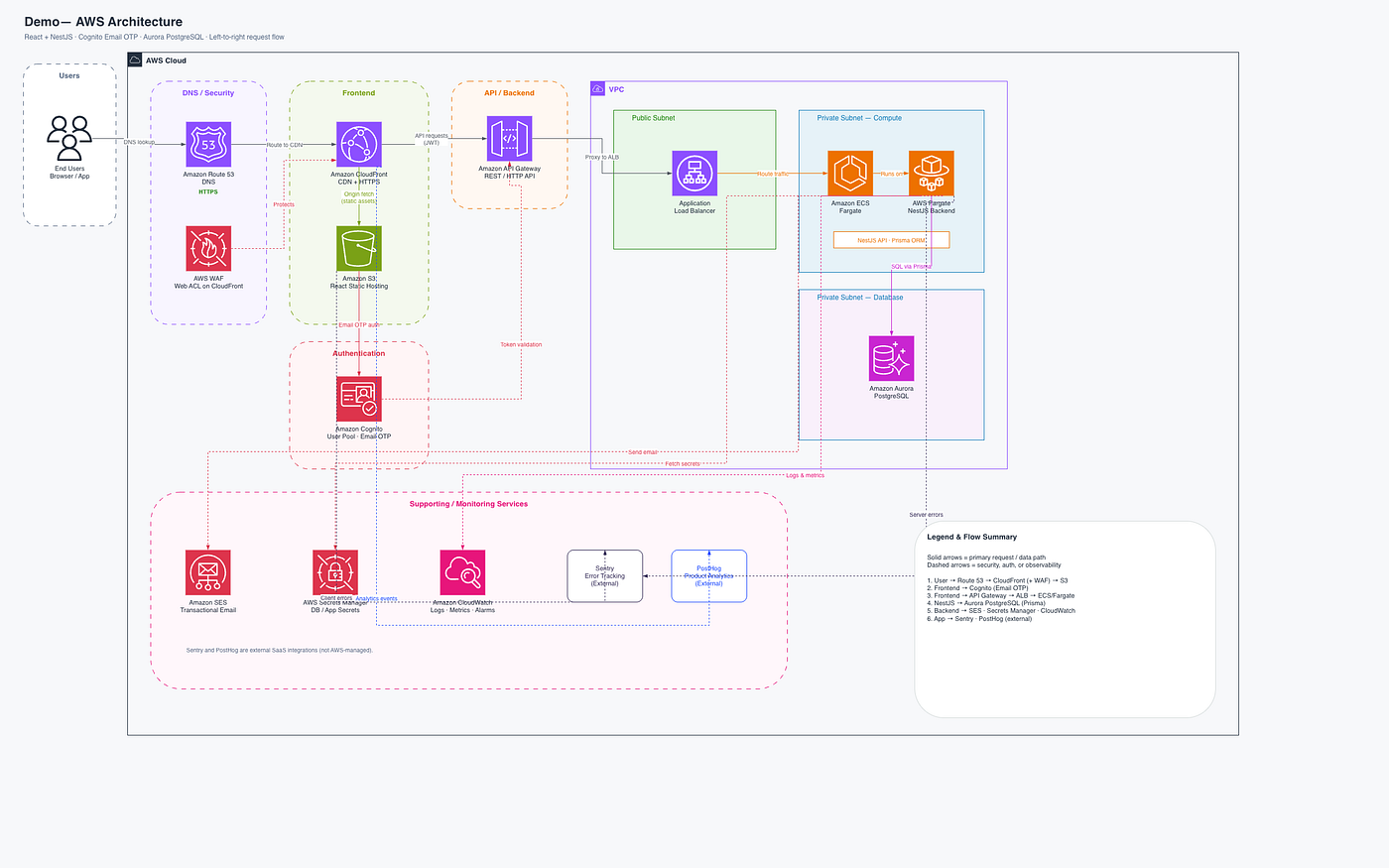
Version 1
The best part is that you can edit the generated diagram directly in the official diagrams.net site, allowing you to add text, modify existing components, or add new components as needed.
- Prompt to refine and improve the generated architecture diagram
Review the generated 'demo-rchitecture.drawio` diagram.
Improve the diagram with the following requirements:
- Use official AWS architecture icons where supported.
- Add clear AWS service labels.
- Group services into logical architecture layers.
- Represent the AWS VPC boundary where applicable.
- Separate public and private components.
- Improve spacing and alignment.
- Minimize crossing connections.
- Add labels to important data flows.
- Clearly represent authentication flow through Cognito.
- Clearly represent frontend-to-backend communication.
- Clearly represent backend-to-database communication.
- Add monitoring and security services in a separate section.
- Keep the final diagram suitable for an engineering architecture review.
Modify the existing
.drawiofile rather than creating a completely separate format.
- The improved architecture diagram will now look like the image attached below.

Version 2
- Validate the Generated Diagram
Review the AWS architecture represented in
demo-architecture.drawioagainstarchitecture-requirements.md.
Identify:
- Missing AWS services
- Incorrect relationships
- Missing data flows
- Incorrect AWS architecture assumptions
- Components that should be inside/outside the VPC
- Security or networking components that should be represented
- Any misleading or ambiguous connections
Provide a validation report and then update the Draw.io file to correct the identified issues.
- Final Version of the Architecture Diagram

Version 3
#AWS #AWSArchitecture #ArtificialIntelligence #AI #GenerativeAI #CursorAI #CloudArchitecture #ArchitectureDiagram #Drawio #DiagramsNet #DevTools #DeveloperProductivity #AIAutomation #EngineeringProductivity #TechInnovation
메타데이터
- post_id
- fea0a8f4cfd9
- slug
- ai-assisted-aws-architecture-diagram-generation-fea0a8f4cfd9
- url
- https://medium.com/@monali16296/ai-assisted-aws-architecture-diagram-generation-fea0a8f4cfd9
- canonical_url
- https://medium.com/@monali16296/ai-assisted-aws-architecture-diagram-generation-fea0a8f4cfd9
- author_url
- https://medium.com/@monali16296
- status
- ok
- fetched_at
- 2026-08-12 17:33:59




