Spring Boot Shopping Cart Demo Using Java 21 Sequenced Collections
A practical Java 21 demo showing addFirst(), addLast(), getFirst(), getLast(), removeLast(), and ordered cart behavior through REST APIs…
Spring Boot Shopping Cart Demo Using Java 21 Sequenced Collections
A practical Java 21 demo showing addFirst(), addLast(), getFirst(), getLast(), removeLast(), and ordered cart behavior through REST APIs, service layer, repository layer, and UI tracing.
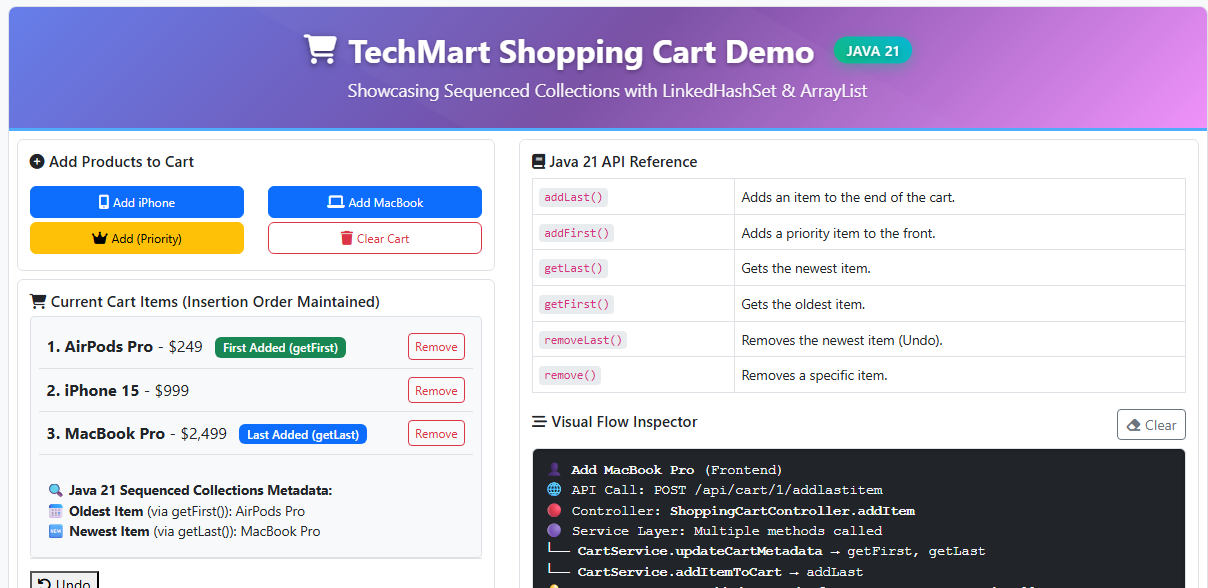
TechMart Shopping Cart Demo built with Spring Boot 3, demonstrating Java 21 Sequenced Collection methods (addFirst, addLast, removeLast) in action
TechMart Shopping Cart Demo built with Spring Boot 3, showing Java 21 Sequenced Collection operations such as addFirst(), addLast(), getFirst(), getLast(), and removeLast() in action.
Java 21 Sequenced Collections are easier to understand when we move beyond isolated examples and apply them to a real backend flow.
In this article, we will use the Spring Boot shopping cart demo shown above to understand how ordered cart behavior can be implemented using Java 21 Sequenced Collections.
Demo Overview
The screenshot above shows two main areas.
On the left, we have the shopping cart UI. Users can add regular items, add priority items, undo the latest action, and see the live cart state.
On the right, we have two important panels:
- Java 21 API Reference — a quick reference for the Sequenced Collection methods used in the demo.
- Visual Flow Inspector — a real-time trace showing how a UI action becomes a REST API call, reaches the Spring Boot controller, delegates to the service layer, and finally executes a Java 21 Sequenced Collection operation.
Why These Panels Matter
The demo has two panels that make the Java 21 behavior easier to understand.
The Java 21 API Reference panel acts as a quick guide. It shows the Sequenced Collection methods used in the demo, such as addFirst(), addLast(), getFirst(), getLast(), and removeLast().
The Visual Flow Inspector is the more important part. It shows how a user action moves through the system:
- a button click in the UI triggers an HTTP request
- the Spring Boot controller receives the request
- the controller delegates to the service layer
- the service layer executes the Java 21 Sequenced Collection operation
- the UI updates with the latest cart state
So instead of only reading about addFirst() or addLast(), you can see where those methods are used in a real Spring Boot request flow.
Why I Built This Demo
Reading about Sequenced Collections is useful, but the concept becomes much clearer when we apply it to a real backend flow.
In this demo, the shopping cart is not just a list of items. It behaves differently depending on the user action:
- Regular cart flow — normal items are added to the end using
addLast(). - Priority flow — “Buy Now” or priority items are added to the front using
addFirst(). - Undo flow — the most recent action is handled using
getLast()andremoveLast().
This is the key idea: a single SequencedCollection can express multiple ordered-data behaviors without index-based code or unclear intent.
Architecture Overview
The TechMart Shopping Cart demo follows a simple layered Spring Boot architecture.
Each user action starts in the browser, reaches a REST endpoint, moves into the service layer, updates the cart state, and finally returns data back to the UI.
At the center of the demo is one important idea:
every cart operation eventually maps to a Java 21
SequencedCollectionmethod.
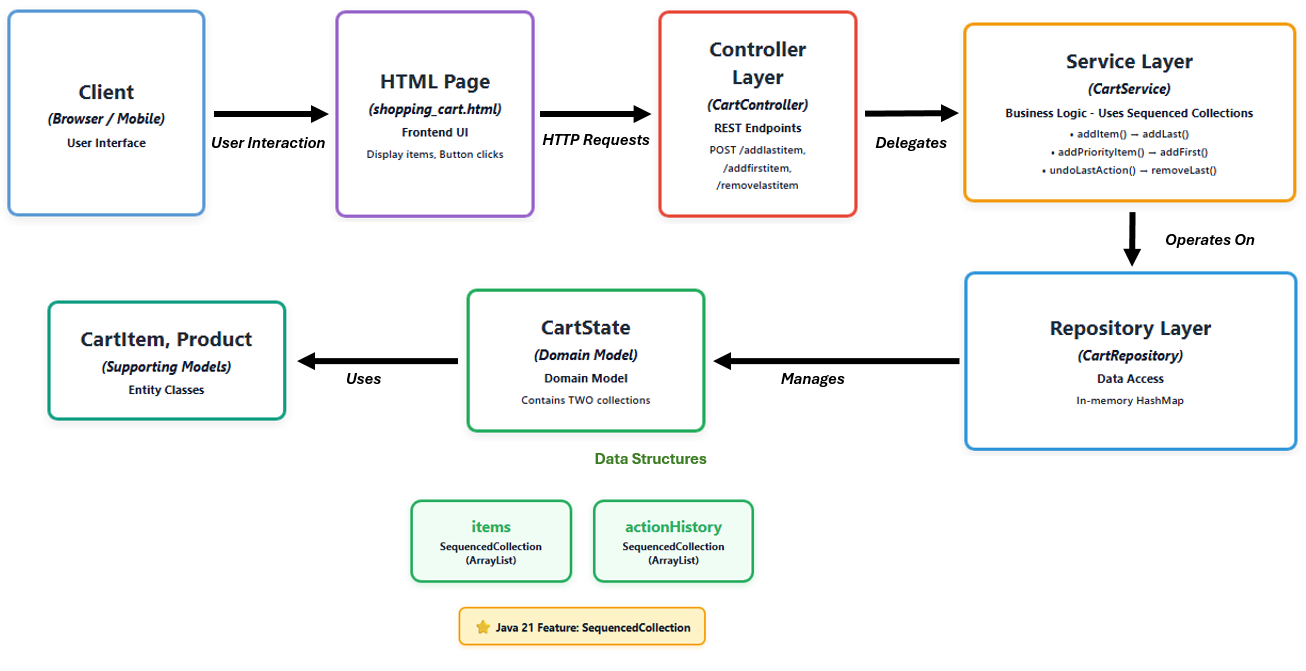
Architecture flow: every REST endpoint eventually triggers a SequencedCollection operation (addFirst, addLast, removeLast).
The flow looks like this:
- Frontend layer — HTML and JavaScript trigger cart actions such as add item, add priority item, and undo.
- Controller layer — Spring Boot REST endpoints receive the request and delegate to the service.
- Service layer — business logic applies
addLast(),addFirst(),getLast(),removeLast(),getFirst(), andgetLast(). - Repository layer — an in-memory
HashMapstores each customer’s cart state. - Domain model —
CartState,CartItem, andProductrepresent the cart data.
This keeps the demo close to a real backend structure while still being simple enough to focus on the Java 21 collection behavior.
Deep Dive: Building the Layers
🌐 Layer 1: Frontend (UI) Layer
The HTML Structure (Bare Minimum)
Our frontend is intentionally minimal — just enough to demonstrate the core functionality:
[embed]shopping_cart.html code snippet
Key Points:
- ✅ Each button triggers a JavaScript function
- ✅
cart-items-displaydiv is updated after each operation - ✅ No complex framework needed — pure JavaScript
The JavaScript Flow (API Communication)
The JavaScript acts as the bridge between UI and backend:
[embed]
The Complete Click-to-Execution Flow
Let’s trace what happens when a user clicks “Add iPhone 15”:
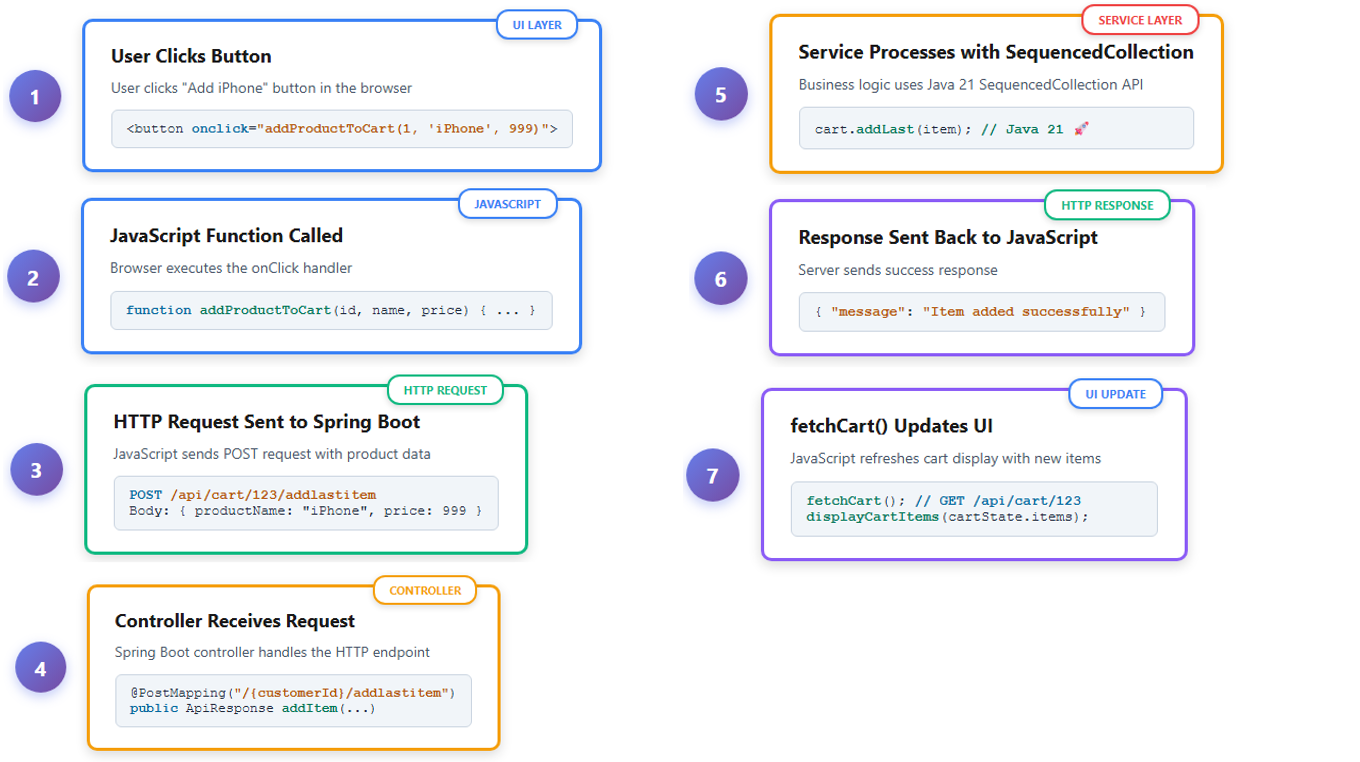
End-to-end journey: from a button click in the browser to a Java 21 Sequenced Collection method executing on the server
Layer 2: Controller — The HTTP Entry Point
The Controller receives HTTP requests from the UI and delegates to the Service Layer, and sends responses back to the UI.
[embed]
Controller’s Job:
- Receive HTTP request
- Extract path variables and request body
- Delegate to Service Layer
- Wrap response in
ApiResponse - Return JSON to UI
ApiResponse: Execution Trace for Visual Flow Inspector
Our ApiResponse class captures the execution flow, enabling the Visual Flow Inspector to show exactly which Java 21 methods were called:
[embed]
JSON Response:
{
  "controllerMethod": "ShoppingCartController.addItem",
  "operationDescription": "Item added to end of cart",
  "serviceCalls": {
    "CartService.addItemToCart": ["addLast()"],
    "CartService.updateCartMetadata": ["getFirst()", "getLast()"]
  }
}
This structure powers the Visual Flow Inspector, showing the exact execution path from controller through service to the Java 21 API calls.
How ApiResponse (Java) becomes JSON (JavaScript)
Before we trace the full flow, how does our Java ApiResponse object become JSON that JavaScript can understand?
This conversion is a core feature of Spring Boot, handled by two key components:
**@RestController:** This annotation on ourCartControllertells Spring to automatically serialize the returned Java object into the HTTP response body.- Jackson (
jackson-databind): This library, included in ourpom.xml, is what Spring uses to perform the serialization.
The Flow:
- Java:
CartControllerreturnsResponseEntity.ok(new ApiResponse(...));. - Spring + Jackson: Jackson intercepts this object and serializes it into a JSON string.
- HTTP: Spring sends an HTTP response with
Content-Type: application/jsonand the JSON string as the body. - JavaScript: The browser’s
fetchAPI receives the response. Theresponse.json()call deserializes the JSON string back into a native JavaScript object, which is then used to update the UI.
Example JavaScript on the frontend:
[embed]
So when the backend returns:
{
  "controllerMethod": "ShoppingCartController.addItem",
  "operationDescription": "Item added to end of cart",
  "serviceCalls": {
    "CartService.addItemToCart": ["addLast()"],
    "CartService.updateCartMetadata": ["getFirst()", "getLast()"]
  }
}
Note: The ApiResponse above is returned from POST/DELETE operations and contains execution trace data for the Visual Flow Inspector. To get the actual cart state, the frontend calls GET /api/cart/{customerId} which returns the CartState directly:
{
  "items": [
    {
      "id": 1731331234567,
      "product": {
        "name": "MacBook Pro",
        "price": 2499.99
      },
      "quantity": 1,
      "unitPrice": 2499.99
    }
  ],
  "actionHistory": [...],
  "oldestItem": {
    "name": "MacBook Pro",
    "price": 2499.99
  },
  "newestItem": {
    "name": "MacBook Pro",
    "price": 2499.99
  }
}
…the JavaScript then() callback receives that same JSON structure and uses it to refresh the cart display, badge count, and total amount on the page.
API DTO: CartItemRequest (Input to Controller)
The CartItemRequest class represents the data sent from the frontend when adding or updating cart items.
Its only purpose is to map the incoming JSON from the JavaScript fetch call into a simple Java object.
[embed]
Spring Boot maps the incoming JSON request body into this DTO using @RequestBody.
How JavaScript Maps to CartItemRequest
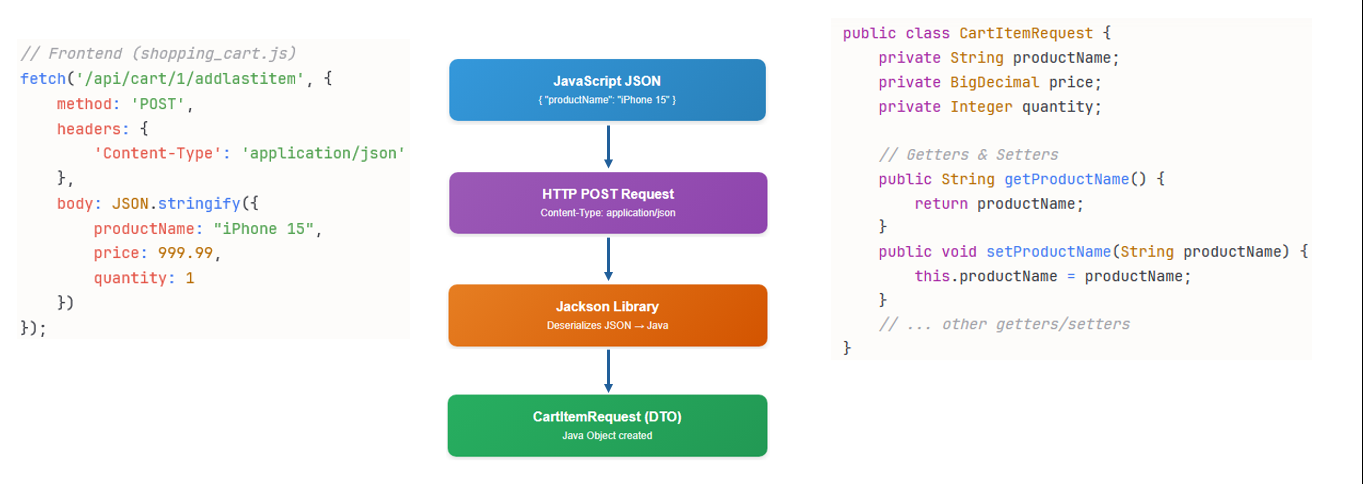
When the user clicks a button in the UI, JavaScript sends JSON to the backend:
[embed]
Spring Boot receives this JSON and automatically converts it into a CartItemRequest object using @RequestBody.
Layer 3: Service Layer
The Service Layer is where the magic of Java 21 Sequenced Collections truly shines. Using the same SequencedCollection<CartItem> type, we implement three different queue behaviors:
- FIFO Queue — Regular items added with
addLast() - Priority Queue — VIP items inserted with
addFirst() - Stack (LIFO) — Undo functionality with
getLast()andremoveLast()
Let’s see how one collection type supports all three patterns with clean, readable code.
1. Standard “Add to Cart” — FIFO Behavior
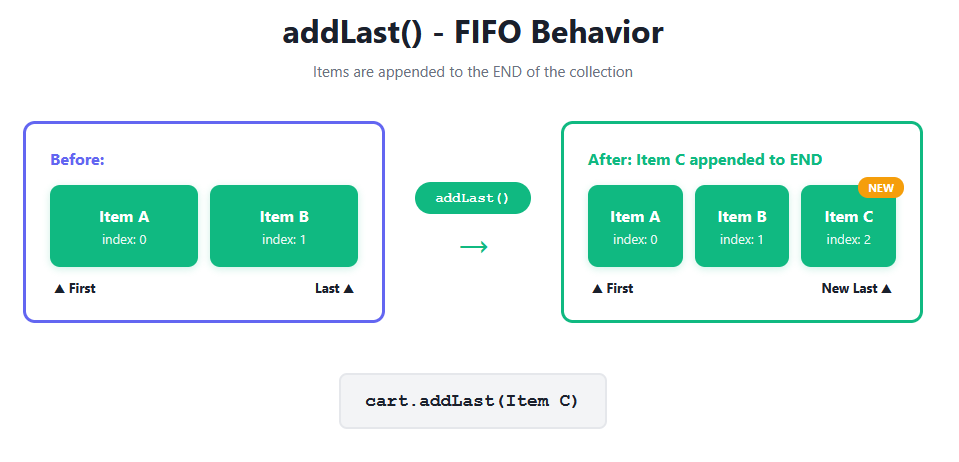
Regular items are added to the end of the cart, maintaining the order customers added them. This is the typical shopping cart experience.
[embed]
Before Java 21:
[embed]
Why addLast() is Better:
- Explicit intent — Code readers instantly know items append to the end
- Implementation agnostic — Works identically across ArrayList, LinkedList, ArrayDeque
2. “Buy Now” / Priority Items — Queue Jumping
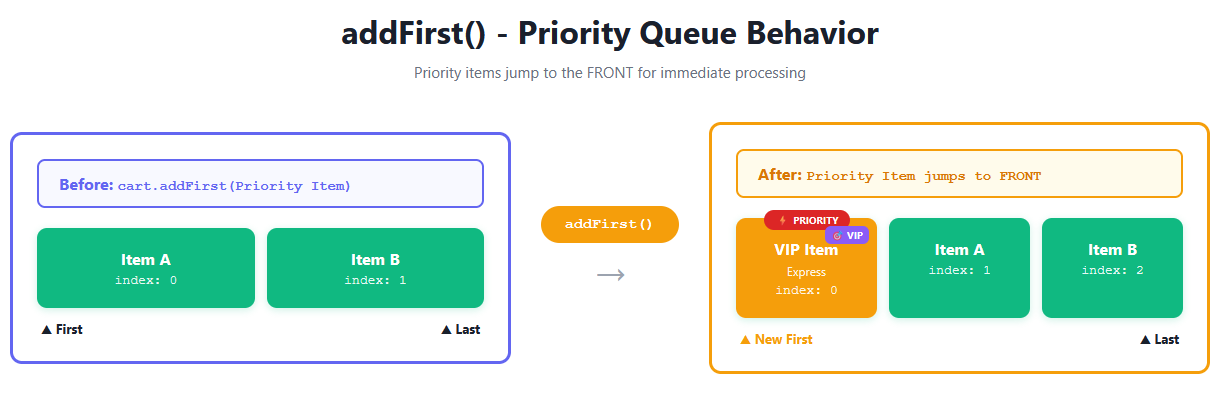
When customers click “Buy Now” or select express shipping, those items should get priority and move to the front of the processing queue.
[embed]
Before Java 21:
[embed]
Why addFirst() is Better:
- Business intent is clear — Method name communicates “this processes first”
- No magic numbers — Eliminates index 0 which requires mental mapping
- Type-safe — Works with any SequencedCollection without casting
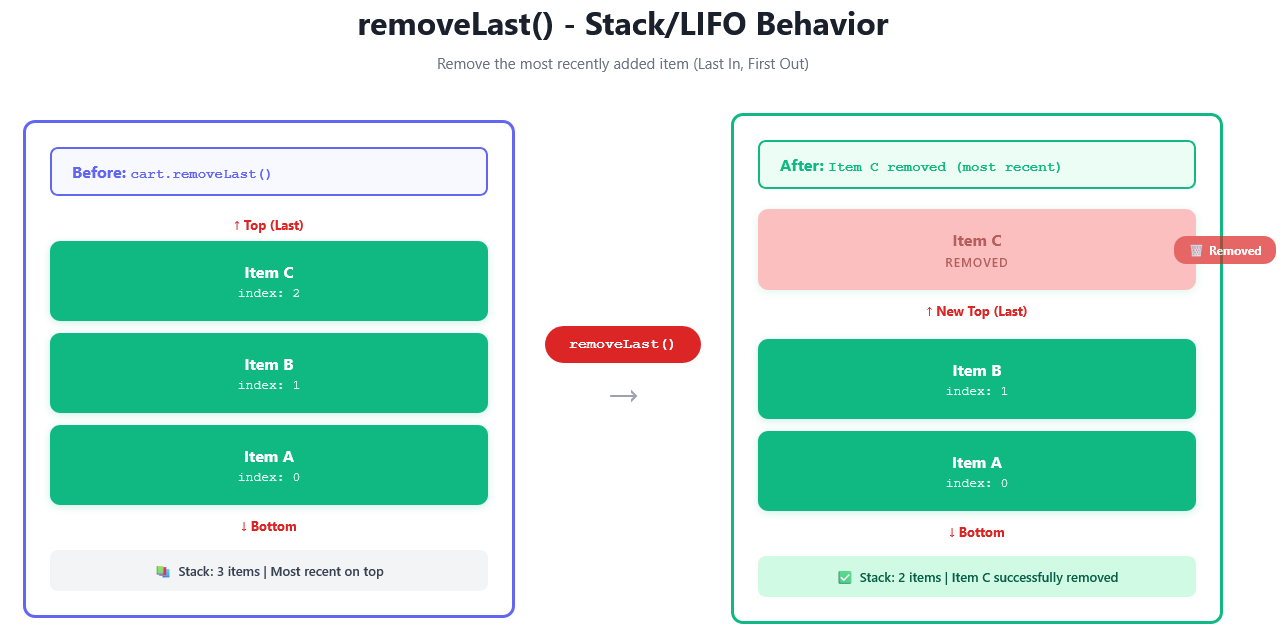
3. Undo Last Action — Stack-like LIFO Behavior
Customers often change their minds. The undo feature needs to remove the most recently added item — classic stack behavior.
[embed]
Before Java 21:
[embed]
Why getLast() + removeLast() is Better:
- Eliminates index arithmetic — No
size() - 1calculations that cause bugs - Atomic semantics — Method names clearly express stack operations (peek + pop)
CartService Complete Class Structure
[embed]
Now that we understand how a single SequencedCollection enables multiple queue patterns, let’s expose this functionality through a REST API.
Layer 4: Repository Layer — CartState and CartRepository
The CartRepository is where cart storage begins. It manages all customer carts using a simple but powerful data structure: a HashMap.
[embed]
This simple class is the backbone of our shopping cart system. Let’s understand how it works.
Understanding the HashMap Structure
The customerCarts HashMap stores:
- Key: Customer ID (Long) — e.g.,
1L,2L,3L - Value: CartState object — contains
itemscollection,actionHistory, and metadata
Conceptual View
// What the HashMap looks like internally
customerCarts = {
    1L  →  CartState { items: [Laptop, Mouse], actionHistory: [...], metadata: {...} },
    2L  →  CartState { items: [Keyboard], actionHistory: [...], metadata: {...} },
    3L  →  CartState { items: [], actionHistory: [], metadata: {...} }
}
Why This Matters
Customer 1’s cart is completely separate from Customer 2’s cart. When you look up customer ID 1L, you get only their cart, not anyone else's.
Benefits:
- ✅ Isolation — Each customer has their own cart
- ✅ Fast lookup — O(1) time to find any customer’s cart
- ✅ Simplicity — No complex queries needed
How the Repository Uses the Map
Getting a Cart: computeIfAbsent()
When a customer makes a request, the repository needs to get their cart:
[embed]
Here’s what happens step by step:
- Check if the customer ID exists as a key in the HashMap
- If it exists: Return the existing CartState value
- If it doesn’t exist: Create a new empty CartState, store it with that customer ID, then return it
Example: First Time vs Returning Customer
[embed]
Saving a Cart: put()
When a customer adds or removes items, we save the updated cart. Note that updateMetadata() is called in the Service layer before saving.
[embed]
The put() method updates the HashMap:
- If the key already exists: It replaces the old value with the new one
- If the key doesn’t exist: It adds a new key-value pair
Example: Updating a Cart
// Customer 1 currently has: { 1L → CartState(items: [Laptop]) }
// Customer 1 adds Mouse
CartState cart = customerCarts.get(1L);
cart.getItems().addLast(mouseItem);
// Save updated cart
customerCarts.put(1L, cart);
// Now has: { 1L → CartState(items: [Laptop, Mouse]) }
The key 1L stays the same, but the value (CartState) is updated with the new items.
Understanding the CartState Value
Now let’s look inside the value part — what exactly is a CartState?
[embed]
CartState contains three main components. Let’s explore each one.
Component 1: items (The Shopping Cart)
The actual shopping cart containing products the customer wants to buy.
private SequencedCollection<CartItem> items = new ArrayList<>();This collection maintains items in the order they were added. Using SequencedCollection as the type makes it explicit that insertion order matters for this cart.
What it stores: Each CartItem contains:
- Unique ID for tracking
- Product information (name, price)
- Quantity selected
- Unit price
Java 21 operations used:
items.getFirst()- Get oldest item (first added)items.getLast()- Get newest item (most recently added)items.addLast(item)- Add to end (regular FIFO)items.addFirst(item)- Add to front (priority)
Component 2: actionHistory (Undo Stack)
Tracks every item added in chronological order for undo functionality.
private SequencedCollection<CartItem> actionHistory = new ArrayList<>();Stack behavior (LIFO — Last In, First Out):
- Add item:
actionHistory.addLast(item)— Push to top - Peek:
actionHistory.getLast()— View top without removing - Undo:
actionHistory.removeLast()— Pop from top
Example:
actionHistory = [Laptop, Mouse, Keyboard]
                                   ↑ Most recent (top)
getLast()      // Returns "Keyboard" (peek)
removeLast()   // Removes "Keyboard" (pop)
actionHistory = [Laptop, Mouse]
Component 3: Metadata (oldestItem, newestItem)
Quick reference fields for UI display, updated automatically after every cart change.
private Product oldestItem;  // First item in cart
private Product newestItem;  // Most recent item
The Metadata Method — Powering the UI: Updated using Java 21 APIs
[embed]
Why useful? UI can show “First item: Laptop” and “Latest item: Keyboard” without iterating the entire collection.
Called after every cart operation to keep UI in sync
Before Java 21:
[embed]
With Java 21: getFirst() and getLast() make intent crystal clear.
The Complete HashMap Lifecycle
Let’s walk through what happens from application startup to multiple customers shopping.
Application Startup
Map<Long, CartState> customerCarts = new HashMap<>();
// Empty HashMap: {}
First Request (Customer 1 adds iPhone):
[embed]
Subsequent Request (Customer 1 adds AirPods):
[embed]
Key Points:
- First request:
computeIfAbsent()creates new CartState - Subsequent requests:
computeIfAbsent()returns existing CartState - The key (customer ID) stays same, value (CartState) gets updated
- Each
addLast()maintains insertion order - Metadata automatically tracks first and last items
Layer 5: Domain Model — CartItem and Product
The domain model represents our business entities. We use Java records for immutability and simplicity.
Product Record
[embed]
Why a record?
- ✅ Immutable by default
- ✅ Automatic equals(), hashCode(), toString()
- ✅ Compact syntax
CartItem Class
[embed]
Key points:
- Each item has a unique ID for tracking
- Immutable design (final fields)
- Simple POJO structure
Complete Request–Response Flow 🚀
Imagine clicking “Add to Cart” on the frontend and watching that single action ripple through every layer — from a JavaScript event to a Spring Boot controller, service logic powered by Java 21 SequencedCollections, and finally back to a live UI update. Let’s trace that journey step by step.
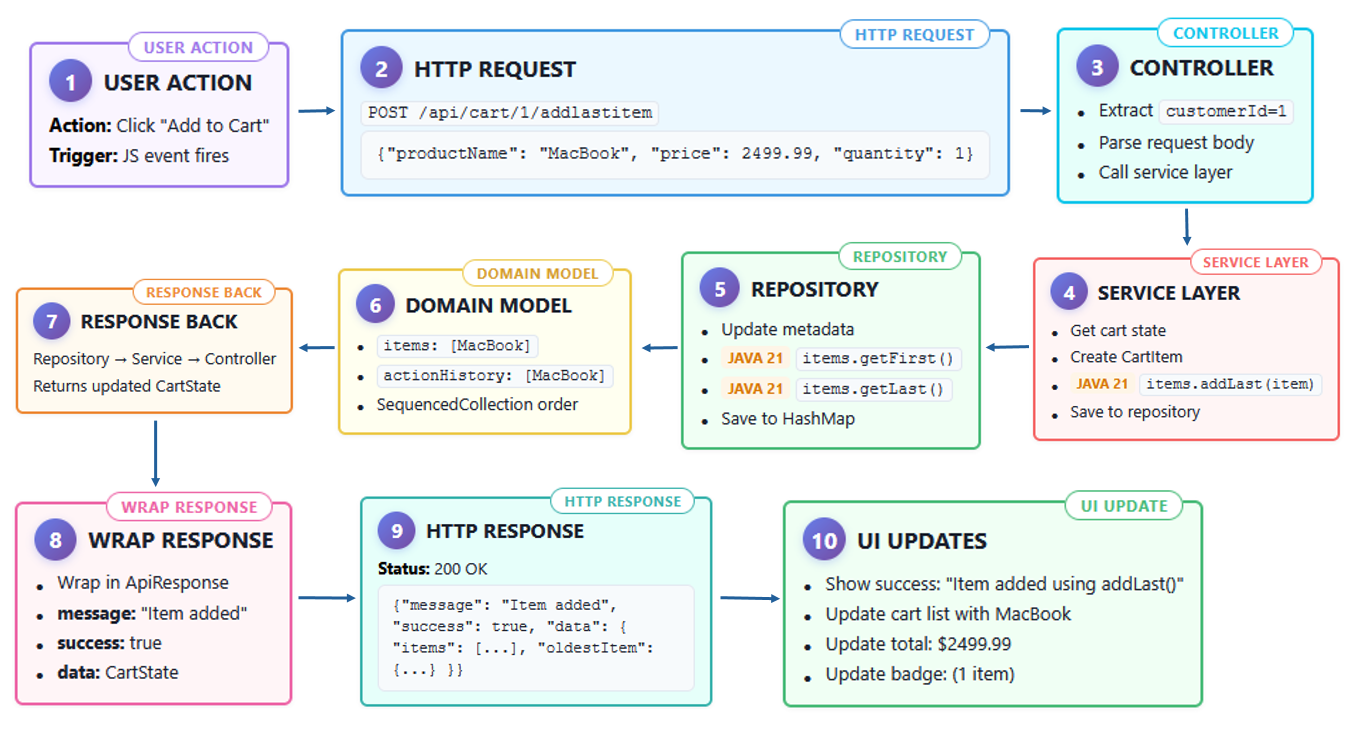
Step-by-step flow from user click to final JSON response
1️⃣ User Action
Trigger: JavaScript event fires when user clicks “Add to Cart.”
Action: Sends MacBook, $2499.99, quantity = 1 to backend.
addProductToCart(2, 'MacBook Pro', 2499.99);2️⃣ HTTP Request
POST /api/cart/1/addlastitem
Content-Type: application/json
{"productId":2,"productName":"MacBook Pro","price":2499.99,"quantity":1}
3️⃣ Controller
- Extracts
customerId = 1 - Parses
CartItemRequest - Calls
cartService.addItem()
4️⃣ Service Layer
[embed]
Applies business logic and saves via repository.
5️⃣ Repository
customerCarts.put(customerId, cartState);Persists cart state to storage.
6️⃣ Domain Model
items: [MacBook Pro]
actionHistory: [MacBook Pro]
Maintains sequential order across both collections.
7️⃣ Response Back
Repository → Service → Controller
Returns updated CartState.
8️⃣ Wrap Response
Controller wraps response in ApiResponse.
{
  "controllerMethod": "ShoppingCartController.addItem",
  "operationDescription": "Item added to end of cart",
  "serviceCalls": {
    "CartService.addItemToCart": ["addLast()"],
    "CartService.updateCartMetadata": ["getFirst()", "getLast()"]
  }
}
9️⃣ HTTP Response
Status: 200 OK
JSON payload returned to frontend.
🔟 UI Updates
- Show: “Item added using addLast()”
- Update cart list with MacBook
- Refresh total →
$2499.99 - Badge shows 1 item
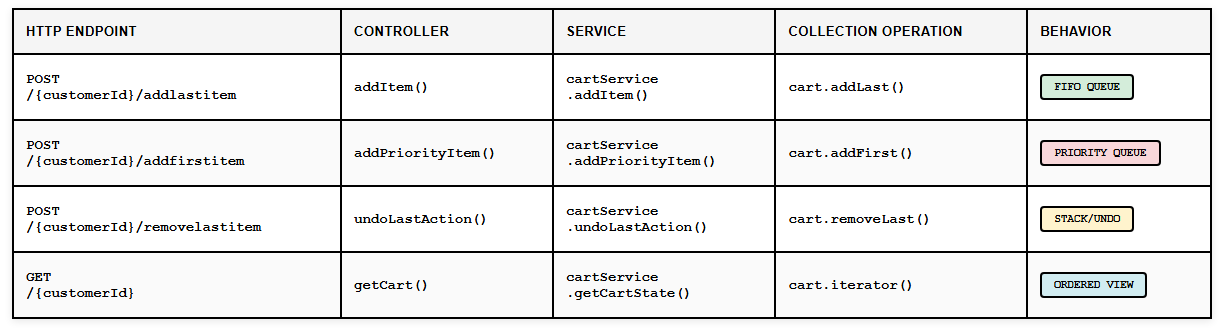
Understanding the Complete Flow: UI → Controller → Service → UI
Before diving into code, let’s understand how a user action flows through the system:
See It Live: Interactive Demo
I have also created a full video version of this lesson where I demonstrate the TechMart Shopping Cart Demo and show how Java 21 Sequenced Collections work in a real Spring Boot flow.
Watch the Spring Boot Shopping Cart demo here:
[embed]
Source Code
All Java 21 examples used in this article are available in this GitHub repository:
https://github.com/j2eeexpert2015/java21-features-showcase
Further Learning
This article is part of my broader Java 21 learning series. If you prefer a structured course format, I also cover Java 21 features, Spring Boot demos, Virtual Threads, JMeter performance testing, monitoring, and Java 21 migration in my Udemy course:
**Java 21 Features Deep Dive: Virtual Threads & Spring Boot**
Disclosure: This is my own Udemy course. If you enroll using the course link above, I may receive instructor revenue from Udemy.
Conclusion: Why This Matters
Java 21 Sequenced Collections make ordered data handling easier to read and reason about.
Instead of relying on index-based operations such as add(0, item) or get(size() - 1), we can now express intent directly with methods such as addFirst(), addLast(), getFirst(), getLast(), and removeLast().
In this shopping cart demo:
- regular cart items go to the end using
addLast() - priority items go to the front using
addFirst() - undo behavior uses
getLast()andremoveLast() - cart metadata uses
getFirst()andgetLast()
The result is cleaner, more expressive backend code that clearly communicates how ordered data should behave.
Thanks for reading!! If you have enjoyed it, please Clap & Share it!!If you found this article valuable and would like to read more of my work, consider following me on Medium for regular updates.
메타데이터
- post_id
- fec9b2e96db2
- slug
- spring-boot-shopping-cart-demo-using-java-21-sequenced-collections-fec9b2e96db2
- url
- https://blog.devgenius.io/spring-boot-shopping-cart-demo-using-java-21-sequenced-collections-fec9b2e96db2
- canonical_url
- https://blog.devgenius.io/spring-boot-shopping-cart-demo-using-java-21-sequenced-collections-fec9b2e96db2
- author_url
- https://medium.com/@mrayandutta
- status
- ok
- fetched_at
- 2026-06-20 20:29:01