Understanding Flutter Packages and Plugins: A Complete Guide for Developers
As a Flutter Developer, one of the key benefits of using Flutter is the large ecosystem of packages and plugins. These tools can help you…
Understanding Flutter Packages and Plugins: A Complete Guide for Developers
As a Flutter Developer, one of the key benefits of using Flutter is the large ecosystem of packages and plugins. These tools can help you add new features, integrate with external services, or even simplify your development process. But what exactly are they, and how do they work?
Let’s break it down in simple terms.

Learn how to enhance your Flutter apps with powerful Packages and Plugins in this complete guide for developers.
What Are Packages in Flutter?
In Flutter, a package is a collection of reusable code that provides a specific functionality or feature. It could be anything from a simple utility function to a full-fledged feature like image processing or JSON parsing.
Packages are easy to add to your Flutter project, and they help you save time by providing ready-made solutions. Instead of writing code from scratch for every feature, you can use packages that the community or third-party developers have already created.
How to Add a Package in Flutter?
To use a package, you need to add it to your pubspec.yaml file (this is where you manage your project’s dependencies). For example, if you want to use the http package to make network requests, you would do this:
dependencies:
  flutter:
    sdk: flutter
  http: ^0.13.3  # Add the package version here
After adding the package, run the following command in your terminal to install it:
flutter pub getNow, you can use the package in your code. Here’s an example of how to use the http package to make a simple GET request:
import 'package:http/http.dart' as http;void fetchData() async {
final response = await http.get(Uri.parse('https://jsonplaceholder.typicode.com/posts'));
if (response.statusCode == 200) {
print('Data fetched successfully: ${response.body}');
} else {
print('Failed to load data');
}
}What Are Plugins in Flutter?
A plugin is a special type of package in Flutter that allows you to access platform-specific features, like the device’s camera, GPS, or sensors. Unlike regular packages, plugins often include platform-specific code (iOS or Android) to handle the functionality.
For example, if you want to access the camera on a device, you need a plugin like camera. This plugin helps you interact with native device APIs and perform tasks that Flutter can’t do on its own.
How to Add a Plugin in Flutter?
Adding a plugin works just like adding a package. You simply add it to your pubspec.yaml file. Here’s an example of adding the camera plugin:
dependencies:
  flutter:
    sdk: flutter
  camera: ^0.9.4+5  # Add the plugin version here
Then, run flutter pub get to install it.
Now, let’s see an example of how to use the camera plugin to capture a photo:
import 'package:camera/camera.dart';void main() async {
final cameras = await availableCameras();
final firstCamera = cameras.first; final CameraController controller = CameraController(
firstCamera,
ResolutionPreset.high,
); await controller.initialize();
// Now you can use the controller to take pictures or record videos
}This code initializes the camera and allows you to interact with it, all thanks to the camera plugin.
Key Differences Between Packages and Plugins
Although packages and plugins might seem similar, there are a few differences:
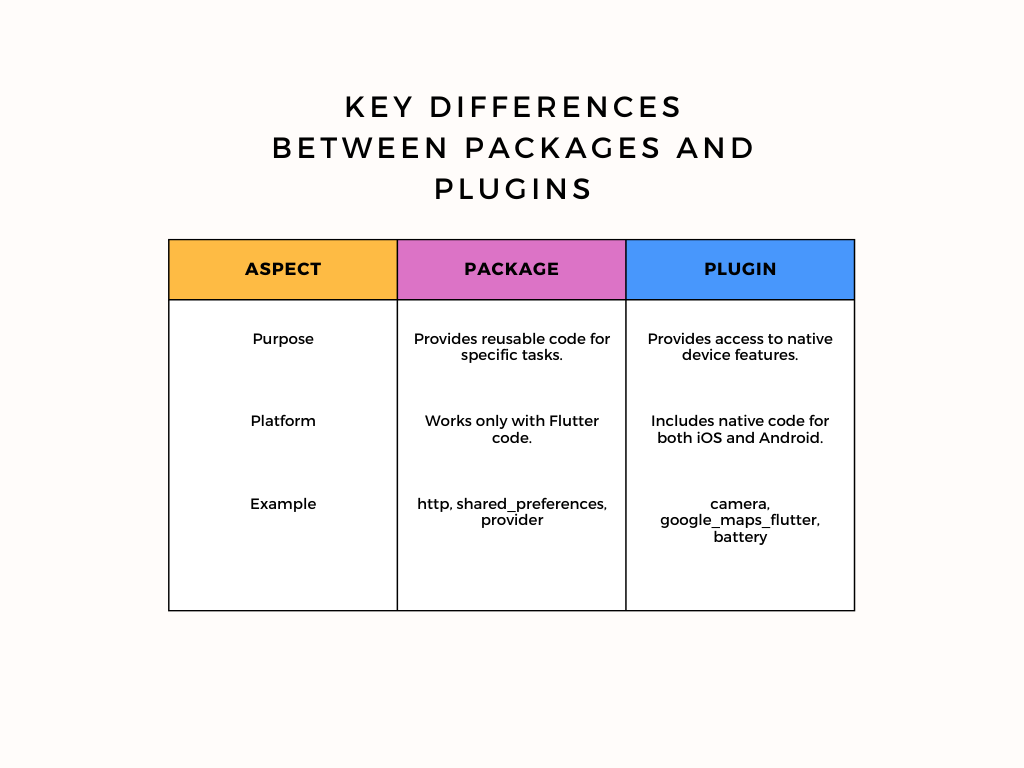
Although packages and plugins might seem similar, there are a few differences:
When to Use a Package or Plugin?
- Use a package when you need a simple solution that works only in Flutter, such as handling data, state management, or parsing JSON.
- Use a plugin when you need to interact with native device features, such as accessing the camera, GPS, or Bluetooth.
Best Practices for Using Packages and Plugins
- Check the Package’s Documentation: Always read the documentation before using a package or plugin. It will help you understand how to use it properly and avoid common issues.
- Update Regularly: Keep your dependencies up to date. Developers regularly release updates to fix bugs and add new features.
- Test Thoroughly: Since plugins interact with native code, always test your app on both iOS and Android to ensure compatibility.
- Use Trusted Packages: Stick to packages that are popular and have good community support. Check for active maintenance to avoid using outdated or broken packages.
Conclusion
As a Flutter Developer, using packages and plugins can save you time and effort while enhancing the functionality of your apps. Packages help with general functionality, while plugins provide access to device-specific features. By understanding their differences and knowing when to use them, you can build more efficient and powerful Flutter applications.
With this knowledge, you’re now ready to start integrating packages and plugins into your Flutter projects, making them more dynamic and feature-rich!
메타데이터
- post_id
- fef2e1a7c3cc
- slug
- understanding-flutter-packages-and-plugins-a-complete-guide-for-developers-fef2e1a7c3cc
- url
- https://medium.com/@trushitkasodiya/understanding-flutter-packages-and-plugins-a-complete-guide-for-developers-fef2e1a7c3cc
- canonical_url
- https://medium.com/@trushitkasodiya/understanding-flutter-packages-and-plugins-a-complete-guide-for-developers-fef2e1a7c3cc
- author_url
- https://medium.com/@trushitkasodiya
- status
- ok
- fetched_at
- 2026-07-21 23:19:27