AI Agents That Never Forget: LangGraph + PostgreSQL Checkpointing
Build agents that pause, remember, and resume
AI Agents That Never Forget: LangGraph + PostgreSQL Checkpointing
Build agents that pause, remember, and resume
25 min read · Beginner–Intermediate · Python 3.10+

Imagine you build an AI agent that helps users plan a vacation. It searches for flights, compares hotels, checks the weather, and drafts an itinerary. It’s doing great — and then your server crashes after step 4.
All that work is gone. The agent has to start over from scratch.
Or picture a different problem: your agent is about to book a non-refundable hotel for ₹15,000. Wouldn’t it be nice if it paused and asked you first before hitting confirm?
These are the two problems this blog solves:
- Checkpointing — automatically save an agent’s state to PostgreSQL so it can survive crashes, resume mid-task, and remember past conversations across sessions.
- Interrupts — pause the agent at a specific step, let a human review what’s about to happen, then resume exactly where it left off.
For this demo, we’ll use Ollama to run the LLM completely offline on your local machine — so there’s no need for an OpenAI account, external APIs, or paid credits.
💡 Who is this for? Python developers who’ve heard of LangGraph but haven’t used checkpointing or interrupts yet. We’ll go from zero to a fully working trip-planner agent.
Table of Contents
- Core Concepts in 5 Minutes
- Setup: Ollama + LangGraph + PostgreSQL
- PostgreSQL Checkpointing: Your Agent’s Long-Term Memory
- Interrupts: Putting Humans Back in the Loop
- Full Example: Trip Planner Agent
- Wrap-Up & What’s Next
1. Core Concepts in 5 Minutes
Before we write a single line of code, let’s build a mental model. LangGraph works like a flowchart that thinks. Here are the four things you need to understand.
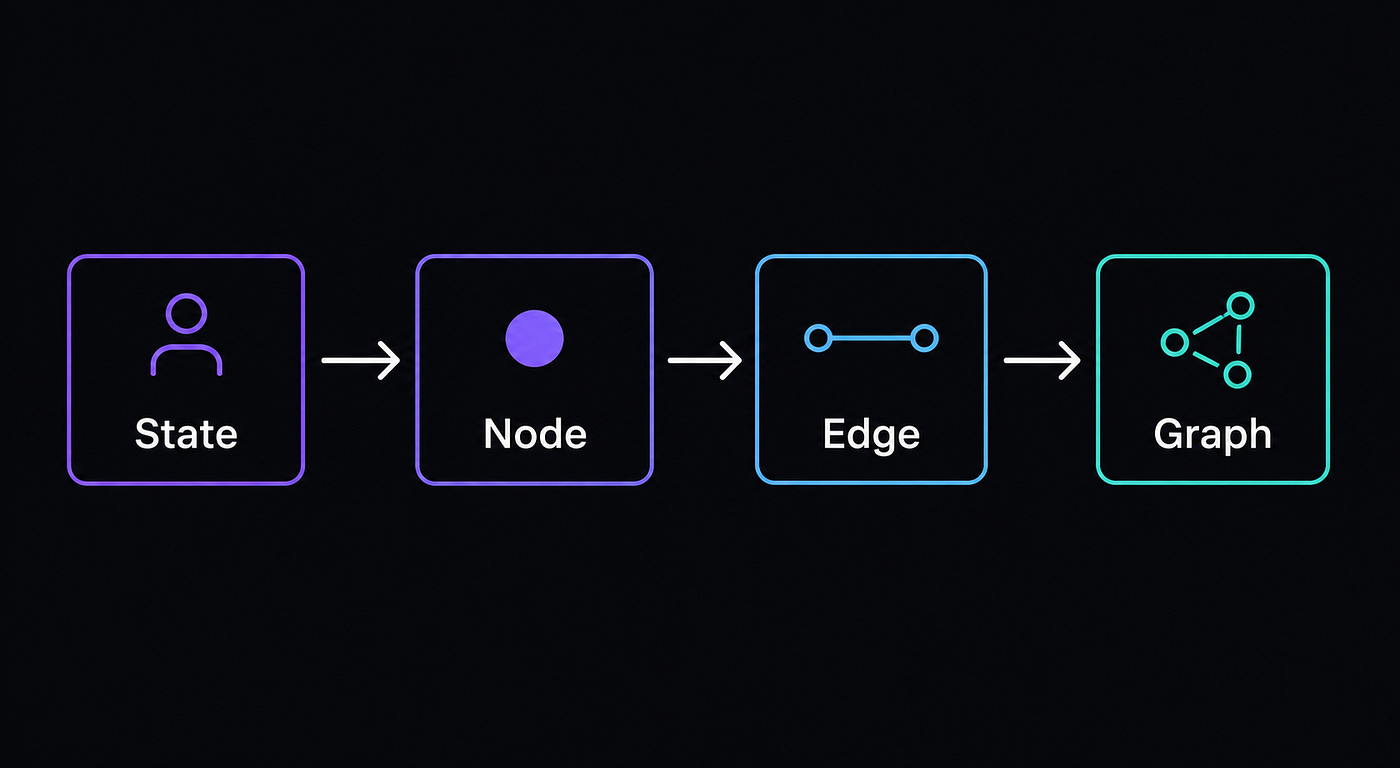
Fig 1
State — the shared notebook
State is a Python dictionary (defined as a TypedDict) that every node in your graph can read and write to. Think of it as a shared Google Doc that all your agent steps collaborate on. One node writes the hotel list. The next node reads it and picks the best one.
from typing import TypedDict, List, Annotated, Optional
from langchain_core.messages import BaseMessage
import operator
class TripState(TypedDict):
messages: Annotated[List[BaseMessage], operator.add] # chat history
destination: str # e.g. "Goa"
budget: str # "budget" | "mid-range" | "luxury"
hotels: List[str] # found hotel options
chosen_hotel: Optional[str]
itinerary: Optional[str]
approved: bool # human gave the go-aheadThe Annotated[List[BaseMessage], operator.add] part just means "when messages are updated, append them instead of replacing them." Every other field is a simple overwrite.
Nodes — the workers
Each node is a Python function. It receives the current state, does some work (calls the LLM, queries an API, runs a calculation), and returns a dictionary of only the values it wants to update. The rest of the spytate stays untouched.
def search_hotels(state: TripState) -> dict:
    destination = state["destination"]
    # call an API, ask the LLM, whatever you need
    hotels = ["Hotel Sunset Goa", "Beach Resort Goa", "Alila Diwa Goa"]
    return {"hotels": hotels}  # only update the hotels key
Edges — the decision arrows
Edges connect nodes. A normal edge always goes A → B. A conditional edge is a function that looks at the current state and returns the name of the next node to visit — this is how you branch your logic.
def should_book(state: TripState) -> str:
    if state.get("approved"):
        return "book_hotel"   # go to booking node
    return "__end__"          # stop the graph
Graph — the assembled machine
The graph ties everything together: you add nodes, connect them with edges, set the entry point, and compile it. Here’s the skeleton:
from langgraph.graph import StateGraph, END

builder = StateGraph(TripState)
builder.add_node("greet_user",    greet_user)
builder.add_node("search_hotels", search_hotels)
builder.add_node("book_hotel",    book_hotel)
builder.set_entry_point("greet_user")
builder.add_edge("greet_user", "search_hotels")
builder.add_conditional_edges(
    "search_hotels",
    should_book,
    {"book_hotel": "book_hotel", END: END}
)
builder.add_edge("book_hotel", END)
graph = builder.compile()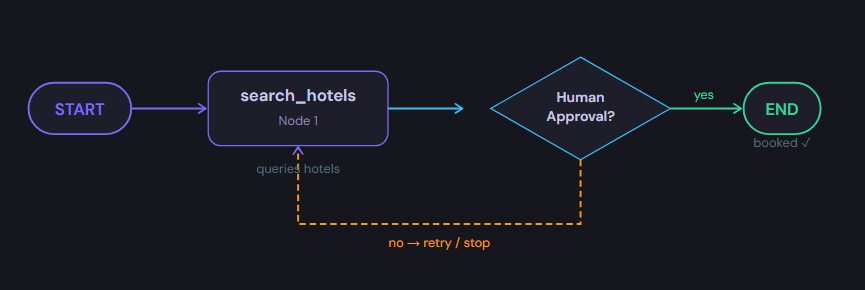
Fig 2— A simple LangGraph: nodes do work, a conditional edge routes based on human approval.
2. Setup: Ollama + LangGraph + PostgreSQL
Step 1 — Install Ollama and pull a model
Ollama lets you run LLMs locally in one command. We’ll use llama3.2:3b — small enough to run on most laptops (8 GB RAM or more recommended).
# Install Ollama (Linux/macOS)
curl -fsSL https://ollama.com/install.sh | sh
# On Windows: download from https://ollama.com/download# Pull the model (downloads ~2 GB)
ollama pull llama3.2:3b# Test it works
ollama run llama3.2:3b "Say hello in one sentence"💡 Model options:
llama3.2:3b(2 GB) — fast, perfect for this tutorial.llama3.1:8b(4.7 GB) — better quality, needs more RAM.mistral:7b(4.1 GB) — solid alternative if llama3 doesn't work for you.
Step 2 — Install Python dependencies
pip install langgraph langchain-ollama langchain-core psycopg2-binaryStep 3 — Start PostgreSQL
The easiest way is Docker. If you already have Postgres running locally, skip this and just create a database called checkpoints.
# Start a Postgres container
docker run \
  --name langgraph-pg \
  -e POSTGRES_USER=langgraph \
  -e POSTGRES_PASSWORD=secret \
  -e POSTGRES_DB=checkpoints \
  -p 5432:5432 \
  -d postgres:16
# Verify it's running
docker ps | grep langgraph-pgWe’ll use this connection string throughout the tutorial:
postgresql://langgraph:secret@localhost:5432/checkpointsStep 4 — Verify everything works together
Run this quick sanity check before going further:
# verify_setup.py
from langchain_ollama import ChatOllama
import psycopg2
# 1. Test Ollama
llm = ChatOllama(model="llama3.2:3b")
response = llm.invoke("Say 'LangGraph rocks!' and nothing else.")
print("Ollama ✓", response.content)
# 2. Test PostgreSQL
conn = psycopg2.connect(
"postgresql://langgraph:secret@localhost:5432/checkpoints"
)
print("PostgreSQL ✓ connected")
conn.close()Expected output:
Ollama ✓ LangGraph rocks!
PostgreSQL ✓ connected
If both lines print, you’re good to go.
3. PostgreSQL Checkpointing: Your Agent’s Long-Term Memory
The video game analogy
Remember playing an RPG where if you forgot to save, you’d lose hours of progress? LangGraph checkpointing is your save button. After every node runs, LangGraph automatically serializes the entire state and writes it to Postgres. If anything crashes — or if you just want to continue a conversation days later — you pass the same thread_id and the agent picks up exactly where it stopped.
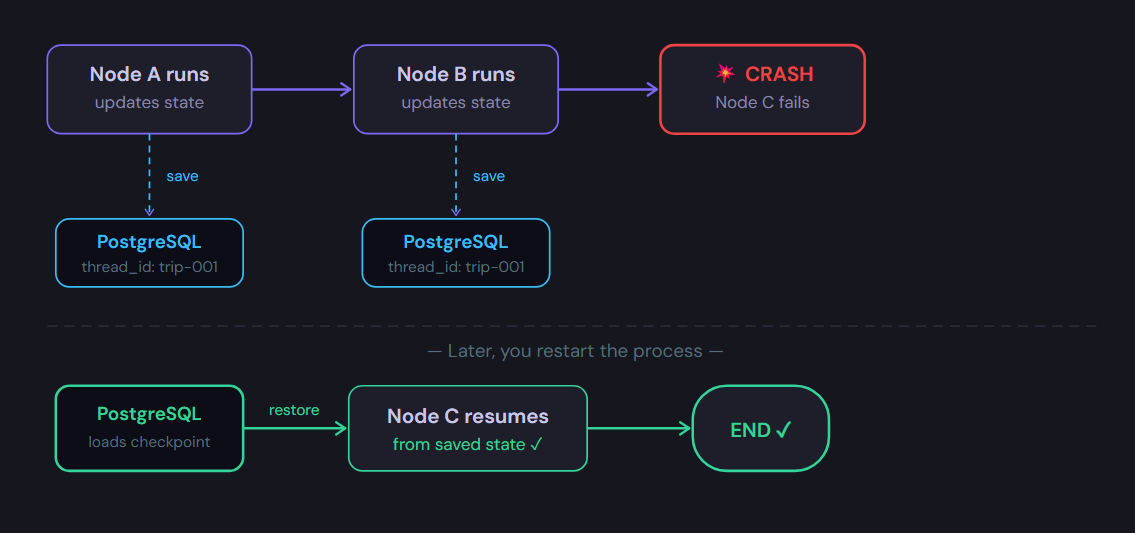
Fig 3— After each node runs, state is saved to Postgres. A crash mid-way is recoverable — restart with the same thread_id and the agent resumes from Node C.
Wiring up the PostgreSQL checkpointer
# checkpointer_setup.py
import psycopg2
from langgraph.checkpoint.postgres import PostgresSaver

DB_URI = "postgresql://langgraph:secret@localhost:5432/checkpoints"
def get_checkpointer():
    conn = psycopg2.connect(DB_URI)
    checkpointer = PostgresSaver(conn)
    # Creates required tables on first run - safe to call multiple times
    checkpointer.setup()
    return checkpointer
📌 What does
.setup()create? It creates two tables in your database:checkpoints(stores the full serialized state) andcheckpoint_writes(stores pending writes). You never need to touch these directly — LangGraph manages them for you.
Compiling the graph with a checkpointer
The only change from a regular graph compile is one argument:
graph = builder.compile(checkpointer=get_checkpointer())That’s it. LangGraph takes care of everything else automatically.
The magic: thread_id
Every invocation must pass a thread_id inside a configurable dictionary. This is the unique key LangGraph uses to find and restore the right checkpoint. Same key = same conversation, resumed from the last saved state.
from langchain_core.messages import HumanMessage

config = {"configurable": {"thread_id": "trip-001"}}
# First run - agent processes this and saves state
graph.invoke(
    {
        "messages":    [HumanMessage(content="Plan a trip to Goa")],
        "destination": "Goa",
    },
    config
)
# Days later - same thread_id loads previous state from DB automatically
graph.invoke(
    {"messages": [HumanMessage(content="Also add a beach day on Saturday")]},
    config
)
💡 Real-world tip: Use meaningful
thread_idvalues like"user-42-session-7"or"booking-{uuid}". In a web app, this maps naturally to a user's conversation or session ID.
4. Interrupts: Putting Humans Back in the Loop
Checkpointing keeps the agent’s memory alive. Interrupts let you pause the agent mid-execution so a human can review, approve, or modify what’s about to happen before the agent continues.
The classic use case: your agent is about to spend money, send an email, or delete data. You want a human to see the plan first and say “go ahead” — or “stop, change this.”
![Fig 4— interrupt_before=["book_hotel"] pauses the agent. The state is already saved (via checkpointing). The human reviews, then calls graph.invoke(None, config) to resume.](https://miro.medium.com/v2/resize:fit:1180/1*p5lyCmHGFC2OHQTWBs6b4A.png)
Fig 4— interrupt_before=["book_hotel"] pauses the agent. The state is already saved (via checkpointing). The human reviews, then calls graph.invoke(None, config) to resume.
Setting up an interrupt
Adding an interrupt takes one extra argument at compile time:
graph = builder.compile(
    checkpointer=get_checkpointer(),
    interrupt_before=["book_hotel"]  # pause before this node runs
)
You can also use interrupt_after if you want the node to run first and then pause for review.
The full interrupt lifecycle
Here’s the complete pattern — run, pause, inspect, resume:
config = {"configurable": {"thread_id": "trip-001"}}

# ── STEP 1: Run until the interrupt ──────────────────────
graph.invoke(
    {
        "messages":    [HumanMessage(content="Plan a trip to Goa")],
        "destination": "Goa",
        "budget":      "mid-range",
        "hotels":      [],
        "approved":    False,
        "chosen_hotel": None,
        "itinerary":   None,
    },
    config
)
# The agent STOPS before book_hotel. State is already saved to Postgres.
# ── STEP 2: Inspect the state ────────────────────────────
snapshot = graph.get_state(config)
print("Hotels found:", snapshot.values["hotels"])
# Hotels found: ['Hotel Sunset Goa', 'Beach Resort Goa', 'Alila Diwa Goa']
print("Next node:", snapshot.next)
# Next node: ('book_hotel',)
# ── STEP 3a: Approve and resume (no changes) ─────────────
graph.invoke(None, config)   # None = "continue as is"
# ── STEP 3b: Or update state, then resume ────────────────
graph.update_state(
    config,
    {"approved": True, "chosen_hotel": "Alila Diwa Goa"}
)
graph.invoke(None, config)   # continues from book_hotel with your changes
⚠️ Important:
graph.invoke(None, config)only works if a checkpointer is attached. Without one, LangGraph has no idea where to resume from. Checkpointing and interrupts are a team — they need each other.
5. Full Example: Trip Planner Agent
Now let’s put it all together. Here’s a complete, working trip-planner agent that uses everything we’ve covered:
- Takes a destination from the user
- Uses Ollama (llama3.2:3b) to find and describe hotels
- Pauses for human approval (interrupt)
- Books the chosen hotel and generates a 3-day itinerary
- Persists the entire conversation in PostgreSQL
Save the following as trip_agent.py and run it with python trip_agent.py.
# trip_agent.py
# Full working trip planner — LangGraph + PostgreSQL + Ollama
#
# Install:  pip install langgraph langchain-ollama langchain-core psycopg2-binary
# Start PG: docker run --name langgraph-pg -e POSTGRES_USER=langgraph \
#             -e POSTGRES_PASSWORD=secret -e POSTGRES_DB=checkpoints \
#             -p 5432:5432 -d postgres:16
# Run:      python trip_agent.py

import operator
import os
import sys
from typing import TypedDict, List, Annotated, Optional

from langchain_core.messages import BaseMessage, HumanMessage, AIMessage
from langchain_ollama import ChatOllama
from langgraph.graph import StateGraph, END
from langgraph.checkpoint.postgres import PostgresSaver
from rich.console import Console
from rich.panel import Panel
from rich.table import Table
from rich.rule import Rule
from rich.prompt import Prompt, Confirm

DB_URI = "postgresql://langgraph:secret@localhost:5432/checkpoints"
MODEL_NAME  = "llama3.2:3b"

BUDGETS     = ["budget", "mid-range", "luxury"]
DAY_OPTIONS = ["2", "3", "4", "5", "7"]

console = Console()
llm     = ChatOllama(model=MODEL_NAME, temperature=0.7)

# ─────────────────────────────────────────────────────────
# STATE
# ─────────────────────────────────────────────────────────
class TripState(TypedDict):
    messages:      Annotated[List[BaseMessage], operator.add]
    user_id:       str
    destination:   str
    budget:        str
    days:          int
    hotels:        List[str]
    chosen_hotel:  Optional[str]
    itinerary:     Optional[str]
    approved:      bool
    past_bookings: List[dict]   # persisted across sessions in the checkpoint

# ─────────────────────────────────────────────────────────
# DISPLAY HELPERS
# ─────────────────────────────────────────────────────────
def rule(title: str, color: str = "white") -> None:
    console.print()
    console.print(Rule(f"[bold {color}]{title}[/bold {color}]", style=color))
    console.print()

def checkpoint_note(thread_id: str) -> None:
    console.print(f"  [dim]💾 Checkpoint saved → thread_id: [italic]{thread_id}[/italic][/dim]")

def show_past_bookings(bookings: List[dict]) -> None:
    if not bookings:
        console.print("  [dim]No previous bookings found.[/dim]")
        return
    t = Table(show_header=True, header_style="bold green", box=None, padding=(0, 2))
    t.add_column("#",           style="dim",   width=4)
    t.add_column("Destination", style="green")
    t.add_column("Hotel",       style="white")
    t.add_column("Budget",      style="cyan")
    t.add_column("Days",        style="cyan",  width=5)
    for i, b in enumerate(bookings, 1):
        t.add_row(str(i), b.get("destination","—"), b.get("hotel","—"),
                  b.get("budget","—"), str(b.get("days","—")))
    console.print(t)

def show_pending_state(values: dict) -> None:
    t = Table(show_header=False, box=None, padding=(0, 2))
    t.add_column("Key",   style="yellow", no_wrap=True, min_width=16)
    t.add_column("Value", style="white")
    for k in ("destination", "budget", "days", "hotels", "chosen_hotel", "approved"):
        v = values.get(k)
        if isinstance(v, list):
            display = ("\n".join(f"  • {i}" for i in v)) if v else "[dim][ ][/dim]"
        else:
            display = "[dim]None[/dim]" if v is None else str(v)
        t.add_row(k, display)
    console.print(t)

# ─────────────────────────────────────────────────────────
# NODES
# ─────────────────────────────────────────────────────────
def greet_user(state: TripState) -> dict:
    text = (
        f"Hi {state['user_id']}! Finding {state['budget']} hotels in "
        f"{state['destination']} for {state['days']} days…"
    )
    console.print(Panel(text, title="[green]greet_user[/green]", border_style="green"))
    return {"messages": [AIMessage(content=text)]}

def search_hotels(state: TripState) -> dict:
    console.print(f"\n  [green]→ search_hotels — querying {MODEL_NAME}…[/green]")
    prompt = (
        f"List exactly 3 real {state['budget']} hotels in {state['destination']}, India. "
        "For each: name, price per night in INR, one standout feature. "
        "Use a simple numbered list like:\n1. HotelName – ₹XXXX/night – feature\n"
        "No sub-bullets, no extra lines."
    )
    full_text = ""
    console.print("  ", end="")
    for chunk in llm.stream(prompt):
        token = chunk.content
        full_text += token
        console.print(token, end="", highlight=False)
    console.print("\n")

    # robust parsing: any line whose first non-space char is a digit
    hotels = []
    for line in full_text.split("\n"):
        stripped = line.strip()
        if stripped and stripped[0].isdigit() and len(hotels) < 3:
            # clean leading "1. " / "1) " etc.
            hotels.append(stripped)
    if not hotels:
        hotels = [full_text.strip()]

    t = Table(title=f"Hotels in {state['destination']}",
              header_style="bold green", box=None, padding=(0, 1))
    t.add_column("#", width=3, style="dim")
    t.add_column("Hotel", style="green")
    for i, h in enumerate(hotels, 1):
        t.add_row(str(i), h)
    console.print(t)
    checkpoint_note(state["user_id"])

    return {
        "messages": [AIMessage(content="Hotels:\n" + "\n".join(hotels))],
        "hotels":   hotels,
    }

def book_hotel(state: TripState) -> dict:
    chosen = state.get("chosen_hotel") or state["hotels"][0]
    console.print(f"\n  [green]→ book_hotel — generating itinerary for {chosen}…[/green]")

    prompt = (
        f"Travel planner: staying at '{chosen}' in {state['destination']}. "
        f"Write an enthusiastic {state['days']}-day itinerary (morning/afternoon/evening). "
        "Under 250 words."
    )
    itinerary = ""
    console.print("  ", end="")
    for chunk in llm.stream(prompt):
        token = chunk.content
        itinerary += token
        console.print(token, end="", highlight=False)
    console.print("\n")

    # ── append to persistent booking history ─────────────
    past = list(state.get("past_bookings") or [])
    past.append({
        "destination": state["destination"],
        "hotel":       chosen,
        "budget":      state["budget"],
        "days":        state["days"],
    })

    text = f"✅ Confirmed: {chosen}\n\n📅 {state['days']}-day itinerary:\n{itinerary}"
    console.print(Panel(text, title="[green]Booking Confirmed[/green]", border_style="green"))
    checkpoint_note(state["user_id"])

    return {
        "messages":      [AIMessage(content=text)],
        "chosen_hotel":  chosen,
        "itinerary":     itinerary,
        "past_bookings": past,       # ← saved into checkpoint here
    }

# ─────────────────────────────────────────────────────────
# CONDITIONAL EDGE
# ─────────────────────────────────────────────────────────
def route_after_search(state: TripState) -> str:
    return "book_hotel" if state.get("approved") else END

# ─────────────────────────────────────────────────────────
# GRAPH
# ─────────────────────────────────────────────────────────
def build_graph(checkpointer):
    b = StateGraph(TripState)
    b.add_node("greet_user",    greet_user)
    b.add_node("search_hotels", search_hotels)
    b.add_node("book_hotel",    book_hotel)
    b.set_entry_point("greet_user")
    b.add_edge("greet_user", "search_hotels")
    b.add_conditional_edges("search_hotels", route_after_search,
                            {"book_hotel": "book_hotel", END: END})
    b.add_edge("book_hotel", END)
    return b.compile(
        checkpointer=checkpointer,
        interrupt_before=["book_hotel"],
    )

# ─────────────────────────────────────────────────────────
# APPROVAL HELPER  (shared by new booking + resume)
# ─────────────────────────────────────────────────────────
def run_approval_and_book(graph, user_id: str, config: dict) -> bool:
    """
    Called after search_hotels has run and the graph is paused at book_hotel.
    Asks the user to pick a hotel, updates state, and resumes.
    Returns True if booking completed, False if cancelled.
    """
    snapshot = graph.get_state(config)
    hotels   = snapshot.values.get("hotels", [])

    if not hotels:
        console.print("[red]No hotels found in checkpoint — cannot proceed.[/red]")
        return False

    console.print(Panel(
        "[bold yellow]⏸  Agent paused — waiting for your approval[/bold yellow]\n\n"
        "[dim]State is saved. You can quit now and approve next time you log in.[/dim]",
        border_style="yellow",
    ))
    console.print("\nHotels found:")
    for i, h in enumerate(hotels, 1):
        console.print(f"  [bold]{i}.[/bold] {h}")

    if not Confirm.ask("\nApprove booking?"):
        console.print(
            "[dim]Left as pending. Log in again to resume — "
            "the agent will pick up right here.[/dim]"
        )
        return False

    pick   = Prompt.ask(f"Choose hotel [1-{len(hotels)}]", default="1")
    idx    = (int(pick) - 1) if pick.isdigit() and 1 <= int(pick) <= len(hotels) else 0
    chosen = hotels[idx]

    console.print(f"\n  [dim]→ update_state: approved=True, chosen_hotel={chosen}[/dim]")
    graph.update_state(config, {"approved": True, "chosen_hotel": chosen})

    console.print(f"  [dim]→ stream(None, config) — resuming from checkpoint…[/dim]\n")
    for _ in graph.stream(None, config, stream_mode="values"):
        pass

    return True

# ─────────────────────────────────────────────────────────
# LOGIN
# ─────────────────────────────────────────────────────────
def login(graph) -> tuple:
    """
    Returns (user_id, config, has_pending_task: bool).
    Prints booking history and pending state on login.
    """
    rule("Login", "cyan")
    user_id = Prompt.ask("[bold cyan]Enter your user ID[/bold cyan]").strip()
    if not user_id:
        console.print("[red]User ID cannot be empty.[/red]")
        sys.exit(1)

    config   = {"configurable": {"thread_id": user_id}}
    snapshot = graph.get_state(config)

    console.print(Panel.fit(
        f"[bold]Welcome, [cyan]{user_id}[/cyan]![/bold]\n"
        f"[dim]thread_id → {user_id}[/dim]",
        border_style="cyan",
    ))

    # ── show booking history (always) ───────────────────
    rule("Your Previous Bookings", "green")
    past = snapshot.values.get("past_bookings", []) if snapshot.values else []
    show_past_bookings(past)

    # ── detect pending (paused at book_hotel) ────────────
    has_pending = bool(snapshot.next and "book_hotel" in snapshot.next)
    if has_pending:
        rule("Pending Trip — Paused at Approval", "yellow")
        console.print(Panel(
            "[bold yellow]⏸  You have a trip waiting for your approval![/bold yellow]\n\n"
            "[dim]Hotels were already searched and saved.\n"
            "The agent will resume from that exact checkpoint — nothing re-runs.[/dim]",
            border_style="yellow",
        ))
        show_pending_state(snapshot.values)

    return user_id, config, has_pending

# ─────────────────────────────────────────────────────────
# NEW BOOKING
# ─────────────────────────────────────────────────────────
def new_booking(graph, user_id: str, config: dict) -> None:
    rule("Plan a New Trip", "cyan")

    destination = Prompt.ask("[bold]Destination[/bold] (city name)").strip()
    if not destination:
        console.print("[red]Destination cannot be empty.[/red]")
        return

    console.print("Budget: " + "  ".join(f"[bold]{i+1}.[/bold] {b}" for i, b in enumerate(BUDGETS)))
    b_pick = Prompt.ask("Choose budget [1-3]", default="2")
    budget = BUDGETS[(int(b_pick) - 1) if b_pick.isdigit() and 1 <= int(b_pick) <= 3 else 1]

    console.print("Days: " + "  ".join(f"[bold]{d}[/bold]" for d in DAY_OPTIONS))
    d_pick = Prompt.ask("How many days?", default="3")
    days   = int(d_pick) if d_pick.isdigit() and d_pick in DAY_OPTIONS else 3

    console.print(Panel(
        f"Destination : [bold]{destination}[/bold]\n"
        f"Budget      : [bold]{budget}[/bold]\n"
        f"Days        : [bold]{days}[/bold]",
        title="[cyan]New Trip[/cyan]", border_style="cyan",
    ))
    if not Confirm.ask("Start planning?"):
        return

    # carry forward existing past_bookings so history isn't wiped
    existing_state = graph.get_state(config)
    past = list(existing_state.values.get("past_bookings", []) if existing_state.values else [])

    # run greet_user → search_hotels (stops at interrupt before book_hotel)
    for _ in graph.stream(
        {
            "messages":      [HumanMessage(content=f"Plan a {days}-day trip to {destination}")],
            "user_id":       user_id,
            "destination":   destination,
            "budget":        budget,
            "days":          days,
            "hotels":        [],
            "approved":      False,
            "chosen_hotel":  None,
            "itinerary":     None,
            "past_bookings": past,
        },
        config,
        stream_mode="values",
    ):
        pass

    # now the graph is paused — run the approval step
    run_approval_and_book(graph, user_id, config)

# ─────────────────────────────────────────────────────────
# MAIN
# ─────────────────────────────────────────────────────────
def main():
    console.print(Panel.fit(
        "[bold white]🧠  AI Agents That Never Forget[/bold white]\n"
        f"[dim]Model: {MODEL_NAME}  |  DB: {DB_URI}[/dim]",
        border_style="white",
    ))

    with PostgresSaver.from_conn_string(DB_URI) as checkpointer:
        checkpointer.setup()
        graph = build_graph(checkpointer)

        while True:
            user_id, config, has_pending = login(graph)

            if has_pending:
                # resume the paused trip directly
                run_approval_and_book(graph, user_id, config)
            else:
                new_booking(graph, user_id, config)

            # show updated history after any action
            rule("Updated Booking History", "green")
            final = graph.get_state(config)
            show_past_bookings(final.values.get("past_bookings", []) if final.values else [])

            console.print()
            if not Confirm.ask("Plan another trip or switch user?"):
                console.print("\n[dim]Bye! All your data is saved in PostgreSQL.[/dim]\n")
                break

if __name__ == "__main__":
    main()
What the output looks like
(venv) K:\Projects\My_Blogs\Blog_1\code>python "trip_agent.py"
╭────────────────────────────────────────────────────────────────────────────────────╮
│ 🧠  AI Agents That Never Forget                                                    │
│ Model: llama3.2:1b  |  DB: postgresql://langgraph:secret@localhost:5432/checkpoints │
╰────────────────────────────────────────────────────────────────────────────────────╯

──────────────────────────────────────────────────────────────────────────── Login ─────────────────────────────────────────────────────────────────────────────

Enter your user ID: user1
╭───────────────────╮
│ Welcome, user1!   │
│ thread_id → user1 │
╰───────────────────╯

──────────────────────────────────────────────────────────────────── Your Previous Bookings ────────────────────────────────────────────────────────────────────

  #       Destination    Hotel                                                       Budget       Days
  1       haryana        3. Le Meridien Puttapuli - ₹4,200/night - Fitness center    mid-range    5

─────────────────────────────────────────────────────────────────────── Plan a New Trip ────────────────────────────────────────────────────────────────────────

Destination (city name): goa
Budget: 1. budget  2. mid-range  3. luxury
Choose budget [1-3] (2): 3
Days: 2  3  4  5  7
How many days? (3): 5
╭────────────────────────────────────────────────────────────────────────── New Trip ──────────────────────────────────────────────────────────────────────────╮
│ Destination : goa                                                                                                                                            │
│ Budget      : luxury                                                                                                                                         │
│ Days        : 5                                                                                                                                              │
╰──────────────────────────────────────────────────────────────────────────────────────────────────────────────────────────────────────────────────────────────╯
Start planning? [y/n]: y
╭───────────────────────────────────────────────────────────────────────── greet_user ─────────────────────────────────────────────────────────────────────────╮
│ Hi user1! Finding luxury hotels in goa for 5 days…                                                                                                           │
╰──────────────────────────────────────────────────────────────────────────────────────────────────────────────────────────────────────────────────────────────╯

  → search_hotels — querying llama3.2:1b…
  Here are three luxury hotels in Goa:

1. The Leela Paliholm Goa Resort & Spa - ₹6,000/night - Private Beach
2. The Connaught Beach Club - ₹7,500/night - Luxury Poolside Villas
3. The Four Seasons Resort Baga Goa - ₹9,500/night - Private Beach

                               Hotels in goa
 #    Hotel
 1    1. The Leela Paliholm Goa Resort & Spa - ₹6,000/night - Private Beach
 2    2. The Connaught Beach Club - ₹7,500/night - Luxury Poolside Villas
 3    3. The Four Seasons Resort Baga Goa - ₹9,500/night - Private Beach
  💾 Checkpoint saved → thread_id: user1
╭──────────────────────────────────────────────────────────────────────────────────────────────────────────────────────────────────────────────────────────────╮
│ ⏸  Agent paused — waiting for your approval                                                                                                                  │
│                                                                                                                                                              │
│ State is saved. You can quit now and approve next time you log in.                                                                                           │
╰──────────────────────────────────────────────────────────────────────────────────────────────────────────────────────────────────────────────────────────────╯

Hotels found:
  1. 1. The Leela Paliholm Goa Resort & Spa - ₹6,000/night - Private Beach
  2. 2. The Connaught Beach Club - ₹7,500/night - Luxury Poolside Villas
  3. 3. The Four Seasons Resort Baga Goa - ₹9,500/night - Private Beach

Approve booking? [y/n]: n
Left as pending. Log in again to resume — the agent will pick up right here.

─────────────────────────────────────────────────────────────────── Updated Booking History ────────────────────────────────────────────────────────────────────

  #       Destination    Hotel                                                       Budget       Days
  1       haryana        3. Le Meridien Puttapuli - ₹4,200/night - Fitness center    mid-range    5

Plan another trip or switch user? [y/n]:
*💡 *What’s happening under the hood? When
build_graph()is called again with the samethread_id, LangGraph automatically loads the latest checkpoint from PostgreSQL and reconstructs the entireTripState— destination, hotel options, selected hotel, itinerary, message history, approval status, and even previous bookings.
Instead of restarting from the beginning, the agent resumes execution from the exact interrupted node (
book_hotelin this case), making the conversation feel completely seamless — as if the crash or shutdown never happened.
6. Wrap-Up & What’s Next
Let’s take a step back and appreciate what you actually built here.
Not just a chatbot. Not a glorified autocomplete wrapper. You built an agent that survives the real world — server crashes, second thoughts, multi-day workflows, and the very human need to say “wait, let me think about this” before spending money.
You started with four deceptively simple ideas. State is the shared notebook every node reads and writes — in our case, a TripState carrying everything from the destination and budget to the full booking history. Nodes are the workers that transform that state, one focused task at a time. The PostgreSQL checkpointer is the silent archivist, snapshotting everything after every step so that a crash mid-workflow is an inconvenience, not a catastrophe. And interrupts are the moment of humanity built into the machine — the pause before anything consequential happens, the space where you get to say "yes, go ahead" or "actually, no."
The mental model worth keeping: think of a LangGraph agent as a relay race. Each node is a runner — it picks up the baton, does its leg, and hands it off. PostgreSQL is the stadium itself, recording every split time so that if a runner trips, the race doesn’t have to restart from scratch. And interrupts are the coach standing trackside, with the authority to pause everything and make a call before the next leg begins.
Without checkpointing, your agents are sprinters with amnesia. Without interrupts, they’re sprinters with no coach. You now have both.
🙏 Found this useful? Leave a clap and drop a comment — I’d love to see what you build with this. If you hit any issues running the code, paste your error in the comments and I’ll help you debug it.
메타데이터
- post_id
- ff00c3d41514
- slug
- ai-agents-that-never-forget-langgraph-postgresql-checkpointing-ff00c3d41514
- url
- https://medium.com/@dubeysanjana23/ai-agents-that-never-forget-langgraph-postgresql-checkpointing-ff00c3d41514
- canonical_url
- https://medium.com/@dubeysanjana23/ai-agents-that-never-forget-langgraph-postgresql-checkpointing-ff00c3d41514
- author_url
- https://medium.com/@dubeysanjana23
- status
- ok
- fetched_at
- 2026-07-21 14:13:00