HTB CTF Write-Up: Dancing
Hello, fellow nerds!
HTB CTF Write-Up: Dancing
Hello, fellow nerds!
We start by identifying the target IP address and verifying connectivity using ping.
Task 1- What does the 3-letter acronym SMB stand for?
SMB is a network protocol used for sharing files, printers, and other resources between computers on a network.
- Server Message Block
Task 2- What port does SMB use to operate at?
A quick Google search confirms that SMB operates on port:
- 445
Task 3- What is the service name for port 445 that came up in our Nmap scan?
Using the following command:
nmap -p <port#> <ip_address>
The -p flag specifies a port to scan.
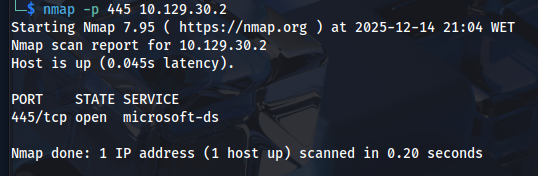
Scanning port 445 with nmap.
Scanning port 445 reveals the service:
- microsoft-ds
Task 4- What is the ‘flag’ or ‘switch’ that we can use with the smbclient utility to ‘list’ the available shares on Dancing?
I haven’t used smbclient at this point but based on how common this flag is on other tools:
- -L
Let’s check what smbclient actually is:
man smbclient

smbclient manual page.
smbclient is a command-line tool to access and interact with SMB shares on a network.
An SMB share can be a file or folder shared on a network, or even a printer.
According to the previous task, the -L flag should list the available shares:
smbclient -L <ip_address>

smbclient anumeration.
Use a blank password.
SMB enumeration:
— ADMIN$ - The administrator share.
— C$ - The C: drive being shared (confirming a Windows target).
— IPC$ - Inter-Process Communication. This is a special share in the Windows OS used for SMB communication and authentication.
— WorkShares - A regular shared folder.
- 4
Task 6- What is the name of the share we are able to access in the end with a blank password?
Using the hint (“It’s the one that doesn’t end with the $ symbol”), the answer is:
- Workshares
Task 8- What is the command we can use within the SMB shell to download the files we find?
SMB network paths use \ in Windows. In Linux, smbclient accepts //server/share. Extra slashes appear due to escaping rules, but they all represent an SMB network path.
Since we know from the previous Task that the Workshares share doesn’t have a password defined we might as well target it.
smbclient\\<ip_address>\Workshares (weird, I know!)
Skip the password.

smbclient connection to Workshares share.
Listing the contents reveals shares belonging to Amy.J and James.P.

smbclient enumeration results on Workshares share.
Amy.J contains only notes, but James.P contains flag.txt.
To download the file from within smbclient, use:
- get
Submit Flag:

Using cat command to expose flag.txt file’s contents.
cat the flag.txt file and get:
- 5f61c10dffbc77a704d76016a22f1664
Stay curious and keep hacking! I know I will!
메타데이터
- post_id
- ff0bc6b50058
- slug
- htb-ctf-write-up-fawn-ff0bc6b50058
- url
- https://medium.com/@pjsm.it/htb-ctf-write-up-fawn-ff0bc6b50058
- canonical_url
- https://medium.com/@pjsm.it/htb-ctf-write-up-fawn-ff0bc6b50058
- author_url
- https://medium.com/@pjsm.it
- status
- ok
- fetched_at
- 2026-06-20 20:29:01



