How Multi-Agent Systems Remember: A Deep Dive into Memory and State
Agents without memory are goldfish. Here’s how well-designed systems store, share, and retrieve context across long-running workflows — and…
How Multi-Agent Systems Remember: A Deep Dive into Memory and State
Agents without memory are goldfish. Here’s how well-designed systems store, share, and retrieve context across long-running workflows — and why most production pipelines quietly break without it.
ABOUT THIS SERIES
- Part 1 — Why Multi-Agent AI Is Different from Everything You’ve Built Before
- Part 2 — The 4 Core Patterns of Multi-Agent Orchestration
- ▶ Part 3 — How Multi-Agent Systems Remember: Memory, State & Context ← you are here
- Part 4 — Agent Communication and Tool Use
- Part 5 — Reliability, Failure Handling & Guardrails
- Part 6 — From Prototype to Production
Here’s a failure mode I’ve seen more times than I’d like to admit.
You build a multi-agent pipeline. Step 1 works perfectly. Step 3 produces a solid result. But by step 7, the agent seems to have forgotten what it was even trying to do. It starts hallucinating context that was established four steps ago. The final output makes confident claims about a goal that shifted two stages back. And you have no idea how it got there.
The problem almost certainly isn’t the model. It’s the memory architecture — or more accurately, the complete absence of one.
Memory is the invisible infrastructure of every agent system. It’s what separates a pipeline that works for three steps from one that stays coherent across fifty. It’s the difference between an agent that can reason about what it’s already done and one that starts fresh with every single call. And it’s the layer that most tutorials, most courses, and most framework demos skip entirely.
This article covers it properly. We’ll go through the four types of memory every agent system needs to understand, how state management keeps pipelines coherent, how vector stores give agents long-term recall, and the three failure modes that quietly destroy production systems when the memory layer isn’t designed carefully.
If you’re coming from Part 2, you already know the four coordination patterns. Now we’re going one level deeper — into what makes those patterns stay coherent over time.
The Memory Problem Nobody Talks About
Here’s something that surprises most developers when they first build a multi-agent system: LLMs have no memory by default.
Every inference call is stateless. You send a prompt, you get a completion, the model forgets everything. There’s no persistence. No accumulated understanding. No “I remember we decided X in step 2.” Whatever context the model needs to do its job must be supplied — explicitly, deliberately, every single time.
In a simple chatbot, you solve this by appending conversation history to each new prompt. Trivial enough. But in a multi-agent system running 20, 50, or 100 steps, this approach collapses fast:
- Context windows fill up. You can’t append the entire history of a 50-step workflow to every prompt.
- Relevant context gets buried. The most important decision made in step 3 might be scrolled past the attention window by step 40.
- Different agents need different context. A writing agent doesn’t need the raw research data — it needs the summarised findings. A fact-checking agent needs the sources, not the prose.
- State needs to be shared. When multiple agents run in parallel and one discovers something important, the others need to know.
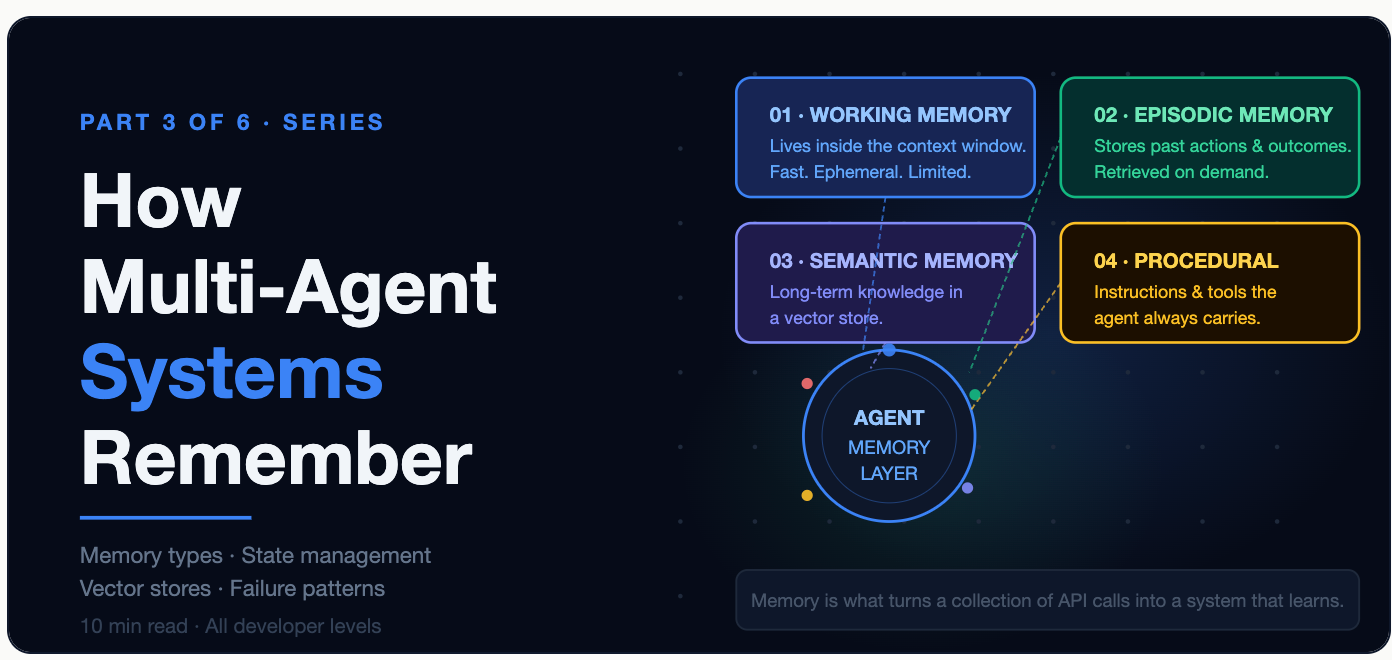
The core insight: Memory in agent systems isn’t one thing — it’s a stack of four distinct layers, each solving a different problem. Getting it wrong at any layer creates failures that are maddeningly hard to debug because they look like model errors when they’re really architecture errors.
The 4 Types of Memory in Agent Systems

Let’s go through each layer in depth.
Type 1: Working Memory (In-Context)
Working memory is the simplest form — it’s everything currently inside the model’s context window. The task description, the conversation so far, the output of the last tool call, the user’s original goal. If it’s in the prompt, it’s in working memory.
This is fast and immediately accessible, but it has one hard limit: it’s finite and ephemeral. Most frontier models give you 128K to 1M tokens of context, which sounds enormous until you’re running a 60-step workflow where each step produces 2,000 tokens of output. By step 30, you’re out of space.
The other problem is attention dilution. Research suggests that LLMs tend to pay more attention to content at the very beginning and very end of a long context — the middle gets fuzzy. A critical decision made at step 5 can effectively “disappear” from the model’s attention by step 45, even if it’s technically still in the context window.
The design principle: Treat working memory as a scratchpad, not a filing cabinet. Keep it lean and purposeful — only what the agent needs right now, not everything it has ever seen.
Type 2: Episodic Memory (External Store)
Episodic memory is how agents remember what they’ve done — across steps, and across context window boundaries. Think of it as the agent’s journal: “At 14:32, I called the web search tool. The query was X. The top result said Y. I decided to follow up on Z.”
This isn’t stored in the prompt. It’s stored in an external database — typically a key-value store like Redis, a relational database like Postgres, or a document store like MongoDB. The agent writes observations and outcomes as it works, and retrieves relevant entries when it needs to remember something specific.
The key benefit is persistence across restarts. If an agent crashes mid-pipeline and needs to resume, episodic memory lets it pick up where it left off rather than starting from scratch.
# Episodic memory: writing and reading agent observations
import json
from datetime import datetime

class EpisodicMemory:
    def __init__(self, db_client, agent_id: str):
        self.db = db_client
        self.agent_id = agent_id
    def record(self, step: str, action: str, outcome: str):
        # Agent writes an observation after every step
        entry = {
            "agent_id"  : self.agent_id,
            "step"      : step,
            "action"    : action,
            "outcome"   : outcome,
            "timestamp" : datetime.utcnow().isoformat()
        }
        self.db.set(f"episode:{self.agent_id}:{step}", json.dumps(entry))
    def recall(self, step: str) -> dict:
        # Retrieve a specific past step
        raw = self.db.get(f"episode:{self.agent_id}:{step}")
        return json.loads(raw) if raw else None
    def recent(self, n: int = 5) -> list:
        # Retrieve the last N observations for context
        keys = self.db.keys(f"episode:{self.agent_id}:*")
        return [json.loads(self.db.get(k)) for k in sorted(keys)[-n:]]
Type 3: Semantic Memory (Vector Store)
Semantic memory is the most powerful — and most misunderstood — layer. Where episodic memory lets you retrieve by key (“give me what happened at step 12”), semantic memory lets you retrieve by meaning (“give me everything relevant to the question I’m about to answer”).
This is what Retrieval-Augmented Generation (RAG) is built on. You convert chunks of knowledge — documents, past conversations, research findings, tool outputs — into vector embeddings and store them in a vector database. When the agent needs information, it embeds its current query and retrieves the most semantically similar chunks from the store.
The result: agents can effectively “remember” far more than fits in any context window, because they’re not loading everything — they’re loading only what’s relevant right now.
Type 4: Procedural Memory (Always Loaded)
Procedural memory is the agent’s standing knowledge about how to operate — not what it knows about the world, but how it knows to behave. This includes the system prompt (its role, constraints, output format requirements), tool definitions (what tools exist and how to call them), and any standard operating procedures it should always follow.
Unlike the other memory types, procedural memory doesn’t change during a workflow. It’s loaded at agent initialization and stays constant. Think of it as the agent’s training manual — always present, always consulted, never updated mid-task.
Getting procedural memory right is often underestimated. A poorly designed system prompt — one that’s too vague, contradictory, or missing key constraints — creates behavioral inconsistencies that look like model failures but are actually procedural failures.
State Management: Keeping the Pipeline Coherent
Memory is where you store things. State is what you’re tracking as the pipeline runs — the evolving snapshot of where the system is, what it’s done, and what it knows so far.
In traditional software, state is explicit — you set a variable, you read a variable. In agent systems, state is more nuanced: it flows between agents, gets updated by multiple actors, and needs to be consistent even when things go wrong.

The diagram above shows a core principle of good state management: checkpointing. After each agent completes its step and writes its output to the shared state object, you persist the full state to disk or an external store. This means if the pipeline fails at step 6, you resume from step 5’s checkpoint — not from the very beginning.
LangGraph, one of the most popular agent frameworks, makes this explicit with its state graph model. Every node in the graph is an agent; every edge is a state transition; and LangGraph automatically persists state at each checkpoint so long-running workflows are resumable.
Immutable vs. mutable state: One design decision worth making deliberately is whether your state object is mutable (agents overwrite fields) or append-only (agents only add new fields, never change old ones). Append-only state creates a complete audit trail of what each agent did and when — invaluable for debugging. The tradeoff is more complex state schemas as the pipeline grows.
Shared Memory vs. Isolated Memory
When multiple agents are running — especially in parallel — you face a critical design decision: should they share a common memory store, or should each agent maintain its own isolated memory?

The shared whiteboard pattern means all agents read from and write to one central state object. Agent B can immediately see what Agent A just discovered — useful for hierarchical pipelines where the manager needs to react to worker findings in real time. The risk is race conditions: if Agent A and Agent B try to update the same state field simultaneously, one will overwrite the other. Solve this with write locks or optimistic concurrency control.
The isolated memory pattern means each agent maintains its own private context and memory. There’s no shared state during execution — only a final merge step where a synthesiser agent combines all outputs. This is safer for parallel pipelines where agents truly don’t need to know what each other is doing mid-run. The tradeoff is you lose real-time cross-agent awareness.
Most well-designed systems use a hybrid: read-only shared state (agents can see the initial goal and prior checkpoints) combined with isolated write stores (each agent writes to its own namespace and a merge happens at defined synchronisation points).
Long-Term Memory with Vector Stores
For tasks that span many steps, sessions, or even days, working memory and episodic memory aren’t enough. You need a way for agents to store knowledge persistently and retrieve it intelligently — without loading the entire knowledge base into every prompt.
That’s exactly what vector stores do.

The process is elegant in its simplicity. When an agent needs to remember something from long-term storage, it:
- Embeds its query — converts the question into a vector using an embedding model (same model used to store the data originally)
- Searches the vector database — finds the chunks most semantically similar to the query using cosine similarity
- Injects the top-K results into its working context — bringing only the relevant knowledge into the prompt
The result: the agent can recall information from a knowledge base with millions of entries — past research sessions, previous reports, expert documents — without being limited by context window size. Only the most relevant chunks make it in.
Memory consolidation: For very long-running pipelines, you’ll also need a strategy for compressing working memory before it overflows. A common pattern is to periodically run a summarisation agent that condenses the last N steps of conversation history into a tight summary, stores the full history to episodic or semantic memory, and replaces the working context with just the summary. This keeps the context window lean without losing important information.
The 3 Memory Failure Modes That Kill Production Systems
Designing the memory layer well isn’t just about choosing the right tools. It’s about anticipating the ways memory can go wrong — because in production, it will.
Failure Mode 1: Memory Poisoning
Memory poisoning happens when an agent stores a bad observation — a hallucinated fact, a misinterpreted result, a tool call that returned corrupted data — and then retrieves it later with high confidence, treating it as ground truth.
The insidious part is that the error compounds. Step 5 stores a wrong assumption. Step 12 retrieves that assumption and builds on it. Step 18 cites it as established fact. By the time you see the problem in the final output, the root cause is buried 15 steps back.
The fix: Treat agent-generated observations with appropriate skepticism in your retrieval logic. Tag stored memories with their source (tool call result vs. model inference), confidence level, and timestamp. When retrieving for high-stakes decisions, prefer tool-verified data over model-generated summaries.
Failure Mode 2: Context Overflow
Context overflow is straightforward but consistently underestimated. As a pipeline grows in complexity — more steps, richer tool outputs, longer intermediate documents — the working memory context fills up. When it overflows, the model either truncates silently or throws an error, and either way, critical context gets lost.
The fix: Monitor context token usage at every step. Implement automatic summarisation when usage crosses a threshold (say, 70% of the context limit). Route verbose intermediate outputs — raw search results, full documents — to episodic or semantic memory immediately, keeping only compressed summaries in working context.
Failure Mode 3: Stale Memory Retrieval
Stale memory is the subtlest failure. Your agent retrieves a chunk from the vector store that was accurate six months ago but is now outdated. The model doesn’t know the data is stale — it was retrieved with high semantic similarity, so it looks relevant. But the facts have changed.
This is particularly dangerous in domains where information changes frequently: financial data, regulatory environments, competitive landscapes, software documentation.
The fix: Store a timestamp and data source with every vector store entry. During retrieval, apply a recency filter alongside the similarity score — give higher priority to recent high-similarity results over old high-similarity results. And for frequently updated domains, implement a scheduled re-embedding job that refreshes stale entries.
Practical Takeaways
WHAT TO TAKE INTO YOUR NEXT BUILD
- Design all four memory layers before writing agent logic. Most developers add memory as an afterthought when things break. Add it upfront — the architecture shapes everything else.
- Use working memory for now; use episodic memory for what happened; use semantic memory for what you know; use procedural memory for how to behave. Keep each layer’s purpose distinct.
- Checkpoint your state at every agent step. A pipeline that can resume from any checkpoint is dramatically more reliable than one that restarts from scratch on failure.
- Treat parallel agents as isolated writers, shared readers. Give every agent its own write namespace. Let them read from a shared goal and prior checkpoints. Merge at synchronisation points.
- Tag every memory entry with source, confidence, and timestamp. You’ll need all three when debugging a memory poisoning or stale retrieval issue in production.
- Monitor context token usage. Build a context budget into your agent — when it hits 70%, compress and offload, don’t let it silently overflow.
Memory Is What Makes Agents Feel Intelligent
Here’s the thing about well-designed memory in agent systems: when it’s working, you don’t notice it. The agent just seems to know things. It references what it did three steps ago naturally. It retrieves the right context at the right moment. It stays coherent across a workflow that’s too complex for any single context window to hold.
When it’s broken, you notice immediately. The agent contradicts itself. It forgets what it was doing. It confidently asserts something wrong that it retrieved from a stale store. And it’s incredibly hard to debug because the failure looks like a model problem when it’s really an architecture problem.
Getting the memory layer right is one of the highest-leverage investments you can make in any multi-agent system. It’s also one of the things most developers skip until they’re already in production wondering why their system is falling apart.
Now you know what to build before you get there.
*Next week: Part 4 — How Agents Talk to Each Other and to the World*. We go into message protocols, tool calling, handoff design, and the communication topologies that determine whether your multi-agent system coordinates cleanly or turns into a game of telephone at scale.
메타데이터
- post_id
- ff2e3ebfd0b5
- slug
- how-multi-agent-systems-remember-a-deep-dive-into-memory-and-state-ff2e3ebfd0b5
- url
- https://medium.com/system-design-mastery-series/how-multi-agent-systems-remember-a-deep-dive-into-memory-and-state-ff2e3ebfd0b5
- canonical_url
- https://medium.com/system-design-mastery-series/how-multi-agent-systems-remember-a-deep-dive-into-memory-and-state-ff2e3ebfd0b5
- author_url
- https://medium.com/@sureshdotariya
- status
- ok
- fetched_at
- 2026-06-09 15:37:30