How to Enable BIP STK on Modems for eSIM IoT SGP-32 Deployments
The adoption of eSIM technology in IoT deployments is accelerating, especially with the new SGP.32 specification designed for remote…
How to Enable BIP STK on Modems for eSIM IoT SGP-32 Deployments

Source
The adoption of eSIM technology in IoT deployments is accelerating, especially with the new SGP.32 specification designed for remote management of IoT eSIMs. To enable eUICC based eSIM’s capabilities on IoT devices, one critical requirement is enabling Bearer Independent Protocol (BIP) via SIM Toolkit (STK) commands on the modem.
Here’s the good news: Most modern modems already support BIP and STK.
The challenge? Sometimes it is not enabled on the modem.
This means that with a few simple configurations, you can unlock full eSIM SGP.32 support without hardware changes — making your existing IoT designs future-ready!
In this blog, we’ll walk through:
- What BIP STK is and why it’s essential
- The common approach to enabling it
- Step-by-step instructions for the five major modem manufacturers: TELIT, Sierra Wireless, Quectel, Fibocomm, and Cinterion
What is BIP STK and Why Does it Matter?
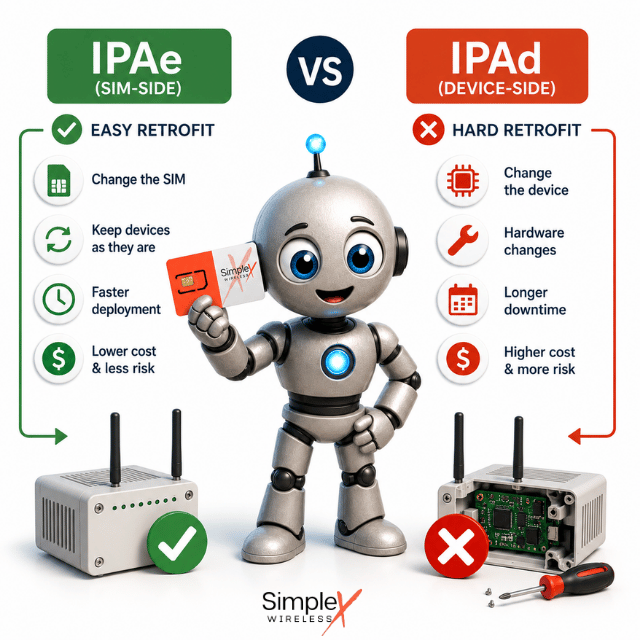
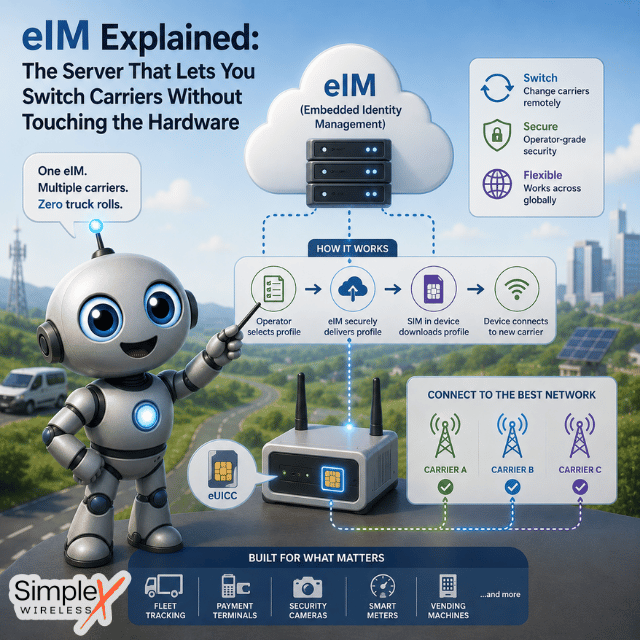
Bearer Independent Protocol (BIP) is a feature defined in the SIM Toolkit (STK) standards that allows the SIM (or eSIM) to open IP connections independently through the modem. In the context of eSIM SGP.32, this functionality is crucial because the eSIM needs to connect to remote servers (like EIM or SM-DP+) to download, manage, and update profiles. Enabling BIP/STK is essential for remote SIM provisioning and management in IoT environments when the IPA is on the SIM card (eUICC).
General Steps to Enable BIP STK on a Modem
Although AT commands vary slightly between modem brands, the general process looks like this:
- Ensure SIM Toolkit (STK) support is active: Most modules expose STK over the modem interface.
- Enable BIP functionality: This often involves activating the SIM’s proactive commands and sometimes unlocking secure areas.
- Test BIP session initiation: Optionally, verify that BIP sessions can be opened successfully via test commands.
How to Enable BIP STK: Manufacturer-Specific Instructions
TELIT Modems (e.g., LE910, ME910, LN920 series)
Activate STK Support
AT#STKM=1
Enable BIP Client Mode (Some TELIT modems use proprietary commands or automatic triggers.)
Verify BIP Support
AT#STKC?
Sierra Wireless Modems (e.g., WP7607, EM75xx, MC7411 series)
Check STK Availability
AT+STKCFG?
Enable STK and BIP
AT+STKCFG=1
Note: Sierra modems may require a secure unlock (AT!OPENLOCK=”password”) for low-level STK changes.
Quectel Modems (e.g., BG95, EG91, EC25 series)
Activate STK and BIP
AT+QCFG="stk/sms",1
AT+QCFG="bip/enable",1
Check if BIP is active
AT+QCFG="bip/enable"
Important: On Quectel, you can verify the SIM card application toolkit status via:
AT+QSIMSTAT
Fibocom Modems (e.g., L610, FG360 series)
Enable SIM Toolkit STK
AT+STKCFG=1
Activate BIP Some models use additional configuration like:
AT+FIBIP=1
Note: Fibocom firmware versions vary heavily. Always check with AT+CGMR for your firmware version and verify in the release notes if BIP STK fixes are included.
Cinterion (Thales/Gemalto) Modems (e.g., PLS62-W, EXS82, TX62 series)
Enable STK Support
AT^SSTK=1
Activate BIP Support (Cinterion modems often automatically expose BIP features when STK is enabled, but you can verify.)
Check BIP Status
AT^SSTK?
Pro Tip: Cinterion’s developer tools (GEMALTO DevKit) can simulate and test BIP sessions if you want to validate before a live deployment.
Final Notes
- Enabling BIP STK is typically a one-time setup during device provisioning.
- Once activated, it ensures smooth, autonomous communication between your device’s eSIM and remote servers, fully aligned with SGP.32 IoT eSIM standards.
- Make sure your firmware is up to date, as BIP stability improvements are frequently included in modem updates.
> You can read the full original article here.
This article was curated by Jan Lattunen, CCO Simplex Wireless
About the Author: Jan Lattunen manages Sales and Marketing for Simplex Wireless. Jan has 20 years’ experience in working with SIM card technology and was involved in launching the eSIM in North America with major carriers and OEMs. His expertise in telecommunications is around SIM cards. On a personal note, Jan is a family man and avid cyclist with advocacy for safety in the roads. You can connect with Jan on https://linkedin.com/in/JanLattunen
메타데이터
- post_id
- ff8d4fcb1b5e
- slug
- how-to-enable-bip-stk-on-modems-for-esim-iot-sgp-32-deployments-ff8d4fcb1b5e
- url
- https://medium.com/@simplexwireless/how-to-enable-bip-stk-on-modems-for-esim-iot-sgp-32-deployments-ff8d4fcb1b5e
- canonical_url
- https://medium.com/@simplexwireless/how-to-enable-bip-stk-on-modems-for-esim-iot-sgp-32-deployments-ff8d4fcb1b5e
- author_url
- https://medium.com/@simplexwireless
- status
- ok
- fetched_at
- 2026-06-29 02:33:43