Building Luneclat: AI-Powered Personal Color Analysis with Google Antigravity
How I built a $100 beauty service using Gemini 3 Pro and agentic development
Building Luneclat: AI-Powered Personal Color Analysis with Google Antigravity
How I built a $100 beauty service using Gemini 3 Pro and agentic development
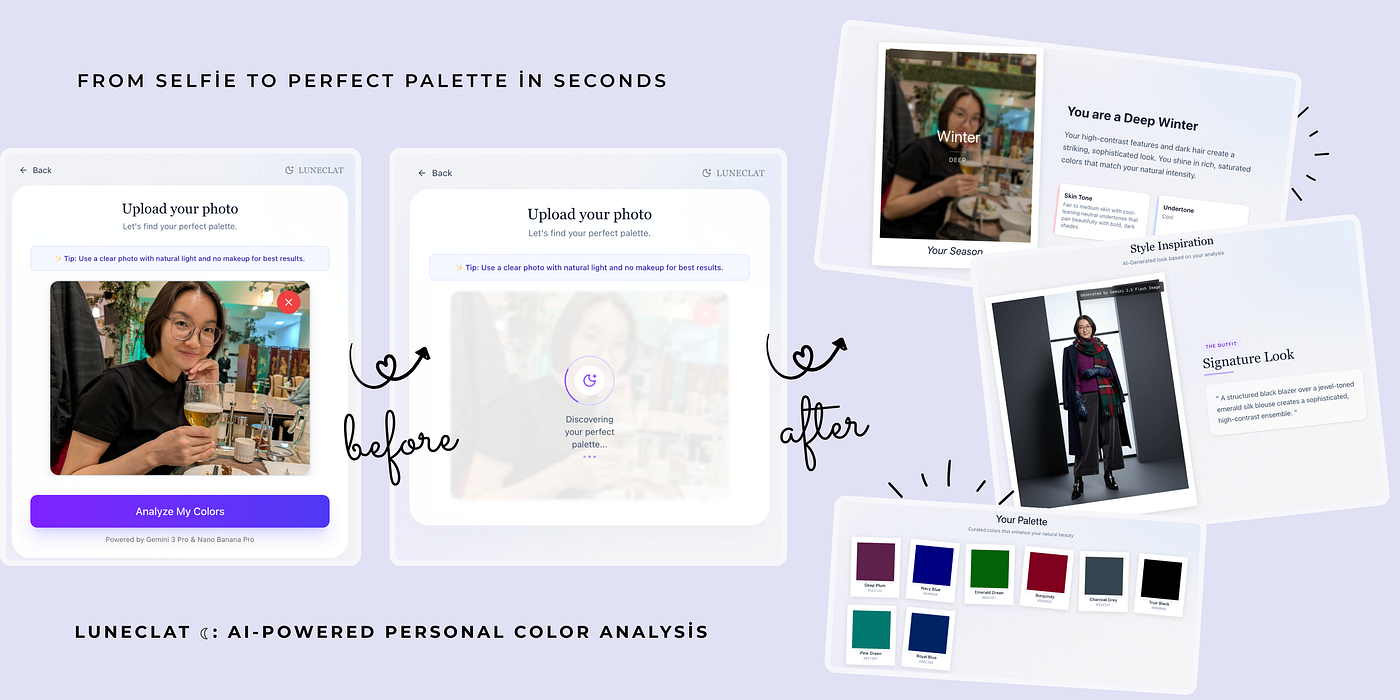
Picture this: You spend hours wandering through stores, trying on countless clothes, testing makeup shades, only to come home exhausted and empty-handed. You’ve wasted your time, energy, and often money on things that just don’t look right on you.
I’ve been there. The endless trial and error. The frustration of buying something that looked perfect on the hanger but wrong on you. The makeup that seemed beautiful in the store but clashed with your skin tone at home.
Then I discovered personal color analysis.
Once I found my colors, everything changed. Shopping became effortless — I could walk into a store and instantly know what would work. I didn’t need heavy makeup or complicated styling. When you wear your colors, you look radiant naturally. You look like yourself, but better.
The catch? Professional color analysis costs $100+ and requires hours of consultation.
The question: What if AI could do this — instantly, accurately, and beautifully?
Google Antigravity
When Google announced Antigravity alongside Gemini 3, I saw the perfect opportunity. Antigravity isn’t just another code assistant — it’s an agentic development platform where AI agents autonomously plan, code, test, and verify complex tasks.
For the Google AI Sprint, I decided to build Luneclat ☾— an AI-powered personal color analysis app that combines:
- Gemini 3 Pro for facial analysis and seasonal color determination
- Nano Banana Pro for generating beautiful, shareable color palette cards
- Beautiful, minimal UI inspired by my personal design aesthetic
- Production-quality code ready to deploy and share
The mission: Make professional color analysis accessible to everyone.
The Antigravity Development Experience
Getting Started
After installing Antigravity, I was greeted not by a traditional IDE, but by the Agent Manager — a “Mission Control” for AI agents.
I gave the agent a single, comprehensive prompt:
Create a Next.js web application called "Luneclat" - an AI-powered personal
color analysis demo.

CORE FEATURES:
1. Image upload with camera capture
2. Gemini 3 Pro API integration for analysis
3. Nano Banana Pro for color card generation
4. Beautiful, minimal UI with polaroid aesthetic
5. Color palette display with inspiration board

DESIGN: Clean, pastel colors, professional quality
TECH: Next.js 14, TypeScript, Tailwind CSS
What happened next was remarkable.
The agent didn’t just start coding. It:
- Generated a Task Plan — breaking down the project into logical steps
- Created an Implementation Plan — detailing file structure and architecture
- Built the entire application — components, pages, API integration
- Verified functionality — using browser automation to test
All while I watched, occasionally approving terminal commands.
Adding Personal Touch
The initial app was impressive, but I wanted my unique design aesthetic. I had code from a previous project with a specific polaroid-card style I loved — clean, minimal, with soft gradients.
Traditional approach: Hours of manual CSS refactoring.
Antigravity approach: I uploaded my original code and instructed:
Apply my previous design code to this app.
Copy the exact styling - polaroid cards, gradients,
spacing, animations - while keeping all functionality.
The agent seamlessly merged my design with the new features. When minor spacing issues appeared, I gave iterative feedback:
1. Reduce top spacing on upload page
2. Move loading animation to overlay on image
3. Fix background gradient consistency across pages
Each iteration took minutes, not hours.
Refinement and Polish
The final touches included:
- Engaging Loading Experience: Elegant rotating messages like “Discovering your perfect palette…” with subtle moon icon animation
- Progressive Results Display: Show season and color analysis immediately, while style inspiration loads in the background
- Consistent Navigation: Clean header with logo across all pages
- Mobile Responsiveness: Tested and optimized for all devices
Then came deployment to Google Cloud Run, making Luneclat accessible to anyone with a browser.
The Technical Stack
// Core Framework
- Next.js 14 (App Router)
- TypeScript
- Tailwind CSS v4

// AI Integration
- Gemini 3 Pro API (skin tone & season analysis)
- Nano Banana Pro (AI-generated color palette cards)

// UI/UX
- Framer Motion (smooth animations)
- Lucide React (icons)
- Custom polaroid card design
How the AI Analysis Works
Gemini 3 Pro handles the core analysis:
- Skin tone identification — detecting warm, cool, or neutral undertones
- Facial feature assessment — analyzing contrast levels and color depth
- Seasonal classification — determining Spring, Summer, Autumn, or Winter (including subtypes like Light Summer, Deep Autumn, etc.)
Nano Banana Pro then creates the visual output:
- Generates a beautiful, personalized color palette card
- Combines the user’s photo with their recommended colors
- Creates a shareable, social-ready image
- Applies aesthetic styling that matches the app’s design language
Together, these AI models deliver the same scientific principles used by professional color analysts, packaged in a format anyone can understand and share.
Key Learnings from Agentic Development
🎯 What Worked Brilliantly
1. Natural Language = Powerful Instructions Instead of explaining how to build each feature, I described what I wanted. The agent figured out the implementation details.
2. Iterative Refinement at Speed Design tweaks that would traditionally take 30+ minutes of manual CSS editing happened in 2–3 minutes with conversational feedback.
3. Transparent Process with Artifacts Antigravity generates Task Plans, Implementation Plans, and Walkthrough artifacts. I could review the agent’s thinking at every step — like pair programming with a colleague who documents everything.
4. Autonomous Browser Testing The agent tested the app in a real browser, captured screenshots, and verified functionality. This caught edge cases I might have missed.
⚠️ What Required Human Judgment
Strategic Decisions:
- Choosing to use progressive loading for better UX (show results fast, generate images in background)
- Balancing AI generation quality with speed
- Deciding on the right user flow and interaction patterns
AI Integration Fine-tuning:
- Crafting effective Gemini 3 Pro prompts for accurate color analysis
- Optimizing Nano Banana Pro parameters for beautiful color cards
- Handling edge cases and error states gracefully
- Environment configuration and API security
Design Aesthetics:
- Personal style preferences and brand identity
- Exact color values and spacing that “feel right”
- User experience flow and emotional design
- Loading states that feel engaging, not frustrating
What Antigravity & I Created:
- ✅ Full-stack Next.js application
- ✅ Gemini 3 Pro integration with custom prompts
- ✅ Nano Banana Pro for AI-generated visuals
- ✅ Production-ready UI/UX with polished animations
- ✅ Fully responsive design (mobile + desktop)
- ✅ Deployed to Google Cloud
- ✅ Public GitHub repository with documentation
- ✅ Comprehensive README and setup guide
My role: Strategic decisions, design choices, AI prompt engineering Antigravity’s role: Code generation, testing, verification
Reflections: The Future of Development
Using Antigravity felt like collaborating with an expert teammate who:
- Never gets tired
- Can work on multiple tasks simultaneously
- Learns from feedback in real-time
- Documents their entire thought process
This isn’t about replacing developers. It’s about elevating our work from writing boilerplate to focusing on what truly matters:
- Creative vision and design decisions
- Business logic and user experience
- Strategic architecture choices
- Problem-solving and innovation
I spent my time making decisions, not typing syntax. That’s transformative.
Why This Matters
Personal color analysis isn’t just about looking good — it’s about confidence, efficiency, and self-knowledge.
When you know your colors:
- Shopping becomes effortless — Walk in, find your items, walk out
- You look radiant naturally — Less makeup, less styling, more you
- You save time and money — No more trial-and-error purchases
- You feel confident — Knowing what works removes doubt
Technology that makes this accessible to everyone? That’s worth building.
Try Luneclat Now!
Ready to discover your perfect colors?
👉 Visit luneclat.com 👉 Upload a selfie 👉 Get your analysis in 30 seconds
No signup required. Completely free.
For Developers
Want to build with Antigravity? 📖 Read the full code: github.com/khongorzulmunkhbat/luneclat-mvp 🚀 Try Antigravity: antigravity.google 💡 Built with: Next.js 14, Gemini 3 Pro, Nano Banana Pro
Acknowledgments
Built with:
- Google Antigravity — Agentic development platform
- Gemini 3 Pro — Advanced AI analysis
- Nano Banana Pro — AI image generation
- A passion for making beauty knowledge accessible to all
Google Cloud credits are provided for this project.
Building something with AI? I’d love to hear about it. Connect with me on LinkedIn, check out my website, or explore my projects on GitHub.
Tags: #AISprintH2 #GDE #GoogleAI #Gemini #Antigravity #WebDevelopment #AIAssisted #NextJS #PersonalColorAnalysis #BeautyTech #AgenticAI #TechInnovation #AgenticAI #NextJS #PersonalColorAnalysis #BeautyTech #GoogleDevExpert #WomenInTech
메타데이터
- post_id
- ffa2ac2d607e
- slug
- building-luneclat-ai-powered-personal-color-analysis-with-google-antigravity-ffa2ac2d607e
- url
- https://medium.com/@centauream/building-luneclat-ai-powered-personal-color-analysis-with-google-antigravity-ffa2ac2d607e
- canonical_url
- https://medium.com/@centauream/building-luneclat-ai-powered-personal-color-analysis-with-google-antigravity-ffa2ac2d607e
- author_url
- https://medium.com/@centauream
- status
- ok
- fetched_at
- 2026-06-11 06:59:45