Databricks News: ZeroOps, DABs, Indexes, Genie, sandboxes, migration from PowerBI, secrets [VIDEO]
Video and article covering the most important updates.
Databricks News: ZeroOps, DABs, Indexes, Genie, sandboxes, migration from PowerBI, secrets [VIDEO]
Video and article covering the most important updates.
[embed]
If you have not yet subscribed to Medium, here is a friend’s link for you.
ZeroOps
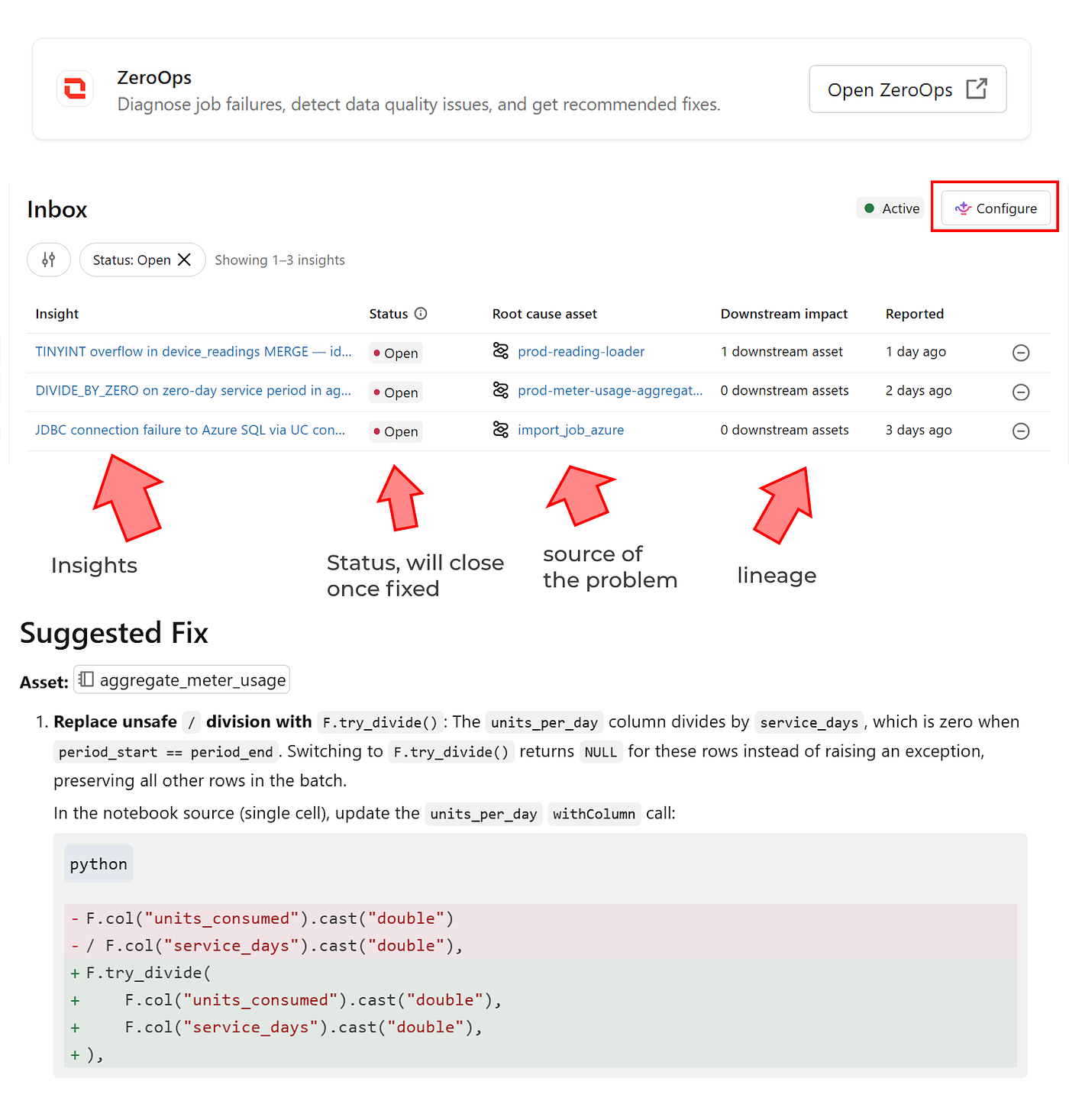
Genie ZeroOps is an autonomous agent that monitors, investigates, and proposes fixes for data pipelines, jobs, tables, and other assets. Soon in your workspace.
Governance Hub in Account console
The Account console now includes the Governance Hub, with dashboards and a wealth of useful information for every admin. Soon also on the workspace level.

Indexes

Indexes came to the Lakehouse, and now you can query/search even 100 times faster. I deep-dive into Full Text Search in that article https://medium.com/databrickscommunity/full-text-search-index-on-databricks-i-managed-to-search-400-times-faster-27070d3a76cd
Genie Ask in CLI
We can use Genie now even in CLI with a simple “genie ask” command.

CLI Version Check
Not yet an automatic update, but at least we can check whether our CLI version is up to date.

Sandboxes
Now we can deploy sandboxes in milliseconds and do isolated operations there. Built for agents but can be used for any use case. Data is persisted till sandbox is deleted.

Lakemeter
The new app from Databricks Labs is available, and it's really interesting. Thanks to Lakemeter, you can estimate the cost of using databricks for your use case. Although the way to calculate serverless pricing is quite awkward, as you need to put … one of many cloud VMs. I think it should have a better way, like just specifying CPU and memory numbers.

DABs: Direct default
Direct mode is now the default in DABs. Direct mode no longer uses Terraform. There are several benefits of direct mode, including quicker deployment, no need to download the Terraform package, a human-readable state, and support for more resources. If, for any reason, you want to use Terraform for your bundle state, you need to specify it explicitly.

DABs: Auto-migrate to Direct
Migration to direct mode is easier than ever; just add engine: direct to the old bundle, and it will be migrated automatically.

DABs: immutable_folder
Don’t overwrite your code — make it immutable! With every deployment, thanks to immutable_folder, all files are copied to a new, read-only folder. They are not overwritten. The biggest benefit is that jobs already underway will not fail or produce unexpected results.

DABs: Instance Pools
Instance Pools are available under DABs, and, as with any DABs resource, we can easily reference them in our jobs or in general compute.

DABs: Genie Spaces (Agents)
Genie Spaces (now renamed to Genie Agents) are available now in DABs as … Genie Spaces. First, run bundle generate to export your existing development Genie as a bundle. Once the JSON with Genie Spaces is saved, you can deploy it with DABs.

Runtime 18 LTS and change of naming convention
19 is already here, but 18 is now LTS. In a new naming convention, LTS doesn’t have a minor version. New features, behavior changes, and fixes are now added incrementally to the same major Runtime version till it becomes LTS. In fact, that approach simplifies the problem with editing code and always thinking which LTS it was, 18.3 or 18.2? Now just put 18.x in your DABs.

Object metadata
Thanks to the new column_object_metadata we have access to storage-level information such as MIME type, ETag, and other metadata. That functionality is for external volumes, as in some use cases that data was needed for ingestion. Just remember that it is row-level data, so if you have a parquet file, it will be returned for every row.

UC secrets
Now we can store secrets in Unity Catalog and use a 3-level namespace convention. Those secrets are no longer at the workspace level, as the old ones were, but at the catalog level. The biggest advantage is ease of managing permissions. There is READ SECRET, but also REFERENCE SECRET for scenarios when it can be used by other databricks services like Lakeflow Connections and not by programmatic access. Reading secrets in a notebook is still done by dbutils.secrets.get
my_secret = dbutils.secrets.get(catalog="main", schema="default", key="example_secret")

One of the greatest additions is that secrets are also in audit tables.

Migrate from Power BI
Now we can drop the .pbit file to Genie Code and ask for migrating to databricks dashboard. I tested in direct query mode, and everything was migrated; I just had to be patient, as the whole process took quite a long time. The process created metrics views for tables used in Power BI, and now I understand why the dashboard relationship option was added. One note here: I had a problem running in auto-approve mode because my SQL warehouse was auto-stopping and then Genie was lost.

Read also in Namaste’s article https://medium.com/databrickscommunity/import-power-bi-files-using-databricks-genie-code-ab61c5846693
Custom visualisations
It solves the last problem with migration to cheap, license-free Databricks dashboards. Any chart is now possible thanks to https://vega.github.io Vega Spec.


If you like this blog post, consider buying me a coffee :-) https://ko-fi.com/hubertdudek
메타데이터
- post_id
- ffac8533774f
- slug
- databricks-news-dabs-indexes-ltap-genie-last-update-25-july-ffac8533774f
- url
- https://medium.com/databrickscommunity/databricks-news-dabs-indexes-ltap-genie-last-update-25-july-ffac8533774f
- canonical_url
- https://medium.com/databrickscommunity/databricks-news-dabs-indexes-ltap-genie-last-update-25-july-ffac8533774f
- author_url
- https://medium.com/@databrickster
- status
- ok
- fetched_at
- 2026-08-18 03:56:49




