How LangGraph Trims Chat Memory
Every language model has a limit on how much text it can process in a single request. This is called the context window or session context…
How LangGraph Trims Chat Memory
Every language model has a limit on how much text it can process in a single request. This is called the context window or session context limit.
When a conversation gets close to that limit, older messages must either be removed or shortened before sending the next request.
One approach is truncation/trimming, which simply removes the oldest messages and keeps only the most recent ones.
Another approach is summarization. Instead of removing older messages, they are replaced with a short summary. The most recent messages are kept unchanged, while only the older part of the conversation is summarized. This helps preserve the important context while using fewer tokens.
For example — suppose the token limit is 10,000 and the conversation grows to 12,000 tokens. The chatbot might keep the most recent 2,000 tokens of messages as they are and replace the older 10,000 tokens with a short summary. That summary is then sent along with the recent messages in future requests.
LangGraph supports both truncation and summarization. Which approach you use depends on your application’s requirements.
This article focuses on the trimming approach. We will build a LangGraph chatbot with Streamlit that keeps only the most recent messages within a token limit and removes the older ones.
The Setup
import streamlit as st
from langchain_core.messages import HumanMessage, trim_messages
from langchain_core.messages.utils import count_tokens_approximately
from langchain_openai import ChatOpenAI
from langgraph.graph import StateGraph, MessagesState, START

MAX_TOKENS = 500

llm = ChatOpenAI(model="gpt-4o-mini")
->Import count_tokens_approximately from langchain_core.messages.utils, not from langchain_core.messages. In current LangChain versions, importing it from the top-level package causes an error. ->MAX_TOKENS only controls how many conversation tokens are sent to the model in each request. It does not affect the chat history stored or displayed in the UI. ->In this example, we use gpt-4o-mini through ChatOpenAI.
Defining the State Schema
LangGraph needs a defined state. It tells the graph what data is available during execution.
builder = StateGraph(MessagesState)MessagesState is a built-in state provided by LangGraph. It contains a single field called messages, which stores the conversation history.
When a node returns a new message, LangGraph automatically adds it to the existing messages list instead of replacing it. This happens because the messages field uses a reducer internally, so you don not have to merge old and new messages yourself.
Writing the Node Function
def chat_node(state: MessagesState):
    trimmed = trim_messages(
        state["messages"],
        strategy="last",
        token_counter=count_tokens_approximately,
        max_tokens=MAX_TOKENS,
        start_on="human",
    )
    response = llm.invoke(trimmed)
    return {"messages": [response]}
This function receives the current conversation from the state. Before sending it to the model, it calls trim_messages() to reduce the conversation size. Only the trimmed messages are sent to the model, and the model’s reply is returned.
trim_messages() is configured using a few arguments:
1)strategy=”last” keeps the most recent messages and removes the oldest ones first. 2)token_counter=count_tokens_approximately estimates the token count locally instead of calling an external service. 3)max_tokens=500 limits the conversation sent to the model to about 500 tokens. 4)start_on=”human” makes sure the trimmed conversation always starts with a user message. This prevents the model from receiving a conversation that begins in the middle of one of its own replies.
One important thing to understand is that trim_messages() only changes what is sent to the model for the current request. It does not delete messages from the chat history, and it does not summarize them. Older messages remain stored in the conversation but are simply left out of that request.
Also, trim_messages() doesn’t keep track of previous trimming. Each time the chatbot runs, it looks at the current conversation, trims it if needed, and sends the result to the model.
Building the Graph
builder.add_node("chat", chat_node)
builder.add_edge(START, "chat")
graph = builder.compile()
add_node() registers chat_node with the name “chat”. add_edge() connects START to that node, so the graph begins by running chat_node. Finally, compile() creates the runnable graph.
Notice that compile() is called without any extra arguments. This means the graph does not automatically remember previous conversations. Each time it runs, it only uses the state passed in that request.
Managing Chat History in Streamlit
Since the graph doesn’t remember previous messages, Streamlit’s session state is used to store the chat history between interactions.
if "messages" not in st.session_state:
    st.session_state.messages = []
This line creates an empty list the first time the app runs. On later reruns, the existing list is reused. Since st.session_state is preserved across reruns, the chat history remains available.
Showing the Token Count
A small counter in the sidebar shows the approximate number of tokens in the current conversation.
with st.sidebar:
    st.metric(
        "Tokens in history",
        count_tokens_approximately(st.session_state.messages),
    )
This counts tokens in the entire chat history, not just the messages sent to the model. As the conversation grows, the count keeps increasing, even beyond 500. It is only shown to help the user see how many tokens are stored in the conversation.
Displaying the Conversation
for msg in st.session_state.messages:
    st.chat_message(msg.type).write(msg.content)
This loop runs every time the app reruns and displays all the messages stored in the chat history. It always shows the full conversation, even if some older messages were not sent to the model in the latest request.
Handling User Input
if user_input := st.chat_input("Say something..."):
    st.session_state.messages.append(HumanMessage(user_input))
    st.chat_message("human").write(user_input)

    result = graph.invoke({"messages": st.session_state.messages})
    st.session_state.messages = result["messages"]

    st.chat_message("ai").write(st.session_state.messages[-1].content)
    st.rerun()
When the user submits a message, it is first added to the chat history and displayed on the screen. The full chat history is then passed to the graph. Inside chat_node, trim_messages() keeps only the most recent messages within the token limit before sending them to the model. The model’s reply is added to the conversation, stored back in st.session_state.messages, and displayed on the screen. Finally, st.rerun() refreshes the page and updates the token count in the sidebar.
Demo
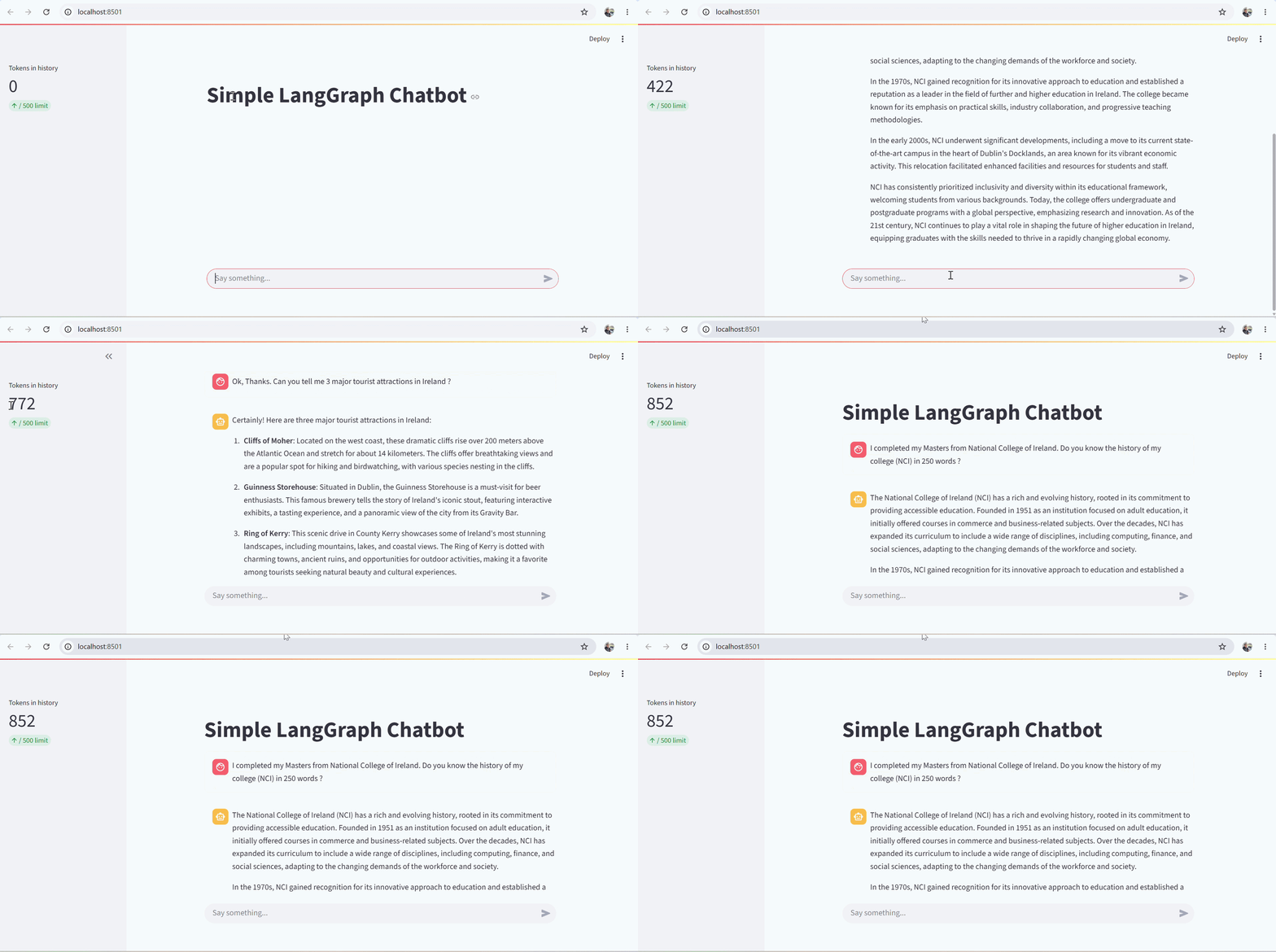
Demo — Testing To Demonstrate How Trimming Workes in LangGraph based Chatbot
To demonstrate this, I first asked about the history of NCI. The chatbot answered, and the token count reached 422, which was still below the 500-token limit.
Next, I asked which college I completed my Master’s from. The chatbot answered correctly because the earlier message mentioning NCI was still within the 500-token window. The token count increased to 472.
I then asked for three tourist attractions in Ireland. After this response, the token count rose to 772, exceeding the 500-token limit.
Finally, I asked again which college I studied at. This time, the chatbot replied that it didn’t have enough information to answer.
This happened because once the conversation exceeded 500 tokens, the oldest messages were trimmed before being sent to the model. The message mentioning NCI was still stored in the chat history and visible on the screen, but it was not included in that request. As a result, there was no mention of NCI in the conversation sent to the LLM.
Key Points
- The model can only remember messages that are within the configured token limit. As long as earlier messages fit within that limit, it can use them to answer new questions.
- Trimming starts automatically once the token limit is exceeded. There is no warning or notification — it simply happens before the next request is sent to the model.
- The request that exceeds the token limit is still processed normally. Trimming only affects subsequent requests, not the one currently being handled.
- Trimming removes older messages — older messages are simply dropped once they exceed the token limit. (This is because we have NOT implemented Summarization on old message in this experiment)
- Stored conversation and model input are different. A message can still exist in the chat history and be visible to the user, even if it is no longer sent to the model.
Credit & Disclaimer: The idea for this article was inspired by the
YouTube video "How To Implement Short Term Memory Using LangGraph" by CampusX.
I expanded on that concept by adding my own explanations, examples, implementation details,
and observations to make it easier to understand and apply in practice.
메타데이터
- post_id
- ffc2dc8e8dae
- slug
- how-langgraph-trims-chat-memory-ffc2dc8e8dae
- url
- https://medium.com/@nachiket4jan/how-langgraph-trims-chat-memory-ffc2dc8e8dae
- canonical_url
- https://medium.com/@nachiket4jan/how-langgraph-trims-chat-memory-ffc2dc8e8dae
- author_url
- https://medium.com/@nachiket4jan
- status
- ok
- fetched_at
- 2026-07-25 14:00:21