Stop Writing Ingestion Pipelines. Build a Framework Instead using Databricks Autolaoder
It was a Sunday morning when the message came in.
Stop Writing Ingestion Pipelines. Build a Framework Instead using Databricks Autolaoder
It was a Sunday morning when the message came in.
A retail client was migrating five years of customer transaction history into their new Databricks lakehouse. The data engineering team had done everything right — scoped the volumes, tested the pipeline on a sample, coordinated the cutover window. The historical load kicked off at midnight. By 6am, the Bronze tables were broken.
The culprit was a single column. customer_tier had been a numeric field from 2018 to 2021 — 1, 2, 3 for Bronze, Silver, Gold customers. At some point in 2022, the CRM team had migrated to a new loyalty platform and the field became a string — "Bronze", "Silver", "Gold". Same column. Same source. Different type. The ingestion pipeline had been written against the current schema. It had never seen the old one.
The Bronze tables didn’t just have wrong data. They had mixed data — some partitions loaded correctly, some failed mid-batch, some wrote partial results before the job died. The team spent the better part of Sunday cleaning up what a single schema assumption had created.
That incident is what eventually led to the framework described in this post.
The Wall Every Data Team Hits
If you work in retail data engineering, you know the source system landscape. POS feeds from stores. ERP extracts from the supply chain team. CRM dumps from the loyalty platform. Supplier inventory files in whatever format the supplier decided to use in 2015 and has never changed. Third-party clickstream exports. Returns data from a different system than the orders data. Each one arriving on its own schedule, in its own format, with its own set of quirks that nobody documented.
For a while, you manage. You write a pipeline for the POS feed. It works. Then the ERP team asks for Bronze ingestion. You copy the notebook, adjust the schema, handle the different file format. Then the supplier feeds come in — and now you need XML parsing, which your existing notebooks don’t do. You build a new one.
Six months later, you have fourteen notebooks doing roughly the same thing. Schema changes from any source team break whichever notebook happens to be reading that source. Historical loads require bespoke handling every time. Onboarding a new data source is a week-long engineering effort.
The problem isn’t the code. It’s the approach. You’ve been building pipelines when you should have been building a framework.
A pipeline runs. A framework governs. The pipeline knows about one source. The framework knows how to handle any source because it reads its instructions from configuration at runtime.
This post is about how to build that framework using Databricks Autoloader — and why Autoloader specifically makes it possible without having to engineer half of it yourself.
The Requirements That Shaped the Design
We catalogued what production actually demanded before writing a line of framework code. These came directly from incidents, near-misses, and the kind of Monday morning conversations nobody wants to have.
1. Files must be processed exactly once
Retail batch ingestion is messier than it looks on a data flow diagram. The POS feed arrives at 3am. The pipeline kicks off. Halfway through, a cluster node fails and the job restarts. Does the restarted job re-process the files that already loaded before the failure? If you’re not careful — yes. And you won’t know for days, until someone notices the sales figures for Tuesday are doubled.
We looked at building a custom file-tracking table. Record each filename, a status, a timestamp. Compare on every run. It’s not a complicated idea — until you’re managing it across forty sources in production, handling the edge cases where a file was partially processed before a failure, and debugging why a file that should be marked COMPLETE is being picked up again.
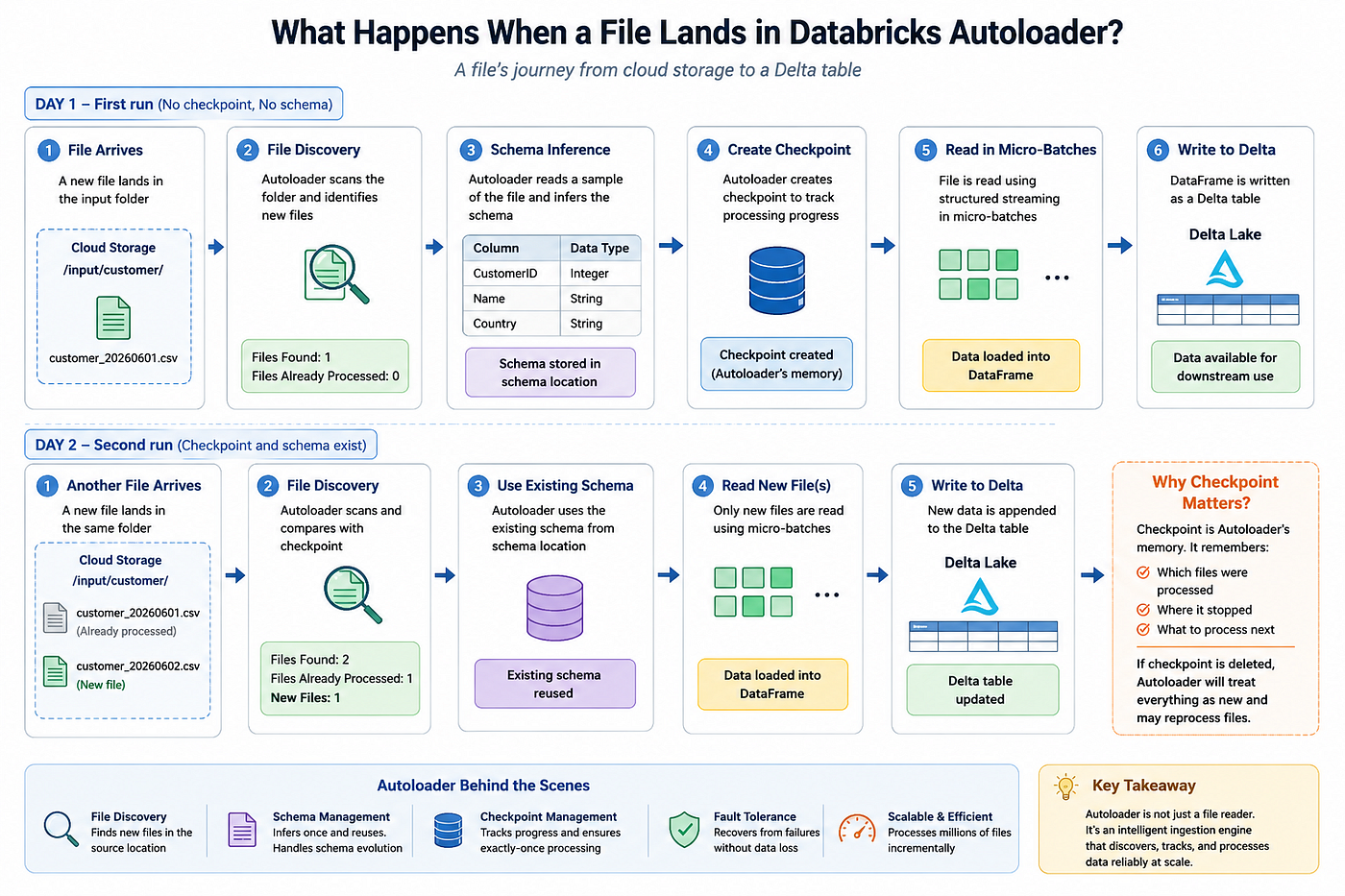
Autoloader’s checkpoint engine removes this problem entirely. It tracks exactly which files have been consumed per stream, persisted to cloud storage. Restarts are safe by default. We never wrote a single line of file-tracking code and never dealt with a duplicate-load incident caused by a restart.
2. Support every file format without forking the codebase
The supplier ecosystem in retail is a time capsule. Large grocery suppliers send EDI-converted XML. Fashion brands export Avro from their warehouse management systems. The internal ERP team sends Parquet because someone on their team read an article about columnar storage in 2019. The loyalty platform sends JSONL. The three smallest suppliers send pipe-delimited CSVs with no header row because that’s what their system has always produced.
Each format has its own parsing requirements. XML needs a row tag. JSONL needs multiline disabled. Headerless CSVs need an explicit schema because there’s nothing to infer column names from. Avro carries its own schema in the file header. If you build per-format notebooks, every cross-cutting change — adding an audit column, changing how you handle nulls, updating error handling — has to be made in six places. And someone will miss one.
The framework needed one reader that could handle all of them. Format-specific options pushed into configuration, not branching code.
3. Historical loads must survive years of schema drift
The Sunday morning incident came from this exact problem. When you’re ingesting current data from a source, schema assumptions are usually safe — the schema is whatever it is today, and your pipeline was written against today’s schema. When you’re ingesting five years of historical files, you’re ingesting the schema history of that source system along with the data.
The customer tier column wasn’t a bug. The CRM team made a legitimate decision to change their loyalty tier representation when they migrated platforms. They just didn’t document it in a way that reached the data engineering team three years later during a lakehouse migration.
Typing columns strictly at Bronze ingestion makes historical loads brittle. The right approach is to capture the data faithfully first — land it, don’t interpret it — and let the Silver layer apply business typing once the data is stable. This became a hard design principle for the framework: Bronze captures data. It doesn’t interpret it.
4. Source schema changes will happen without warning
It was a Thursday afternoon. The trading team’s nightly inventory feed started failing. The pipeline threw a schema mismatch error. The supply chain team had added three new columns to the extract that week as part of a product attributes enhancement. They had told the platform team. The platform team had not told data engineering. The nightly Bronze load for inventory was broken for four days before anyone noticed, because the alert was on pipeline failure, not on data freshness.
Without a schema evolution strategy, every additive change from a source team is a potential production incident. In a retail environment with multiple source teams operating independently, this is not an edge case — it is the default condition.
The framework needed configurable evolution modes. New columns should be handleable without a code deployment. Whether to absorb new columns silently, capture them in a rescue column, or fail deliberately and alert — that decision should be configurable per source, not hardcoded.
5. Unexpected data must not disappear
Related to schema evolution but distinct from it: sometimes source systems send data that isn’t a schema change, it’s just wrong. A nested structure where a flat one was expected. An array where a scalar should be. An additional attribute that wasn’t in the agreed spec.
Traditional ingestion approaches fail the load. You get a job failure, a support ticket, and a conversation about what went wrong — but the actual data that caused the problem is gone. You’re debugging a ghost.
The rescued data column changes this. Anything that doesn’t fit the current schema is preserved as a JSON string in _rescued_data. The load completes. The data is there. You can query it, understand what arrived, and decide how to handle the change without the pressure of a failed pipeline and missing data simultaneously.
In practice, we’ve used the rescued data column as an early warning system more than as a recovery mechanism. A spike in rescued rows from a source often means the source team deployed a change they didn’t communicate. It’s a signal, not a failure.
6. Parsing quirks belong in configuration, not code
The three smallest suppliers and their headerless CSVs. Every time a new one onboarded, someone had to touch the notebook — change the header flag, add the explicit schema, adjust the delimiter. Thirty-minute code change, PR, review, deployment, smoke test. For a CSV delimiter.
Encoding differences in legacy supplier files. Custom null value representations. XML attribute prefixing. Case sensitivity in column names from a source that uses CustomerID where everything else uses customer_id. These are real variations that real systems produce.
None of them should require touching framework code. They should be configuration — set once when the source onboards, readable by the framework at runtime.
Why Autoloader, Not a Custom Build
We seriously considered building the file tracking ourselves. We designed a schema for it. We almost built it.
What stopped us was the honest accounting of what we were signing up for. A file tracking system isn’t a table and a few inserts. It’s distributed coordination across concurrent jobs. It’s handling partial failures. It’s recovery from a corrupted state. It’s operational tooling to inspect and repair tracking state when things go wrong. It’s keeping it in sync with the actual state of the Delta tables when the two diverge.
Autoloader had already built all of that, running in production at Databricks scale, integrated natively with Spark Structured Streaming. The checkpoint mechanism isn’t a simple file list — it handles partial batch failures, concurrent stream recovery, and schema location management. We would have spent months building an inferior version of something that already existed.
The same logic applied to schema evolution and rescued data. These aren’t features we got for free — they were requirements we had to satisfy. Autoloader satisfied them without us writing a line of infrastructure code.
The framework’s job is to sit on top of those capabilities and expose them through configuration. That’s the part worth building.
The Framework Code
One parameterised notebook. One runtime parameter: operation_id. Everything else — cloud path, file format, schema, write mode, parsing options — is resolved from a metadata config object at the start of execution.
📎 The metadata schema — source, target, and operations tables — is covered in Designing a Metadata-Driven Lakehouse Architecture | by Divyansh Goyal | Medium This post focuses on what the framework does with that config at runtime.
Step 1 — Load config from metadata
from pyspark.sql import SparkSession
import json
def load_config(spark: SparkSession, operation: str) -> dict:
    """
    Reads source, target, and operations metadata for a given source_id.
    Returns a flat config dict. Everything the framework needs lives here.
    Nothing downstream is hardcoded.
    """
    ops= (spark.table("operation")
               .filter(f"operation_id= '{operation_id}' AND enabled = TRUE")
               .collect())
    if not src:
        raise ValueError(f"Source '{source_id}' not found or disabled.")
    src= (spark.table("object")
               .filter(f"object_id = 'ops.{source_object_id}'")
               .collect())
    tgt= (spark.table("object")
               .filter(f"source_id = 'ops.{target_object_id}'")
               .collect())
    s, t, o = src[0].asDict(), tgt[0].asDict(), ops[0].asDict()
    # Full cloud path resolved from parts: storage account + container + path + wildcard.
    # A POS feed might be: abfss://landing@retaildl.dfs.core.windows.net/pos/transactions/year=*/month=*/*.parquet
    # A supplier CSV might be: abfss://landing@retaildl.dfs.core.windows.net/suppliers/acme/*.csv
    full_path = (
        f"abfss://{s['container']}@{s['storage_account']}.dfs.core.windows.net"
        f"{s['file_path']}{s['wildcard_pattern']}"
    )
    # Explicit schema parsed from JSON DDL if provided - used for headerless CSVs,
    # legacy supplier files, or any source where inference isn't reliable
    schema = None
    if s.get("object_schema"):
        from pyspark.sql.types import StructType
        schema = StructType.fromJson(json.loads(s["object_schema"]))
    return {
        "source_id":             source_id,
        "full_path":             full_path,
        "file_format":           s["file_format"],
        "row_tag":               s.get("row_tag"),        # XML only - e.g. "Order", "Product"
        "schema":                schema,                   # None = let Autoloader infer
        "fq_table":              f"{t['target_catalog']}.{t['target_schema']}.{t['target_table']}",
        "table_path":            t.get("table_path"),     # set for external Delta tables
        "partition_cols":        [c.strip() for c in (t.get("partition_cols") or "").split(",") if c.strip()],
        "merge_keys":            [k.strip() for k in (t.get("merge_keys") or "").split(",") if k.strip()],
        "load_type":             o["load_type"],           # append | merge | overwrite
        "merge_schema":          o["merge_schema"],
        "schema_evolution_mode": o["schema_evolution_mode"],
        "cast_all_as_string":    o["cast_all_as_string"],  # True for historical loads
        "multiline":             o["multiline"],            # JSON documents spanning multiple lines
        "case_sensitive":        o["case_sensitive"],
        "max_files_per_trigger": o["max_files_per_trigger"],
        "explode_key":           o.get("explode_key"),    # top-level array key to explode (variant JSON)
    }
Step 2 — Build format options dynamically
This is where the format variation collapses into a single interface. Every option passed to readStream comes from the config — no format-specific branches anywhere else in the framework.
def build_format_options(cfg: dict) -> dict:
    """
    Constructs the complete Autoloader options dict from config.Pattern: base options apply to all sources. Format-specific options
    are merged on top. The reader receives the combined result and
    calls .option(key, value) for each entry - no hardcoded values anywhere.
    """
    fmt = cfg["file_format"]
    # Base options - applied to every source regardless of format
    base_options = {
        "cloudFiles.format":             fmt,
        "cloudFiles.schemaEvolutionMode": cfg["schema_evolution_mode"],
        # inferColumnTypes=false when cast_all_as_string is set -
        # historical loads land everything as string, Silver handles typing
        "cloudFiles.inferColumnTypes":   str(not cfg["cast_all_as_string"]).lower(),
        "cloudFiles.caseSensitive":      str(cfg["case_sensitive"]).lower(),
        "maxFilesPerTrigger":            str(cfg["max_files_per_trigger"]),
    }
    # Format-specific options
    format_options = {
        # CSV: most variation lives here - delimiters, encoding, header presence.
        # header=false when schema is explicitly supplied (headerless supplier files).
        "csv": {
            "cloudFiles.format": "csv",
            "header":            "true" if cfg["schema"] is None else "false",
            "sep":               cfg.get("delimiter", ","),
            "encoding":          cfg.get("encoding", "UTF-8"),
            "inferSchema":       "false",   # cloudFiles handles inference - don't double-infer
            "nullValue":         cfg.get("null_value", ""),
        },
        # JSON: multiline flag comes from ops metadata.
        # Standard REST API dumps are typically single-line;
        # document exports from some platforms are multiline.
        "json": {
            "cloudFiles.format": "json",
            "multiLine":         str(cfg["multiline"]).lower(),
            "allowComments":     "true",
        },
        # JSONL: JSON with multiLine forced off.
        # Clickstream exports and event platform dumps typically use this.
        "jsonl": {
            "cloudFiles.format": "json",
            "multiLine":         "false",
        },
        # Parquet: carries its own schema - no parsing options needed.
        # ERP and internal platform exports typically land in Parquet.
        "parquet": {
            "cloudFiles.format": "parquet",
        },
        # Avro: schema embedded in file header.
        # WMS and some logistics platform exports use Avro.
        "avro": {
            "cloudFiles.format": "avro",
        },
        # XML: rowTag is required and comes from metadata - not optional.
        # Supplier EDI feeds and legacy ERP extracts are the common cases.
        "xml": {
            "cloudFiles.format": "xml",
            "rowTag":            cfg["row_tag"],
            "attributePrefix":   "_",
            "valueTag":          "_VALUE",
        },
    }
    if fmt not in format_options:
        raise ValueError(f"Unsupported file format: '{fmt}'")
    # Base first, format-specific second - format options win on conflict
    return {**base_options, **format_options[fmt]}
Step 3 — Build the streaming reader
from pyspark.sql import DataFrame, SparkSession
from pyspark.sql import functions as F
def build_reader(spark: SparkSession, cfg: dict, options: dict) -> DataFrame:
    """
    Constructs the Autoloader streaming DataFrame.
    Schema, path, options - all from config. Nothing hardcoded.
    """
    # Checkpoint path is source-scoped - each source gets its own checkpoint.
    # Moving or renaming this path resets file tracking for that source.
    checkpoint_path = (
        f"abfss://checkpoints@retaildl.dfs.core.windows.net"
        f"/_autoloader/{cfg['source_id']}"
    )
    options["cloudFiles.schemaLocation"] = checkpoint_path + "/schema"
    reader = spark.readStream.format("cloudFiles")
    for key, value in options.items():
        reader = reader.option(key, value)
    # Explicit schema wins over inference.
    # Used for headerless CSVs and legacy supplier files where
    # Autoloader inference would produce wrong column names or types.
    if cfg["schema"] is not None:
        reader = reader.schema(cfg["schema"])
    df = reader.load(cfg["full_path"])
    # Historical load mode: land everything as string.
    # This is what would have saved the Sunday morning incident -
    # customer_tier: "1" and customer_tier: "Bronze" both land without failure.
    # Casting to the correct type is Silver's responsibility, not Bronze's.
    if cfg["cast_all_as_string"]:
        df = df.select([F.col(c).cast("string").alias(c) for c in df.columns])
    # Variant/nested JSON: some API exports wrap records in a top-level array.
    # e.g. {"events": [{...}, {...}]} - explode_key="events" flattens to one row per event.
    if cfg.get("explode_key"):
        df = (df
            .select(F.explode(F.col(cfg["explode_key"])).alias("record"))
            .select("record.*"))
    # Audit columns on every row - source traceability without downstream joins
    df = (df
        .withColumn("_source_file", F.input_file_name())
        .withColumn("_ingested_at", F.current_timestamp())
        .withColumn("_source_id",   F.lit(cfg["source_id"])))
    return df
Step 4 — Route writes by load type
from delta.tables import DeltaTable
from pyspark.sql import DataFrame
def write_batch(batch_df: DataFrame, batch_id: int, cfg: dict):
    """
    foreachBatch handler - routes to append, merge, or overwrite
    based on load_type from the operations metadata.
    This is the only place write logic lives. All three paths are here.
    No per-source write notebooks.
    """
    if batch_df.isEmpty():
        return
    load_type = cfg["load_type"]
    fq_table  = cfg["fq_table"]
    # ── APPEND ─────────────────────────────────────────────────────────
    # Default for most Bronze sources. POS transactions, clickstream events,
    # inventory snapshots - data arrives and accumulates.
    if load_type == "append":
        writer = batch_df.write.format("delta").mode("append")
        if cfg["merge_schema"]:
            writer = writer.option("mergeSchema", "true")
        if cfg["partition_cols"]:
            writer = writer.partitionBy(*cfg["partition_cols"])
        if cfg.get("table_path"):
            # External table: write to explicit storage path,
            # then register in Unity Catalog if it doesn't exist yet.
            writer.save(cfg["table_path"])
            batch_df.sparkSession.sql(f"""
                CREATE TABLE IF NOT EXISTS {fq_table}
                USING DELTA LOCATION '{cfg["table_path"]}'
            """)
        else:
            writer.saveAsTable(fq_table)
    # ── MERGE (upsert) ──────────────────────────────────────────────────
    # Used where source systems resend records that may already exist.
    # CRM customer extracts, product catalogue feeds, loyalty account data -
    # sources that represent current state rather than events.
    elif load_type == "merge":
        merge_condition = " AND ".join(
            [f"target.{k} = source.{k}" for k in cfg["merge_keys"]]
        )
        (DeltaTable.forName(batch_df.sparkSession, fq_table)
            .alias("target")
            .merge(batch_df.alias("source"), merge_condition)
            .whenMatchedUpdateAll()
            .whenNotMatchedInsertAll()
            .execute())
    # ── OVERWRITE ───────────────────────────────────────────────────────
    # Full extract sources where the file always represents complete state.
    # Some supplier inventory feeds work this way - yesterday's file is irrelevant
    # the moment today's arrives.
    elif load_type == "overwrite":
        (batch_df.write
            .format("delta")
            .mode("overwrite")
            .option("overwriteSchema", "true")
            .saveAsTable(fq_table))
    else:
        raise ValueError(f"Unknown load_type: '{load_type}'")
Step 5 — The entry point
import time
from pyspark.sql import SparkSession
spark = SparkSession.builder.getOrCreate()
# The only thing this notebook needs to know at deploy time.
# Everything else is in the metadata tables.
source_id = dbutils.widgets.get("source_id")
start_ts = time.time()
status, error_msg = "SUCCESS", None
try:
    cfg     = load_config(spark, source_id)
    options = build_format_options(cfg)
    df      = build_reader(spark, cfg, options)
    checkpoint_path = (
        f"abfss://checkpoints@retaildl.dfs.core.windows.net"
        f"/_autoloader/{source_id}"
    )
    query = (
        df.writeStream
          .trigger(availableNow=True)   # process all available files, then stop cleanly
          .option("checkpointLocation", checkpoint_path)
          .foreachBatch(lambda batch, bid: write_batch(batch, bid, cfg))
          .start()
    )
    query.awaitTermination()
except Exception as e:
    status, error_msg = "FAILED", str(e)
    raise
finally:
    duration_ms = int((time.time() - start_ts) * 1000)
    spark.sql(f"""
        INSERT INTO prod.framework.ingestion_audit_log VALUES (
            '{source_id}',
            current_timestamp(),
            '{status}',
            {duration_ms},
            {f"'{error_msg}'" if error_msg else "NULL"}
        )
    """)
What This Changes in Practice
The inventory pipeline that broke for four days when the supply chain team added columns? With schema_evolution_mode: addNewColumns and merge_schema: true, the new columns land automatically. The Bronze table grows. Silver picks them up on its next run. Nobody gets paged.
The Sunday morning historical load incident? The same framework entry point with cast_all_as_string: true in the operations config. customer_tier: 1 from 2018 and customer_tier: "Bronze" from 2024 both land as strings without conflict. The Silver transformation handles the type normalisation once, cleanly, with full visibility into what arrived.
Onboarding a new supplier CSV feed — headerless, pipe-delimited, encoding issues, a column naming convention that doesn’t match anything else in the lake? That’s a metadata insert. The explicit schema goes in object_schema as a JSON DDL string. The delimiter, encoding, and null value go in the operations config. The framework picks it up on the next scheduler cycle. No notebook. No deployment. No PR.
That’s the shift. Complexity moves from code into configuration. The framework stays stable. The config absorbs the variation. And when something goes wrong — rescued data means you’re debugging with the actual payload in front of you, not reconstructing what might have arrived from logs.

Lessons Learned
The schema you write against today is not the schema you’ll be reading in three years. Every Bronze table is eventually a historical table. Design for it from the start, not as a retrofit.
Source teams and data engineering teams don’t have the same communication cadence. Build schema evolution into the framework as a default, not as an exception handler. Assume changes will arrive without warning, because they will.
Bronze’s job is faithful capture. The temptation to apply business logic at ingestion time is real — it feels efficient. It makes historical loads brittle, creates tight coupling to source system conventions, and puts transformation logic in the wrong layer. Resist it.
File tracking is a solved problem. Don’t build it. Autoloader’s checkpoint mechanism handles partial failures, concurrent recovery, and schema location management in ways that would take months to build and years to stabilise. Use it.
Rescued data is a signal, not a fallback. If you’re seeing rescued rows from a source that previously had none, something changed upstream. Wire an alert to it. Treat it like a data quality metric, not a quiet catch-all.
The framework is worth building once. Every hour spent getting the config structure right, the format options clean, the write routing solid — that pays back every time a new source onboards in five minutes instead of five days.
Schema Inference — Let Autoloader Do the Heavy Lifting
One thing worth calling out explicitly: you don’t have to create the Bronze table yourself. Autoloader’s schema inference will read your files, determine the column names and types, create the table on first run, and evolve the schema location as new files arrive. For teams ingesting sources with 300, 400, 500 columns — and retail sources absolutely get there, think a full ERP product extract or a POS transaction feed with every possible tender type and promotion code — this alone is worth the price of admission. Nobody is hand-writing a 500-column DDL statement and manually verifying it against a supplier’s latest file spec. Autoloader reads the files, builds the schema, and gets out of your way. The one caveat: if you’re following the Bronze-as-faithful-capture principle from earlier in this post, you may deliberately want every column as a string and inference switched off — cast_all_as_string: true in the framework config handles exactly that. But for sources where you trust the types, or where you're doing exploratory onboarding before the schema is formalised, inference is a genuine productivity win. It's also worth distinguishing inference from schema evolution — inference is what happens the first time Autoloader sees your files, evolution is what happens when those files change after the table exists. They're related but different tools for different problems. I've covered schema evolution in depth Databricks Autoloader: Schema Evolution vs Schema Inference | by Divyansh Goyal | May, 2026 | Medium if you want the full picture on how to configure it per source and when each mode is appropriate.
The Takeaway
The Sunday morning incident wasn’t a data quality failure or an operations failure. It was an architecture failure. A pipeline written against one version of reality, fed a different version, with no graceful path between them.
The framework described here wouldn’t have prevented the CRM team from changing the customer tier field. It would have prevented that change from breaking Bronze. The historical load would have landed everything as strings. The type mismatch would have surfaced as a Silver transformation concern, handled once, intentionally, with clean data to work from.
That’s what the shift from pipeline to framework actually buys you. Not fewer problems — retail data is always going to be messy, source teams are always going to surprise you, and history is always going to be more complicated than the current schema suggests. What you get is a system that absorbs the mess without breaking, captures what arrived even when it’s unexpected, and lets you respond deliberately rather than reactively.
Autoloader handles the hard infrastructure. The framework handles the variation. Your job becomes governing the behaviour, not fighting the pipelines.
메타데이터
- post_id
- ffc90761a245
- slug
- stop-writing-ingestion-pipelines-build-a-framework-instead-using-databricks-autolaoder-ffc90761a245
- url
- https://medium.com/@divyanshgoyal8989/stop-writing-ingestion-pipelines-build-a-framework-instead-using-databricks-autolaoder-ffc90761a245
- canonical_url
- https://medium.com/@divyanshgoyal8989/stop-writing-ingestion-pipelines-build-a-framework-instead-using-databricks-autolaoder-ffc90761a245
- author_url
- https://medium.com/@divyanshgoyal8989
- status
- ok
- fetched_at
- 2026-06-09 15:37:30