WTF is a public VLAN?
I thought I had a decent understanding of networking, but this concept threw me for a loop. Initially, I thought a “Public VLAN” was just a…
WTF is a public VLAN?
I thought I had a decent understanding of networking, but this concept threw me for a loop. Initially, I thought a “Public VLAN” was just a network segment that magically routes all over the internet. But as smart as that sounds, if you stop and think about it for two seconds, it’s a total oxymoron.
The public internet runs on the IP stack, which lives at Layer 3 of the OSI model. VLANs, on the other hand operating down at Layer 2. The internet doesn’t route VLAN tags; it routes IP addresses. So, how the hell do these two worlds shake hands?
Leave a 👏🏾 if you learnt something new from this article
First what is VLAN
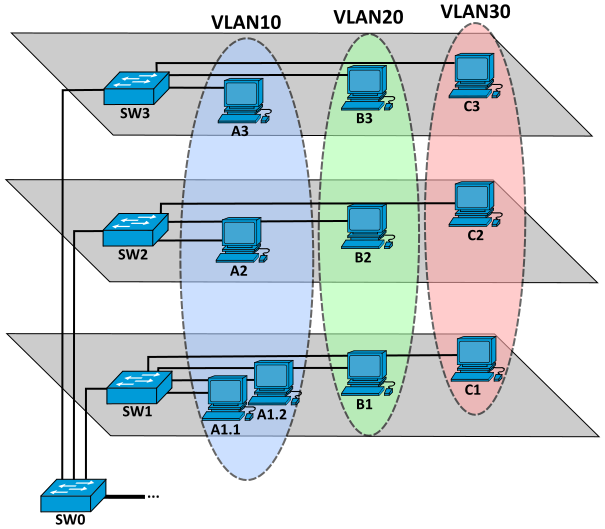
VLAN from Wiki
One liner: VLANs are used to create virtual network isolation.
Ok let’s break this down with an example. Say your company has three different departments (A, B, and C) and you want total network isolation between them — meaning, you want to stop computers in one department from snooping on or talking to another.
You could configure this the old-school way: buy a completely separate physical switch for each department and only plug that team’s computers into their designated box. This way, no two computers in different departments can physically cross paths. While this method absolutely works, it leaves you entirely dependent on physical hardware to enforce your rules. Plus it doesn’t make much of financial sense to buy a new switch every time you add a new dept.
How VLANs remove the hardware constraint ?
Every physical switch comes with a fixed number of ports — say, 24 or 48 plug-in slots on the front. Instead of treating the entire box as one giant network, a VLAN allows you to group these physical ports into distinct logical buckets. Only devices that are part of the same group of ports (VLAN) can communicate over L2.
This solves the problem by segmenting ports on a switch but what if your network is large and extends beyond a single switch (as shown in the above diagram).
Introducing 802.1Q tagging (read spec here RFC2674)

VLAN tagging from Wiki
Segmenting ports on a single switch is a great starting point, but what happens when your company grows and your network expands across multiple switches on different floors or different racks? Take a look back at the diagram with computers A1 and A2 connected to separate switches, SW1 and SW2. If both computers belong to Department A, they need a way to talk to each other across that physical divide.
The moment a packet leaves SW1 to travel down the highway toward SW2, we run into a major roadblock: how does the second switch know which department the packet belongs to? Without a unified tracking system, the context is completely lost.
To bridge this gap, the networking world relies on a universal standard called IEEE 802.1Q tagging (often referred to as “Dot1q”).
The moment a packet leaves computer A1 and hits its port on SW1, the switch intercepts it and stamps a tiny, 4-byte digital tracking tag directly into the middle of the Ethernet frame saying this frame belongs to VLAN A the switch SW2 on receiving the frame forwards it to ports that belong to VLAN A on SW2.
Now ports on a switch can be in one of two modes Access mode and Trunk mode. An Access Port is designed to connect directly to end-user devices like laptops or servers. These devices are completely “VLAN-blind” — they don’t understand tags, and if they receive one, they get confused and drop the packet. An access port is hardcoded to exactly one specific VLAN. It acts like a translation barrier: it strips the tag off before handing data to a computer.
A Trunk Port is the heavy-duty link that connects switches to other switches, or switches to routers. Unlike access ports, trunk ports don’t discriminate. They allow traffic from multiple different VLAN IDs to fly across a single physical wire simultaneously. Crucially, trunk ports keep the 802.1Q tags glued on tight.
So, in our above example all the ports on SW0 are in trunk mode.
Up to this point, we have successfully built logical isolation (VLANs) and figured out how to pass traffic between switches, but right now, our network is still functionally useless. If a computer wants to send data, it has no idea how to target another machine because, at this stage, it doesn’t have an IP address. Hence subnets.
What are subnets
A subnet is a smaller, segmented part of a larger network. By utilizing subnets, we introduce essential hierarchy into network architecture. Without this hierarchy, the internet would be entirely flat; for two devices to communicate, they would have to scan the entire global network to locate each other, which is computationally inefficient and impossible to scale.
A typical subnet block looks like this: **189.34.146.200/29**.
The **/29** notation is the subnet mask (also known as CIDR). Because IPv4 addresses are exactly 32 bits long, a /29 means the first 29 bits are locked in place as the network identifier, leaving the remaining 3 bits free to change. This math (2^3 = 8) provides a total allocation of 8 IP addresses.
In this scenario, 189.34.146.200 represents the fixed network portion, while the changing values at the end represent the individual IP addresses assigned to specific devices.
Every standard subnet requires these four distinct address definitions to function:
- Network ID (
189.34.146.200): This is the very first IP in the block and serves as the unique identifier for the entire network. Devices like routers and firewalls use this specific address to identify the network block and apply associated security and routing rules. - Gateway (
189.34.146.201): The IP address assigned to the router interface servicing this subnet. It acts as the exit point for the network. - Netmask (
255.255.255.248): This is simply the/29CIDR mask written out in traditional decimal form, used by devices to calculate network boundaries. - Broadcast (
189.34.146.207): The absolute last IP address in the allocated block. If a device needs to send a packet to every single machine within this specific subnet simultaneously, it targets this address.
Any two devices residing within the same subnet can communicate directly at Layer 2 without involving a router. Devices use their configured netmask to analyze a destination IP address; if the mask confirms the destination is local, they send the data directly across the switch. If the destination is external, they automatically forward the packet to the gateway address instead.
To communicate with any device outside of their local subnet, a router is required. The router bridges different networks and routes traffic between them. Because of this, the router must physically and logically exist as a member of the subnet it serves, which is why it holds the designated gateway IP. By widespread industry convention, the first usable IP immediately following the Network ID is assigned to the router, though any usable IP within the block would technically work.
What is a Public VLAN then?
Edge routers receive blocks of public IP addresses allocated directly from an Internet Service Provider (ISP). The core challenge is understanding how these Layer 3 public IP addresses are mapped down to a Layer 2 VLAN, since you cannot route an IP address directly to a raw VLAN.
To bridge this gap, network administrators identify which segments of their infrastructure need to be accessible from the public internet. They then overlay a public Layer 3 subnet directly on top of a designated Layer 2 VLAN containing those specific target devices (stay with me example makes it super clear).
Because the edge router acts as the gateway for this public traffic, it must also be a participant in that subnet, occupying one of the available public IPs in that CIDR block.
If you inspect the interface configuration of the router, you will see a dedicated virtual subinterface configured for each individual VLAN it manages, allowing a single physical router port to act as the public gateway for multiple isolated virtual networks simultaneously.
Eg; When an inbound packet from the public internet arrives at the edge router destined for your server’s public IP (like 189.34.146.202), the router checks its routing table and matches it to that specific public subnet. It sees that the subnet is tied directly to a virtual subinterface, such as eth0.4005.
Here 4005 is the VLAN ID and eth0 is the parent interface, this eth0.4005 is called a subif (subinterface) this does not exist physically. In practice eth0 is the only physical interface that receives all trafic, the OS when looking at the frame if it finds a VLAD tag then sends it to the virtual interface eth0.4005 after stripping down the VLAN tag. Similarly if a device writes to eth0.4005 interface the packet when leaves the physical eth0 interface the OS adds a VLAN tag saying this originated from VLAN 4005.
So to continue our example the router received a frame destined for 189.34.146.202 and after looking at its routing table it sees that this IP address lives inside the public subnet assigned to eth0.4005. The router then forwards the packet to this virtual subinterface, which automatically stamps the packet header with the 802.1Q VLAN tag 4005 before firing it out of the physical eth0 port.
From there, the packet travels down the trunk cable to your switch fabric. The switch reads that 4005 tag, ensures the traffic stays strictly confined to the boundaries of VLAN 4005, and passes it along the line. When the packet finally hits the physical network card of your hosted Linux server, your server's OS recognizes the tag, strips it off, and drops the raw data straight into your server's own virtual eth0.4005 interface for your application to process.
So this is how a public IP is routed to a device in a VLAN. If you liked the article follow me on medium, i am planning to write more stuff related to networking. Next article will be on VXLAN (using these you can extend a VLAN across different networks)
Socials Linkedin https://www.linkedin.com/in/abdul-rehman-mohammad/
Github https://github.com/iam-abdul
메타데이터
- post_id
- fff032303bab
- slug
- wtf-is-a-public-vlan-fff032303bab
- url
- https://levelup.gitconnected.com/wtf-is-a-public-vlan-fff032303bab
- canonical_url
- https://levelup.gitconnected.com/wtf-is-a-public-vlan-fff032303bab
- author_url
- https://medium.com/@iamabd
- status
- ok
- fetched_at
- 2026-06-21 22:26:41